A context window is the total amount of text an AI model can process in a single conversation. It includes everything you have typed, everything the AI has responded with, and any code or files you have shared. When that window fills up, the AI starts forgetting earlier parts of your conversation, and the quality of its output drops without warning.
This is one of those concepts that confuses everyone at first because the failure is silent. There is no error message that says "I have forgotten your earlier instructions." The AI just quietly starts producing worse code, contradicting itself, or ignoring requirements you stated clearly twenty prompts ago.
Why This Changes How You Work
Context windows matter because they define the boundaries of what your AI coding tool can think about at any given moment. Every AI model has a fixed context window size measured in tokens (roughly three-quarters of a word each). When people say a model has a "128K context window," they mean it can hold about 128,000 tokens, or roughly 96,000 words, in a single conversation.
That sounds like a lot. And for short conversations it is. But vibe coding conversations grow fast. Every prompt you send, every code snippet the AI generates, every error message you paste in, every follow-up question and answer, all of it stacks up. A typical vibe coding session can burn through 30,000 to 50,000 tokens in under an hour. A long session working on a complex feature can hit the limit within a single sitting.
The problem is not just running out of space. It is what happens as you approach the limit. AI models do not process all tokens in their window equally. Information at the beginning and end of the conversation tends to be processed more reliably than information in the middle. As your conversation grows, the AI's grip on the middle portion, where most of your important instructions and code live, weakens.
Context window degradation is the number one hidden cause of AI-generated code getting worse during long sessions. The AI does not tell you it is forgetting; it just silently produces lower-quality output.
This is why experienced vibe coders report a pattern that feels paradoxical. Their first few prompts produce clean, working code. By prompt twenty, the AI is making unrelated changes, removing features it built earlier, or combining words into gibberish. The tool did not get dumber. The conversation got longer.
The Desk That Can Only Hold So Many Papers
The best way to understand a context window is to imagine a desk that can only hold a fixed number of papers.
When you start a new conversation, the desk is empty. You place your first instruction on the desk (a piece of paper describing what you want to build). The AI reads it clearly and responds with working code. You place the code on the desk. Then your next prompt. Then the AI's response. Paper after paper, the desk fills up.
At first everything is fine. The desk holds all your papers and the AI can glance at any of them. But the desk has a hard limit. When you run out of space, one of two things happens depending on the model. Either the oldest papers get pushed off the edge of the desk entirely (the AI cannot see them at all), or the papers in the middle of the stack become difficult to read (the AI can technically see them but processes them poorly).
In both cases, the result is the same. Instructions you gave early in the conversation start getting ignored. Code the AI wrote for you earlier gets contradicted. Decisions you thought were settled get revisited. The AI is working with an incomplete picture, but it does not tell you this. It just keeps generating responses as if everything is fine.
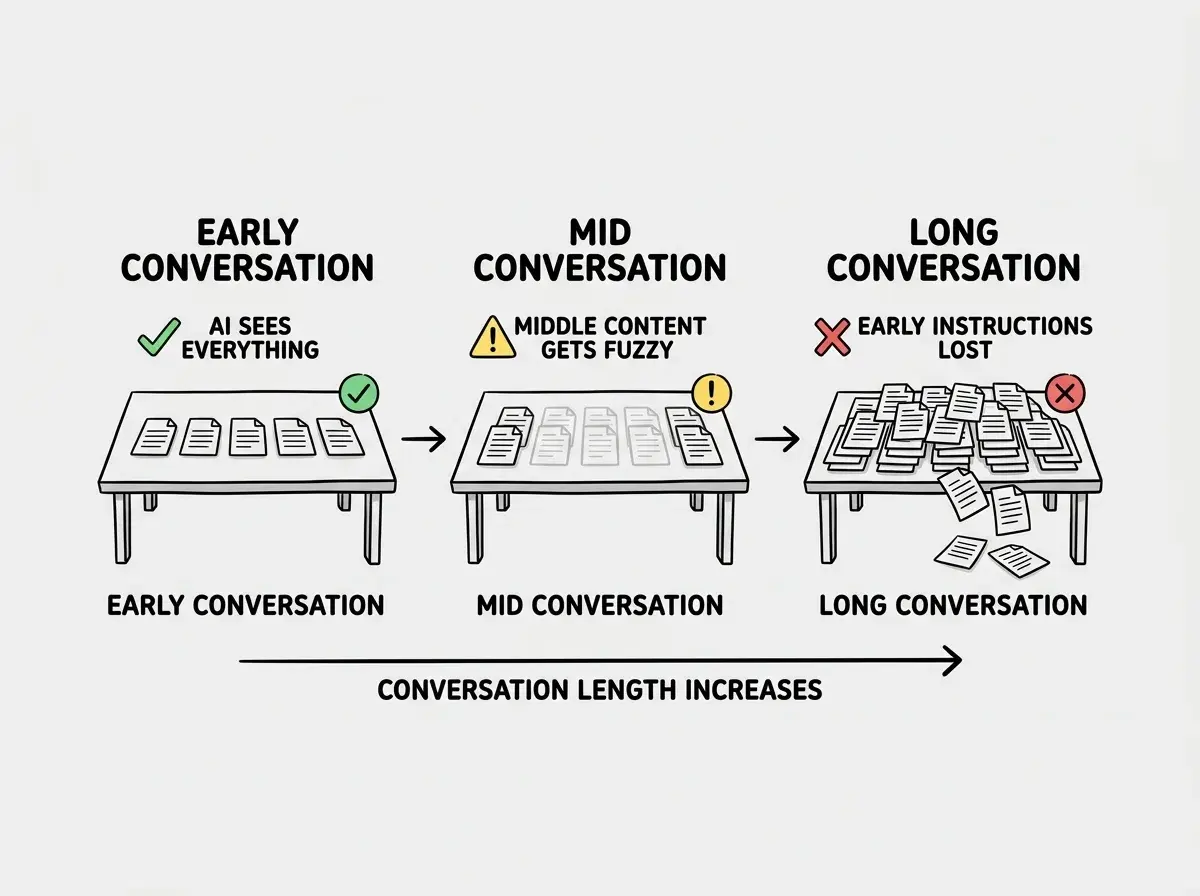
This analogy also explains why starting a new conversation often fixes problems that seemed impossible to solve. When you start fresh, you clear the desk. You place only the relevant code and instructions on it. The AI can read everything clearly again. The same prompt that produced broken code in a long conversation might produce perfect code in a short one. The difference is not the prompt. It is how much the AI can see.
How to Tell When the Window Is Degrading
Context window degradation does not announce itself, but it leaves fingerprints you can learn to recognize. Here are the three most reliable signs.
The AI contradicts earlier decisions. You told it to use Supabase for the database. Thirty prompts later, it starts generating code for a completely different database. You did not ask for the change. The AI simply lost track of the earlier decision because it fell off the desk.
Features start disappearing. You built a working login system ten prompts ago. Now you ask the AI to add a profile page, and the new code somehow removes parts of the login system. This happens because the AI can no longer see the full login code and does not realize it is overwriting something important.
The code quality drops noticeably. Early in the conversation, the AI produced clean, well-organized code. Now it is producing messy, repetitive code with obvious errors. The AI is not getting lazier. It has less context to work with, so it fills in gaps with lower-quality guesses.
Learn the foundational concepts that make AI tools click.
Read the introYou might think this means you need a bigger context window. But actually, the research shows that even very large context windows (200K or more tokens) still exhibit degradation in the middle section. A bigger desk helps, but the same problem persists. The most effective solution is not a bigger desk. It is learning to keep your desk clean.
Practical Strategies for Working Within the Limits
The best vibe coders do not fight the context window. They work with it. Here are the strategies that make the biggest difference.
Start new conversations frequently. This is the simplest and most effective strategy. When you notice any of the degradation signs above, start a fresh conversation. Copy in only the relevant code and a clear description of what you need. You are clearing the desk and placing only the essential papers on it.
Front-load your most important instructions. Because AI models process the beginning and end of the conversation more reliably than the middle, put your critical requirements at the very start of each conversation. Architecture decisions, coding standards, and must-not-break features belong in your opening prompt, not buried in prompt fifteen.
Use system prompts and project files. Many AI coding tools (Cursor, Claude) let you set persistent instructions that appear at the beginning of every conversation. Use these for project-wide rules that should never be forgotten. These instructions get premium real estate at the top of every conversation, right where the AI processes most reliably.
Summarize before continuing. When a conversation gets long but you are not ready to start fresh, ask the AI to summarize all current decisions, architecture choices, and code state. Then start a new conversation with that summary as the opening context. You are essentially compressing your papers into a smaller stack that fits on a clean desk.
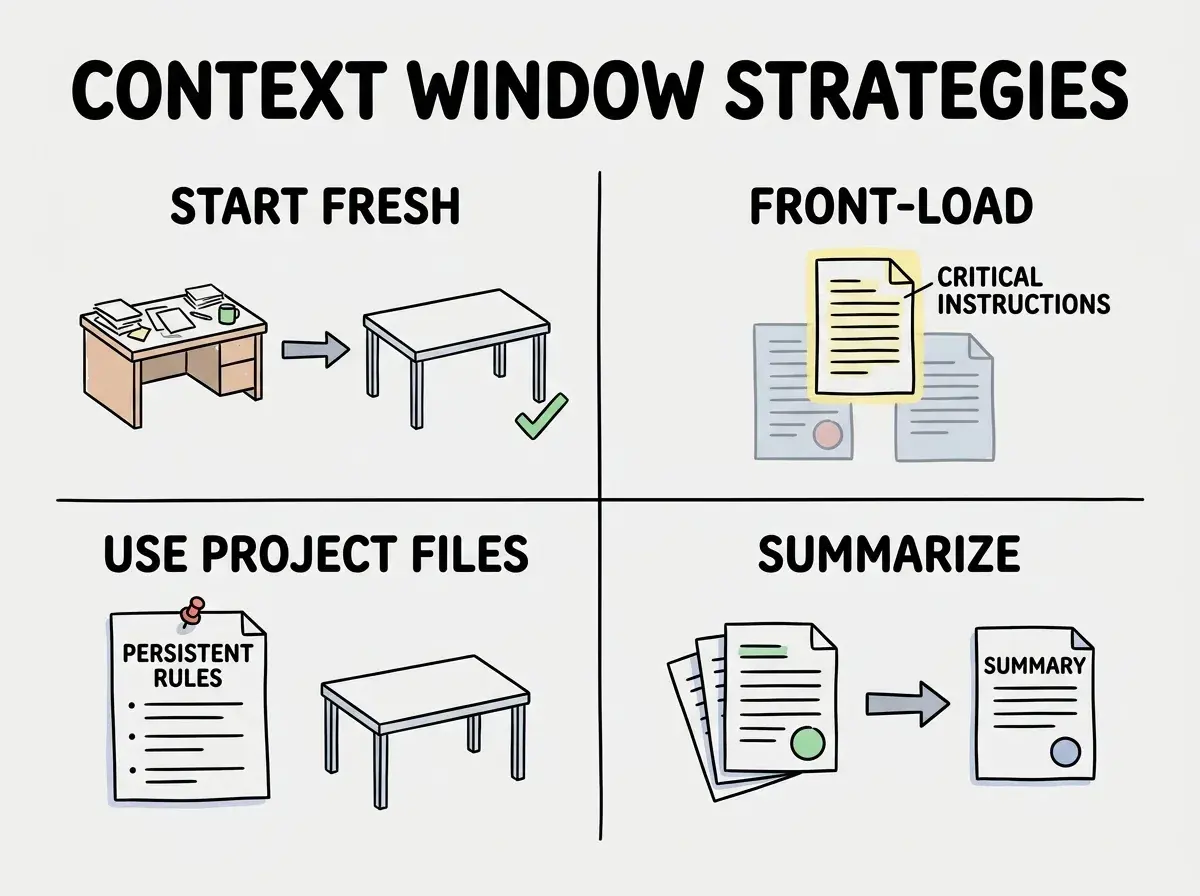
These strategies compound. A vibe coder who starts fresh conversations, front-loads instructions, and summarizes progress will get dramatically better results than one who runs a single conversation until the AI starts producing gibberish. The code is the same. The prompts might be the same. The difference is context management.
Continuing a long conversation because you do not want to "lose" the context from earlier prompts. In reality, the AI has already lost that context due to window degradation. Starting fresh with a focused summary actually gives the AI more useful context, not less.
Understanding context windows also explains one of the most counterintuitive findings in vibe coding. A study found that 92% of developers use AI tools daily, but only 33% trust the accuracy of the output. This trust gap makes more sense when you realize that accuracy degrades over long sessions. Developers who have experienced the AI confidently producing wrong code after a long conversation learn to distrust it, even though the same tool produces excellent code in short, focused sessions. The tool is not unreliable. The way most people use it exceeds the context window's effective range.
What This Means For You
The context window is the invisible constraint behind almost every frustrating experience in vibe coding. Code that gets worse over time, features that disappear, instructions that get ignored; these are all symptoms of the same root cause. Once you understand that your AI tool has a limited desk and learn to keep that desk clean, the quality of your results improves immediately.
- If you are a founder, context windows explain why AI demos look magical but real projects are harder. The demo is a clean desk with one focused task. Your real project is a cluttered desk with fifty competing requirements. Managing context is managing complexity.
- If you are changing careers, this is one of the highest-leverage concepts you can learn early. Most vibe coders discover context degradation through frustration. Knowing about it in advance means you will structure your work differently from day one, and produce better results.
- If you are a student, experiment with this deliberately. Run one long conversation and one series of short conversations on the same task. Compare the results. Seeing context degradation firsthand will teach you more about working with AI than any tutorial.
Master the concepts that make AI tools work better for you.
Explore more