The single biggest factor in getting good results from AI coding tools is learning how to give AI context. Not better prompts, not fancier tools, just the right background information. 92% of developers now use AI daily, and the ones getting great output have figured out one thing: AI builds better when it understands the full picture.
If you have ever asked an AI to "build me a landing page" and received something generic, the problem was not the AI. It was that you handed it an empty canvas with no reference material. This guide will show you exactly how to fix that, even if you have never written a line of code in your life.
How to Give Context to an AI
Giving context to an AI is like briefing a freelancer you have never worked with before. You would not just say "make me a website" and walk away. You would share your brand guidelines, show examples of sites you admire, explain who your customers are, and describe what you need the site to accomplish. AI works the same way.
Context is any information that helps the AI understand your situation, your preferences, and your goals. This includes documentation from tools you are using, screenshots of designs you want to match, examples of code or output you like, and even plain-English descriptions of your business. The more relevant information you provide upfront, the less time you spend going back and forth fixing misunderstandings.
63% of vibe coding users are non-developers, which means most people using AI to build software are not starting from a technical background. That is perfectly fine. You do not need to understand code to give AI good context. You just need to know what kinds of information are helpful and how to share them effectively.
Context is the gap between what you imagine and what the AI produces. The wider the gap, the worse the output. Closing that gap is not about technical skill; it is about sharing the right reference material before you ask AI to build anything.
Think of it this way: every piece of context you provide is like removing one possible wrong interpretation. If you share a screenshot of a pricing page you love, the AI will not guess at layout, typography, or color scheme. It already knows.
The Briefing Folder Analogy
Imagine you are hiring a contractor to renovate your kitchen. You would not just call them and say "make it nice." You would put together a folder. Maybe it includes magazine clippings of kitchens you like, the floor plan of your house, your budget, a list of appliances you already own, and notes about what you hate about the current layout. That folder is your context.
AI coding tools work on the same principle. Every conversation with an AI starts from zero. It does not remember your last project, your design preferences, or your tech stack. Each time you start a new task, you are essentially handing a fresh contractor an empty folder. Your job is to fill that folder with everything they need to do great work on the first try.
The briefing folder for AI context has a few key categories. You have reference material (docs, screenshots, examples), project-specific information (what you have already built, what tools you are using), and intent (what the end result should look and feel like). Most people only provide intent, which is like telling the contractor "modern kitchen" with no photos, no measurements, and no budget. Technically helpful, but wildly open to interpretation.
The good news is that building a great briefing folder takes minutes, not hours.
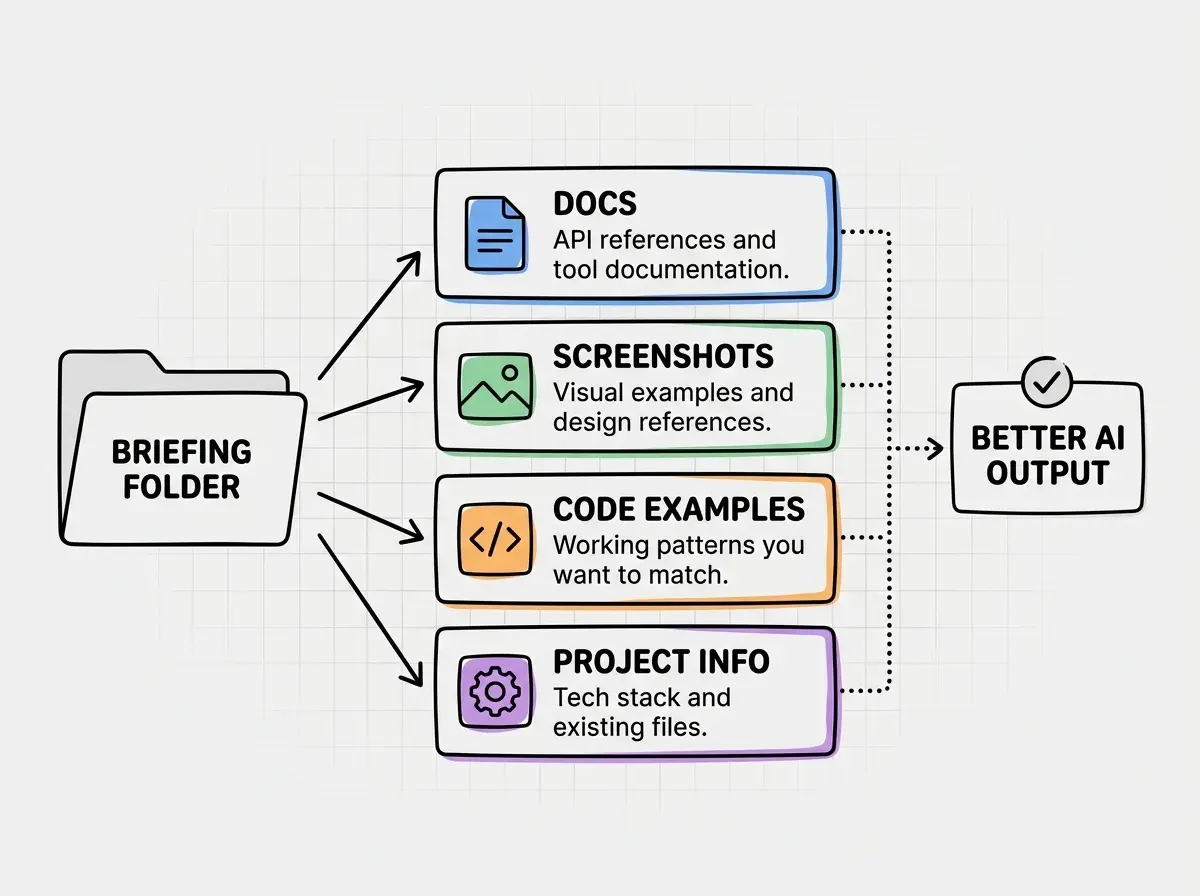
This approach scales naturally. A simple task might only need one or two items from the folder. A complex project might need all four categories. Either way, the habit of thinking "what does the AI need to know?" before you start typing will transform your results.
Five Ways to Share Context That Actually Work
Now for the practical part. Here are five specific methods for sharing context with AI, ranked roughly from easiest to most powerful.
Paste documentation snippets. When you are using a specific tool, framework, or API, copy the relevant section from its documentation and paste it directly into your conversation. If you are building with Stripe, paste the Stripe docs for the specific endpoint you need. If you are using a CSS framework, paste the section about the component you want. You do not need to paste entire docs; just the relevant paragraphs. AI is excellent at working from official documentation because it is structured, precise, and unambiguous.
Share screenshots. Most modern AI tools accept images. Screenshot a design you want to replicate, a competitor's feature you want to match, or even a hand-drawn sketch on a napkin. Screenshots communicate layout, color, spacing, and visual hierarchy instantly. One screenshot replaces hundreds of words of description.
Provide example code or output. If you have a component that works the way you want and you need another one like it, paste the working code as an example. AI will pattern-match against it and produce something consistent. Found a CodePen or GitHub snippet that does roughly what you want? Paste it in and say "build something like this but for my use case." The AI will adapt the pattern rather than inventing from scratch.
Reference URLs and live sites. Some AI tools can browse URLs directly. Even when they cannot, you can paste the text content from a webpage. If a tutorial explains the integration you need, paste the relevant steps. Real-world data and real examples ground the AI in reality rather than letting it hallucinate patterns.
Mention existing files and structure. When working in a codebase (even one the AI helped you create), tell it what already exists. Say "I have a header component in components/Header.tsx that uses Tailwind" or paste the file contents. This prevents the AI from creating conflicting styles or incompatible patterns.
Context is the foundation. See what you can build once you get the basics right.
Explore tutorialsThe key insight across all five methods is specificity. Vague context produces vague results. Specific documentation, precise screenshots, and concrete examples produce output that actually matches what you need. When in doubt, err on the side of sharing more rather than less.
How Much Context Is Too Much
There is a real limit to how much context AI can process, and hitting that limit actually makes results worse. Every AI model has a "context window," which is essentially its working memory. Think of it like your contractor's desk. If you dump every magazine you have ever read onto it, the important floor plan gets buried under irrelevant inspiration photos from 2015.
The practical guideline is to share context that is directly relevant to the current task. If you are building a checkout flow, the Stripe payment docs are relevant but your brand's social media strategy doc is not. If you are matching a design, one or two reference screenshots are better than fifteen. The AI cannot always tell which pieces of context matter most, so curating your briefing folder is part of the job.
A helpful rule of thumb is the "would a freelancer need this?" test. Before pasting something in, ask yourself whether a freelancer working on this specific task would find it useful. Your logo guidelines? Yes, if the task involves visual design. Your five-year roadmap? Probably not for building a contact form.
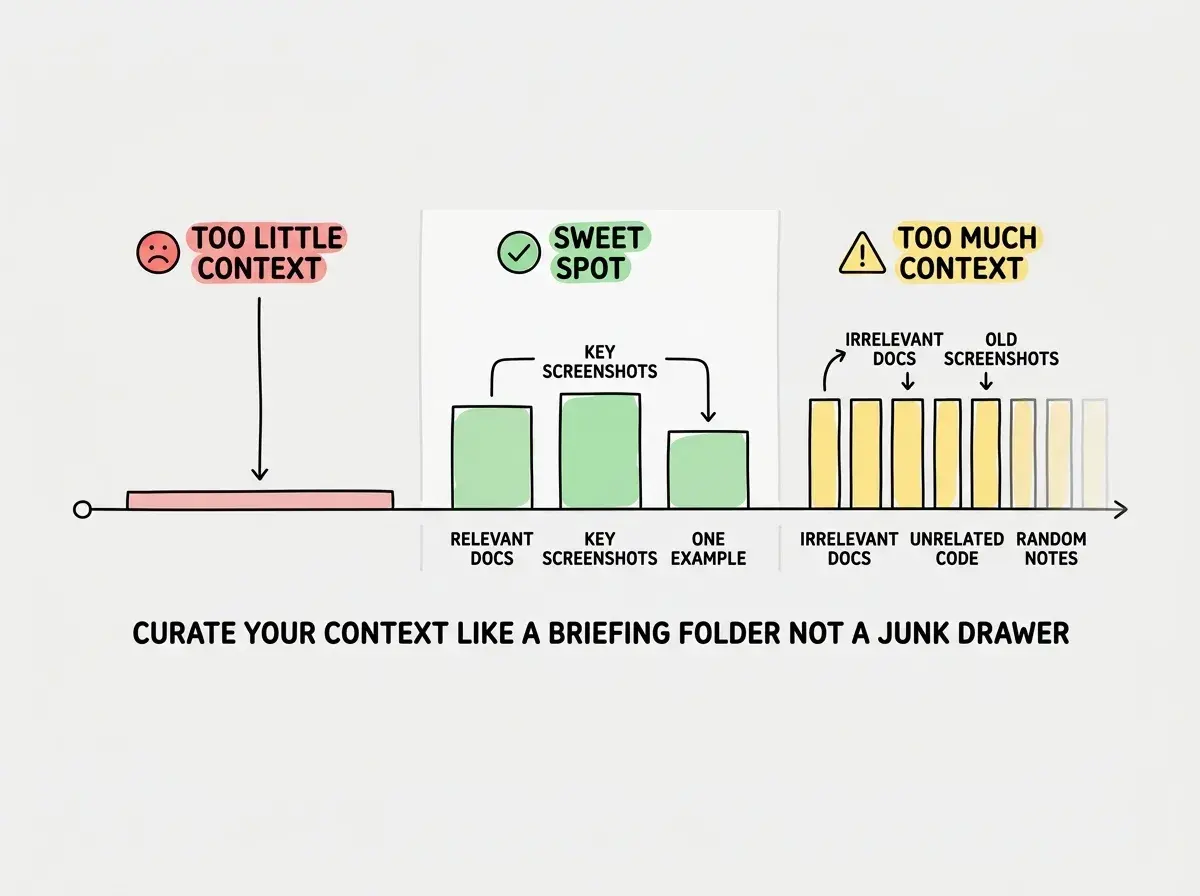
Another sign you have shared too much context is when the AI starts contradicting itself or mixing up details from different parts of your input. If that happens, trim your context down to just the essentials for the immediate task. You can always add more in follow-up messages as the conversation progresses.
Dumping your entire project documentation, full codebase, and every screenshot into a single message. This overwhelms the AI's context window and actually degrades output quality. Share only what is relevant to the specific task at hand, and add more incrementally as needed.
The best vibe coders develop an instinct for context curation over time. It starts mechanical (asking yourself "does the AI need this?") and eventually becomes second nature. You will notice your first messages getting shorter and more precise while your results get dramatically better.
What This Means For You
No matter your background, mastering AI context is the highest-leverage skill you can develop right now. Here is what that looks like depending on where you are starting from.
- If you are a founder or maker, giving AI good context means you can ship MVPs and landing pages that match your vision on the first try. Instead of three rounds of "no, not like that," you share your Figma mockup, paste your Stripe docs, and get working code in one shot.
- If you are switching careers into tech, learning to provide context effectively is more valuable than memorizing syntax. The developers getting promoted are the ones who use AI tools productively, and productive AI use starts with context.
- If you are a student or creative exploring code for the first time, context is your equalizer. You do not need years of experience to share a screenshot, paste documentation, or show an example. These are skills you already have from every other area of your life.
You have the context skills. Now put them to work on your first project.
Get started