Every app eventually needs to do something that takes too long for a normal HTTP request. Sending emails after signup. Processing uploaded files. Syncing data from a third-party API that rate-limits you. These are background jobs, and if you have been duct-taping them together with setTimeout or hoping your serverless function does not time out, Trigger.dev wants to be your upgrade path.
Think of Trigger.dev as a sophisticated task manager app for your server. The way a good task manager assigns work to the right person, tracks progress, retries when something falls through the cracks, and reports back with a status update, Trigger.dev does the same thing for your background work. It accepts tasks, routes them to dedicated machines, monitors execution, handles failures automatically, and gives you a dashboard showing exactly what happened at every step.
With 92% of developers now using AI tools daily, the infrastructure layer underneath your AI-generated code matters more than ever. Your AI assistant can scaffold a Next.js app in minutes, but it cannot magically solve the serverless timeout problem. That is where Trigger.dev background jobs come in.
What Trigger.dev Actually Does
Trigger.dev is an open-source background job framework built specifically for TypeScript. You define tasks in your codebase as regular TypeScript functions, deploy them, and trigger them from your app via an API call or event. The platform handles execution, retries, scheduling, concurrency limits, and observability.
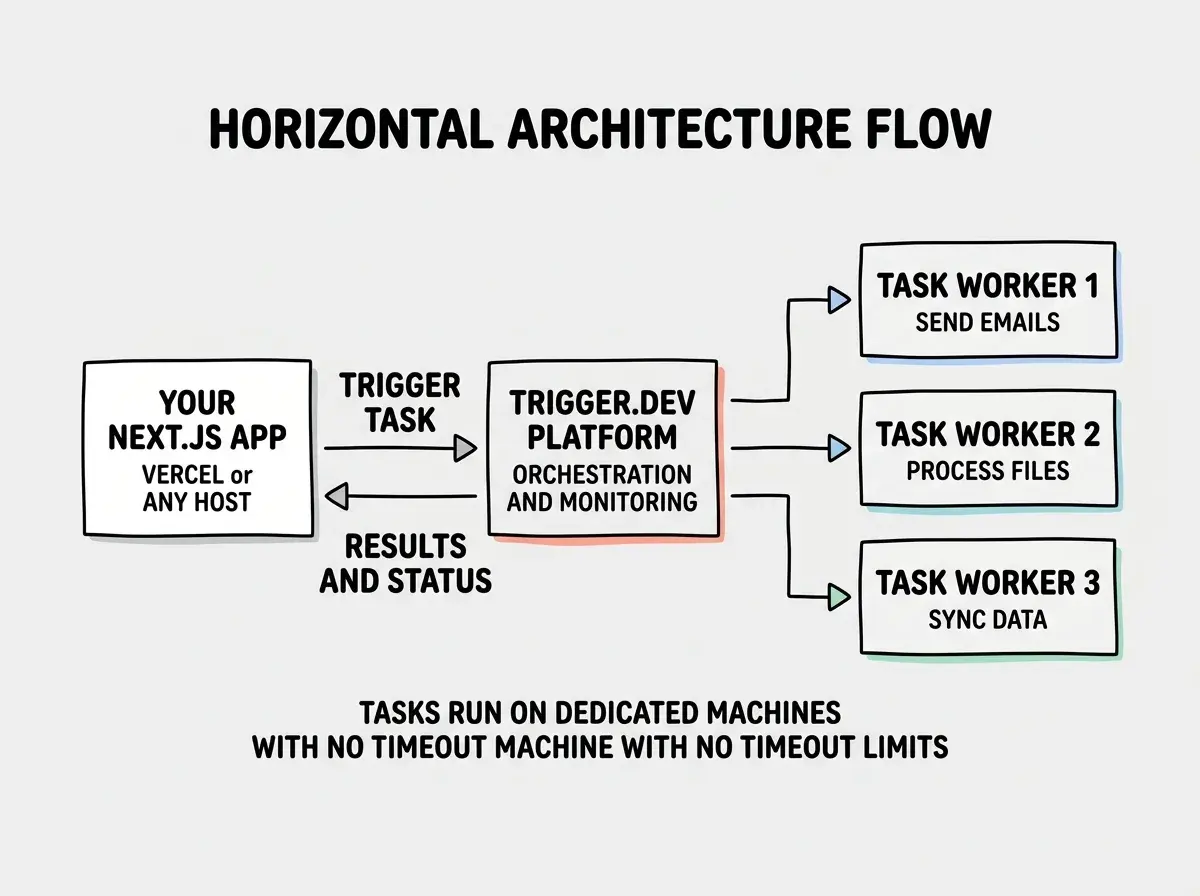
The key architectural decision that separates Trigger.dev from older approaches is how v3 runs your tasks. Instead of running jobs inside your web server process or inside a short-lived serverless function, Trigger.dev v3 executes tasks on dedicated long-running machines. Your task gets its own execution environment with no timeout ceiling imposed by your hosting provider. A job that needs to run for 5 minutes, 30 minutes, or even hours just runs until it finishes.
This is the task manager analogy in action. Your web server is like the executive who delegates work. Trigger.dev is the operations team that actually gets things done, tracks every step, and sends the executive a summary when the job is complete.
The v3 Architecture
Trigger.dev v3, released in 2024 and now the standard, introduced a fundamentally different execution model from v2. In v2, tasks ran inside your existing server infrastructure using a persistent connection to the Trigger.dev platform. This worked but inherited all the limitations of your hosting environment, including serverless timeouts.
v3 flipped the model. Your tasks deploy to Trigger.dev's infrastructure (or your own self-hosted machines) as containerized processes. When you trigger a task, the platform spins up an execution environment, runs your code, and reports results back.
This means a few important things in practice. Your Next.js app on Vercel stays lightweight because the heavy processing happens elsewhere. Your tasks can use Node.js APIs that serverless environments restrict, like long-lived database connections or file system operations. And you get genuine parallelism because each task run gets its own isolated process.
The deployment workflow is clean. You run npx trigger.dev@latest deploy and it bundles your task files, pushes them to the platform, and makes them available for execution. Trigger calls from your app go through the SDK, which communicates with the platform API.
TypeScript-First, Not TypeScript-Compatible
A lot of job queue libraries support TypeScript. Trigger.dev was built for TypeScript from the ground up. The difference shows in daily usage.
Your task definitions are fully typed. The payload you send when triggering a task is type-checked against the schema you defined. The return value is typed. The SDK provides generic types for task handles, so when you call myTask.trigger({ userId: "123" }), your IDE knows exactly what properties the payload accepts and what the task returns.
Error handling follows TypeScript patterns. You get typed error objects, proper stack traces that map back to your source code, and retry logic that you configure per-task with a typed options object. There is no YAML configuration file. No separate DSL to learn. Everything lives in .ts files alongside your application code.
For senior developers already deep in the TypeScript ecosystem, this means zero context switching. Your task code looks and feels like the rest of your application code. You test it the same way. You debug it the same way. The task manager just happens to run it on a different machine.
Self-Hosting Option
Trigger.dev is open source under the Apache 2.0 license. You can self-host the entire platform on your own infrastructure. The self-hosted version includes the web dashboard, the task execution engine, and the API layer.
Self-hosting makes sense when you are processing sensitive data that cannot leave your infrastructure, when you have predictable high-volume workloads where self-hosting is cheaper, or when compliance requires specific geographic regions.
The tradeoff is operational overhead. You are responsible for keeping the platform running, scaling workers, and handling upgrades. For most teams, the managed version is the right starting point until you have a specific reason to self-host.
Trigger.dev background jobs solve the serverless timeout problem by moving task execution to dedicated machines. Your web app stays fast and lightweight while long-running work happens on infrastructure designed for it. The TypeScript-first design means your task code is just TypeScript with full type safety, retries, and observability built in.
Next.js and Vercel Integration
Trigger.dev integrates cleanly with Next.js apps deployed on Vercel, which is where a large chunk of the TypeScript community deploys.
You install the SDK, define tasks in a /trigger directory, and call tasks.trigger() from your API routes or server actions. The trigger call is a quick API request that returns immediately, so your API route responds fast while the actual work happens asynchronously on Trigger.dev's infrastructure.
This pattern solves the classic Vercel problem. Vercel's serverless functions have a maximum execution time (10 seconds on the Hobby plan, 60 seconds on Pro). If your background work takes longer than that, it simply fails. With Trigger.dev, your Vercel function only needs to last long enough to make the trigger call, which takes milliseconds. The task itself runs without any timeout pressure.
Scheduled tasks (cron jobs) work the same way. You define a schedule in your task file, and Trigger.dev executes it on the specified interval. No need for Vercel Cron or external cron services.
How It Compares to Inngest and BullMQ
The background jobs space for TypeScript has three serious contenders right now. Here is how they stack up.
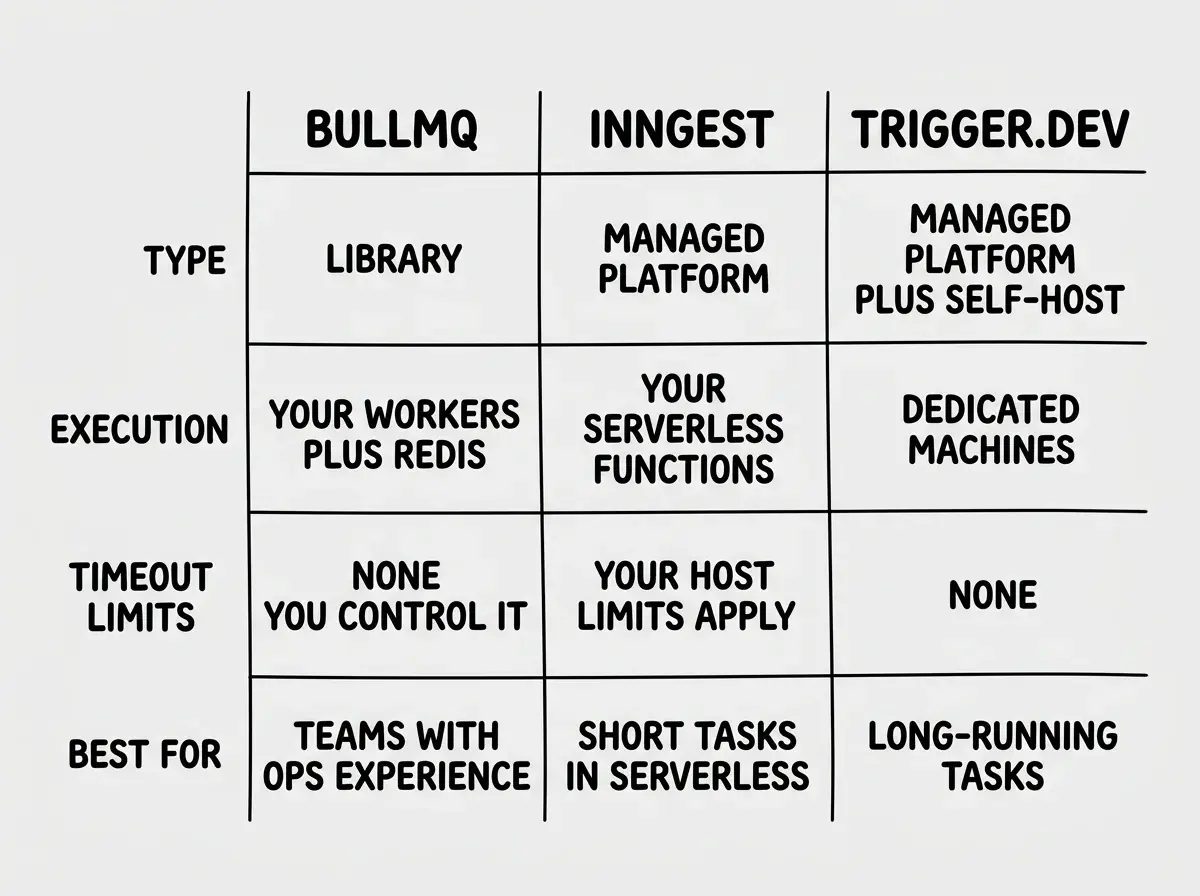
BullMQ is the veteran. It is a Redis-backed job queue that has been around for years and handles millions of jobs in production across the industry. BullMQ is a library, not a platform. You bring your own Redis instance, your own worker processes, and your own monitoring. It gives you maximum control and zero vendor dependency, but you build and maintain the infrastructure yourself. If you already run Redis and have the ops experience to manage worker processes, BullMQ is battle-tested and reliable.
Inngest is the closest competitor to Trigger.dev in the managed platform space. Inngest uses an event-driven model where you define functions that respond to events. It handles retries, scheduling, and orchestration. The key architectural difference is that Inngest runs your functions within your existing infrastructure (your serverless functions), while Trigger.dev v3 runs tasks on separate dedicated machines. This means Inngest inherits your hosting provider's timeout limits, while Trigger.dev does not.
Trigger.dev sits between BullMQ's raw control and Inngest's managed convenience. You get a managed platform with a dashboard and observability, but your tasks run on dedicated infrastructure without serverless constraints. The self-hosting option gives you an escape hatch that Inngest does not offer.
For senior developers choosing between these, it comes down to your constraints. Need tasks that run for minutes or hours? Trigger.dev. Want to keep everything inside your existing serverless deployment? Inngest. Want full control with no platform dependency? BullMQ with your own Redis.
Assuming that Inngest and Trigger.dev are interchangeable because both are "managed background job platforms." The execution model is fundamentally different. Inngest runs your code inside your existing serverless functions, so you still hit timeout limits. Trigger.dev v3 runs your code on separate machines with no imposed timeouts. If your tasks are short (under 60 seconds), either works. If your tasks are long-running, Trigger.dev's architecture is specifically designed for that problem.
Pricing
Trigger.dev's managed cloud offers a free Hobby tier with 50,000 task runs per month. The Pro plan starts at $30/month with more runs and longer maximum durations. Self-hosted deployments are free; you pay only for your own infrastructure.
Compared to Inngest's free tier (25,000 runs) and BullMQ's cost (Redis hosting plus your own compute), Trigger.dev lands in a competitive spot. The free tier is generous enough for side projects and MVPs.
What This Means for Your Stack
Trigger.dev background jobs fill a real gap in the TypeScript ecosystem. Before v3, you either managed your own BullMQ infrastructure, accepted serverless timeout limits, or cobbled together workarounds with external cron services and webhook chains.
Start with the fundamentals of how apps are structured before adding infrastructure.
Learn the basicsThe task manager analogy holds all the way through. Just like a good task manager does not care whether the work takes five minutes or five hours, Trigger.dev's dedicated execution model handles both equally well. It assigns the work, tracks it, retries on failure, and reports back.
If you are a senior developer building production TypeScript apps that need reliable background processing, Trigger.dev is worth evaluating seriously. The self-hosting option provides a real escape hatch, and the v3 architecture solves the timeout problem that plagues serverless deployments.
Start with one task. Move your longest-running API route into a Trigger.dev task, see how it performs, and decide from there. The free tier gives you plenty of room to experiment before committing.
Understand tech stacks and how tools like Trigger.dev fit into the bigger picture.
Explore tech stacks