With 92% of developers now using AI tools daily, the market for AI coding assistants has split into two camps. On one side, polished subscription products like Cursor and GitHub Copilot. On the other, open-source alternatives that hand you every lever and expect you to bring your own engine. Kilo Code VS Code AI sits firmly in that second camp, and it might be the most compelling option there.
Think of Kilo Code as a community-built toolbox. The toolbox itself is free, well-organized, and constantly improved by the people who actually use it. But you bring your own power tools. In this case, those power tools are your API keys from Anthropic, OpenAI, Google, or any other LLM provider you prefer. Nobody charges you for the privilege of plugging them in.
Where Kilo Code Comes From
Kilo Code is a fork of Cline, one of the earliest open-source AI coding extensions for VS Code. When Cline began shifting toward a more commercial model with managed API access, a group of contributors forked the project to preserve the fully open, bring-your-own-key philosophy. The result is Kilo Code, licensed under Apache 2.0, with an active community on GitHub and Discord driving development.
The fork was not a hostile split. It was a natural divergence in philosophy. Cline moved toward simplifying the experience by offering managed API access. Kilo Code doubled down on transparency and user control. Both approaches are valid, but they serve different developers.
The codebase is TypeScript, built as a standard VS Code extension. If you can read TypeScript, you can audit every line of code that runs on your machine. There is no telemetry you cannot disable and no black-box middleware sitting between your editor and your chosen model.
Kilo Code gives you the same agentic coding capabilities as commercial tools, but you own the entire pipeline. Your API keys, your model choices, your cost controls. The tradeoff is that nobody holds your hand through setup or billing. If you are comfortable managing API keys and reading documentation, that tradeoff works heavily in your favor.
How the Architecture Works
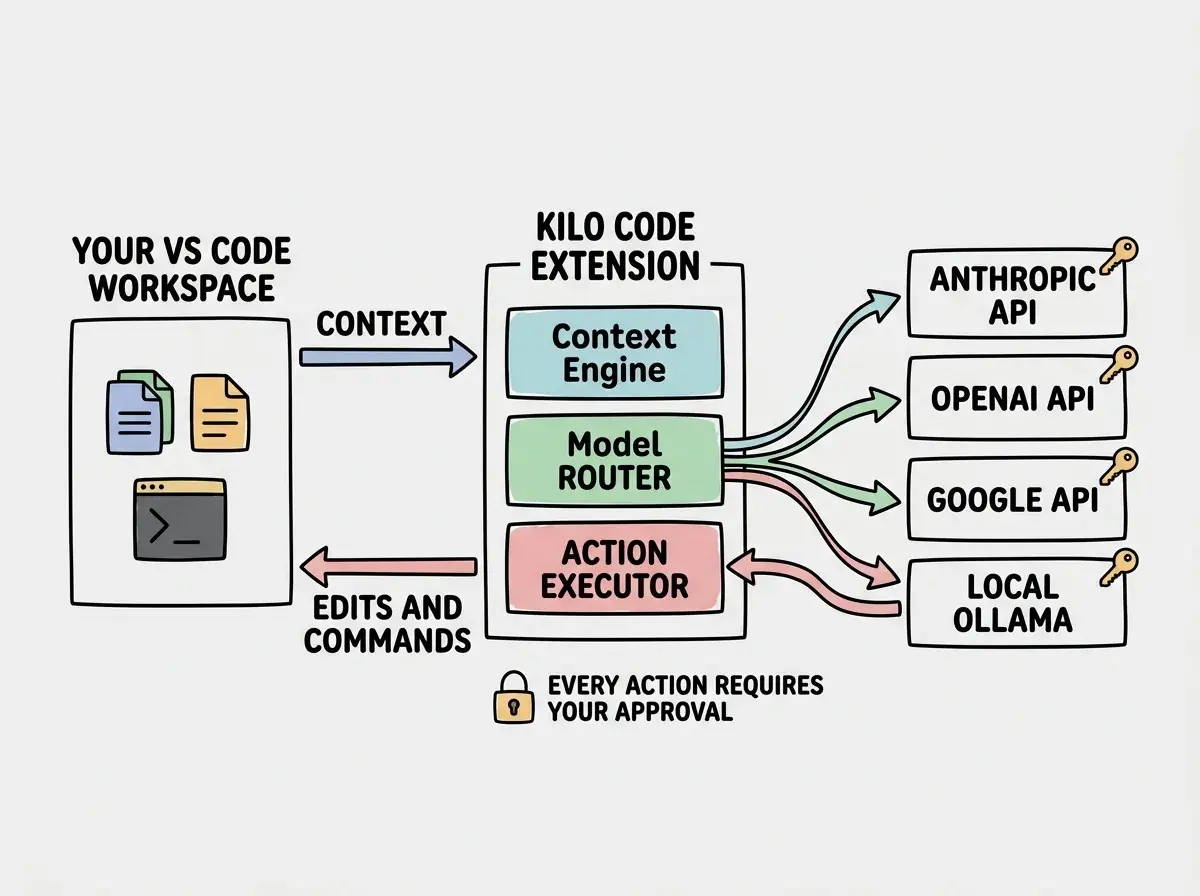
Going back to the toolbox analogy, Kilo Code provides the frame and the compartments while you fill them with whatever tools fit your workflow. At its core, the extension is an agentic loop that reads your codebase context, sends prompts to your chosen LLM, receives responses, and executes actions like file edits, terminal commands, and browser interactions.
The architecture breaks down into a few key layers.
The context engine scans your workspace and builds a representation of your project structure, open files, and recent changes. This context gets bundled into every prompt so the model understands what it is working with.
The model router is where the "bring your own power tools" concept really shines. You configure API keys for one or more providers, and Kilo Code routes requests accordingly. Want to use Claude Sonnet for complex refactoring but GPT-4o for quick edits? You can set that up. Want to point everything at a local Ollama instance running Llama 3? That works too. The extension does not care which model answers, only that it follows the expected response format.
The action executor parses the model's output and performs actions in your editor. File creation, code edits, terminal command execution, and even browser-based testing all happen through VS Code's extension API. Every action requires your approval by default (though you can configure auto-approval for trusted operations).
The conversation manager maintains context across turns within a session, allowing multi-step tasks. You can ask Kilo Code to scaffold a component, then refine the styling, then add tests, all within a single conversation that remembers what came before.
Multi-Model Support in Practice
Most commercial AI coding tools lock you into one model or a curated set of models. Cursor uses its own fine-tuned models alongside Claude and GPT-4. GitHub Copilot runs on OpenAI's infrastructure. You get what they offer.
Kilo Code takes the opposite approach. The extension supports any API-compatible model provider through a straightforward configuration system. The currently supported providers include Anthropic (Claude), OpenAI (GPT-4o, o1), Google (Gemini), AWS Bedrock, Azure OpenAI, OpenRouter, and any OpenAI-compatible API endpoint. That last one is the wildcard. It means local models through Ollama, LM Studio, or any self-hosted inference server work out of the box.
In practice, multi-model support matters because different models excel at different tasks. Claude tends to produce better architectural decisions and more thoughtful code organization. GPT-4o is faster for simple completions and boilerplate. Local models give you offline capability and zero API cost for quick iterations. Being able to switch between them without changing tools is genuinely useful.
Kilo Code vs Cline vs Cursor
The Cline comparison is the most direct since Kilo Code forked from it. Against Cursor, the comparison is more about philosophy than features.
| Kilo Code | Cline | Cursor | |
|---|---|---|---|
| License | Apache 2.0, fully open | Open-source with commercial layer | Proprietary |
| Pricing | Free (you pay API costs) | Free + paid managed API tier | $20/mo Pro, $40/mo Business |
| Model flexibility | Any API-compatible model | Primary models + some BYOK | Claude, GPT-4, custom fine-tunes |
| Editor | VS Code extension | VS Code extension | Standalone editor (VS Code fork) |
| Action approval | Configurable per action type | Configurable | Varies by feature |
| Community governance | Community-driven, open roadmap | Company-directed | Company-directed |
| Offline capability | Yes, with local models | Limited | No |
Against Cline, the differences come down to governance and cost structure. Cline now offers a managed API tier where they handle keys and billing for you. This is convenient but introduces a middleman. Kilo Code maintains the pure BYOK approach. If you want full control and cost transparency, Kilo Code is the better fit.
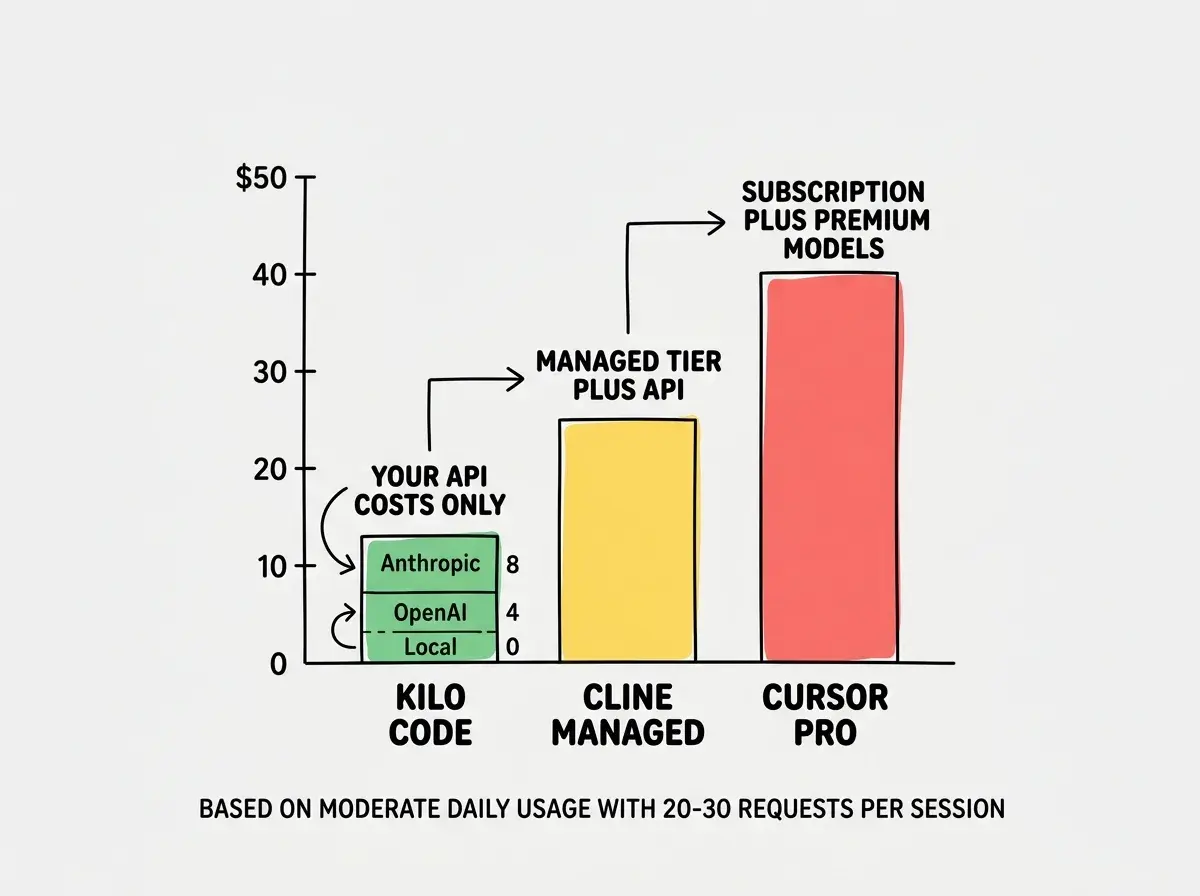
Against Cursor, the comparison is fundamentally different. Cursor is a standalone IDE with deeply integrated AI features including tab completion, inline edits, chat, and agent mode. The experience is more polished. But it costs $20-40/month before premium model usage, and it is closed-source. You cannot audit what data leaves your machine or swap in a local model for air-gapped development.
For senior developers who value transparency and control, Kilo Code offers roughly 85-90% of Cursor's agentic capabilities at a fraction of the cost. The missing 10-15% is mostly polish, things like Cursor's tab completion and custom fine-tuned models.
Comparing Kilo Code to Cursor purely on features and concluding Cursor wins. The real comparison is about total cost of ownership and control. A developer using Kilo Code with their own Anthropic API key spends $5-15/month on actual API calls for heavy usage. A Cursor Pro user pays $20/month before premium model costs. Over a year, the difference adds up, and with Kilo Code you can see exactly where every dollar goes.
Cost Transparency That Actually Matters
This is where the toolbox analogy lands hardest. With a subscription tool, you pay a flat fee and hope the value exceeds the cost. With Kilo Code, you see exactly what every request costs because you are paying the API providers directly.
Kilo Code includes a built-in cost tracker that shows token usage and estimated cost per conversation. A typical coding session with 20-30 exchanges costs roughly $0.50-2.00 depending on model and context size. Heavy refactoring sessions might hit $5. The point is that you see the number and you decide whether the value was there.
This transparency changes how you work. You learn which tasks are worth sending to an expensive model and which ones a local model handles fine. Over time, most developers find their monthly spend settles between $10-30 for daily usage, well below any subscription alternative.
Community-Driven Development
Open-source projects live or die by their community, and Kilo Code's is notably active. The GitHub repository sees regular contributions from dozens of developers. Feature requests are discussed openly, and the roadmap is shaped by the people who use the tool daily.
Recent community-driven additions include improved context window management, better monorepo workspace support, and a plugin system for extending the agent loop with custom tools. That plugin system is particularly interesting because it lets developers add capabilities without forking the entire codebase.
This is the advantage of genuine open-source development over "source available" projects. The community does not just use Kilo Code. They build it. Every contributor has the same access as the maintainers. There is no premium tier with hidden features, no enterprise edition with the good stuff locked away.
See how different tools fit different development workflows and budgets.
Browse tool comparisonsSetting Up Kilo Code
Getting started takes about five minutes. Install the extension from the VS Code marketplace, add your API key for at least one provider in the settings, choose a default model, and start a conversation. The defaults for context management and action approval are sensible out of the box.
For teams, commit a shared settings file with model configurations (without actual API keys) to your repository. Each developer adds their own keys locally, giving the team consistent behavior while keeping credentials private.
Who Should Use Kilo Code
Kilo Code fits a specific developer profile. You are comfortable managing API keys. You want to see exactly what your AI tooling costs. You value open-source governance over polished commercial experiences. You want the flexibility to use local models for offline work or to try new model releases the day they launch.
If that sounds like more work than you want, a managed solution like Cursor or Cline's paid tier will serve you better. There is no shame in paying for convenience.
But if you have been thinking "I just want a good agentic coding loop in VS Code without a subscription," Kilo Code is the answer. The community-built toolbox is open, well-maintained, and ready for your power tools.
The right tool depends on your workflow, budget, and how much control you want.
Explore AI tool guides