Inngest background jobs solve one of the most persistent headaches in serverless development. You need to send a welcome email after signup, process a webhook from Stripe, or fan out notifications to 10,000 users. In a traditional server, you would spin up a Redis-backed queue and run workers. In serverless, there is no persistent process to run those workers. With 92% of developers using AI tools daily, the apps we ship are more complex than ever, and the background work has outgrown simple API route hacks.
Inngest offers a different model. Think of it as a smart postal sorting office. Your application drops off packages (events). The sorting office reads the labels, routes each package to the correct department (functions), retries failed deliveries automatically, and gives you a full audit log. You never hire your own mail carriers or maintain your own trucks. Just drop off the package and trust the system.
What Inngest Actually Does
Inngest is an event-driven background job platform built for serverless and edge runtimes. Instead of managing queues, workers, and infrastructure, you define functions that respond to events. Inngest handles orchestration, scheduling, retries, and observability.
The core model has three parts. Events are JSON payloads sent when something happens. Functions run in response to events. Steps are individual units of work within a function that can be retried independently.
import { inngest } from "./client";

export const sendWelcomeEmail = inngest.createFunction(
  { id: "send-welcome-email" },
  { event: "user/signed.up" },
  async ({ event, step }) => {
    const user = await step.run("fetch-user", async () => {
      return await db.users.find(event.data.userId);
    });

    await step.run("send-email", async () => {
      return await resend.emails.send({
        to: user.email,
        subject: "Welcome aboard",
        html: renderWelcomeEmail(user),
      });
    });

    await step.sleep("wait-3-days", "3d");

    await step.run("send-follow-up", async () => {
      return await resend.emails.send({
        to: user.email,
        subject: "How is everything going?",
        html: renderFollowUpEmail(user),
      });
    });
  }
);
That code does something remarkable for serverless. It sends a welcome email, waits three days without holding compute resources, then sends a follow-up. Each step.run is independently retryable. If the follow-up email fails, Inngest retries just that step, not the entire function. The postal sorting office does not re-sort every package because one delivery truck had a flat tire.
Event-Driven Architecture Without the Plumbing
Traditional event-driven systems require message brokers, consumer groups, dead letter queues, and monitoring dashboards. Inngest collapses all of that into a single SDK and a hosted platform.
Your app sends events through inngest.send(). Multiple functions can listen to the same event. When a user signs up, one function sends the welcome email, another creates their Stripe customer record, and a third updates analytics. This is fan-out, and it happens automatically.
// Three functions, one event, zero coordination code
inngest.createFunction(
  { id: "create-stripe-customer" },
  { event: "user/signed.up" },
  async ({ event, step }) => { /* ... */ }
);

inngest.createFunction(
  { id: "update-analytics" },
  { event: "user/signed.up" },
  async ({ event, step }) => { /* ... */ }
);
The sorting office analogy holds perfectly. You drop off one package labeled "new user," and the office duplicates it, routing copies to billing, communications, and records. Each department processes its copy independently.
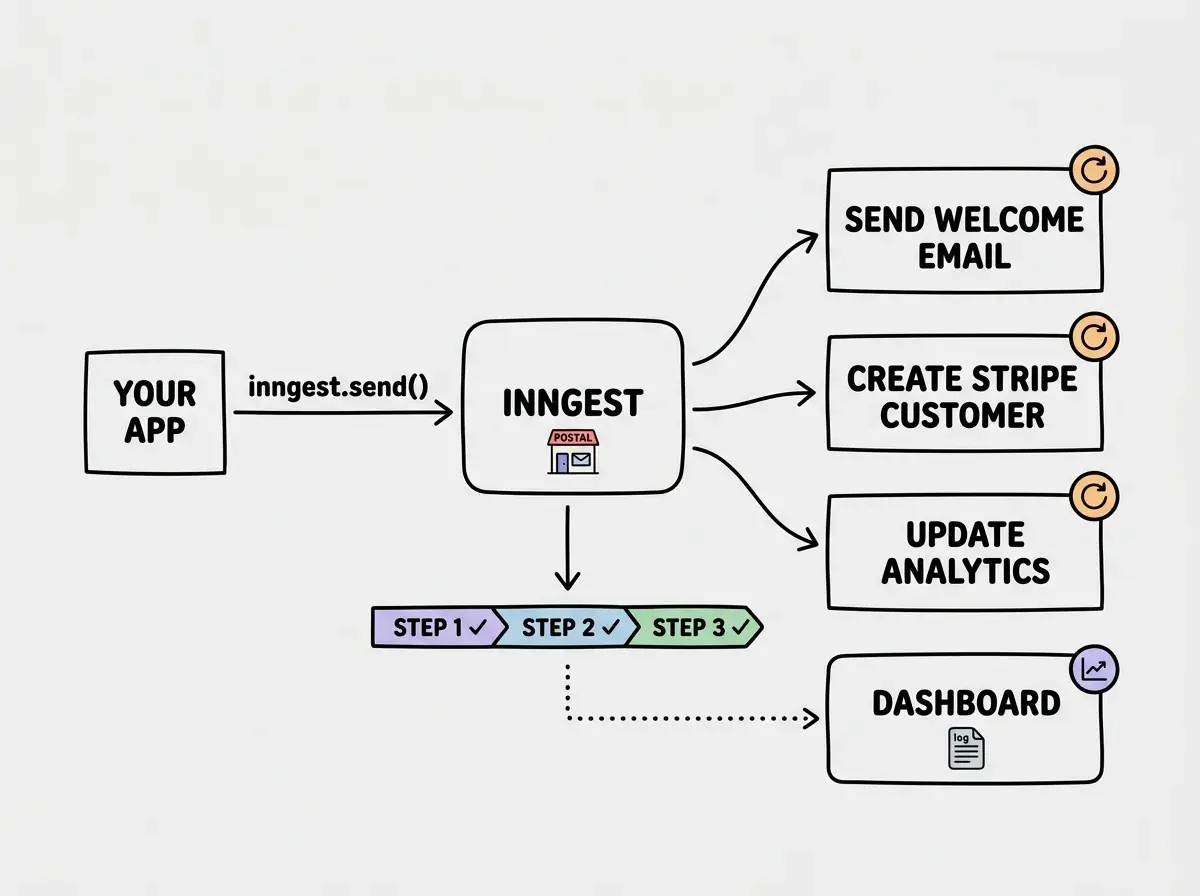
Step Functions and Why They Matter
The step primitive is what separates Inngest from a basic queue. Each step is a checkpoint. If your function has five steps and step four fails, Inngest replays from step four, not step one. The results from steps one through three are already cached.
This matters for expensive operations. If step one calls an AI model at $0.15 per request and step two writes to the database, you do not want to re-run the AI call every time the database write fails. Steps give you transactional-style guarantees in an environment that has no transactions.
Steps also enable patterns that would be awkward with traditional queues. step.waitForEvent pauses execution until a specific event arrives or a timeout expires. Approval workflows, two-phase processes, and human-in-the-loop patterns become straightforward.
Inngest step functions give you durable execution in serverless environments. Each step is independently retryable with cached results, so a failure in step four never re-runs steps one through three. For AI-heavy workflows where individual API calls are expensive, this alone can justify the platform.
Retries That Actually Work
Inngest's retry system is configurable per function. The defaults are sensible (three retries with exponential backoff), and you can adjust the count, backoff multiplier, and maximum retry duration.
The retry behavior applies at the step level, not the function level. A function with ten steps where step seven fails will retry only step seven. In a traditional queue, the entire job re-enters the queue, and you either build idempotency checks for every side effect or accept duplicate work.
The sorting office does not ship your entire order back to the warehouse because one item was out of stock. It re-orders just the missing piece.
Vercel and Cloudflare Integration
Inngest works with any HTTP endpoint, but the Vercel and Cloudflare integrations are where it shines brightest for modern serverless stacks.
On Vercel, you create a single API route that serves as Inngest's endpoint. The SDK handles registration, event ingestion, and function execution through that route. Deployment is automatic.
// app/api/inngest/route.ts
import { serve } from "inngest/next";
import { inngest } from "@/inngest/client";
import { sendWelcomeEmail } from "@/inngest/functions";

export const { GET, POST, PUT } = serve({
  client: inngest,
  functions: [sendWelcomeEmail],
});
On Cloudflare Workers, the integration uses the Hono adapter or the generic HTTP handler. Because Inngest steps are individually invoked, each step runs as its own Worker request within execution time limits. A function with twenty steps makes twenty separate invocations, each well within the time budget.
This is particularly relevant for AI-built apps. When your Cursor-generated Next.js app runs on Vercel, adding Inngest background jobs takes about fifteen minutes. The AI tools generate reasonable Inngest code because the SDK's API surface is small and well-documented.
How Inngest Compares to Trigger.dev and BullMQ
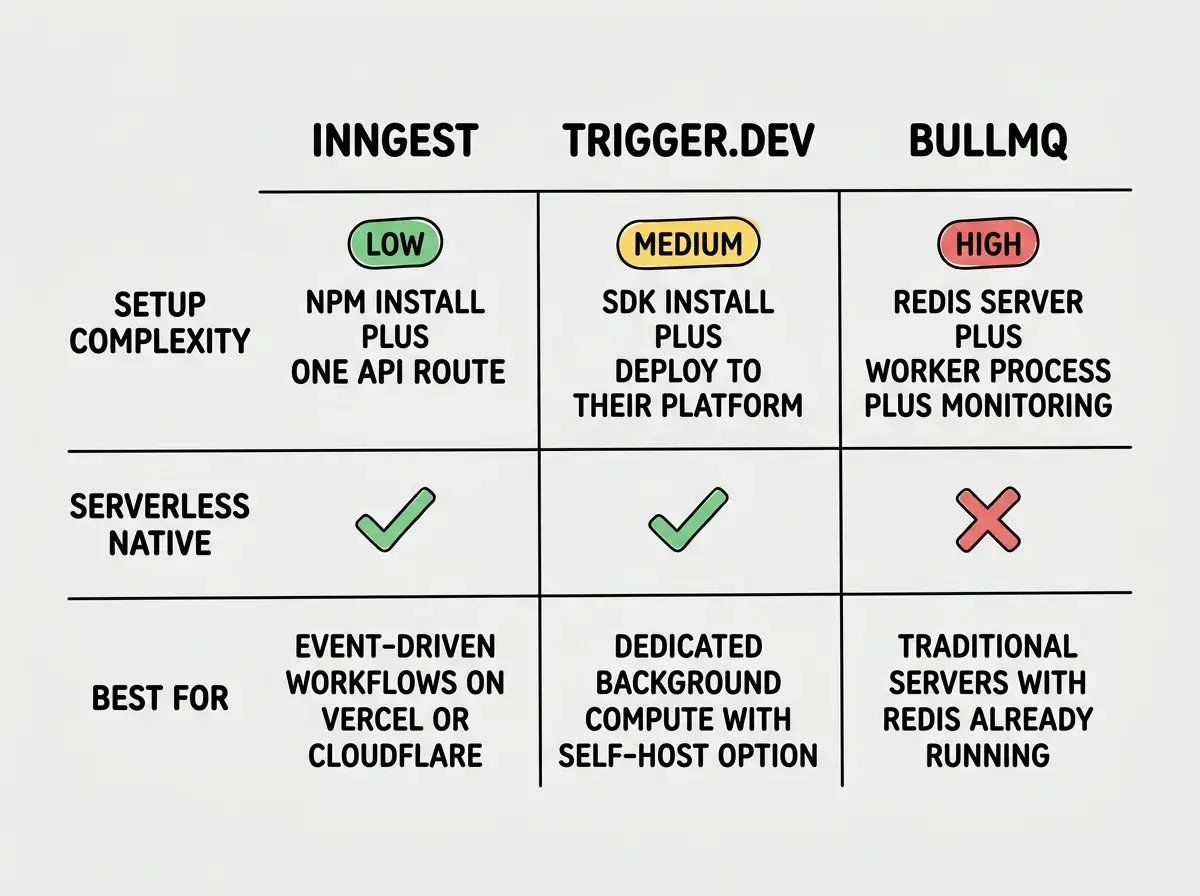
Trigger.dev is the closest competitor. Like Inngest, it targets serverless environments and provides durable execution with steps. The key difference is architectural. Trigger.dev runs your code on its own infrastructure, while Inngest invokes your existing serverless functions. With Inngest, your functions stay in your Vercel or Cloudflare project and get called via HTTP.
For teams that want everything in one repo deployed to one platform, Inngest's model is simpler. For teams that want dedicated compute for background jobs, Trigger.dev has advantages. It also offers a self-hosted option for enterprises with data residency requirements.
BullMQ is the traditional choice and remains excellent if you have a persistent server. It requires Redis, a running Node.js process, and operational overhead. For a serverless stack, BullMQ is a non-starter unless you add a separate server just for queue processing. If you already run a Node.js server, BullMQ is battle-tested and free.
| Inngest | Trigger.dev | BullMQ | |
|---|---|---|---|
| Runtime | Your serverless functions (Vercel, Cloudflare) | Trigger.dev's infrastructure | Your Node.js server + Redis |
| Step functions | Yes, with caching | Yes, with checkpoints | No (single job execution) |
| Retries | Per-step, configurable | Per-step, configurable | Per-job, configurable |
| Fan-out | Native via events | Via SDK | Manual via separate jobs |
| Self-hosted | Cloud only | Cloud or self-hosted | Self-hosted only |
| Cost | Free to 5K runs/mo, then usage-based | Free to 10K runs/mo, then usage-based | Free (you pay for Redis + compute) |
Reaching for BullMQ or a Redis queue in a serverless project because it is familiar. If your app runs on Vercel or Cloudflare with no persistent server, you will need to provision separate infrastructure just to run queue workers. Inngest and Trigger.dev exist specifically to eliminate that operational burden. Choose the tool that matches your runtime, not the one you used at your last job.
Pricing Reality Check
Inngest's free tier gives you 5,000 function runs per month with unlimited steps. The Pro tier starts at $50/month with 25,000 runs and $0.002 per additional run. For most indie projects, the free tier covers months of usage.
The pricing model is straightforward: you pay per function invocation, not per step. A function with fifteen steps counts as one run. Trigger.dev's free tier is more generous at 10,000 runs, but their compute model differs since you pay for execution time on their infrastructure rather than invocations on yours.
Background jobs are just one piece of a production serverless architecture.
Explore the toolsWhen to Use Inngest
Inngest fits best when your application is serverless-first and you need reliable background processing without managing infrastructure. Webhook handlers, email sequences, AI pipeline orchestration, scheduled reports, and event-driven workflows are all strong use cases.
The sweet spot is a Next.js app on Vercel or a Workers app on Cloudflare where you want background processing without a new deployment target. One npm install, one API route, and your functions run reliably with retries, observability, and fan-out.
Where Inngest is less ideal: CPU-intensive jobs needing minutes of continuous compute (use Trigger.dev), jobs requiring sub-second latency (use synchronous processing), or teams needing complete data sovereignty (use Trigger.dev's self-hosted option).
The postal sorting office works brilliantly when you have lots of packages flowing through a well-defined system. For oversized cargo, you might need your own warehouse. But for the vast majority of background work in modern serverless apps, letting someone else run the sorting office is the smarter call.
Get the foundations right before adding background job infrastructure.
Read the guideFinal Verdict
Inngest has earned its place as the default background job solution for serverless applications. The event-driven model, step function primitives, and seamless Vercel/Cloudflare integration make it the most natural fit for modern apps. Trigger.dev is a strong alternative when you need self-hosting or dedicated compute. BullMQ remains king if you run your own servers.
For most builders on serverless platforms, Inngest is the tool to reach for first. The postal sorting office is open, the rates are fair, and it handles your packages better than you would handle them yourself.