Every npm package you install becomes part of your application. When you run an npm security audit, you are checking whether any of those packages have known vulnerabilities. With 92% of developers using AI tools daily and 45% of AI-generated code containing security flaws, the packages your AI assistant chose deserve serious scrutiny.
Your App Is Mostly Other People's Code
A typical Next.js project has between 800 and 1,200 packages in its dependency tree. You chose maybe ten of them directly. The rest are transitive dependencies, packages that your packages depend on, which depend on other packages, which depend on still more packages. You are running code written by thousands of strangers, and you are trusting all of it.
This is not inherently bad. But efficiency without oversight is how supply chain attacks work. A single compromised package deep in your dependency tree can exfiltrate environment variables, inject cryptocurrency miners, or open a backdoor into your server. The event-stream incident in 2018 proved this. A maintainer handed off a popular package to a stranger who injected code targeting a Bitcoin wallet application. Millions of downloads. One malicious commit.
AI coding tools make this worse. When you ask an AI to add a feature, it picks packages for you. It does not evaluate those packages for security posture, maintainer reputation, or whether the package even exists. It picks what its training data suggests, and its training data is full of outdated recommendations.
Slopsquatting Is Real and It Targets You
Slopsquatting happens when AI tools hallucinate package names that do not exist, and attackers register those exact names with malicious code.
Socket.dev found that AI coding assistants regularly suggest packages that have never been published. The names sound plausible. They follow naming conventions. But they do not exist, or rather, they did not exist until an attacker registered them.
Here is how it works. You ask your AI tool to help you parse CSV files. The AI suggests npm install csv-parse-utils. That package does not exist. But an attacker registers csv-parse-utils and publishes it with a postinstall script that sends your .env file to an external server. The next person whose AI suggests that same name installs the malicious package without a second thought.
Typosquatting is the older version of this attack. Someone registers lodassh (two s's) hoping you will mistype the real package name. Slopsquatting is worse because you did not mistype anything. Your AI tool confidently recommended a package that was either nonexistent or malicious.
Before installing any package your AI suggests, verify it exists on npmjs.com. Check the download count, the last publish date, the maintainer, and the repository link. If a package has fewer than 1,000 weekly downloads and was published recently, treat it with extreme suspicion.
Your AI tool does not verify that the packages it recommends actually exist or are safe. Slopsquatting exploits this gap by registering malicious packages under names that AI tools hallucinate. Always verify a package on npmjs.com before installing it, checking download counts, maintainer history, and last publish date.
Running npm audit the Right Way
The npm audit command checks your installed packages against the GitHub Advisory Database. Running it is simple. Understanding the output takes more care.
npm audit
This produces a report listing vulnerabilities by severity: critical, high, moderate, and low. For each, you get the package name, the vulnerable version range, the patched version (if one exists), and a description.
Most projects will show dozens of vulnerabilities on the first run. Do not panic. Not every reported vulnerability is exploitable in your context. A critical vulnerability in a development-only testing library does not affect your production application. Focus on vulnerabilities in production dependencies first.
npm audit --omit=dev
This filters out development dependencies and shows only what ships to production.
For automated fixing, npm audit fix applies non-breaking patches. It updates vulnerable packages to patched versions within the same major version. For breaking changes, you would need npm audit fix --force, but be careful with this. It can update major versions that break your code.
npm outdated and Why It Matters
Vulnerabilities are not the only risk. Outdated packages are a risk multiplier. An old package might not have a known vulnerability today, but it is no longer receiving security patches, which means the next vulnerability discovered will never be fixed.
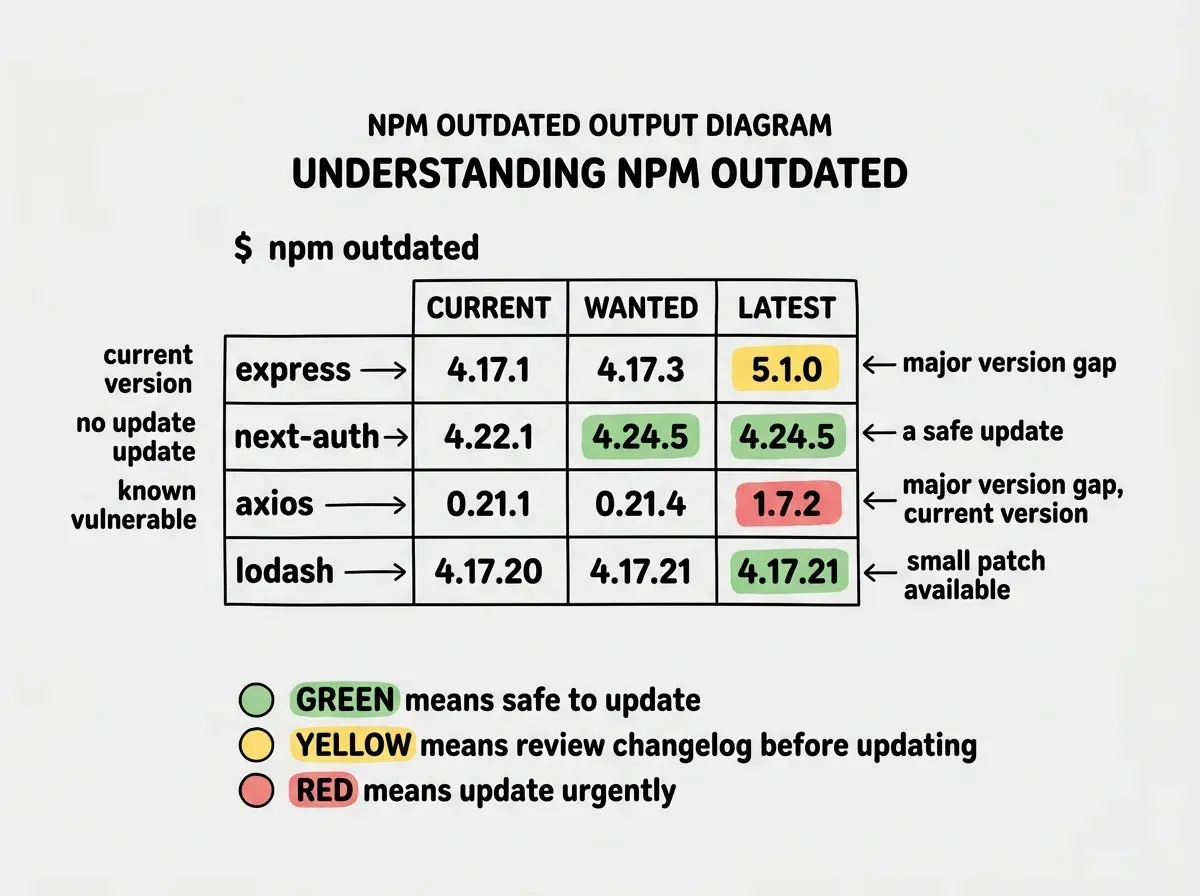
npm outdated
This shows every package where a newer version exists. The output lists your current version, the wanted version (highest that satisfies your semver range), and the latest available version.
Pay attention to packages where the current version is multiple major versions behind latest. A package at version 2.x when version 5.x is current has likely accumulated years of security improvements you are missing.
Using Snyk and Socket.dev for Deeper Analysis
npm audit catches known vulnerabilities. It does not catch malicious packages, abandoned projects, or suspicious behavior. For that, you need additional tools.
Socket.dev analyzes packages for supply chain risks. It detects install scripts that make network requests, packages that access the filesystem unexpectedly, and obfuscated code. It catches the kind of malicious behavior that slopsquatting packages use. Socket provides a GitHub app that flags risky dependency changes in pull requests before they merge.
Snyk offers deeper vulnerability scanning with better remediation advice. It maps vulnerability paths through your dependency tree and suggests the minimum upgrade needed to patch each issue. The free tier covers open-source projects. Install it globally and run it alongside npm audit.
npx snyk test
Both tools integrate with CI/CD pipelines and can block deployments that introduce new vulnerabilities. This is the single most effective measure for dependency security.
Your Lockfile Is a Security Tool
Your package-lock.json (or yarn.lock or pnpm-lock.yaml) pins every package in your dependency tree to an exact version. Without it, running npm install on two different machines can produce two different dependency trees because semver ranges allow version flexibility.
A compromised version could be installed on your production server even if your development machine has a safe version. The lockfile prevents this by ensuring everyone gets exactly the same versions.
Always commit your lockfile. If your .gitignore excludes it, remove that exclusion immediately. A missing lockfile is a supply chain vulnerability.
Never run npm install with --no-package-lock. Never delete your lockfile to "fix" dependency issues. Resolve conflicts properly instead of nuking the lockfile and hoping for the best.
Deleting your lockfile when dependency installation fails. This feels like it fixes the problem because npm install succeeds afterward. But you have just allowed npm to resolve every version range from scratch, potentially pulling in different (and possibly compromised) versions of every transitive dependency. Resolve conflicts by updating specific packages, not by throwing away your version pins.
Automating Updates with Dependabot and Renovate
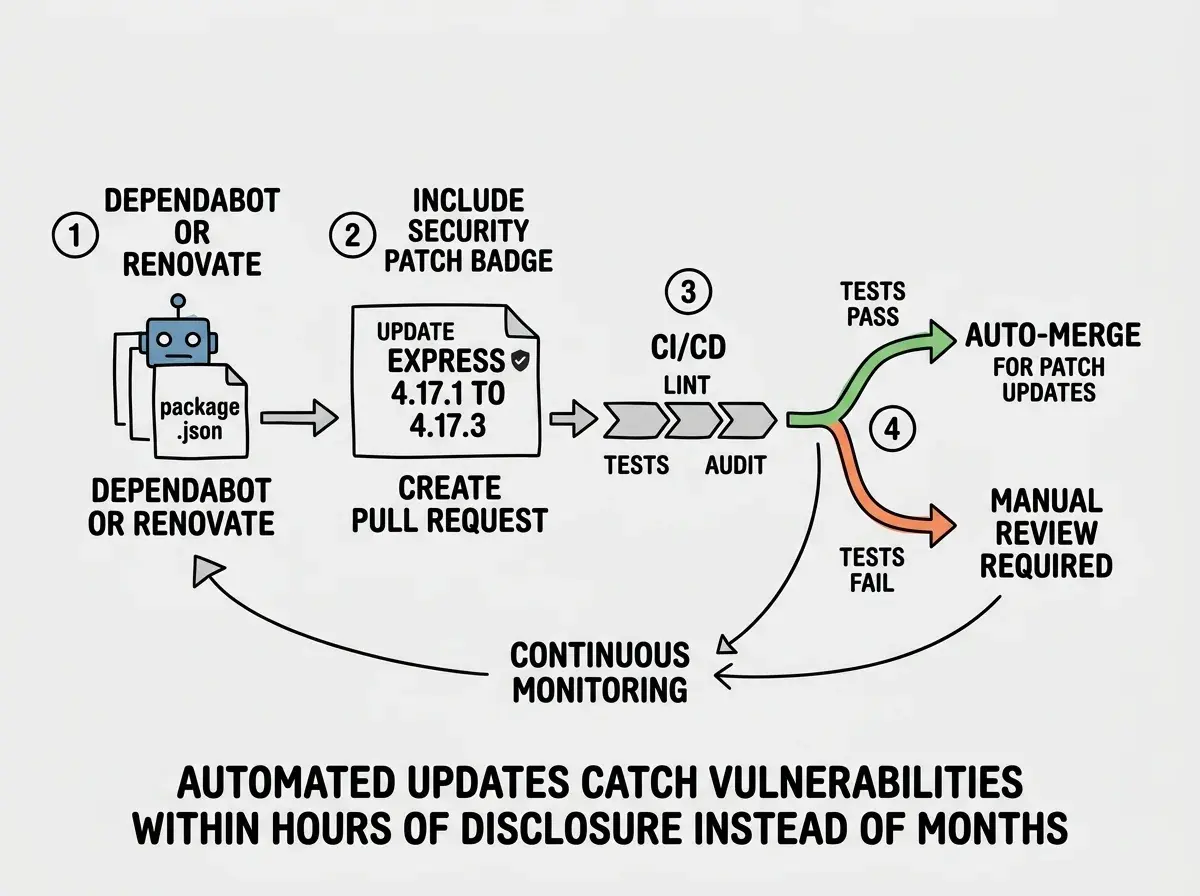
Manual auditing does not scale. You will not remember to run npm audit every week, and vulnerabilities are discovered continuously. Automated tools solve this.
Dependabot (built into GitHub) monitors your dependencies and creates pull requests when updates are available. It groups security updates separately from feature updates, so you can prioritize patches. Enable it by adding a .github/dependabot.yml file to your repository.
version: 2
updates:
  - package-ecosystem: "npm"
    directory: "/"
    schedule:
      interval: "weekly"
    open-pull-requests-limit: 10
Renovate is the more configurable alternative. It supports auto-merging for patch updates, grouping related packages, and scheduling updates during low-traffic hours. For teams that want automated updates without constant PR noise, Renovate is worth the setup time.
Both tools create PRs with changelogs and test results. The key is actually merging them. The most common failure mode is enabling Dependabot and then ignoring its PRs until you have 47 stale update requests cluttering your repository.
When to Update vs When to Pin
Not every update deserves immediate attention, and not every vulnerability requires action. Here is how to prioritize.
Update immediately when a critical or high-severity vulnerability exists in a production dependency and a patch is available. Also update when the vulnerability is actively being exploited in the wild (check the advisory for "known exploits" or "actively exploited" language).
Update on your next regular maintenance cycle when the vulnerability is moderate severity, only affects development dependencies, or requires a major version bump that needs testing.
Pin and do not update when a package is deeply integrated, the update includes breaking changes, and the vulnerability is not exploitable in your specific usage. Document this decision so future you understands why.
The worst decision is no decision. An unreviewed vulnerability is not "accepted risk." It is "unknown risk."
Open your terminal. Run npm audit. The results will tell you what needs attention today.
Read the security survival guideBuilding a Dependency Security Routine
Security is a habit, not a one-time event. Here is a minimal routine that catches the majority of dependency risks.
Weekly: Review and merge Dependabot or Renovate PRs. Run npm audit --omit=dev and address critical findings.
Before every deploy: Run npm audit as part of your CI/CD pipeline. Block deployments with critical vulnerabilities.
Before installing any new package: Check npmjs.com for download counts, last publish date, and maintainer information. If your AI suggested the package, verify it exists before running install.
Monthly: Run npm outdated and plan updates for packages more than one major version behind.
What This Means For You
Your application is only as secure as its weakest dependency, and you probably have hundreds you have never looked at. AI tools make this worse by choosing packages without security evaluation and occasionally suggesting packages that do not exist at all.
The tooling is mature and mostly free. npm audit, Socket.dev, Snyk, Dependabot, and Renovate collectively cover the vast majority of supply chain risks. The hard part is building the habit of using them consistently.
Start with npm audit --omit=dev today. Set up Dependabot this week. Verify every new package before installing it. Those three steps put you ahead of most teams shipping production code right now.
Dependency security is one piece. See the complete security landscape for AI-generated code.
See the full landscape