The 70% wall in vibe coding is the point where your AI-built project looks almost done but refuses to cross the finish line. The prototype works beautifully, the demo impresses everyone, and then every remaining feature becomes a grinding battle against your AI tool.
If you have been vibe coding for any length of time, you already know this feeling. The first 70% of your app comes together in hours, maybe a single afternoon. Login works. The main page looks great. The core feature does what it should. You start to think this might actually be easy. Then you try to add error handling, or edge cases, or that one integration your users actually need, and suddenly every prompt produces broken code, half-fixes, or changes that break something else entirely.
Why This Wall Exists
The 70% wall is not a failure of willpower or skill. It is a structural feature of how AI coding tools work today. Understanding the mechanics behind it transforms it from a mysterious blocker into a predictable challenge you can plan for.
AI coding tools like Cursor, Claude, and Copilot are trained on massive amounts of existing code. The common patterns, the well-documented features, the things that appear in thousands of tutorials and Stack Overflow answers, those are the patterns AI reproduces extremely well. A login page, a to-do list, a basic CRUD application, a landing page with a hero section. These are patterns the AI has seen thousands of times.
But the last 30% of any real project is, by definition, the uncommon part. It is the specific business logic for your app. It is the edge case where a user does something unexpected. It is the integration between two systems that do not play nicely together. It is the error handling for a situation the AI has never seen in its training data. The AI has fewer examples to draw from, so it starts guessing, and those guesses get worse the more specific your requirements become.
AI tools get you 70% of the way because that 70% is made of common patterns found everywhere in training data. The last 30% is unique to your project, which means the AI has far fewer examples to draw from and starts producing lower-quality output.
This is not a flaw that will be fixed with the next model upgrade. As long as the final stretch of any project involves custom logic that does not exist in training data, AI will struggle with it more than with the beginning.
The Mountain Analogy
Think of building an app like climbing a mountain. The first 70% of the elevation gain follows a well-marked trail. The path is wide, the grade is gentle, and there are signs everywhere pointing you in the right direction. You cover ground fast. You feel strong. You might even jog parts of it.
Then the trail narrows. The markers get farther apart. The air gets thinner. The last 30% of elevation gain takes 70% of the effort. You are scrambling over rocks now, not strolling on a path. Every hundred feet requires more energy than the first thousand did.
This is exactly what happens with AI coding. The well-marked trail is the common patterns. The thinning air is the AI's diminishing ability to help as your project becomes more specific. The disappearing trail markers are the moments when AI starts hallucinating APIs, generating code that contradicts your existing codebase, or making changes that silently break features you already finished.
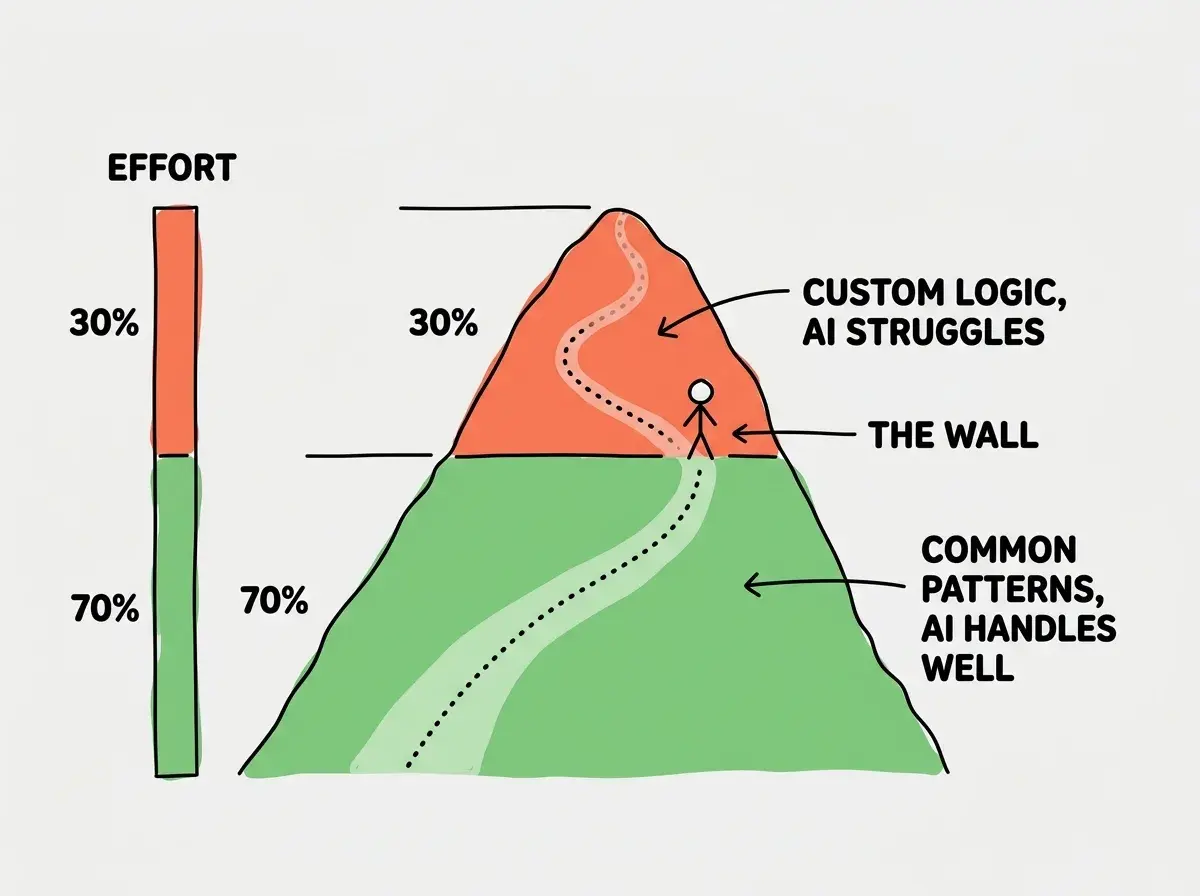
The mountain analogy also explains something else that frustrates vibe coders: the feeling that you were making progress just minutes ago. On a mountain, the moment you hit steep terrain feels sudden even though you could see the peak getting closer. In vibe coding, the moment AI stops being helpful feels sudden too. Your last five prompts worked perfectly. The sixth one produces garbage. Nothing changed about your approach, but everything changed about the difficulty of what you were asking for.
How to Recognize the Wall When You Hit It
The 70% wall does not announce itself. It shows up as a collection of symptoms that are easy to misdiagnose. Here are the three most common signs.
Your prompts stop producing clean results. Earlier in the project, AI gave you working code on the first try. Now it takes three or four attempts to get something that even runs. You start spending more time fixing AI output than you would have spent writing the code yourself. This is the wall.
You start seeing regressions. You ask AI to add a new feature and it breaks an existing one. You fix the existing one and the new feature breaks again. This loop, where fixing one thing breaks another, is one of the most frustrating experiences in vibe coding. It happens because the AI cannot hold the full complexity of your growing codebase in its context window.
The AI starts contradicting itself. In one response it uses one approach. In the next response it switches to a completely different approach. It forgets decisions it made three prompts ago. This is context window degradation, and it gets worse as your project grows. The AI is not being inconsistent on purpose. It literally cannot see its earlier work anymore.
Start with the fundamentals before you hit the wall.
Read the introThis confuses everyone at first. You might think the tool is broken, or that you are doing something wrong, or that you need a better AI model. But the wall is not about the tool. It is about the nature of what you are building. Recognizing this is the first step toward getting through it.
Strategies That Actually Work
Once you understand why the wall exists, you can start working with it instead of against it. None of these strategies eliminate the wall, but they move it further up the mountain and make the scramble above it less painful.
Break the remaining work into tiny pieces. Instead of asking AI to "finish the checkout flow," ask it to "add a function that validates the coupon code format." The smaller and more specific your prompts, the better AI performs. You are essentially converting one big custom problem into many small, more common problems. Each small problem is closer to the well-marked trail.
Start new conversations frequently. Context window degradation is real. When your conversation with AI gets long, the quality of responses drops because the AI cannot see its earlier work clearly. Starting a fresh conversation with a focused prompt often produces dramatically better results than continuing a long thread. Copy the relevant code into the new conversation and give clear context about what you need.
Learn to read error messages. This is the single highest-leverage skill for getting past the wall. When AI-generated code fails, the error message tells you what went wrong. If you can read that message and understand it even at a basic level, you can write a much better follow-up prompt. Instead of "it doesn't work, fix it," you can say "the function throws a TypeError because user.email is undefined when no user is logged in."
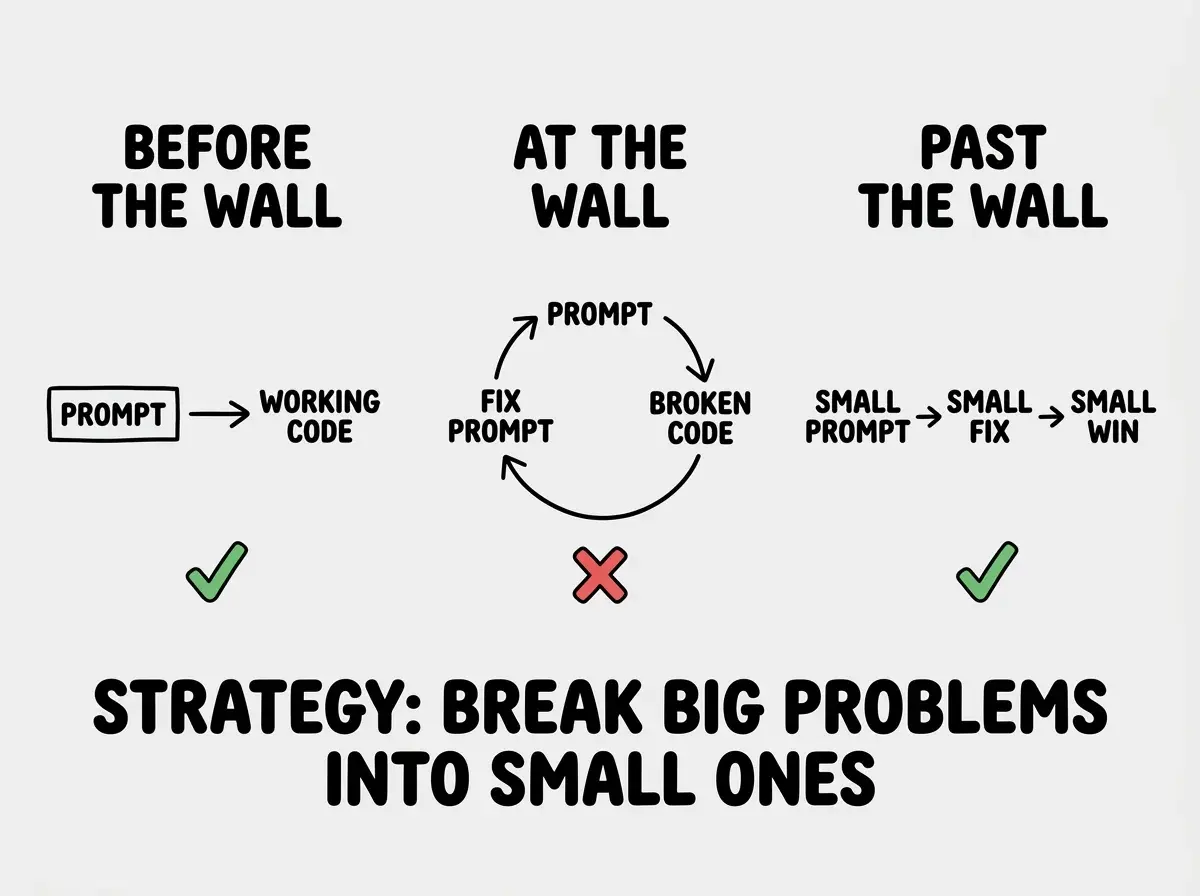
Accept that some work will be manual. You might think AI should handle everything if it handled the first 70%. But actually, the most productive vibe coders treat AI as a collaborator who is great at the common stuff and needs your help on the custom stuff. The wall is where you start contributing your understanding of your specific project. That is not a failure of the process. That is the process.
Trying to force AI past the wall by writing longer, more detailed prompts in a single conversation. This usually makes things worse because it fills the context window faster. Instead, start fresh conversations with focused, specific requests for each small piece of the remaining work.
The 70% wall is also where the data starts to match lived experience. Studies show that 46% of code in modern projects is AI-generated, which maps surprisingly well to the first-70%-is-easy pattern. The AI contributes most of the volume, but the human developer contributes the critical connective tissue that makes the project actually work.
Dig deeper
A few hand-picked sources if you want to go further.
What This Means For You
The 70% wall is the most important concept in vibe coding because it sets accurate expectations. Once you know the wall is coming, you stop blaming yourself when progress slows. You plan for it. You budget time for the scramble. And you develop the specific skills, reading errors, writing focused prompts, breaking problems down, that make the last 30% manageable instead of impossible.
- If you are a founder, budget your project timeline accordingly. The working demo that took a weekend to build might need another two to four weeks to become production-ready. Do not promise customers features based on how fast the prototype came together.
- If you are changing careers, the 70% wall is actually your opportunity. The people who learn to push through it, who develop basic debugging skills and learn to write precise prompts, are the ones who build real products. Most people give up at the wall. You do not have to.
- If you are a student, knowing about the wall before you hit it puts you ahead of most vibe coders. Start practicing with small, complete projects rather than one large ambitious one. Each finished project teaches you more about the wall than ten abandoned prototypes.
Learn the strategies that separate prototypes from products.
Explore more