Imagine if Figma could export production React components instead of mockups. Not flattened images or half-broken CSS, but real, typed, composable code that slots into your existing Next.js project. That is the promise behind Tempo, and after spending serious time with it, I can say the promise is closer to reality than you might expect.
With 92% of developers now using AI tools daily, the landscape has fragmented into distinct philosophies. Some tools generate entire apps from prompts. Others act as autocomplete on steroids inside your editor. Tempo takes a third path that is uniquely interesting for React developers and designers who think visually.
What Tempo Actually Is
Tempo is a visual development environment built specifically for React and Next.js. You design components visually, manipulating layout, spacing, typography, and color through a direct-manipulation interface, and Tempo writes the corresponding React code in real time. Think of it as a Figma that outputs production React instead of static mockups.
The key distinction is that Tempo operates at the component level. You are not designing full pages in a freeform canvas. You are building and editing individual React components that understand props, state, and composition. The visual editor knows about your component tree, your design tokens, and your existing codebase. When you drag a padding slider or change a font size, the underlying JSX and Tailwind classes update immediately.
This is fundamentally different from screenshot-to-code tools that try to reverse-engineer a flat image into components. Tempo starts with the component model and gives you a visual way to manipulate it. The code is always the source of truth.
Tempo is not a no-code tool. It is a visual interface for writing React code. The output is standard JSX with Tailwind CSS that you can edit, version-control, and deploy like any handwritten component. If you would not ship AI-generated code without reviewing it, you will appreciate that Tempo keeps the code human-readable and fully accessible at all times.
The Visual Editing Experience
Opening Tempo for the first time feels familiar if you have used any modern design tool. There is a canvas, a layer panel, and a properties inspector. But within about thirty seconds, you realize this is not Figma. Every element on the canvas is a real React component. Every style change writes actual Tailwind classes. Every layout adjustment modifies real flexbox or grid properties in your JSX.
The workflow starts with either importing existing components from your codebase or creating new ones from scratch. When you import, Tempo parses your React files and renders them in the visual editor. You can then click on any element, adjust its properties visually, and see the code update in a side panel. The round-trip between visual and code is instant.
For designers who write some code, this is transformative. Instead of creating a mockup, handing it off, and then reviewing whether the developer interpreted the spacing correctly, you are directly editing the thing that ships. For developers who think visually, it removes the tedium of tweaking padding values by 2px increments in your editor and refreshing the browser to check the result.
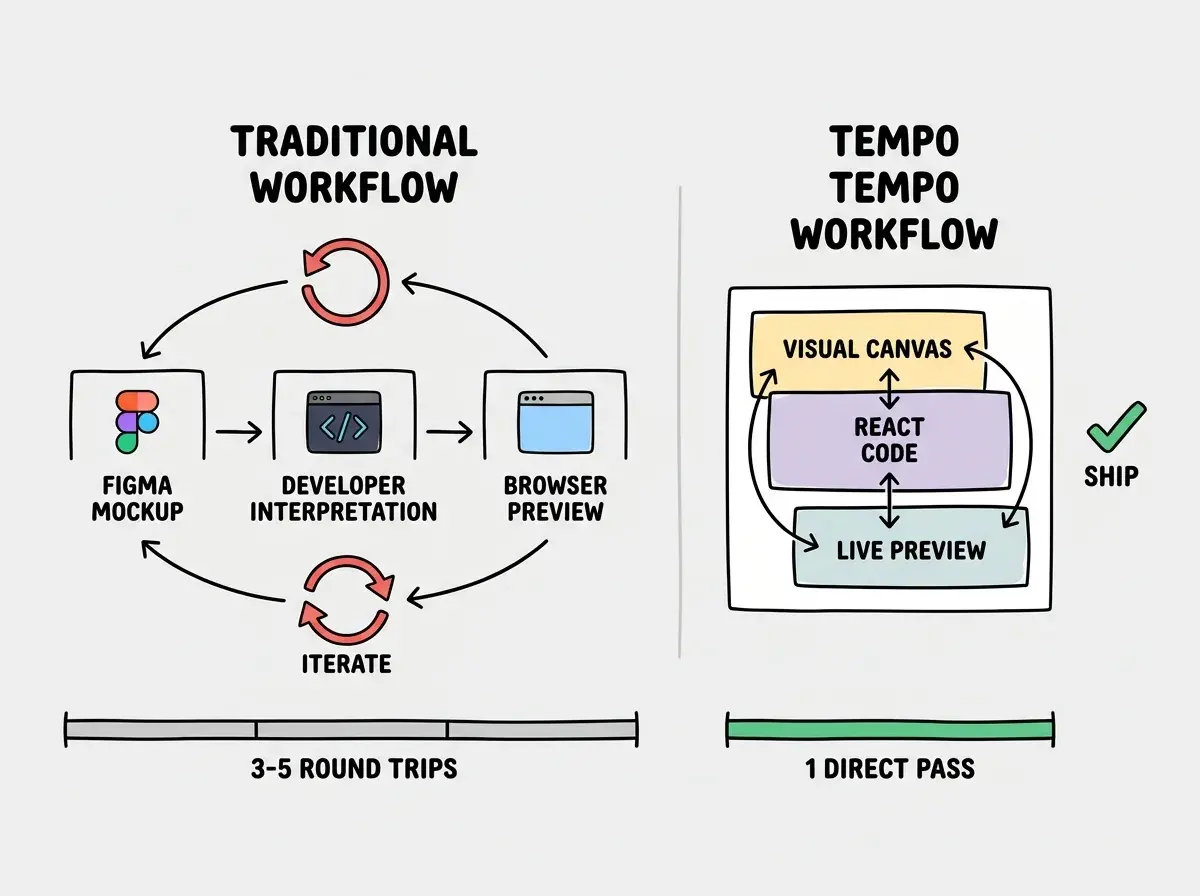
The component isolation is where Tempo really shines. You can work on a single button component, tweak its hover states visually, adjust responsive behavior across breakpoints, and see the generated code stay clean. The tool does not produce wrapper divs or unnecessary nesting. The output reads like something a careful developer would write by hand.
React and Next.js Focus
Unlike general-purpose AI coding tools, Tempo is opinionated about its target. It generates React components with Tailwind CSS. It understands Next.js conventions like the App Router, server and client components, and layout patterns. This narrow focus is actually a strength.
When you ask v0 or a general AI tool to build a component, it generates code that might work in React, Vue, or Svelte depending on context. Tempo never has that ambiguity. Every decision it makes is optimized for the React component model. Props are typed. Component composition follows React patterns. The Tailwind classes it generates are idiomatic, not the bloated output you sometimes get from AI tools that treat CSS as an afterthought.
The Next.js integration goes deeper than just generating compatible code. Tempo understands route groups, layouts, and the distinction between server and client components. When you build a component that needs interactivity, it adds the 'use client' directive automatically. When you build something purely presentational, it keeps the component server-friendly. This awareness prevents a whole class of "why is my server component importing useState" errors.
Design System Integration
This is where the Figma analogy gets most concrete. Tempo lets you define and use design tokens for colors, spacing, typography, and shadows. These tokens map directly to your Tailwind configuration. When you update a primary color in your design system, every component using that token updates automatically, both visually and in the generated code.
For teams that maintain a component library, Tempo can import existing components and treat them as building blocks. Your custom Button, Card, and Input components appear in the editor alongside native HTML elements. You compose pages using your own design system, and the generated code imports from your actual component library paths.
This matters because the biggest problem with AI-generated UI is not quality in isolation, it is consistency with your existing design system. A generated card component that looks great on its own but uses different spacing, colors, and border radii than your existing cards creates more work than it saves. Tempo solves this by working within your system from the start.
Trying to use Tempo as a full app builder instead of a component-level tool. Tempo excels at building and refining individual components and page sections. If you expect it to scaffold an entire authenticated SaaS app from a single prompt, you will be disappointed. Use Tempo for the visual layer and pair it with a code-first AI tool for business logic, data fetching, and backend integration.
How Tempo Differs From v0 and Lovable
The AI UI tool space is crowded in 2026, and the distinctions between tools matter more than most comparison posts acknowledge.
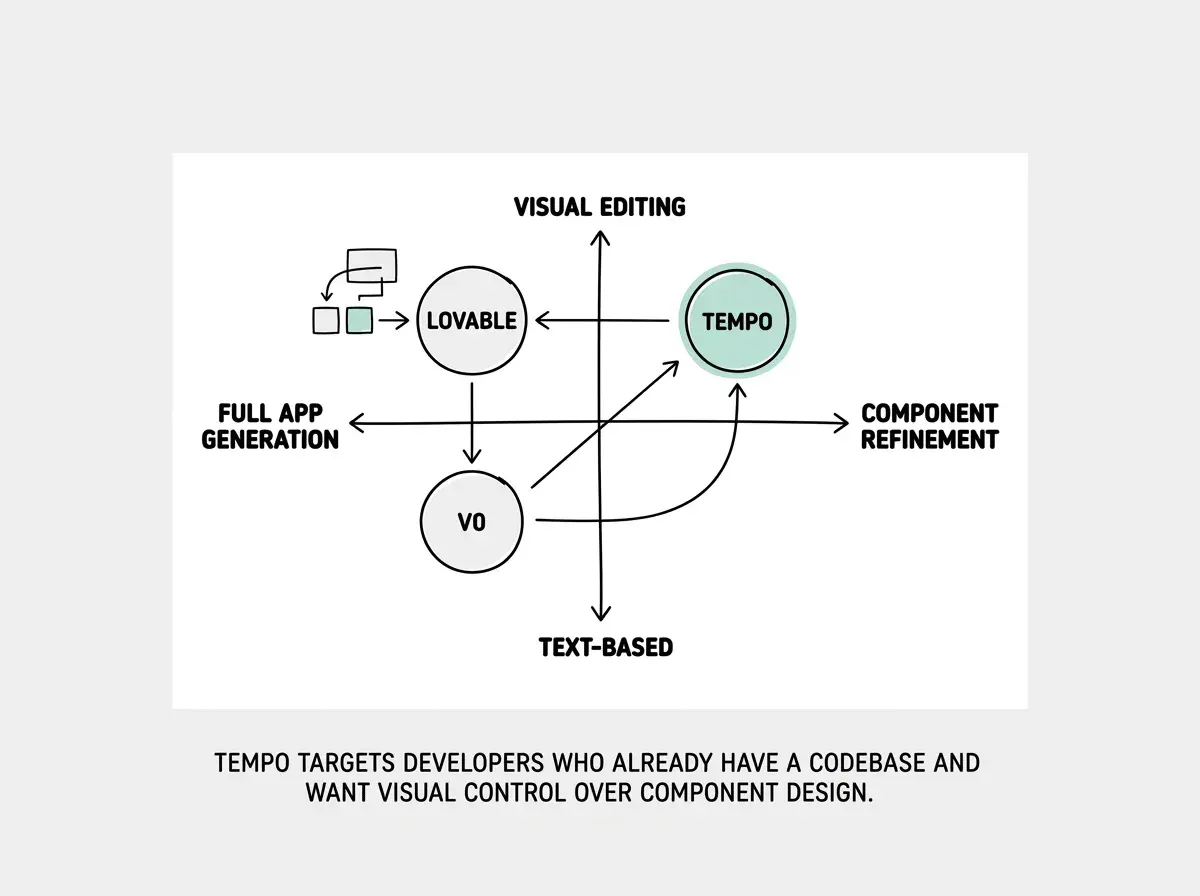
v0 is a prompt-to-component generator. You describe what you want in natural language, and it produces React code. The output is often impressive, but the workflow is text-in, code-out. You cannot visually adjust the result within v0 itself. If the padding is wrong, you either edit the code manually or write another prompt asking for adjustments. v0 is excellent for generating a first draft. It is less helpful for the iterative refinement that takes a component from "close enough" to "ready to ship."
Lovable generates entire applications from prompts, handling both frontend and backend. It is optimized for shipping complete products quickly. The tradeoff is that the generated code is often opinionated about architecture, database choices, and deployment targets. Lovable is building for the "idea to deployed app" use case. It is not designed for developers who already have a codebase and want to improve their component-building workflow.
Tempo occupies the space between these two. It is more developer-oriented than Lovable and more visual than v0. The workflow assumes you have an existing React or Next.js project, you understand component architecture, and you want a faster way to build and refine UI components within that project. It is not trying to replace your development environment. It is trying to augment the visual parts of it.
For a senior developer, the positioning makes intuitive sense. You do not need a tool to scaffold your project or choose your database. You need a tool that makes pixel-pushing, responsive breakpoint testing, and design-to-code translation significantly faster without sacrificing code quality.
Current Limitations
Tempo is still a relatively young tool, and some rough edges remain.
State and logic handling is limited. Tempo handles visual and layout work well but does not touch complex state management, data fetching, or business logic. If your component needs API calls or form state, you write that code yourself.
The learning curve is real. Despite the Figma-like interface, Tempo requires you to think in React component terms. Designers without React experience will struggle with concepts like props and component composition that the tool surfaces directly.
Performance with large codebases varies. Importing a design system with hundreds of components can slow the initial setup. Real-time code generation works well for individual components but can lag with deeply nested component trees.
Collaboration features are still maturing. Tempo supports Git-based version control, but the real-time multiplayer editing and design review workflows that teams expect from Figma are not fully there yet.
See how AI tools are reshaping frontend development workflows in 2026.
Explore AI dev toolsWho Should Use Tempo
Tempo fits best for React and Next.js developers who spend significant time on UI work. If you build design systems, create component libraries, or frequently translate designs into code, Tempo can cut hours out of your week.
It also works well for designer-developer hybrids who think visually but understand enough React to work with components. Teams where designers and developers collaborate closely can use Tempo as a shared language, editing the same components instead of annotating Figma files with spacing specs.
If your stack is Vue, Svelte, or anything outside the React ecosystem, Tempo is not the right tool. The React specificity is both its greatest strength and its clearest boundary.
The right combination of AI tools depends on your role, your stack, and where you lose the most time.
See the full breakdownWhat This Means Going Forward
Tempo represents a bet that the future of AI-assisted development is not just about generating code from text prompts. It is about giving developers visual control over their code with AI handling the translation between what you see and what ships. A Figma that outputs production React is not a gimmick. It is a fundamentally different workflow for building component-driven interfaces.
The tool is not a replacement for your code editor or your AI coding assistant. It is a specialized instrument for the visual layer of React development, and in that niche, it performs remarkably well. As design tools and development environments continue to converge, Tempo is one of the most compelling examples of what that future actually looks like in practice.