Think of CSS approaches like languages a translator speaks. A translator who grew up reading English literature, watching English movies, and writing English essays will produce significantly better English than French, even if they technically know both. That is exactly what is happening with AI coding tools and Tailwind CSS in 2026. With 92% of developers using AI tools daily, the styling approach your AI speaks most fluently shapes what you ship.
Quick Verdict
| Tailwind CSS | CSS Modules | styled-components | Emotion | Vanilla CSS | |
|---|---|---|---|---|---|
| Best for | AI-assisted development, rapid prototyping | Large teams, design system enforcement | React component libraries | Runtime theming, SSR flexibility | Simple sites, learning CSS |
| AI output quality | Excellent | Good | Moderate | Moderate | Good but verbose |
| Strength | Utility-first, all styles visible in markup | True style isolation, familiar CSS syntax | Co-located styles with logic | Framework-agnostic CSS-in-JS | Zero dependencies, full control |
| Weakness | Long class strings, learning curve | Separate files, harder to prototype fast | Runtime overhead, large bundle | Runtime cost, SSR complexity | Global scope conflicts at scale |
The table gives you the quick answer. But the more interesting question is why AI tools generate dramatically better Tailwind output, and whether that advantage alone should drive your decision.
AI tools generate better Tailwind CSS because Tailwind dominates their training data. Every open-source Next.js starter, every YouTube tutorial repo, and every SaaS template from the past three years uses Tailwind. The AI is not recommending Tailwind because it is objectively superior. It is generating better Tailwind because it has seen orders of magnitude more examples than any alternative. Understanding this distinction helps you choose based on your project needs, not your AI tool's training bias.
How Tailwind CSS Works
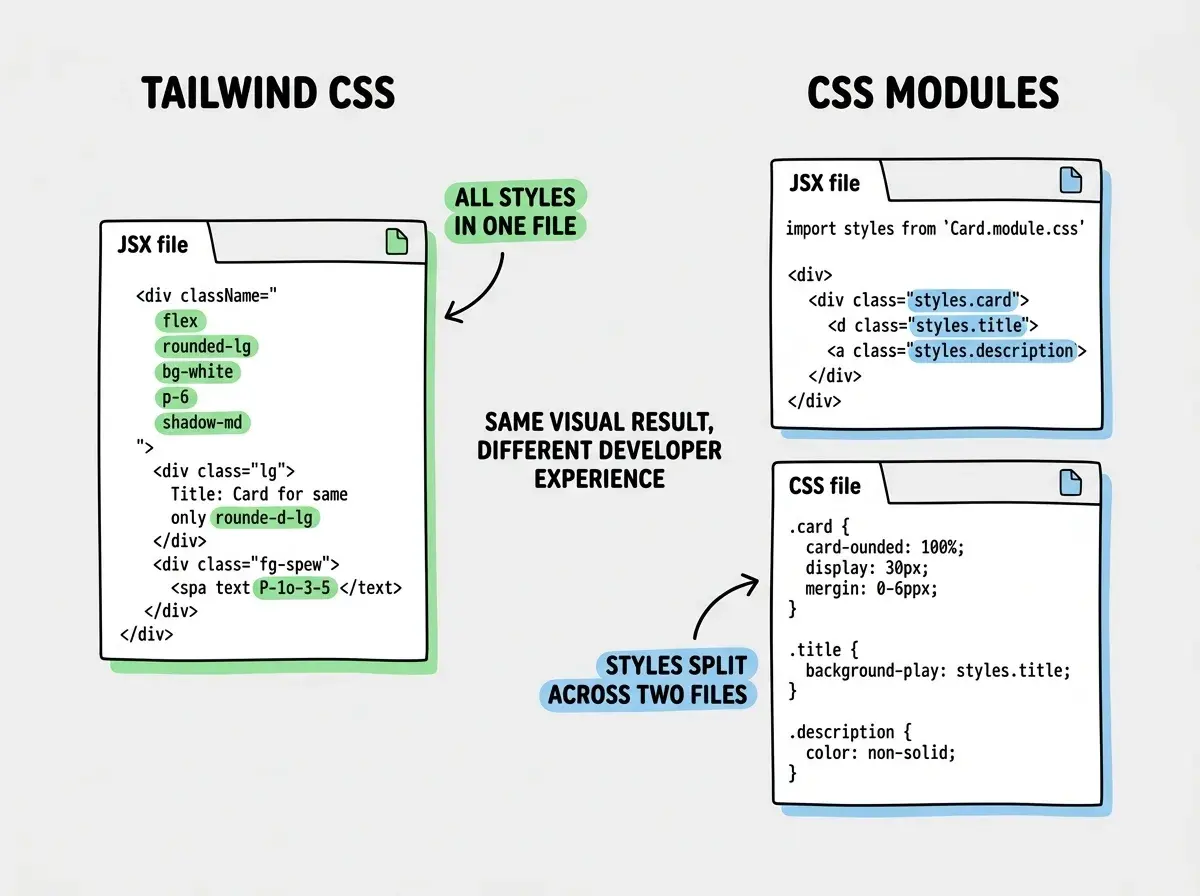
Tailwind is a utility-first CSS framework. Instead of writing custom CSS classes, you compose styles directly in your HTML or JSX using pre-defined utility classes. className="flex items-center gap-4 rounded-lg bg-white p-6 shadow-md" replaces what would traditionally be a separate CSS file with a custom class name and six property declarations.
The approach eliminates context switching. You never leave your component file to understand how something is styled. Every visual decision is visible inline. For designers reviewing pull requests, this is a genuine advantage. You can read a component and immediately understand its layout, spacing, colors, and responsive behavior without opening a second file.
Tailwind's constraint system prevents design drift. The default spacing scale (4, 8, 12, 16, 20...), color palette, and typography scale act as guardrails. Developers pick from a finite set of tokens rather than inventing arbitrary pixel values. Teams end up with more consistent UIs not because they agreed on a design system, but because the framework only offers a curated set of options.
The tradeoff is readability at scale. A complex component can end up with class strings that span three lines. Conditional styles with clsx add another layer of visual noise. Senior developers sometimes find Tailwind components harder to review than equivalents with semantic class names.
How CSS Modules Work
CSS Modules give you scoped CSS with zero runtime cost. You write standard CSS in a .module.css file, import it into your component, and reference classes by name. The build tool automatically generates unique class names, preventing style collisions without any runtime JavaScript. The CSS ships as a normal stylesheet.
The developer experience feels familiar to anyone who knows CSS. There is no new syntax to learn. Media queries, pseudo-selectors, animations, and every other CSS feature work exactly as documented on MDN. For teams with strong CSS knowledge, this is the most natural approach.
CSS Modules enforce a clean separation of concerns. Styles live in dedicated files. Components import what they need. This structure works well for large codebases where multiple teams contribute components, because the boundaries are explicit and style conflicts are architecturally impossible. The downside is prototyping speed. Every new component requires creating a separate CSS file, writing classes, importing them, and mapping them to elements. When iterating fast with AI, this round-trip adds friction.
How styled-components and Emotion Work
styled-components and Emotion are CSS-in-JS libraries. They let you write CSS directly inside your JavaScript files using tagged template literals. const Button = styled.button followed by a template literal containing CSS creates a React component with those styles baked in. Dynamic styling based on props is trivial, making these libraries excellent for components where visual state changes frequently.
The runtime cost is the primary concern. Both libraries parse CSS strings, generate class names, and inject style tags at runtime. This adds JavaScript weight (7-15 KB) and processing time. For most apps, the cost is negligible. For performance-sensitive apps with hundreds of styled components on a single page, it becomes measurable. Emotion offers slightly more flexibility with its css prop approach and works beyond React, but styled-components has the larger ecosystem.
Why AI Generates Better Tailwind Output
This is where the language fluency analogy becomes concrete. Here is what happens when you ask an AI coding tool to "build a pricing card component" using different styling approaches.
With Tailwind, the AI produces near-shippable code on the first try. The utility classes are self-documenting. The AI has seen thousands of pricing card examples using Tailwind in its training data. It knows the common patterns: rounded-xl shadow-lg for the card, text-3xl font-bold for the price, bg-blue-600 text-white for the CTA button. The output is immediately usable about 90% of the time.
With CSS Modules, the AI produces functional but generic code. It generates reasonable class names and CSS properties, but the organization and naming conventions vary wildly between generations. One attempt might use BEM naming, the next might use camelCase, the next might use flat generic names. The CSS itself is correct, but the developer experience of working with AI-generated CSS Module code requires more cleanup.
With styled-components, the AI struggles with version-specific APIs. styled-components has gone through significant API changes across major versions. AI tools sometimes mix v5 and v6 patterns, generate deprecated attrs usage, or produce theme provider configurations that do not match your setup. The output works about 60-70% of the time without manual intervention.
With Emotion, results are similar to styled-components but with the added complication that Emotion has multiple import paths (@emotion/styled, @emotion/react, @emotion/css) and the AI sometimes picks the wrong one for your configuration.
The pattern is clear. The more training data available, the better AI generates it. Tailwind has the most training data by a significant margin. This is not a permanent advantage. It reflects what the open-source ecosystem has been building with for the past few years.
Choosing Tailwind only because AI generates it well, then fighting it when your project needs something different. If your app requires complex animations, heavy runtime theming with user-customizable color schemes, or a strict design system with semantic token enforcement, you will spend more time working around Tailwind's utility-first model than you save from better AI output. Match the tool to the requirement, not to the AI's preference.
When Alternatives Still Win
Better AI output does not make Tailwind the right choice for every project. Several scenarios favor the alternatives.
Strict design systems with semantic tokens. If your team maintains a design system where components reference tokens like color-interactive-primary and spacing-content-compact, CSS Modules or CSS-in-JS libraries map more naturally to that vocabulary. Tailwind can do custom themes, but the indirection between semantic intent and utility class names creates confusion.
Animation-heavy applications. Complex animations with staggered timings, spring physics, and gesture-based interactions live more naturally in JavaScript. styled-components and Emotion let you compute styles based on animation state in ways that Tailwind's static utility classes cannot match.
Team CSS expertise. A team of senior frontend developers with deep CSS knowledge will often be more productive with CSS Modules than Tailwind. Forcing a team to learn Tailwind's class vocabulary when they already know the underlying CSS is a lateral move, not an upgrade.
Existing large codebases. If your app already has 200 components styled with CSS Modules or styled-components, migrating to Tailwind for better AI output is almost never worth the effort. The 10-20% quality gap in AI output does not justify rewriting your entire styling layer.
Start with the right tool and the right approach for your first project.
Pick your first toolChoosing the Right Approach
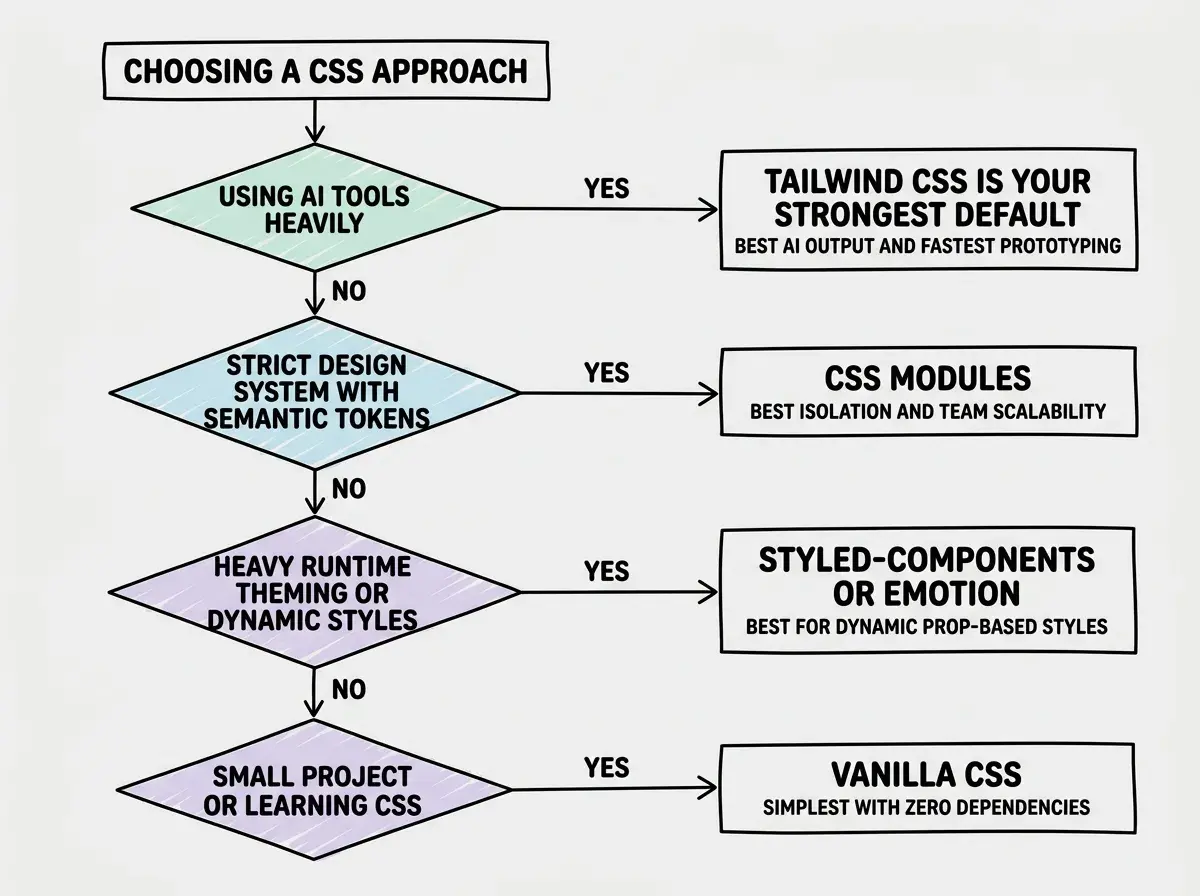
The decision depends on which constraints matter most for your project.
Dig deeper
A few hand-picked sources if you want to go further.
What This Means For You
The Tailwind CSS vs alternatives decision depends on your situation more than any universal ranking.
- If you are building with AI tools and moving fast: Tailwind is the strongest default. AI generates better Tailwind output, prototyping is faster with utility classes, and the ecosystem momentum means more templates and components are Tailwind-first.
- If you maintain a design system for a large team: CSS Modules give you isolation, familiar syntax, and zero-runtime cost that scale across dozens of contributors. The separate file structure that slows prototyping actually helps at scale by enforcing clear boundaries.
- If your app is animation-heavy with dynamic theming: styled-components or Emotion let you compute styles from props and state in ways that utility classes cannot. The runtime cost is a fair trade for the flexibility.
- If you are learning CSS fundamentals: Vanilla CSS teaches you the language itself. Start here, understand the box model and cascade, then adopt a framework knowing what it does for you.
The fluency analogy holds. AI is most fluent in Tailwind today because that is where the training data is densest. But fluency in one language does not make the others useless. Pick the language that fits your actual conversation.
Learn how all the pieces of a modern web app fit together.
Understand tech stacks