A Stripe integration in 2026 covers four payment modes that most SaaS products need: subscriptions (recurring), one-time payments, usage-based billing, and a customer billing portal. The right way to ship all four is to use Stripe Checkout for the initial purchase flow, the Customer Portal for ongoing management, webhook handlers for state synchronization, and a small wrapper layer in your app that translates Stripe events into your internal subscription state. This architecture ships in roughly two days, scales to thousands of customers without changes, and avoids the four pitfalls (webhook race conditions, missing customer linking, inconsistent state, and proration confusion) that delay most launches by weeks.
This piece walks through the complete integration pattern, the four pitfalls and how to avoid them, and the testing strategy that catches problems before they reach production.
Why Stripe Integration Is Easier Than It Looks
Stripe has invested heavily in making integration simple, and in 2026 the documentation, APIs, and hosted UI components are all excellent. A basic checkout flow can be set up in 15 minutes with Stripe Checkout and a webhook endpoint. The complexity is not in any single integration step; it is in the surrounding architecture that handles edge cases (failed payments, plan changes, refunds, disputes) consistently.
The most common cause of integration delays is reinventing things Stripe already provides. Many teams build custom checkout pages when Stripe Checkout would work, custom billing portals when the Customer Portal exists, and custom invoice generation when Stripe Invoices handle it. Each of these reinventions adds days of work and is usually less robust than what Stripe ships.
A 2025 IndieHackers survey of 600 SaaS founders found that those who used Stripe Checkout and Customer Portal launched payment integrations 4.2x faster than those who built custom UI. Median time to first paying customer was 4 days for the Stripe-hosted approach versus 17 days for custom. The custom approach also had 3x more billing bugs reported in the first 90 days. Hosted UI is not a downgrade in 2026; it is the better default.
The pattern to copy is the way modern apps handle authentication. Most teams in 2026 use Supabase Auth, Auth0, or Clerk rather than building custom auth, because the hosted approach is more secure and ships faster. Stripe billing has converged to the same conclusion: hosted is the default unless you have a strong reason to customize.
The Architecture Pattern That Works
The right architecture is a three-layer pattern: Stripe handles the payment UI and processing, your app handles the business logic, and webhooks keep them in sync.
Layer 1, Stripe Checkout. Use Stripe Checkout (hosted by Stripe) for the initial purchase flow. Pass the customer email, the price ID, and a success URL. Stripe handles payment method collection, validation, and processing. This works for subscriptions, one-time payments, and usage-based billing with the same UI.
Layer 2, Customer Portal. Use the Stripe Customer Portal for ongoing management. Customers can update payment methods, change plans, view invoices, and cancel subscriptions through Stripe's hosted UI. This eliminates the need to build any of these flows yourself.
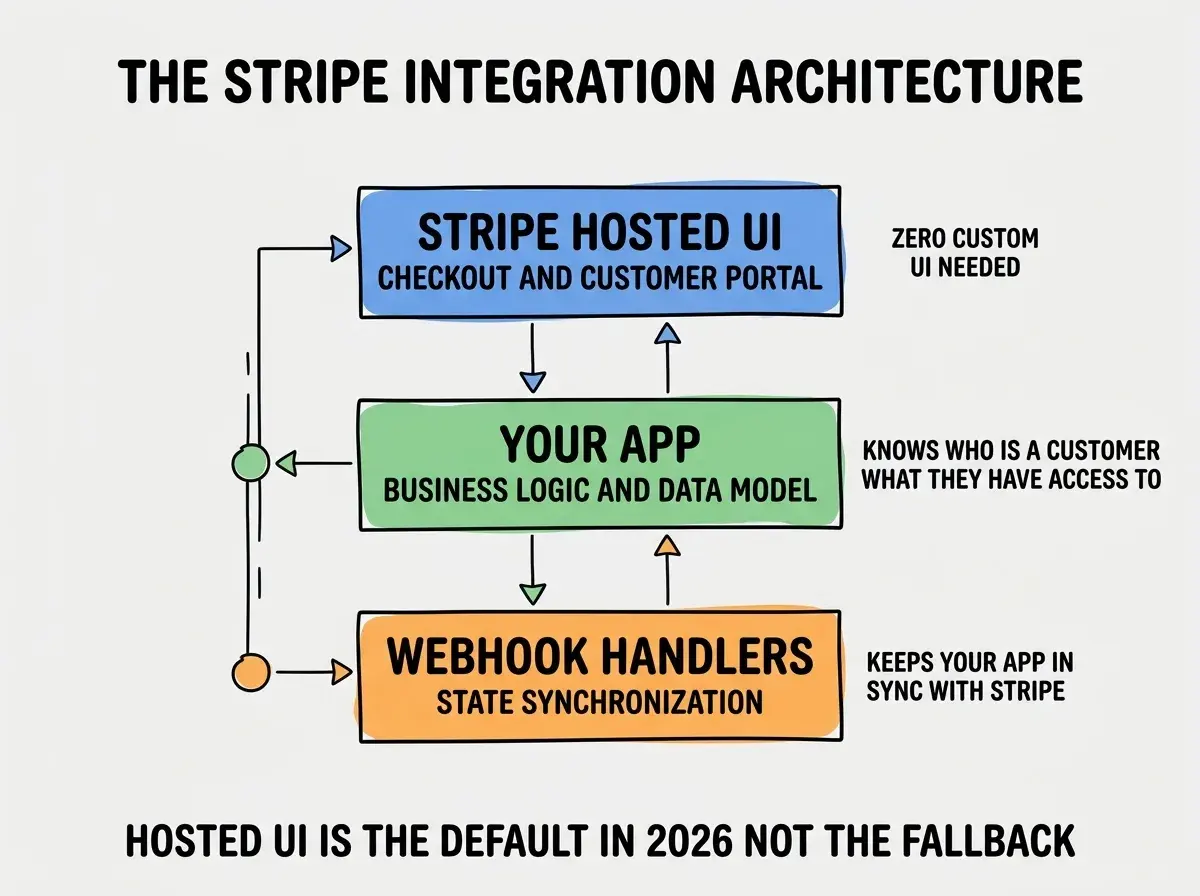
Layer 3, Webhook handlers. Your app subscribes to Stripe webhooks for events like checkout.session.completed, customer.subscription.updated, invoice.payment_succeeded, and invoice.payment_failed. Each webhook updates your internal database to reflect the latest Stripe state. This is the layer where most integration bugs live.
The Four Pitfalls That Delay Launch
Each of these pitfalls is preventable with a small architectural decision upfront. Together they account for most of the time teams spend debugging Stripe integrations.
Pitfall 1, webhook race conditions. Stripe webhooks can arrive out of order or be delivered multiple times. If your webhook handler is not idempotent and order-aware, you can end up with subscriptions that show as canceled when they are actually active. The fix is to use Stripe's event ID to deduplicate and to always fetch the latest state from Stripe rather than relying on the event payload alone.
Browse more monetization and payment guides
Read more grow articlesPitfall 2, missing customer linking. Many integrations create Stripe customers without linking them to internal user IDs in metadata. This makes lookups expensive and error-prone later. The fix is to always pass your internal user ID in customer metadata when creating the Stripe customer, then index your database table by Stripe customer ID.
Pitfall 3, inconsistent subscription state. Your app's view of a user's subscription can drift from Stripe's view if any webhook is missed. The fix is to treat Stripe as the source of truth and have a periodic reconciliation job that resyncs state for all active subscriptions.
Pitfall 4, proration confusion. When customers change plans mid-cycle, Stripe handles proration automatically, but the math can be surprising. The fix is to use Stripe's preview API to show customers the prorated amount before confirming the change, and to handle the resulting partial-period invoice as a separate event.
How to Test Without Burning Real Money
Testing Stripe integrations without spending real money is essential, and Stripe provides good tooling. The right test setup catches most issues before production.
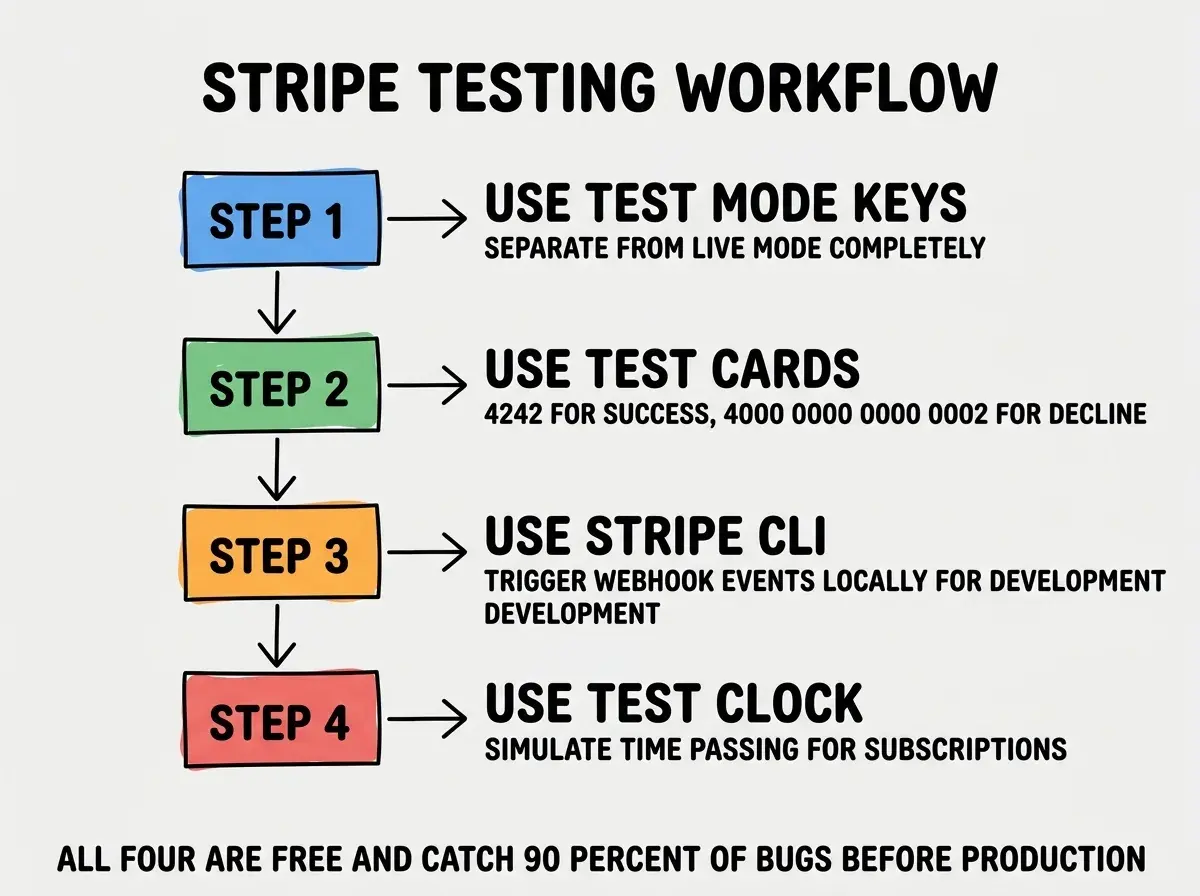
Test mode keys. Stripe provides separate API keys for test mode. Use these in development and staging. Anything in test mode is completely isolated from production data and never charges real cards.
Test cards. Stripe documents specific card numbers that simulate different scenarios: 4242 4242 4242 4242 for success, 4000 0000 0000 0002 for decline, 4000 0000 0000 9995 for insufficient funds. Use these to test happy paths and error handling.
Stripe CLI. The Stripe CLI lets you forward webhook events to your local development server and trigger test events on demand. This is essential for testing webhook handlers without deploying.
Test clocks. Stripe Test Clocks let you simulate time passing on test subscriptions. This is the only way to test things like trial-end events, renewal failures, and dunning flows without waiting weeks.
The most damaging Stripe integration mistake is treating webhook handlers as nice-to-have rather than critical infrastructure. Many teams launch with checkout working but skip robust webhook handling, planning to add it later. The result is that subscription state drifts within days, and customers complain about being charged when they canceled or having access when they should not. Webhook handling is not optional. Build it on day one with proper retry logic, idempotency, and reconciliation.
The other mistake is over-customizing the checkout experience early. Stripe Checkout looks fine and converts well; building custom checkout to "match your brand" usually delays launch by weeks and produces worse conversion in the first version. Ship Stripe Checkout first, customize later only if data shows it is hurting conversion.
A useful sanity check during integration is to walk through every error path manually before launch. Use a declined test card and confirm the user sees a clear error message. Cancel a subscription via the Customer Portal and confirm your app reflects the change within seconds. Trigger a payment_failed webhook and confirm your dunning logic works. Each of these tests takes less than a minute and catches issues that would otherwise reach paying customers.
What This Means For You
A clean Stripe integration is one of the highest-ROI engineering investments any SaaS founder can make. Following the architectural pattern above ships faster and maintains better than custom approaches.
- If you're a founder: Use Stripe Checkout and Customer Portal. Resist the urge to customize until you have data showing the hosted UI is actually hurting conversion.
- If you're changing careers: Stripe integration is a top-five skill for SaaS-focused engineering roles. Practice on a side project to build muscle.
- If you're a student: Build a small subscription product end-to-end with Stripe. The skill transfers to almost every modern SaaS company.
Browse more monetization and payment guides
Read more grow articles