A status page is the public-facing twin of your monitoring system, the single URL customers check when your app feels broken. Done well, it converts an outage from "this product is unreliable" into "this product is honest." Done poorly, or skipped entirely, it forces every customer to email support, every founder to scramble for a tweet, and every incident to look bigger than it actually was.
This guide covers how to set up a credible status page in 30 minutes, what to write during an active incident, and how to use the page as a long-term trust signal even when nothing is broken.
Why a Status Page Earns Trust
The instinct most founders have during an outage is to go quiet, to fix the problem first and then communicate. The data says the opposite is correct. A 2024 customer trust survey by Atlassian found that 79% of customers rated companies that provided real-time incident updates as "more trustworthy" than companies that resolved outages silently, even when both groups had identical outage durations.
The reason is simple. From the customer's side, an outage with no communication looks like incompetence or indifference. The same outage with a status page that says "we noticed the issue 3 minutes ago, our engineer is investigating, next update in 15 minutes" looks like a competent team handling a routine problem. Same outcome, completely different perception.
A 2025 incident response benchmark from incident.io found that companies with public status pages had 64% lower customer churn after incidents lasting longer than 30 minutes, compared to companies with no public communication channel.
The pattern to copy is the airline departure board. Even when a flight is delayed, the board updates with new estimated times, the gate, and the reason. Travelers stay in the airport, the airline keeps its customer. Hide the same information and travelers leave for another airline.
Picking a Status Page Tool
The three options that cover almost every solo builder use case are Atlassian Statuspage, Better Stack, and Instatus. Atlassian Statuspage is the most established and integrates with the largest ecosystem of monitoring tools, but the free tier is gone and the paid tier starts around 30 dollars per month. Better Stack bundles a status page with its uptime monitoring on a single subscription. Instatus is the cheapest, with a generous free tier and a paid tier starting at 20 dollars per month.
For a solo builder shipping their first production app, Better Stack is usually the right choice because the status page automatically updates when the uptime monitor detects an outage. You configure it once, and the dashboard moves from green to red without manual intervention. Instatus is the right choice if you want a beautifully designed page with a custom domain on a tighter budget. Atlassian Statuspage is the right choice if your customers are large companies that expect a familiar interface.
The setup steps are similar across all three, sign up, add the components your app exposes (web app, API, dashboard), connect a monitoring source if available, set up subscribers (email, SMS, RSS, webhook), and add a custom domain. Plan for 30 minutes the first time.
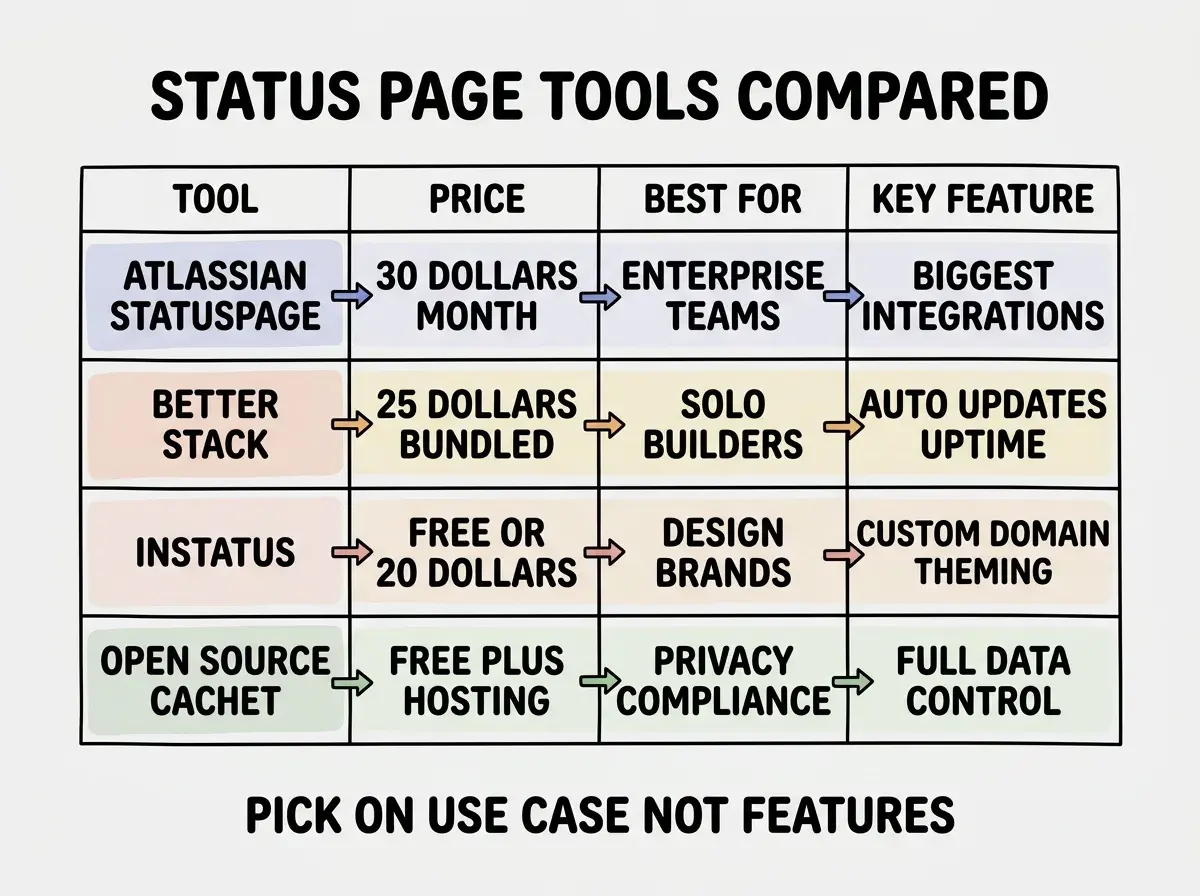
If you do not want to pay for any of these, you can self-host an open source option like Cachet or Statping. The tradeoff is that hosting your status page on the same infrastructure as your app means it goes down when your app goes down, which defeats the point. Always host the status page on a different provider than the app it tracks.
What Components to Show
The components on your status page should match how customers think about the product, not how the system is internally organized. A customer does not care whether your problem is in the API gateway or the auth service, they care whether they can sign in, see their data, and check out.
For most vibe coded apps, three or four components are plenty, "Web App" for the user-facing site, "API" for any backend services exposed to integrations, "Authentication" if it lives on a separate provider like Auth0 or Clerk, and "Payments" if checkout failures matter as a separate signal from API failures. Adding more components than the customer cares about creates noise, the page should answer "is the thing I am trying to do working" in two seconds.
The 30-minute investment that pays back during your first outage
Read more grow guidesThe other piece worth configuring is subscribers. Most tools let users subscribe to incident updates by email, SMS, or RSS. Enable this and link to subscription on the page itself. Customers who subscribe become advocates, they hear about the issue from you instead of from a frustrating user experience.
Writing Updates During an Incident
The actual writing during an active incident is where most builders fail. The instinct is to either say nothing until the fix lands, or to write defensive corporate language that hides as much as it reveals. Both are wrong. The pattern that works is short, factual, frequent updates with a stated next-update time.
Every update should answer four questions, what we know, what we are doing about it, who is affected, and when the next update will come. That last part matters more than any other detail. A customer who knows the next update is in 15 minutes will check back in 15 minutes. A customer who has no idea will check every 60 seconds and tweet about it in between.
A working template is, "Investigating, we have detected a spike in errors affecting Login starting at 14:32 UTC. Approximately 30% of login attempts are returning a 503. Engineering is investigating. Next update by 14:50 UTC."
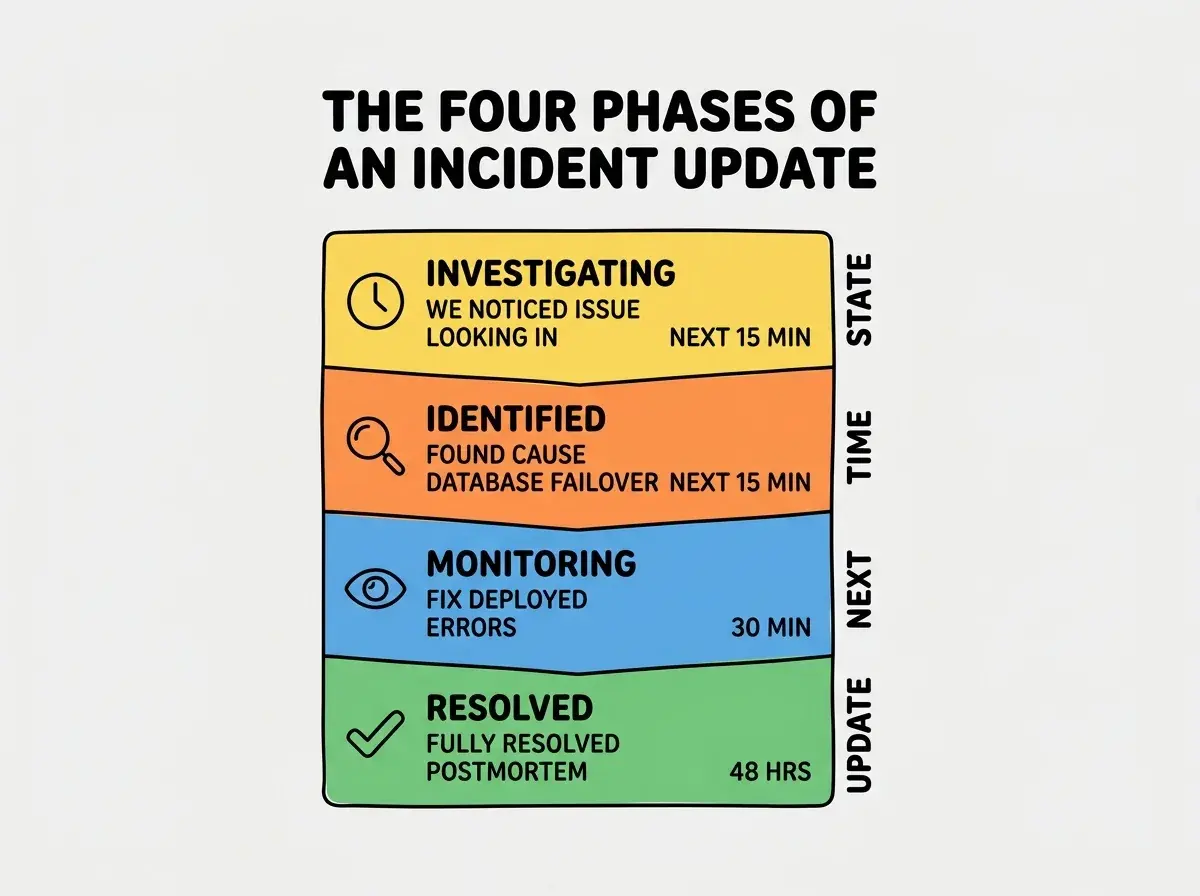
The four-phase pattern, investigating, identified, monitoring, resolved, is what every major status page tool supports out of the box. Use it. Do not skip from investigating to resolved without an identified or monitoring phase, even on short incidents, because customers want to see that you understood what happened before declaring it fixed.
After the Incident, the Postmortem
A status page entry should not end at "resolved." It should end with a public postmortem, a short document that explains what happened, why, what you did to fix it, and what you are doing to prevent recurrence. The postmortem is what turns a one-time outage into a permanent trust signal.
The postmortem does not need to be long. The format I recommend is one page, four sections, summary of impact, root cause, timeline of detection and response, and prevention steps. Publish it within a week of the incident, link to it from the resolved status page entry, and announce it on your changelog or blog.
The most common postmortem mistake is the blameless framing wrapped around a still-defensive technical narrative, "the database experienced unexpected load due to a configuration drift." Customers can tell when you are hiding behind passive voice. Be specific, "we deployed a query that scanned a non-indexed column under load." The specificity is the credibility.
The compounding return of this discipline is enormous. Customers who stick around after an incident with a transparent postmortem typically have higher retention than customers who never experienced an incident at all. The act of seeing how you handled the worst case is a stronger trust signal than the absence of bad cases.
What This Means For You
A status page is the smallest piece of operational infrastructure with the largest trust return. 30 minutes of setup, 25 dollars a month, and a habit of writing during incidents will materially change how customers experience your worst days.
- If you're a founder: Set this up before your first significant customer. The first time something breaks, you will not have time to set it up, and the first incident is exactly when you most need it.
- If you're changing careers: Practice writing incident updates during quiet times. The skill of writing under pressure is not natural, it is rehearsed. Treat your status page like a writing portfolio.
- If you're a student: Read the public postmortems from major outages at companies like Cloudflare, GitHub, or Vercel. They are short, honest, technically detailed, and will teach you more about operational maturity than any textbook.
Read more guides on operations and reliability
Browse the grow category