SSG vs SSR is one of those decisions that sounds academic until you get your first hosting bill. The rendering strategy your app uses determines where it can be deployed, how much that deployment costs, and how fast your pages load for users around the world. Most vibe coders never make this choice consciously because their AI tool makes it for them.
That is a problem. A 2025 Stack Overflow survey found that 92% of US developers use AI coding tools daily. Most of those tools default to Next.js with server-side rendering enabled, because SSR handles more use cases out of the box. But "handles more use cases" also means "requires more infrastructure," which means "costs more money" and "limits your hosting options."
If you do not understand the difference between SSG and SSR, you are letting your AI tool's default settings dictate your hosting bill. Let me fix that.
The Restaurant Analogy
Think of SSG like a buffet. Before the doors open, the kitchen prepares every dish. When guests arrive, the food is ready to serve. No waiting, no cooking per order. The tradeoff is you cannot customize dishes for individual guests, and anything that runs out means going back to the kitchen for a whole new batch.
SSR is made-to-order dining. Every time a guest orders, the kitchen cooks that specific dish from scratch. It takes longer, but every plate can be customized. The tradeoff is you need a full kitchen running the entire time the restaurant is open.
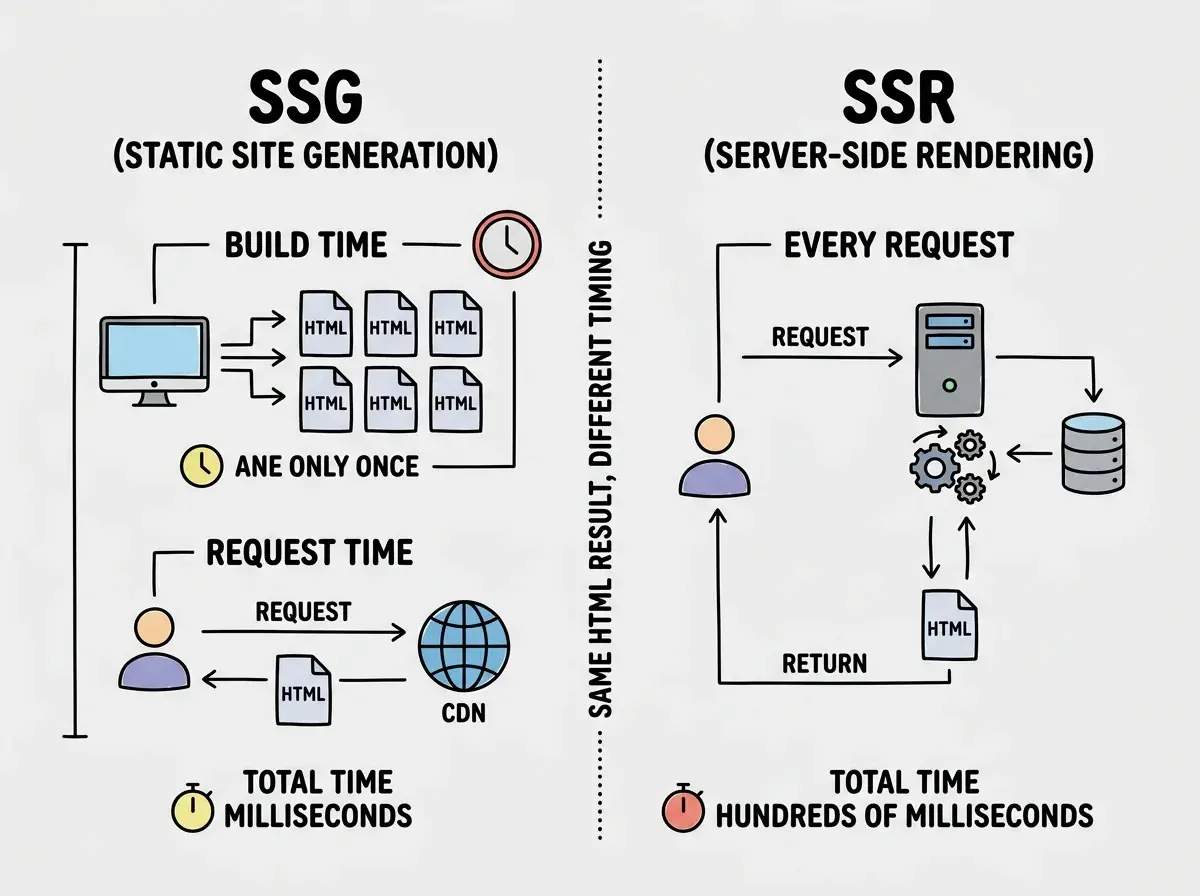
SSG pre-builds every page at deploy time. SSR builds each page when a user requests it.
What SSG Actually Does
Static Site Generation means your app builds every page into plain HTML files before anyone visits. When you run next build on an SSG app, the build process generates an HTML file for each route. These files get uploaded to a CDN (Content Delivery Network), a network of servers spread across the globe.
When a user visits your site, the CDN serves the pre-built HTML from the nearest server. No computation happens. No database queries run. The CDN just hands over a file, the same way a file server hands over a PDF.
This makes SSG apps fast, cheap, and reliable. There is no server to crash, no compute to pay for, and no cold starts. Your app is a folder of files on a CDN, and CDNs are very good at serving files.
The limitation is obvious. If your content changes, you need to rebuild and redeploy. A blog post with a typo? Rebuild. A new product in your catalog? Rebuild. A personalized user dashboard? Not possible with pure SSG, because every user would need their own pre-built HTML file.
What SSR Actually Does
Server-Side Rendering means your app generates HTML on the fly every time someone requests a page. A server receives the request, runs your page's code (database queries, API calls, dynamic logic), builds the HTML, and sends it back.
This gives you full flexibility. Each page can be different for each user. E-commerce pages with live inventory, social feeds with algorithmic sorting, dashboards with user-specific metrics. These all require SSR or something like it.
The cost is that you need a server running at all times. Not files on a CDN, but actual compute that executes JavaScript and queries databases. That compute has a per-request cost, cold start latency, and failure modes that static files do not have.
Here is what most vibe coders miss. When your AI tool scaffolds a Next.js app, it often creates pages with getServerSideProps or server components with dynamic data fetching. The AI does this because it is the most flexible approach, but it means your app requires SSR infrastructure even if most pages could have been static.
ISR Is the Middle Ground
Incremental Static Regeneration is Next.js's answer to the "SSG is too rigid, SSR is too expensive" problem. ISR pre-builds pages at deploy time like SSG, then regenerates individual pages in the background after a specified interval.
Back to the restaurant. ISR is a buffet that quietly replaces dishes as they get stale. Guests still get served instantly from what is prepared, but the kitchen periodically makes fresh versions. If a page has revalidate: 60, it gets served from cache for 60 seconds, then the next request triggers a background rebuild. The visitor gets the cached version instantly, and the next person after the rebuild gets the fresh page.
ISR gives you SSG's speed and cost with some of SSR's freshness. But not every platform supports it, and the ones that do implement it differently.
ISR is not a magic solution. It works well for content that changes occasionally (blog posts, product pages, marketing sites) but poorly for content that must be real-time (live dashboards, chat interfaces, real-time collaboration). Understand your data freshness requirements before choosing a rendering strategy.
Which Platforms Support What
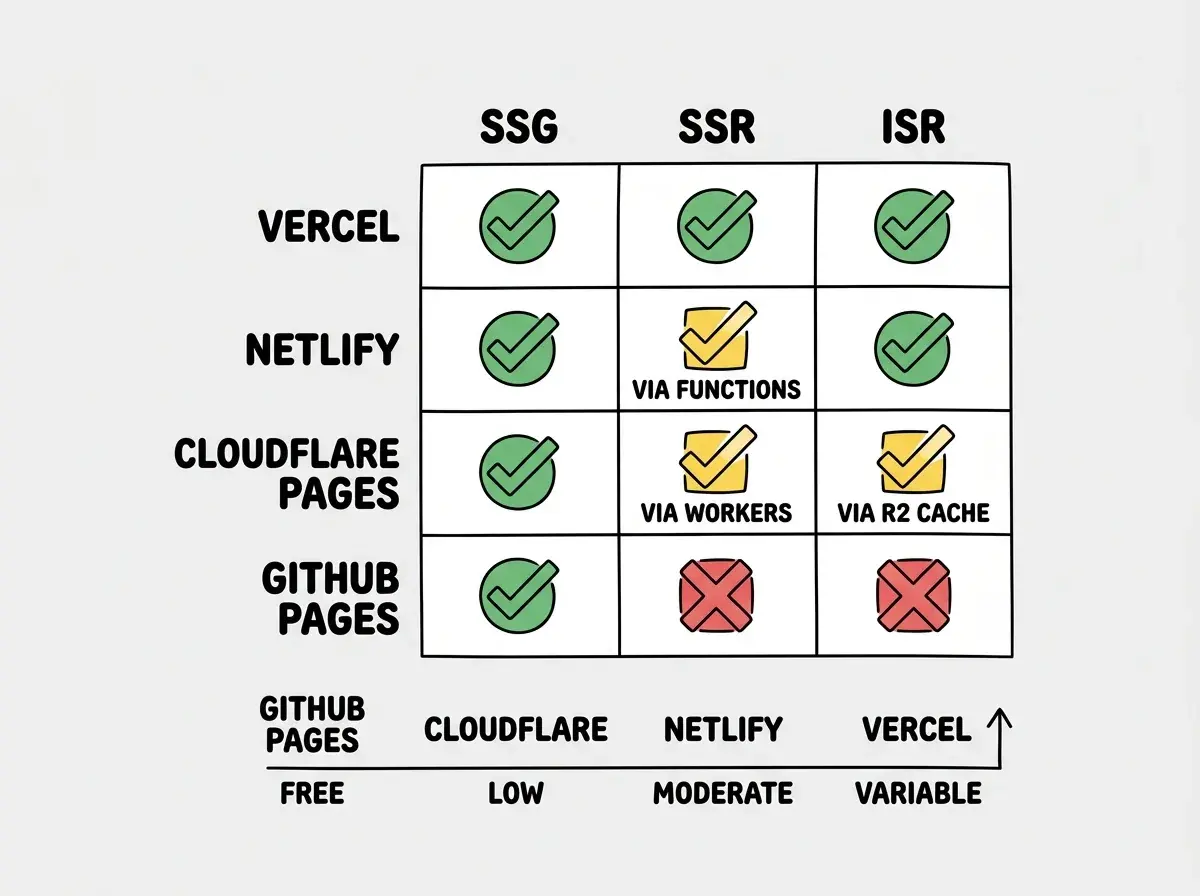
This is where the rendering decision becomes a deployment decision. Not every platform supports every strategy, and the ones that do charge very differently for the compute.
Vercel supports everything. SSG, SSR, ISR, streaming, edge rendering, and every other Next.js feature. It should, because Vercel builds Next.js. If you are using the full spectrum of rendering strategies, Vercel is the path of least resistance. The tradeoff is cost. Vercel's free tier is generous for static content, but SSR functions and ISR revalidation eat into your serverless function quotas fast.
Netlify handles SSG natively and has solid ISR support through its own caching layer. SSR support exists through Netlify Functions, but it is not as seamless as Vercel's integration with Next.js. If your app is mostly static with some ISR pages, Netlify is a strong and cost-effective choice.
Cloudflare Pages excels at SSG and has growing SSR support through Cloudflare Workers. The @opennextjs/cloudflare adapter lets you run Next.js with SSR on Workers, though it comes with constraints (3 MiB bundle size on free, no Node.js fs). ISR is supported via R2-backed caching. Cloudflare's pricing is the most favorable at scale because bandwidth is unlimited.
GitHub Pages is SSG only. No server-side rendering, no ISR, no API routes. It serves static files from a repository, and that is it. For a purely static site, it is free and simple. For anything else, it is not an option.
The Cost Equation
SSG is almost always cheaper than SSR, and the gap widens as traffic increases.
An SSG site serving 100,000 page views per month on Cloudflare Pages costs $0. The same traffic on Vercel's free tier also costs $0 if pages are static. But if those pages use SSR, each view triggers a serverless function invocation. Vercel's free tier includes 100,000 invocations per month, and you are already at the limit. Exceed that, and you are on Pro at $20/month minimum with unpredictable overage charges.
At scale the gap widens further. A million monthly page views on a static site costs roughly $5/month on Cloudflare. The same traffic on SSR through Vercel could run $100+ depending on function execution time and bandwidth.
This is not a knock on Vercel. SSR exists because some apps genuinely need server-side logic per request. But if your vibe-coded blog or marketing site uses SSR because the AI tool defaulted to it, you are paying for infrastructure you do not need.
Before you deploy, check your Next.js build output. Run next build and look at the output. Pages marked with a circle (○) are static. Pages marked with a lambda (λ) use SSR. Pages marked with a filled circle (●) use ISR. If you see lambda symbols on pages that do not need dynamic data, refactor them to static or ISR. Your hosting bill will thank you.
When to Use Each Strategy
Use SSG when your content changes infrequently and is the same for every visitor. Blogs, documentation, portfolios, landing pages, marketing sites. If you can rebuild and redeploy when content changes, SSG gives you the best performance at the lowest cost. Most vibe-coded projects fall into this category.
Use SSR when each page must be different per user or must reflect real-time data. Authenticated dashboards, personalized feeds, e-commerce with live pricing, search results pages. If skipping a request to the server would show stale or incorrect information, SSR is the right call.
Use ISR when your content changes periodically but does not need to be real-time. Product catalogs that update daily, blog sites where comments or view counts change, news sites where articles are published throughout the day. ISR gives you static-site performance with a freshness guarantee.
Mix strategies when different pages have different needs. Next.js lets you use SSG for marketing pages, ISR for your blog, and SSR for your dashboard, all in the same app. This is the most practical approach for real applications.
What This Means For You
If you are vibe coding, you are probably building something that could be entirely static or mostly static with a few dynamic pages. That means SSG or ISR should be your default, not SSR.
Before your next deploy, open your terminal and run next build. Look at the route summary. Count how many routes show the lambda symbol. For each one, ask yourself a simple question. Does this page actually need to be generated fresh on every request? If the answer is no, you can convert it to a static page or an ISR page, and immediately open up cheaper hosting options.
The rendering strategy you choose is not just a technical decision. It is a business decision that affects your hosting costs, platform options, and performance. Make that choice deliberately instead of accepting whatever default your AI tool handed you.