Boris Cherny, the head of Claude Code, runs five Claude Code instances in parallel terminal tabs, each with its own git worktree of the same repo. Then he opens five to ten more sessions on claude.ai/code in his browser. Then he keeps the iOS app open too. Sholto Douglas, an Anthropic researcher, calls this "multiplexing" and says it is how the team's best engineers operate now. It is also how Boris hit a personal record of around 150 PRs landed in a single day.
This is not a productivity tip. It is a different shape of work. Once you internalize it, the goal stops being "write more code faster" and starts being "supervise more agents at once." The team that built Claude Code does not type into one editor anymore. They run a swarm.
What Multi-Claude Actually Looks Like
In a Jan 2, 2026 thread on X, Boris Cherny laid out his daily setup. Five terminal tabs, each running Claude Code against its own git worktree of the same repo. System notifications tell him which tab needs input. On top of that, five to ten browser sessions on claude.ai/code working on cloud-side tasks. On top of that, the iOS app open on his phone for prompts he fires off between meetings. That is roughly fifteen concurrent Claude agents, all running, all owned by one person.
This sounds insane until you see the output. Boris has said in interviews, including Sequoia AI Ascent 2026 and Lenny's Podcast, that he routinely ships ten to thirty PRs per day and that his personal record is around 150 PRs landed in a single day. Sholto Douglas put the cultural shift more bluntly:
Many of our best engineers no longer manually write code, they multiplex across multiple cc sessions.
The implication is that the unit of engineering work is no longer the keystroke or even the function. It is the agent task. Your job is to spawn them, route them, unblock them, and review what they produce. The actual typing happens inside the model.
The parallelism unlock isn't just running more agents. It's redesigning your day around supervising agents instead of typing into one. Boris ships 10-30 PRs per day routinely and his record is around 150 in a single day. The math only works with parallelism.
If you have never tried this, the first reaction is usually "I cannot context-switch that fast." That is correct. You cannot, until you build the scaffolding that makes it manageable. That scaffolding is what the rest of this post is about.
Naming, Worktrees, and the Control Plane
The first problem you hit when you spin up five Claudes is that you cannot tell them apart. Terminal tabs all look identical, and shouting "which one is the auth refactor?" at your laptop does not scale. Cat Wu, head of product on Claude Code, posted the fix:
Multi-clauding? Use
/rename [label]to name each terminal session.
A small thing, but it is the difference between five anonymous panes and five labeled workspaces. Your brain stops paying tax to figure out which tab is which.
The second problem is layout and oversight. You want to see what every agent is doing without alt-tabbing through fifteen windows. Cat shipped the answer for the desktop:
The Claude Code desktop is the best way to kick off and manage multiple CC sessions across local and cloud in one place. You can also see git status, pin active sessions, and drag and drop layout to view multiple sessions.
That gave the desktop crowd a single pane of glass for the swarm.
Then the terminal got its own equivalent. On May 11, 2026, Boris announced the new control plane:
Agent control plane in terminal, the best way to level up from 1 agent to many agents. No more cycling between terminal tabs.
Cat followed up the next day with the actual command:
Run
claude agentsfrom your root code dir to manage all your claude code agents in one place.
This is the new front door for multi-Claude work. One process, every agent visible, no tab-cycling tax.
The third problem is collisions. If five agents edit the same branch they will overwrite each other. Boris's solution, announced Feb 21, 2026, is built-in git worktree support for subagents via the isolation: worktree flag. Each agent gets its own working directory on its own branch. They can run in parallel without ever touching the same file at the same time. The tooling exists specifically to make parallelism manageable, which is the whole point.
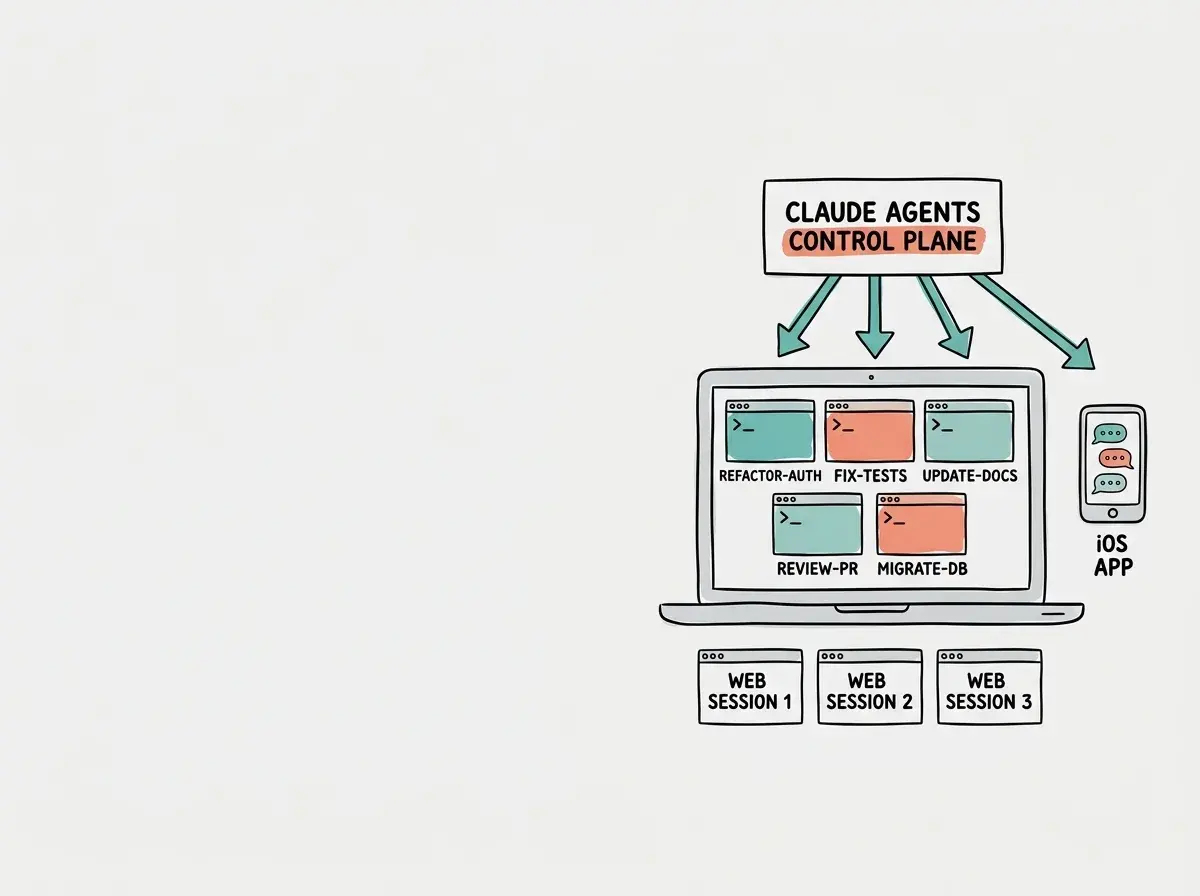
Put together, these four pieces, rename, worktrees, desktop layout, and the terminal control plane, are what make the swarm shape sustainable. Without them, multi-Claude is a chaos demo. With them, it is a workflow.
/batch for Dozens of Agents in Parallel
If running five agents by hand is the intermediate level, the advanced move is letting Claude Code orchestrate dozens of agents itself. On Feb 28, 2026, Boris introduced the /batch slash command:
Interactively plan out code migrations, then execute in parallel using dozens of agents. Each agent runs with full isolation using git worktrees, testing its work before putting up a PR. Usage:
/batch migrate src/ from Solid to React.
Read that carefully. You type one command, you describe the migration, Claude Code plans it out interactively with you, and then it forks the work across however many agents the job needs. Each agent runs in its own worktree, makes its changes, runs the tests, and only opens a PR when its piece passes. You get a stack of PRs to review, not a stack of broken branches to babysit.
This is the natural endgame of three trends the Claude Code team has been pushing for a year. Plan-mode separates thinking from doing. Built-in verification means agents check their own work before they hand it back. Worktree isolation means parallelism does not create merge conflicts. Stack those three and /batch becomes possible. A migration that used to take a team a sprint now takes one engineer an afternoon of review.
We're publishing a deep-dive series on how the Claude Code team ships at this scale.
Browse our Claude Code coverageThe right mental model for /batch is not "automated refactor tool." It is "interactively spawned task force." You are still the engineer in charge. You are just no longer the bottleneck on the typing.
The Web and Mobile Workflow
Parallelism does not stop at the desktop. Sid Bidasaria, a founding engineer at Anthropic, posted this in March 2026:
More than 50% of my CC usage is now on the web and it's made me 2x more productive. Don't sleep on this.
Half of his Claude Code usage is no longer happening in a terminal at all. It is happening in a browser tab, which means he can spawn it from any device, anywhere, and check on it later. He took that to its logical conclusion earlier in the year, in January 2026:
70 PRs + a weekend later my blog has 4 games and a full redesign. All built from my phone. Not a single line of code read.
Seventy PRs in two days, zero keystrokes on a keyboard, zero lines of code visually inspected by a human.
The team treats web and mobile as first-class agent surfaces, not as fallback options. The web is for cloud-side work you do not need to see locally. The mobile app is for capturing intent the moment you have it, so the agent is already running when you sit back down at your laptop. The combination is what makes "fifteen concurrent Claudes" actually fit inside a normal day. Most of them are not on your screen at all.
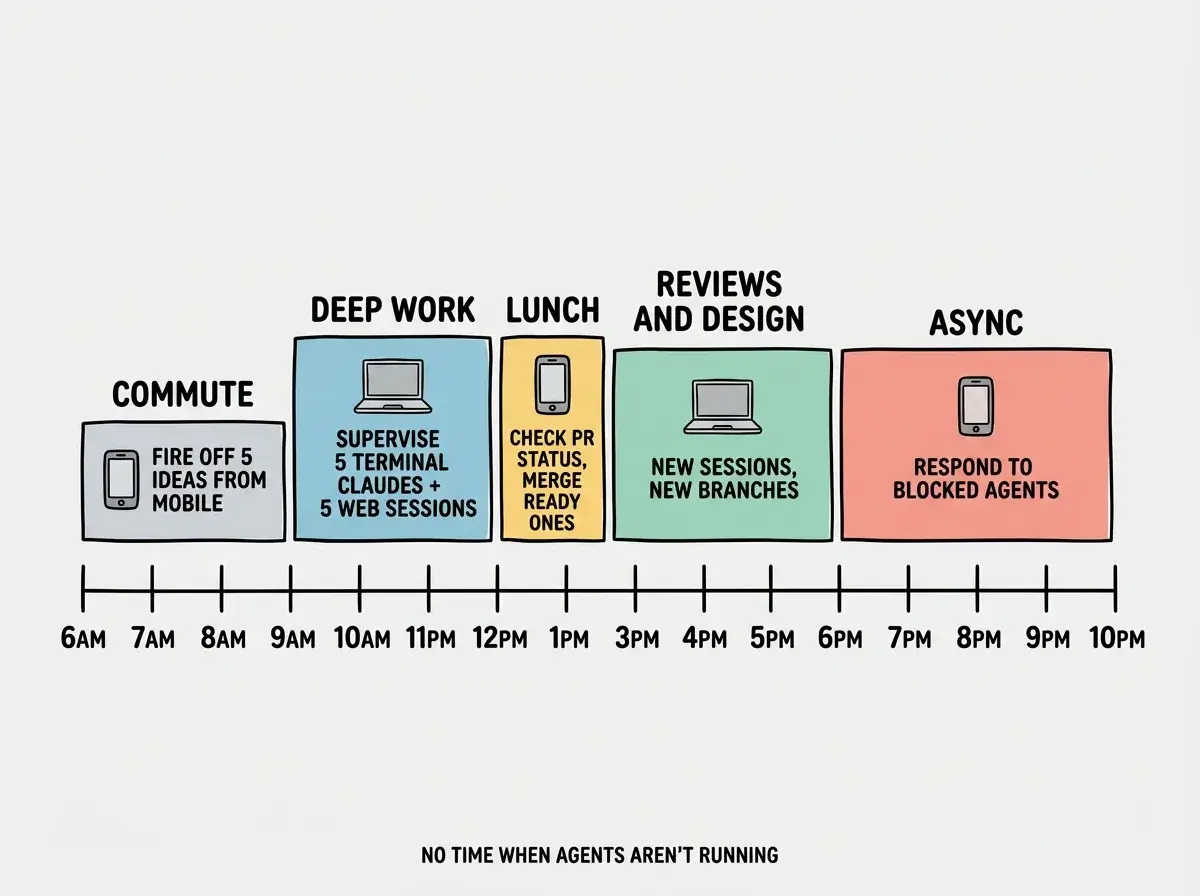
That timeline is what 30x productivity actually looks like in practice. It is not heroic typing speed. It is the simple insight that agents work while you sleep, eat, commute, and meet, as long as you keep them fed with prompts.
Running 5 Claudes on the same branch. Each agent needs its own git worktree, or they'll stomp each other's changes. Boris's setup uses worktrees by default for exactly this reason, and the isolation: worktree flag exists for subagents to do the same thing automatically.
If you remember nothing else from this post, remember worktrees. Every horror story about multi-agent workflows traces back to two agents fighting over the same files. Solve that one structural issue and the rest of the workflow opens up.
How to Get Started With Multi-Claude
Do not jump straight to fifteen agents. Start small and let the habit build. The first step is installing the latest version of Claude Code so you have /rename, the agents control plane, and built-in worktree support. None of the rest of the workflow exists without those primitives.
Then set up a git worktree workflow you actually understand. The shape is simple. Each parallel task gets a directory under a worktrees/ folder in your repo, created with git worktree add worktrees/feature-x -b feature-x. Each Claude Code session opens inside one of those directories. They share the same repo history but cannot touch each other's working files. Practice this with one terminal until it feels natural, then add a second.
Open two or three terminal tabs to start, not five. Run /rename on each one with a label that matches the task it is doing. Enable system notifications so you know when a session needs your input instead of staring at silent tabs. When that feels comfortable, add a web session for something cloud-side that does not need your local environment. The web is the easiest place to add parallelism because it does not require any setup at all. You spin it up at claude.ai/code and forget about it until it pings you back.
Dig deeper
A few hand-picked sources if you want to go further.
What This Means For You
- If you're a founder: Parallelism redefines what one person can ship. The gap between a founder who runs one agent and one who runs ten is bigger than the gap between any two solo engineers in history. This is the leverage curve that decides who wins the next two years.
- If you're changing careers: Supervising agents is a learnable skill, and it scales much further than typing speed. Spend a weekend running two terminal Claudes against a side project. The mental model you build there transfers to every team that has caught up to this workflow.
- If you're a student: Start with two sessions before trying five. The management overhead is real until you build the habit of naming, labeling, and routing work. Treat it like learning a new IDE. Painful for a week, transformative for a career.
Worktrees, /rename, and the claude agents control plane. The team's setup, ready to copy.
See the team's playbook