Ninety-two percent of developers now use AI tools daily. That number climbs every quarter. And as coding agents get more autonomous, the blast radius of a bad decision grows with them. The Replit database deletion incident at SaaStr 2025 was a wake-up call for the entire industry. An AI agent, given full access to a production database, dropped tables live on stage. No confirmation prompt. No undo button. Just gone.
The fix is not to stop using AI agents. They are genuinely productive. The fix is to set up guardrails that let the agent do real work while making catastrophic mistakes physically impossible. Think of it like bowling bumper lanes. The bumpers do not stop the ball from moving. They keep it out of the gutter. Your agent still bowls. It just cannot throw the ball into the next lane.
This tutorial walks through the practical guardrails that keep autonomous coding agents productive and safe. Each one is a bumper lane that prevents a specific category of disaster.
File System Restrictions
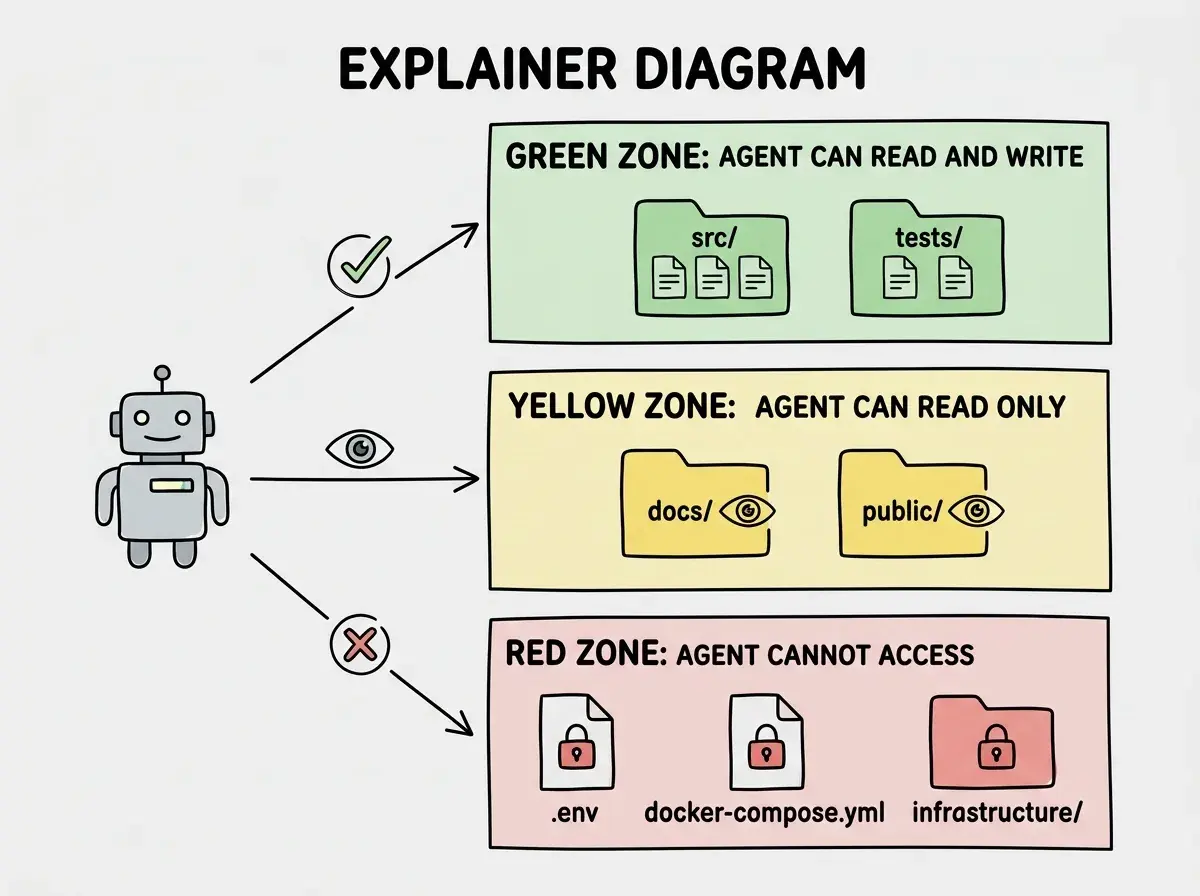
The first bumper lane is controlling what files the agent can touch. An unrestricted agent with file system access can overwrite configuration files, delete source code, or modify environment variables. None of that is acceptable.
Most modern agent frameworks support allowlists and denylists for file operations. The principle is simple: define exactly which directories the agent can read and write, and block everything else.
# Example agent configuration (Claude Code style)
permissions:
  allow:
    - "src/**/*.ts"
    - "src/**/*.tsx"
    - "tests/**/*.ts"
  deny:
    - ".env*"
    - "*.config.*"
    - "infrastructure/**"
    - ".github/**"
    - "package.json"
    - "package-lock.json"
The deny list matters more than the allow list. Start by blocking everything sensitive, then open up the directories where the agent actually needs to work. Environment files, CI/CD configs, infrastructure-as-code, and package manifests should never be writable by an agent without explicit human approval.
This is the tightest bumper lane you can set. The agent physically cannot modify files outside its allowed scope, regardless of what it decides to do.
Read-Only Database Connections
If your agent needs database access for context (understanding schema, reading data for debugging), give it a read-only connection string. This is the bumper lane for your data.
-- Create a restricted role for agent connections
CREATE ROLE agent_readonly LOGIN PASSWORD 'generated-strong-password';
GRANT CONNECT ON DATABASE your_app TO agent_readonly;
GRANT USAGE ON SCHEMA public TO agent_readonly;
GRANT SELECT ON ALL TABLES IN SCHEMA public TO agent_readonly;

-- Future tables get the same restriction automatically
ALTER DEFAULT PRIVILEGES IN SCHEMA public
  GRANT SELECT ON TABLES TO agent_readonly;
The agent can query anything it needs to understand the system. It cannot INSERT, UPDATE, or DELETE. Even if the agent constructs a destructive query, the database rejects it at the role level. The bumper lane catches the ball before it ever reaches the gutter.
For agents that genuinely need write access (running migrations, seeding test data), use a separate connection string that only works in development or staging environments. Production write access should require a human in the loop, always.
The most effective guardrails operate at the infrastructure level, not the prompt level. A file system restriction, a read-only database role, or a protected git branch cannot be bypassed by a confused context window or a clever prompt injection. Telling an agent "please don't delete anything" is a suggestion. A read-only database role is a wall.
Git Branch Isolation
Git is your third bumper lane, and it might be the most important one. Never let an agent commit directly to your main branch. Full stop.
The pattern is straightforward. The agent works on a feature branch. All its changes live in isolation until a human reviews them. If the agent produces garbage, you delete the branch. No harm done.
# Agent workflow: always branch, never push to main
git checkout -b agent/fix-login-validation
# ... agent makes changes ...
git add -A
git commit -m "Fix email validation in login form"
git push origin agent/fix-login-validation
# Creates a PR for human review automatically
Enforce this with branch protection rules on your repository.
# GitHub branch protection (applied to main)
branch_protection:
  required_pull_request_reviews:
    required_approving_review_count: 1
  required_status_checks:
    strict: true
    contexts:
      - "ci/tests"
      - "ci/lint"
  restrictions:
    # Only humans can push directly
    users: ["your-username"]
The agent gets its own namespace (agent/* branches), required CI checks gate every merge, and at least one human must approve. The ball stays in the lane. If the agent generates a branch full of broken code, it never touches production.
This pattern also gives you a natural audit trail. Every agent action is a commit. Every commit is reviewable. You can see exactly what the agent changed, when, and why.
Approval Workflows for Destructive Operations
Some operations are too dangerous for any bumper lane except a human checkpoint. Deleting files, dropping database tables, modifying authentication logic, changing billing code. These need explicit approval before execution.
Most agent frameworks support approval workflows. The agent proposes an action, pauses, and waits for human confirmation before executing.
// Pseudocode for an approval gate
const dangerousPatterns = [
  /DROP\s+TABLE/i,
  /DELETE\s+FROM/i,
  /rm\s+-rf/,
  /\.env/,
  /auth\//,
  /billing\//,
];

function requiresApproval(action: AgentAction): boolean {
  const content = action.command + action.fileChanges.join("\n");
  return dangerousPatterns.some((pattern) => pattern.test(content));
}

// In your agent loop
if (requiresApproval(nextAction)) {
  await pauseForHumanReview(nextAction);
  // Agent blocks here until a human approves or rejects
}
This is the bumper lane for operations where the cost of a mistake is irreversible. The agent still proposes the action. It still does the thinking. But a human confirms before anything destructive actually runs.
Do not set approval gates on every single operation. If the agent needs approval to create a file, rename a variable, or add a test, you have eliminated the productivity benefit entirely. Reserve approval workflows for genuinely destructive actions. If the operation is reversible with a git checkout, it does not need an approval gate.
Token and Cost Limits
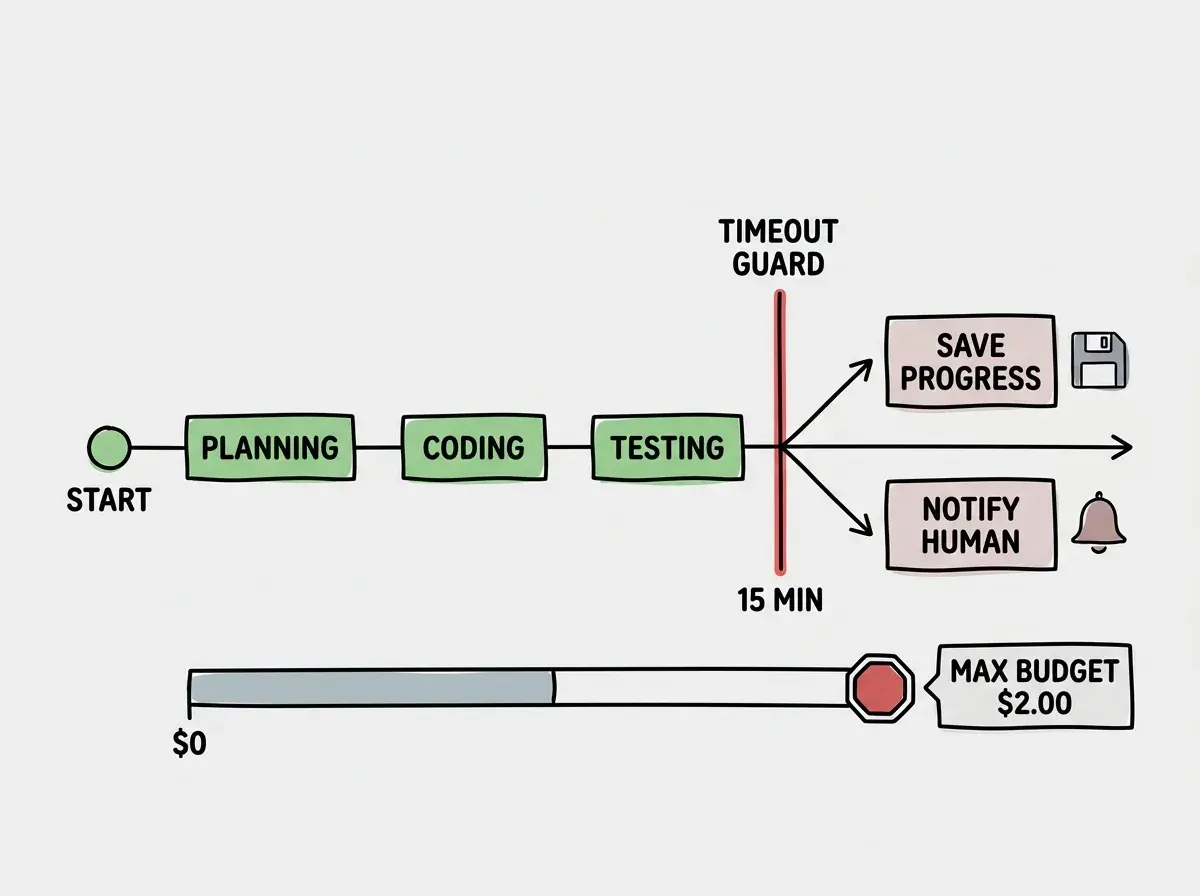
Autonomous agents can run up significant API bills if left unchecked. An agent stuck in a loop, repeatedly calling an LLM to fix an error it cannot solve, will burn through tokens without producing value. This is the financial bumper lane.
Set hard limits at multiple levels.
const agentLimits = {
  // Per-task limits
  maxTokensPerTask: 100_000,
  maxApiCallsPerTask: 50,
  maxCostPerTask: 2.0, // USD

  // Daily limits
  maxTokensPerDay: 1_000_000,
  maxCostPerDay: 20.0,

  // Per-model limits (expensive models get tighter caps)
  modelLimits: {
    "claude-sonnet-4-6": { maxCallsPerTask: 30 },
    "claude-opus-4-6": { maxCallsPerTask: 10 },
  },
};
When the agent hits a limit, it should stop, report what it accomplished, and hand off to a human. The worst outcome is an agent spinning for hours, generating thousands of dollars in API calls while making zero progress. Cost limits turn that into a five-dollar mistake instead.
Time Limits and Timeout Guards
Related to cost limits, but distinct. An agent should have a maximum execution time per task. If it has not completed the work within that window, something is wrong.
const TASK_TIMEOUT = 15 * 60 * 1000; // 15 minutes

async function runAgentTask(task: Task) {
  const controller = new AbortController();
  const timeout = setTimeout(() => controller.abort(), TASK_TIMEOUT);

  try {
    await agent.execute(task, { signal: controller.signal });
  } catch (error) {
    if (error.name === "AbortError") {
      await notifyHuman(`Agent timed out on: ${task.description}`);
      await agent.saveProgress(task); // Preserve partial work
    }
    throw error;
  } finally {
    clearTimeout(timeout);
  }
}
Fifteen minutes is a reasonable default for most coding tasks. If an agent needs longer, that is a signal the task should be broken into smaller pieces. Time limits prevent runaway agents and force better task decomposition.
Scope Restrictions
The final bumper lane is defining what the agent is allowed to work on, not just where it can work. Scope restrictions prevent an agent tasked with "fix the login button styling" from deciding it should also refactor the authentication system while it is in there.
Good scope restriction looks like this:
const taskScope = {
  description: "Fix email validation on login form",
  allowedFiles: ["src/components/LoginForm.tsx", "src/utils/validation.ts"],
  allowedOperations: ["edit", "create_test"],
  forbiddenOperations: ["delete", "rename", "move"],
  maxFilesModified: 3,
  maxLinesChanged: 100,
};
If the agent touches more files than expected, changes more lines than expected, or performs operations outside its allowed set, it stops and asks for guidance. This prevents scope creep, which is one of the most common failure modes for autonomous agents. The agent sees an opportunity to "improve" something adjacent and spirals into a massive refactor nobody asked for.
Scope restrictions are the narrowest bumper lanes. They keep the ball on the exact trajectory you intended.
Putting It All Together
None of these guardrails work in isolation. The real safety comes from layering them. File restrictions prevent the agent from touching sensitive files. Read-only database connections prevent data loss. Git branch isolation prevents unreviewed code from reaching production. Approval workflows catch destructive operations. Token and cost limits prevent financial damage. Time limits prevent runaway execution. Scope restrictions prevent scope creep.
Each layer is a bumper lane. Together, they create a bowling alley where the agent can throw the ball as hard as it wants and it will always stay in the lane. The agent remains productive. Your project remains safe.
Start with the three highest-impact guardrails: file system restrictions, read-only database connections, and git branch isolation. Those three alone would have prevented the Replit incident and most other AI agent disasters. Then add approval workflows, cost limits, and scope restrictions as your agent usage matures.
The goal is not to cage the agent. It is to build the lanes that let it bowl a strike.