Agent orchestration patterns are what separate "I asked Claude to build my app" from "I coordinate six agents building different subsystems that compose into a working product." 92% of developers use AI daily, but most treat it as a single assistant. The real leverage comes when you think like an orchestra conductor, directing different instrument sections to play their parts in coordination, each agent handling a distinct voice in the composition while you keep everyone in tempo.
This deep dive covers the major orchestration patterns for coordinating multiple AI agents on complex projects. Fan-out/fan-in for parallelizing independent work. Pipelines for sequential stages. Supervisor agents for dynamic coordination. Human-in-the-loop checkpoints. And critically, when all this complexity hurts more than it helps.
The Fan-Out/Fan-In Pattern for Parallel Work
Fan-out/fan-in is the most immediately useful orchestration pattern. You take a large task, decompose it into independent subtasks, hand each subtask to a separate agent, and then merge the results back together. Think of the conductor splitting the orchestra into sections. The strings, brass, and woodwinds practice their parts independently, then come together for the full arrangement.
In practice, this looks like spinning up separate agent sessions for each module of a feature. Building a dashboard? One agent handles the data fetching layer, another builds the UI components, a third writes the API endpoints. Each works in its own context without stepping on the others.
The fan-out phase is straightforward. The real challenge is fan-in, where you merge everything back together. Interface mismatches are the biggest risk. Agent A expects a getUserMetrics() function to return { data: Metric[] } while Agent B implemented it returning { metrics: Metric[], total: number }. Without shared contracts, you end up spending more time fixing integration bugs than you saved through parallelism.
The fix is defining interfaces before fanning out. Write your TypeScript types, API contracts, or function signatures first. Hand every agent the same shared context document that includes these contracts. Now each section of the orchestra is reading from the same sheet music.
// Define the contract BEFORE fanning out to agents
interface DashboardDataService {
  getUserMetrics(userId: string): Promise<MetricsResponse>;
  getActivityFeed(userId: string, limit: number): Promise<Activity[]>;
  getProjectSummaries(userId: string): Promise<ProjectSummary[]>;
}

interface MetricsResponse {
  data: Metric[];
  generatedAt: Date;
}

// Each agent receives this interface as part of their context
// Agent A: implement DashboardDataService
// Agent B: build UI consuming DashboardDataService
// Agent C: write API routes exposing DashboardDataService
Fan-out/fan-in works best when tasks are genuinely independent. If Agent B needs output from Agent A before it can start, you do not have a fan-out problem. You have a pipeline.
Fan-out/fan-in multiplies your throughput on independent tasks, but only if you define shared interfaces and contracts before distributing work. Without shared contracts, the fan-in merge phase becomes more expensive than doing everything sequentially. Write your types first, then distribute.
The Pipeline Pattern for Sequential Stages
The pipeline pattern chains agents together in sequence, where each agent's output becomes the next agent's input. This mirrors how an orchestra moves through movements of a symphony. The first movement establishes the theme, the second develops it, the third transforms it, and the finale brings it all together. Each stage builds on what came before.
A practical pipeline for building a feature might look like this. Stage one is an architecture agent that takes your requirements and produces a technical design document with file structure, data models, and API contracts. Stage two is an implementation agent that takes that design and writes the actual code. Stage three is a review agent that audits the implementation for bugs, security issues, and style violations. Stage four is a testing agent that generates test suites based on the implementation and design doc.
Requirements → [Architecture Agent] → Design Doc
Design Doc   → [Implementation Agent] → Source Code
Source Code  → [Review Agent] → Issues + Fixes
Code + Fixes → [Testing Agent] → Test Suite
The power of pipelines is that each agent operates in a focused context. The architecture agent does not need to think about test coverage. The testing agent does not need to worry about system design. Each agent is a specialist, and specialists produce better output than generalists trying to do everything at once.
The risk with pipelines is error propagation. If the architecture agent makes a bad design decision, every downstream agent builds on that bad foundation. By the time the review agent catches the issue, three stages of work need to be redone.
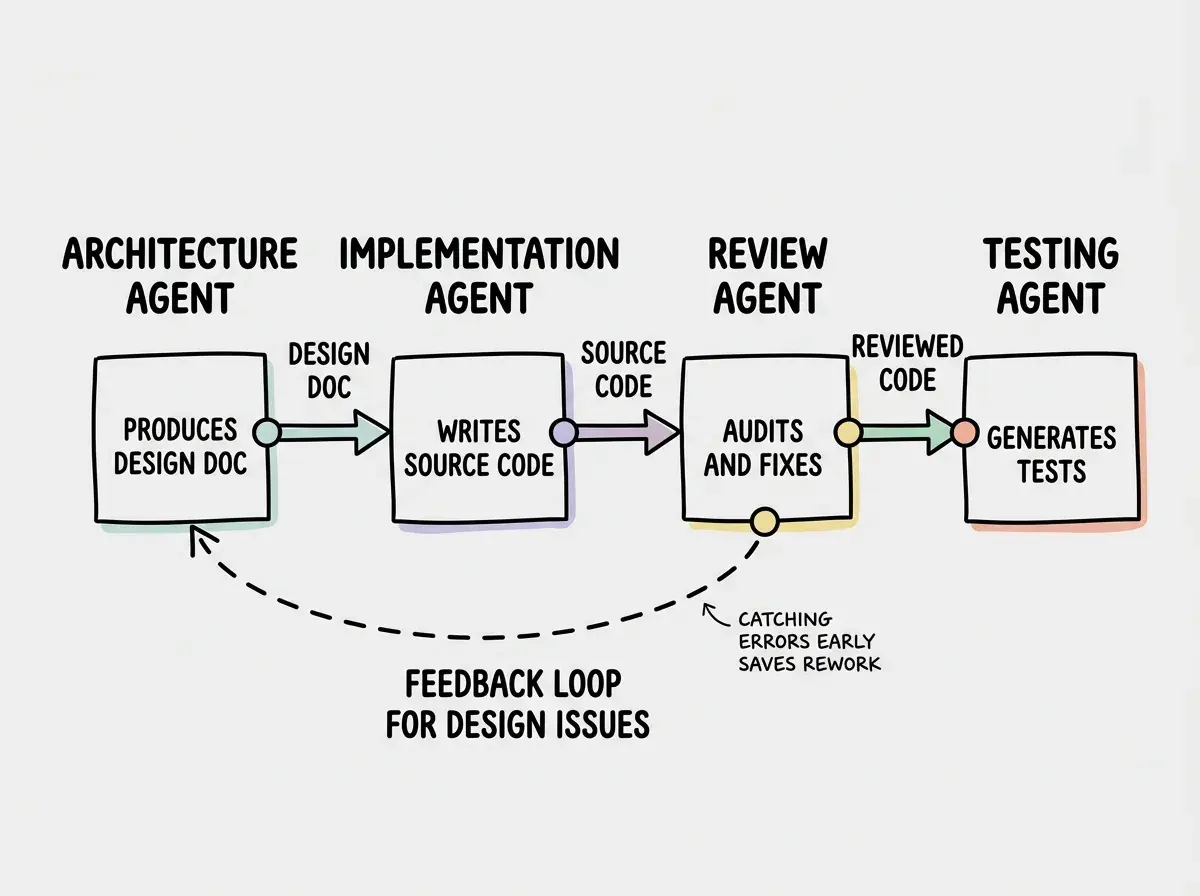
Mitigate this by adding validation gates between stages. Before the implementation agent starts, have a quick check on the design doc. Does it cover all the requirements? Are the data models reasonable? A two-minute review at each gate saves hours of rework downstream.
The Supervisor Pattern for Dynamic Coordination
The supervisor pattern introduces a coordinating agent that manages other agents dynamically. Instead of you manually orchestrating fan-outs and pipelines, a supervisor agent decides which sub-agents to spawn, what tasks to assign them, and how to handle results. The conductor is no longer you. You have promoted an AI to be the conductor while you sit in the audience and intervene only when the performance goes off track.
In practice, the supervisor receives a high-level goal like "build the user authentication system." It decomposes this into subtasks, assigns them to worker agents, monitors progress, handles failures by reassigning or retrying, and assembles the final result. Tools like Claude's agent SDK, LangGraph, and CrewAI provide frameworks for building supervisors.
The supervisor pattern shines when the task structure is not known upfront. With fan-out, you need to know the subtasks in advance. With a supervisor, the coordinating agent discovers the right decomposition as it works.
The danger is that supervisor agents can spiral. They spawn agents that spawn more agents, burning tokens and context while producing increasingly fragmented work. Set explicit boundaries. Limit the number of concurrent sub-agents. Cap the total token budget. Require the supervisor to present its plan before executing.
See how top builders are using these patterns to ship faster with AI.
Read moreHuman-in-the-Loop Checkpoints That Actually Work
Every orchestration pattern needs human checkpoints, but most developers put them in the wrong places. They review the final output and then spend hours fixing issues that should have been caught at the design stage. Effective checkpoints are like the conductor pausing between movements to tune the orchestra, not waiting until the end of the concert to notice the violins were out of key.
Place checkpoints at decision points, not output points. Before the architecture agent's design doc gets passed to implementation, you review it. Before the supervisor spawns its third round of sub-agents, you approve the plan. Before fan-out agents start working, you validate the shared contracts.
The most effective checkpoint pattern is "propose, then execute." Every agent produces a plan before it produces code. The plan is cheap to review, easy to redirect, and catches misunderstandings early. A five-line plan review takes thirty seconds. Reviewing five hundred lines of wrong code takes an hour.
# Agent checkpoint protocol
1. Agent receives task
2. Agent produces plan (3-5 bullet points of what it will do)
3. Human reviews plan (approve / redirect / reject)
4. Agent executes approved plan
5. Human spot-checks output (not full review)
This protocol adds maybe two minutes per agent task. It saves the twenty-minute debugging sessions that happen when an agent misunderstands the requirement and builds the wrong thing confidently.
Putting human review only at the end of an agent pipeline or fan-out. By then, the damage is done and you are debugging instead of directing. Place checkpoints before agents start executing, not after they finish. Reviewing a plan takes seconds. Reviewing wrong code takes hours.
Shared State Management Across Agents
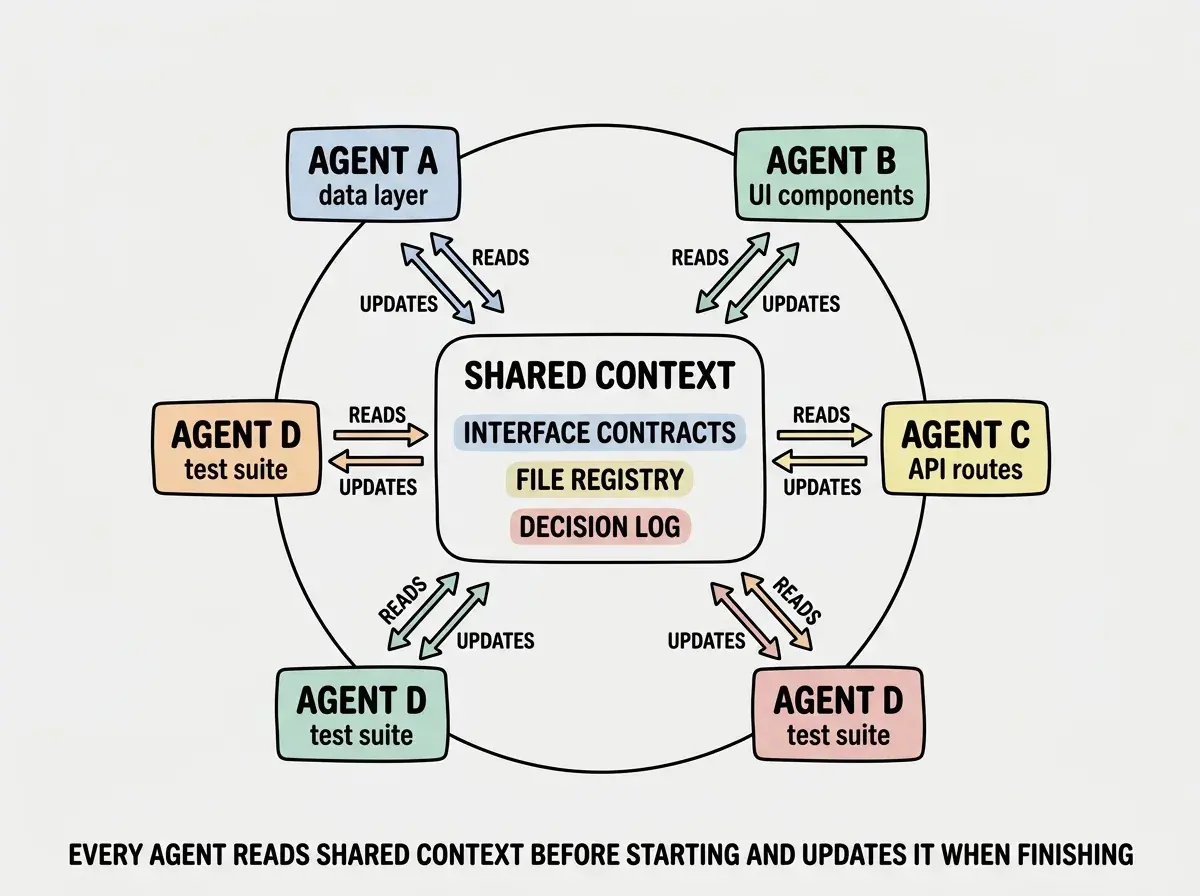
When multiple agents work on the same codebase, they need a shared understanding of what exists and what has changed. Without shared state, Agent A creates a utility function and Agent B creates an identical one with a different name. The orchestra falls apart when sections cannot hear each other.
The simplest shared state approach is a living context document that every agent reads before starting work and updates when finishing. This document tracks what files exist, what interfaces are defined, what decisions have been made, and what is still in progress.
For git-based workflows, the repository itself serves as shared state. Each agent works on a branch, and you merge branches as sections complete. Conflicts during merge reveal integration issues. More sophisticated setups use a shared memory store that agents read from and write to as they work. The supervisor pattern naturally centralizes this state in the coordinating agent, which is one of its advantages over manual fan-out.
When Complexity Hurts More Than It Helps
Here is the uncomfortable truth about agent orchestration. For most tasks, a single well-prompted agent with a clear context window outperforms a complex multi-agent system. Orchestration adds latency, token costs, integration overhead, and failure modes. If your task fits in one agent's context and can be completed in one session, adding orchestration is like hiring a full orchestra to play a solo piano piece.
Orchestration earns its keep in specific scenarios. The codebase is too large for a single context window. The task has genuinely independent subtasks that benefit from parallelism. The work requires different specialized prompts or tool configurations.
If your project is under 5,000 lines of code and the feature touches fewer than ten files, a single agent with good context is almost certainly the right call. Save orchestration for when you are coordinating work across multiple subsystems, migrating large codebases, or building features that span many independent modules.
The best orchestra conductors know when to let a soloist carry the piece. The best developers using AI know when a single agent conversation is more effective than a complex orchestration setup.
Dig deeper
A few hand-picked sources if you want to go further.
Discover more patterns and tools for building effectively with AI agents.
Explore more