To build a safe and effective tool stack for kids and teens learning vibe coding in 2026, choose the four-tool stack that combines age-appropriate AI access (Claude.ai education tier or Microsoft Copilot for Education), beginner-friendly editor (Replit for ages 10+, VS Code with Continue extension for 13+), free hosting (Vercel or Netlify free tier), and version control (GitHub free with parent oversight). Layer parent or educator supervision around all four tools, with explicit guidelines about appropriate use. The total cost is $0 per kid; the educational value is significant.
This piece walks through each tool in the stack, the supervision patterns that protect kids, the alternatives by age group, and the four mistakes that put kids in inappropriate AI tool situations.
Why a Curated Stack Matters for Kids
Adult coders can pick from dozens of AI tools and adapt to whatever combination works. Kids cannot navigate that complexity, and parents/educators do not have time to research every tool individually. A curated stack with known safety properties and consistent UX dramatically reduces friction.
The 2026 reality is that consumer AI services often violate kids' privacy through training data collection, contain content not appropriate for minors, or lack appropriate parental controls. Educational tiers exist for most major AI services; using them is the responsible default.
A 2025 Common Sense Media study of 2,000 parents found that 67 percent of kids ages 8-17 used AI tools weekly, but only 23 percent of parents knew which specific tools their kids used. The information gap creates real risks: kids on consumer AI tiers expose data and content that educational tiers protect. The simple act of switching to educational AI tiers eliminates most safety concerns at zero cost. Awareness is the highest-leverage parental investment.
The pattern to copy is the way schools curate textbooks. Schools do not let kids use any book; they pick books appropriate for the age and curriculum. The curation is what makes school safe and effective. AI tools deserve the same curation. Letting kids use whatever AI tool they find creates the same problems unrestricted internet access created in the 2000s.
The Four-Tool Stack
Four tools cover what kids and teens need for vibe coding, all free, all reasonably safe with appropriate supervision.
Tool 1, AI access (Claude.ai education or Microsoft Copilot for Education). Both have appropriate content filtering, do not train on student data, and offer free tiers for educational use. Claude is generally easier for kids to talk to; Copilot integrates better with Microsoft tools.
Tool 2, code editor (Replit for ages 10+, VS Code with Continue for 13+). Replit is browser-based, no installation, designed for beginners. VS Code with Continue is the desktop option for older teens ready for "real" tools.
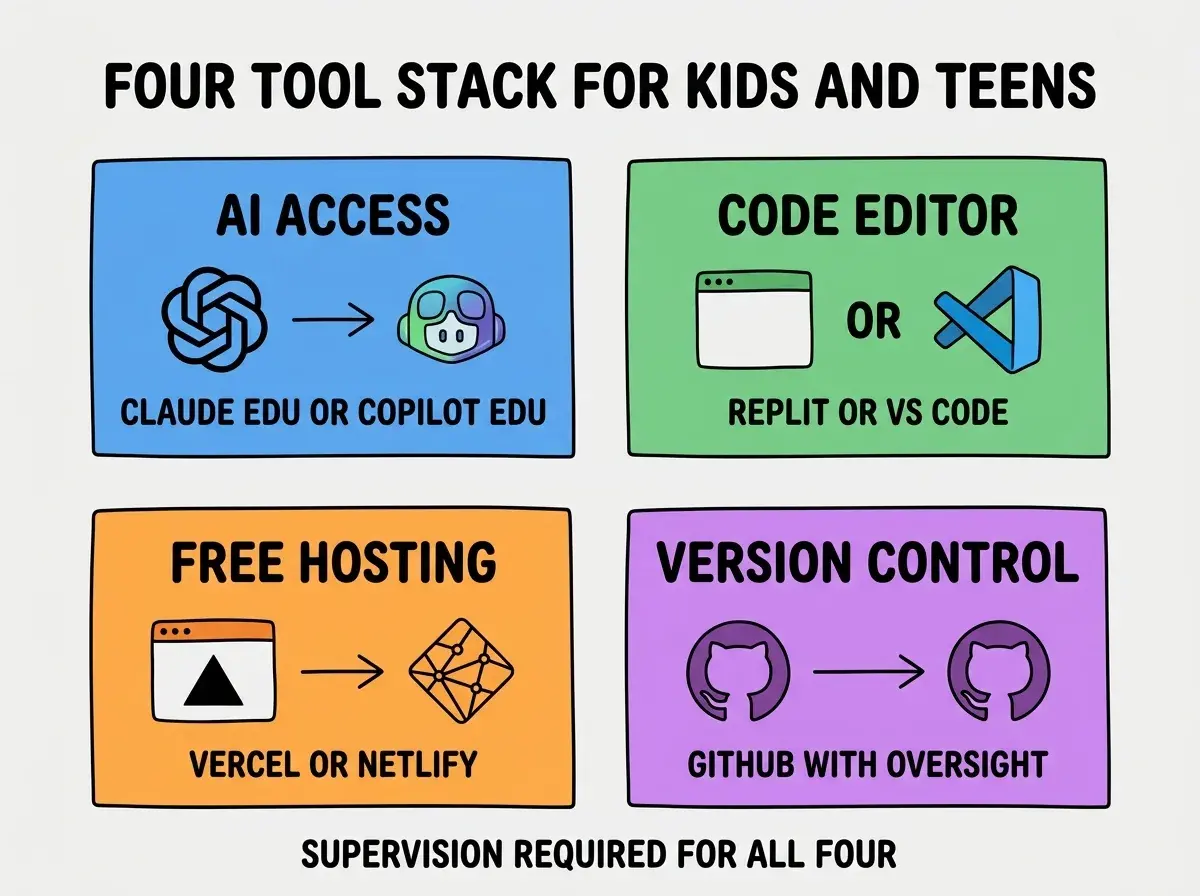
Tool 3, free hosting (Vercel or Netlify). Both have generous free tiers; both support deploying from GitHub easily. Lets kids share their work with friends and family at real URLs.
Tool 4, version control (GitHub with parent oversight). GitHub free tier, kid's account linked to parent for under-13 (per GitHub policies). Public vs private repo settings should default to private for kids.
The Supervision Patterns That Protect
Tool selection matters but supervision patterns matter equally. Three patterns work across age groups.
Pattern 1, AI conversations visible to adults. Kids should know that AI conversations may be reviewed. Most AI services let parents see chat history. The transparency prevents inappropriate use.
Browse more kids learning guides
Read more tools articlesPattern 2, weekly check-ins on projects. Sit down with the kid weekly to review what they built. Builds connection, surfaces problems early, demonstrates that the work matters to you.
Pattern 3, gradual privacy as trust builds. Younger kids need more oversight; teens need more privacy. Adjust supervision based on demonstrated maturity. Avoid both extremes (constant surveillance or zero awareness).
Alternatives by Age Group
Different ages benefit from different tool combinations. Three age-tier defaults work well.
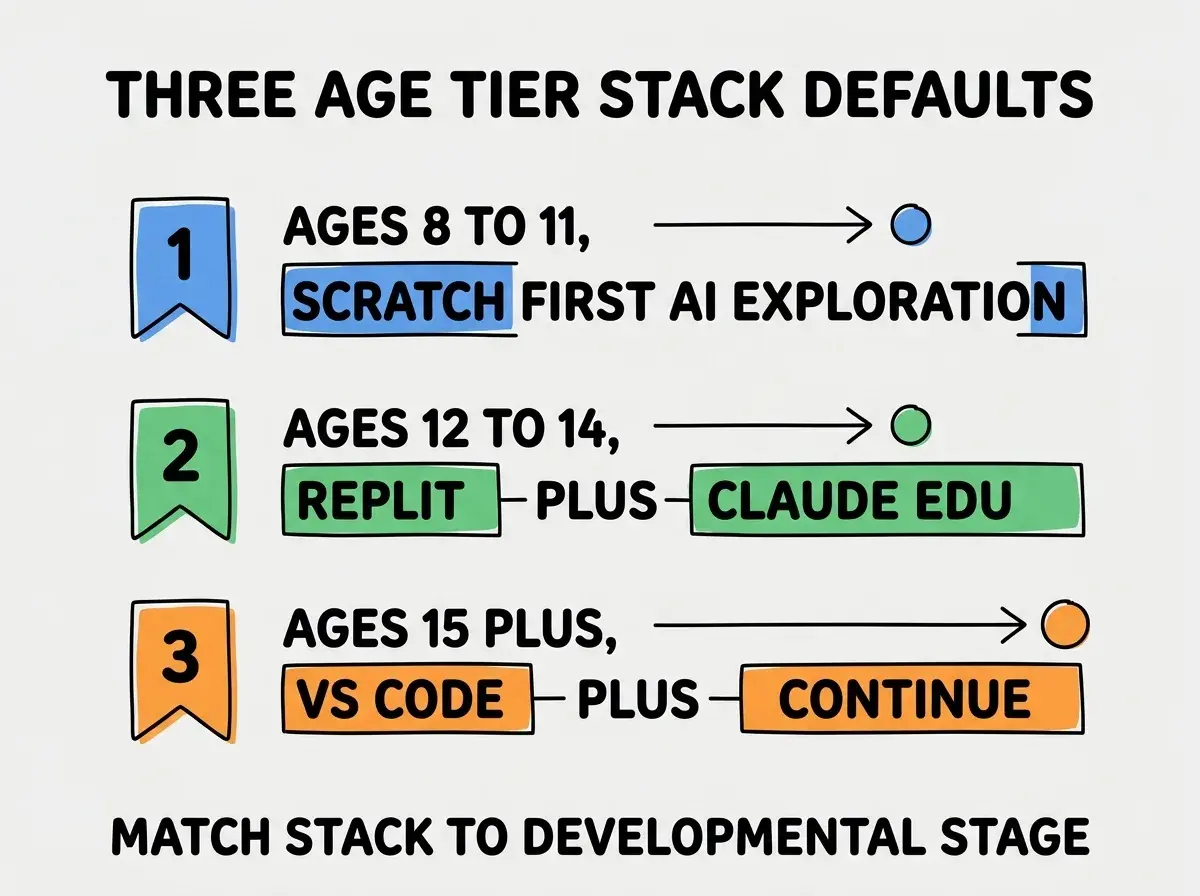
Tier 1, ages 8-11. Scratch as the primary tool, with light AI exploration through parent-supervised Claude.ai. Focus on visual programming concepts; AI is supplementary.
Tier 2, ages 12-14. Replit + Claude.ai education tier. The bridge from blocks to code. Real projects but with significant supervision.
Tier 3, ages 15+. VS Code + Continue + GitHub. Adult-style tools as kids approach adulthood. More autonomy, less supervision.
What to Avoid in Kids' Tool Choices
Three categories of tools should be avoided for kids and teens.
Avoid 1, consumer AI services that train on submitted data. Free tier ChatGPT, free tier Gemini, etc. The data privacy issues are significant for minors. Always use educational tiers.
Avoid 2, AI services without content filtering. Some open-source AI alternatives have minimal content filtering, exposing kids to inappropriate output. Stick with mainstream educational services.
Avoid 3, autonomous agents. Tools that complete tasks without supervision are inappropriate for kids learning. They remove the learning loop and create inappropriate dependencies.
The combination of these avoidances keeps kids on the safer side of the AI tool landscape. The tools to use are well-known; the tools to avoid are also well-known.
The most damaging mistake parents make with kids' AI tools is letting kids use whatever AI services they discover from friends or social media. Kids talking to consumer ChatGPT free tier (which trains on submitted data) creates exposures that educational tiers prevent for free. The fix is to set up educational-tier accounts before kids start using AI, ideally before they ask. Proactive setup prevents the much harder conversation of "stop using the tool you have been using." The 30 minutes of setup work is the highest-leverage parental investment for kid AI safety in 2026.
The other mistake is over-investing in paid tier subscriptions before kids demonstrate sustained interest. The free tiers cover almost everything kids need for first 6 to 12 months. Pay for premium only after the kid demonstrates they will use the additional features. Many parents pay for advanced features that go unused because the kid lost interest.
Setting Up the Stack Together
The setup process is itself a parenting opportunity. Three patterns make the setup productive.
Pattern 1, do it together as a project. Sit down with your kid for an hour, set up all four tools together. Walk through the basics. Establishes that you are involved and informed.
Pattern 2, agree on first project. Pick a small first project together (a personal quiz, a simple game). Gives the kid a clear goal and you a chance to see the tools in use.
Pattern 3, set check-in cadence. Agree on weekly review of what the kid built. Not surveillance, but engaged interest. Builds connection and surfaces issues early.
The setup hour is one of the higher-leverage parenting investments for kids in tech. The tone you set during setup carries through months of use, and it costs almost nothing compared to the alternative of letting kids navigate AI tools without guidance, which is the default that produces most of the safety problems parents worry about later.
Dig deeper
A few hand-picked sources if you want to go further.
What This Means For You
A safe, effective tool stack for kids and teens learning vibe coding is achievable for $0 with appropriate supervision. The right tools and supervision patterns produce dramatically better outcomes than letting kids navigate alone.
- If you're a founder: Set up the stack for your kids proactively. The investment is small and the protection is real.
- If you're an educator: Standardize on the four-tool stack across your CS classes. The consistency reduces support overhead and improves safety baseline.
- If you're a teen: Talk to your parents about which AI tools you use. Educational tiers protect you in ways consumer tiers do not.
Browse more kids learning guides
Read more tools articles