Serverless vs server comes down to who runs the machine. Serverless executes your code in short-lived functions that scale automatically and bill per request. A server is a machine you control, with predictable costs and no cold starts. Your AI tool almost certainly defaulted to serverless, and that may be fine or a costly mistake waiting to surface.
The Restaurant Analogy You Will Actually Remember
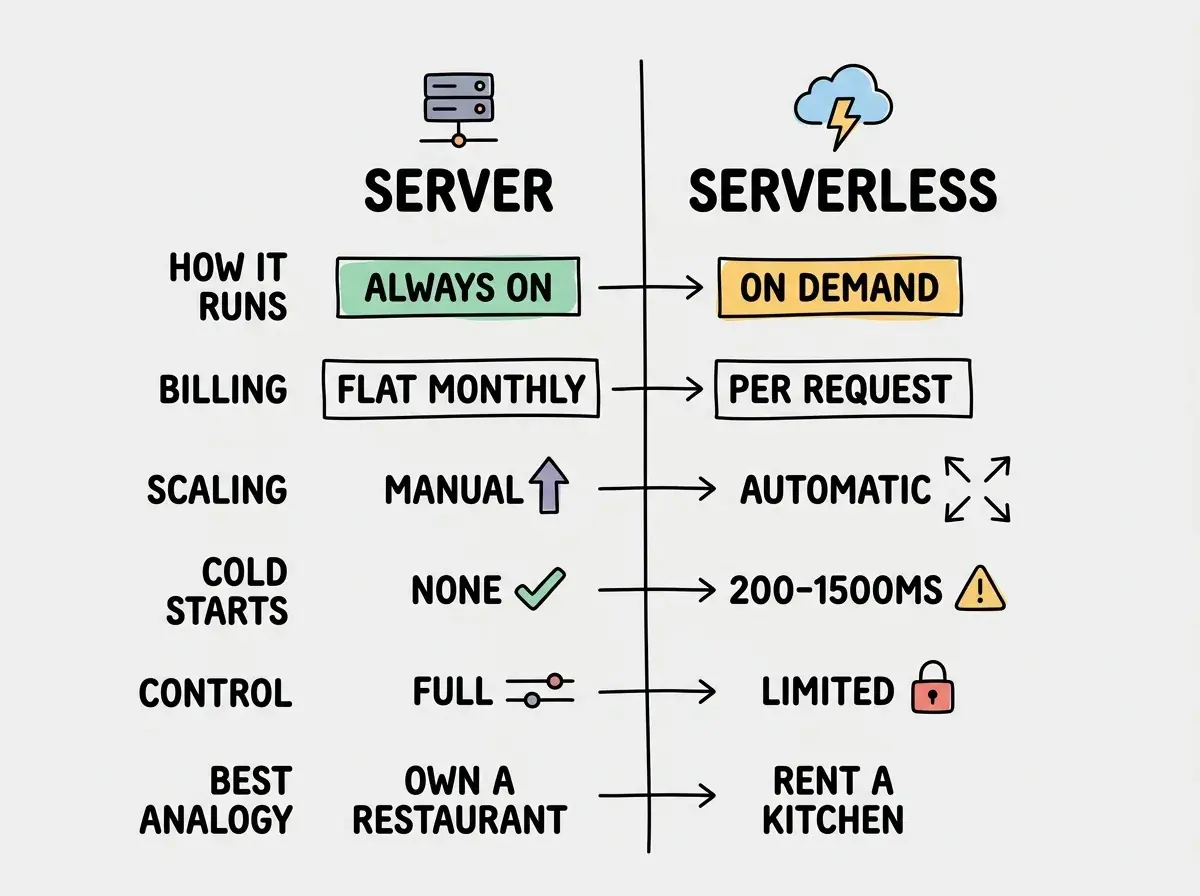
Think of deploying your app like feeding people. A server is owning a restaurant. You pay rent every month whether the dining room is full or empty. You control every detail of the experience. If a hundred people show up at once, you are limited by how many seats you have.
Serverless is a catering operation out of a commercial kitchen you rent by the hour. No customers, no bill. A thousand orders come in, the kitchen scales up. But you do not control the equipment, you pay a premium per plate, and sometimes there is a delay while the ovens warm up (that is a cold start).
This analogy will carry us through the entire article, so keep it in your head.
What Is the Difference Between Server and Serverless?
The core difference is who manages the infrastructure and how you pay for it.
With a server (a VPS, a container on Railway or Fly.io), you get a computer that is always on. You choose its size, install what you need, and your app runs continuously. You pay a flat monthly rate regardless of traffic. A $5/mo server handles your app whether it gets 10 visitors or 10,000 visitors that month. The rent is the same whether you serve five meals or five hundred.
With serverless (Vercel Functions, AWS Lambda, Cloudflare Workers), your code only runs when a request arrives. No request, no compute, no cost. Each function invocation spins up, executes, and shuts down. The catering kitchen only charges you when you are cooking.
Here is where this gets practical. With 92% of US developers using AI coding tools daily, and 46% of all new code being AI-generated, the deployment model your AI tool defaults to matters. Cursor, Claude Code, Bolt, and Lovable all scaffold Next.js projects designed for serverless. Vercel and Netlify, the default deploy targets for most AI tools, are serverless platforms.
Your AI tool is not making a bad choice. It is making the most common choice. But common and correct are not the same thing.
Why Are We Leaving Serverless?
This question has been trending in developer communities, and it deserves an honest answer. Not everyone is leaving serverless, but the developers who are leaving have specific, valid reasons.
Cold starts kill user experience for certain apps. When a serverless function has not been called recently, it needs to spin up from scratch. That adds 200 to 1500 milliseconds of latency depending on the runtime and platform. For a blog, barely noticeable. For a real-time dashboard or chat app, a dealbreaker. Imagine telling a customer their appetizer will take an extra 30 seconds while the kitchen warms up.
Costs become unpredictable at scale. Serverless pricing is beautiful at low traffic and terrifying at high traffic. A function that costs $0.02/month serving 100 requests can cost $200/month serving 10 million. Companies like Basecamp and Amazon Prime Video have publicly shared cases where moving from serverless to servers cut their infrastructure costs by 60-90%.
Size limits constrain what you can build. Cloudflare Workers have a 3 MiB compressed size limit on the free plan and 10 MiB on paid. AWS Lambda caps at 50 MiB compressed. If your AI tool generates a feature-rich app with heavy dependencies, you may hit these limits before your app does anything interesting.
Vendor lock-in is real. Serverless platforms have proprietary APIs and platform-specific configuration. An app built for Vercel's serverless functions does not trivially move to AWS Lambda or Cloudflare Workers. With a server, you can move to any hosting provider that offers a Linux box.
Serverless is not getting worse. Expectations are getting more specific. Serverless excels at variable, unpredictable workloads with low baseline traffic. It struggles with latency-sensitive apps, high-throughput workloads, and budgets that need predictability. The developers "leaving serverless" are the ones whose apps outgrew the model, not the ones who never needed it.
What Are the Disadvantages of Serverless?
Beyond the headline problems above, there are practical constraints that bite vibe coders specifically.
Execution time limits. Most serverless platforms cap function execution at 10-30 seconds. If your app needs to process a large file or call a slow API, the kitchen kicks you out mid-recipe.
No persistent connections. Serverless functions cannot hold a WebSocket open or keep a database connection pool alive. If your app needs live chat or streaming updates, you need to bolt on services like Pusher or Ably.
Debugging is harder. You cannot SSH in and check logs. You depend on whatever observability your platform provides, which is often limited on free plans.
The "serverless tax" on architecture. Because functions are stateless, you add managed databases, external caching, queue services, and orchestration tools. Each is another bill and another failure point. What started as "simpler than a server" can become more complex than the server would have been.
When Serverless Is the Right Call
Unpredictable traffic. If your app gets 50 requests on Monday and 50,000 on Friday, serverless scales without intervention. The catering kitchen shines when you do not know how many orders are coming.
MVPs and validation. Serverless free tiers let you ship without spending a dollar. Do not rent a restaurant to test a recipe.
Event-driven workloads. Webhook handlers, form submissions, scheduled cron jobs. These run infrequently, finish quickly, and are a perfect serverless fit.
Static sites with a few API routes. The pattern most AI tools generate: a statically-rendered frontend with serverless API routes for forms, auth, and data fetching. This is the sweet spot.
Start with the fundamentals of getting your vibe-coded project live.
Learn deployment basicsWhen a Server Is the Better Choice
Here is where the restaurant starts making more sense than the catering kitchen.
Consistent traffic. If your SaaS has 1,000 daily active users generating steady requests, a $10-20/mo server is dramatically cheaper than per-invocation pricing. The kitchen is always busy, so you are better off owning it.
Real-time features. WebSockets, server-sent events, and persistent connections require a long-running process. A server handles this natively.
Heavy processing. Image processing, video transcoding, ML inference. These tasks need more than 10-30 seconds and more than 256 MB of memory. You cannot rush a slow-roasted brisket in a microwave.
Full control. Custom runtimes, specific system dependencies, or compliance requirements that demand you know exactly where your data lives.
The Decision Framework
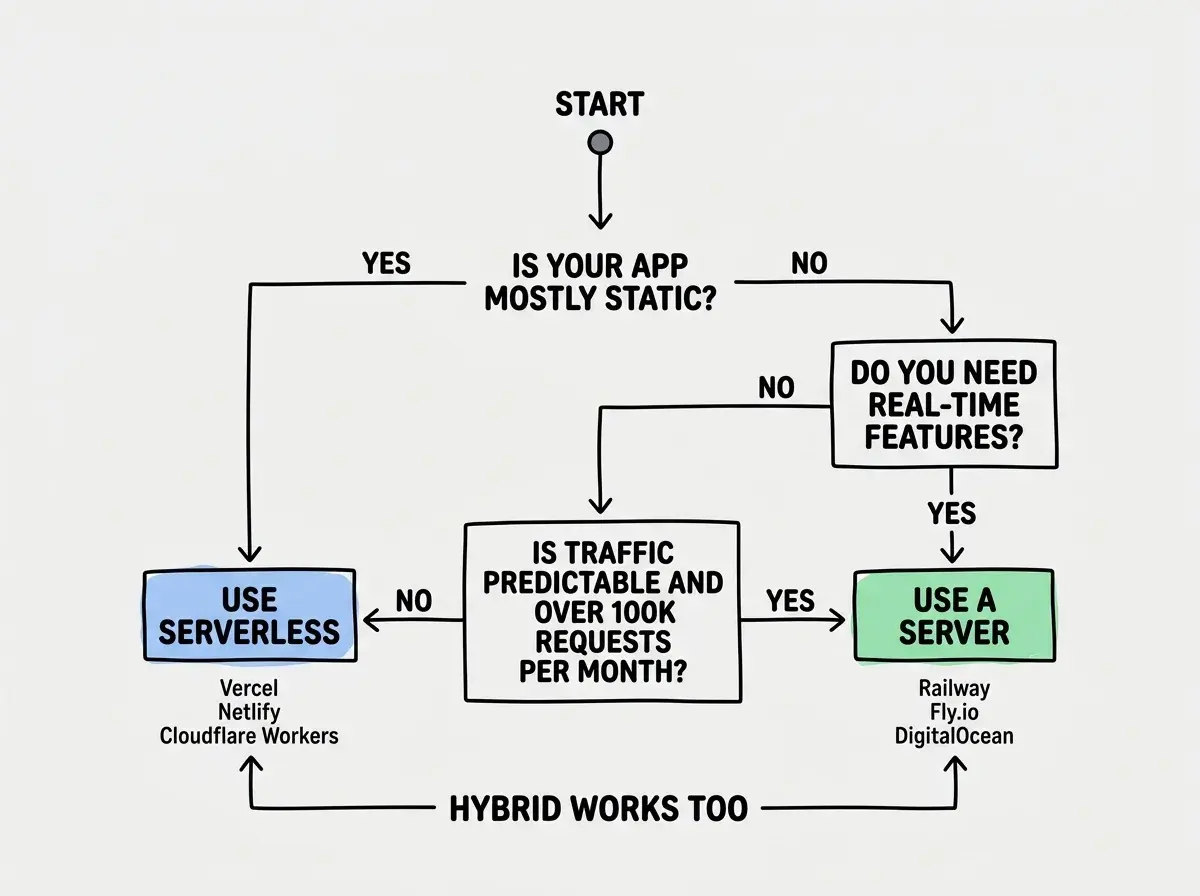
Start with serverless if:
- You are building an MVP or validation project
- Traffic is unpredictable or low (under 100,000 requests/month)
- Your app is mostly static with a few dynamic endpoints
- Your AI tool generated a Next.js or SvelteKit app and you want to ship fast
Move to a server if:
- Monthly serverless costs exceed $50-100 consistently
- You need WebSockets or persistent connections
- Cold starts are degrading your user experience
- You want predictable monthly costs
Consider a hybrid approach if:
- Your app has static marketing pages (serverless) and a real-time dashboard (server)
- You are using Railway or Fly.io, which blur the line between the two models
Real Cost Comparison
Abstractions do not pay bills. Here are actual numbers.
Scenario: A SaaS with 10,000 monthly active users, 500,000 API requests/month.
| Serverless (Vercel Pro) | Server (Railway) | Server (Fly.io) | |
|---|---|---|---|
| Base cost | $20/mo | $5/mo | $5/mo |
| Compute | Included up to limits | $5-10/mo (1 GB RAM) | $5-10/mo (1 GB RAM) |
| Bandwidth | 1 TB included, $40/100 GB over | Included | Included |
| Estimated total | $20-60/mo | $10-20/mo | $10-20/mo |
At 10,000 users the difference is modest. At 100,000 users with 5 million requests/month, Vercel climbs to $200-500/mo while the server stays at $20-40/mo. The restaurant's rent goes up slowly; the catering fees go up linearly.
Assuming your AI tool's default deployment choice is optimized for your project. It is optimized for the fastest path to a working deploy, which is serverless. Before your app gets real traffic, spend 30 minutes modeling your expected usage against both serverless pricing and a $10-20/mo server. The math might surprise you.
Serverless vs Containers vs Microservices
These related comparisons come up in every discussion, so a quick clarification.
Serverless vs containers is not either/or. Containers (Docker on Railway, Fly.io, or AWS ECS) give you server-like control with standardized portability. When people say "use a server," they usually mean "run a container."
Serverless vs microservices is a different axis. Microservices splits your app into independent services; you can run those on servers or serverless. Most vibe-coded apps are monoliths, and that is fine.
What This Means For You
The serverless vs server decision is not permanent. It is a starting point you should revisit as your app grows.
- If you are a founder validating an idea: Use serverless. Ship on Vercel or Netlify's free tier, get users, prove the concept. Do not spend an hour on server configuration until you have paying customers.
- If you are a career changer building a portfolio: Serverless removes infrastructure complexity so you can focus on building. But learn how to deploy to a server too (Railway makes it nearly as easy). Understanding both models makes you a stronger candidate.
- If you are a student learning to build: Start serverless to remove friction, then deploy the same project to a server. That comparison will teach you more about how apps work than any tutorial.
Your AI tool chose serverless because it is the fastest path to a live URL. That is a fine starting point. Just make sure you are the one deciding whether to stay.
Explore deployment guides for every platform and every budget.
See all guides