Imagine a vending machine. It sits there, costs almost nothing when nobody is using it, and the moment someone drops in a coin it whirs to life, delivers exactly what was requested, and goes back to sleep. That is serverless functions in a single image. Compare it to hiring a full-time employee to stand behind a counter 24/7, even when the store is empty at 3 AM. Traditional servers are the employee. Serverless is the vending machine.
If you are building with AI tools in 2026, your app probably already uses serverless functions and you did not realize it. When Cursor generates an API route in Next.js, when Claude Code scaffolds an endpoint, the default output is a serverless function. Understanding what that means, when it fits, and where it falls apart will save you from bugs and billing surprises that catch even experienced developers off guard.
What Serverless Actually Means
Serverless does not mean "no server." There is always a server somewhere. The name describes the developer's relationship to that server, which is none. You write a function, upload it, and a cloud provider handles everything else: provisioning machines, scaling to traffic, patching operating systems, and shutting down when nobody is calling your code.
With a traditional server (a VPS, a Docker container, a bare-metal machine), you are responsible for keeping it running. If traffic spikes, you add capacity. If traffic drops to zero, you still pay for idle compute. The vending machine metaphor holds: a traditional server is like keeping the store staffed regardless of demand. Serverless only charges when someone walks up and makes a request.
The major platforms all offer their own flavor. Vercel has Serverless Functions and Edge Functions. Netlify has Netlify Functions. Cloudflare has Workers. AWS has Lambda. Each differs in runtime and pricing, but the core promise is identical: you write code, they run it, you pay per invocation.
Serverless functions are not a separate technology you install. If you are using Vercel, Netlify, or Cloudflare to deploy a modern framework like Next.js, your API routes are already serverless functions. Understanding this changes how you debug, optimize, and budget for your app.
When Serverless Is the Right Choice
Serverless works best for workloads that are bursty, stateless, and short-lived. If your function receives a request, does some work (query a database, call an API, process a form), and returns a response in under 30 seconds, serverless is almost certainly the right fit.
Here are the scenarios where the vending machine model shines:
API routes for AI-built apps. When 92% of developers use AI daily and roughly 46% of code is AI-generated, the resulting apps tend to follow predictable patterns. Form handlers, authentication callbacks, webhook receivers, data fetching endpoints. These are textbook serverless workloads. Each request is independent, the compute is minimal, and traffic is unpredictable.
Side projects and MVPs. You are building a waitlist page, a portfolio with a contact form, or a SaaS prototype. Traffic will be near zero most days, then spike when you share it on Twitter or Hacker News. Serverless handles both extremes without you touching infrastructure. The vending machine sleeps when nobody is around and activates when the crowd shows up.
Webhook handlers and background tasks. Stripe payment webhooks, GitHub event handlers, scheduled cron functions. These are perfect for serverless because they arrive unpredictably, need to execute quickly, and have no relationship to each other.
Multi-tenant SaaS backends. Each tenant's request is isolated, traffic per tenant is low, and the aggregate is hard to predict. Serverless auto-scales per request without you managing capacity planning.
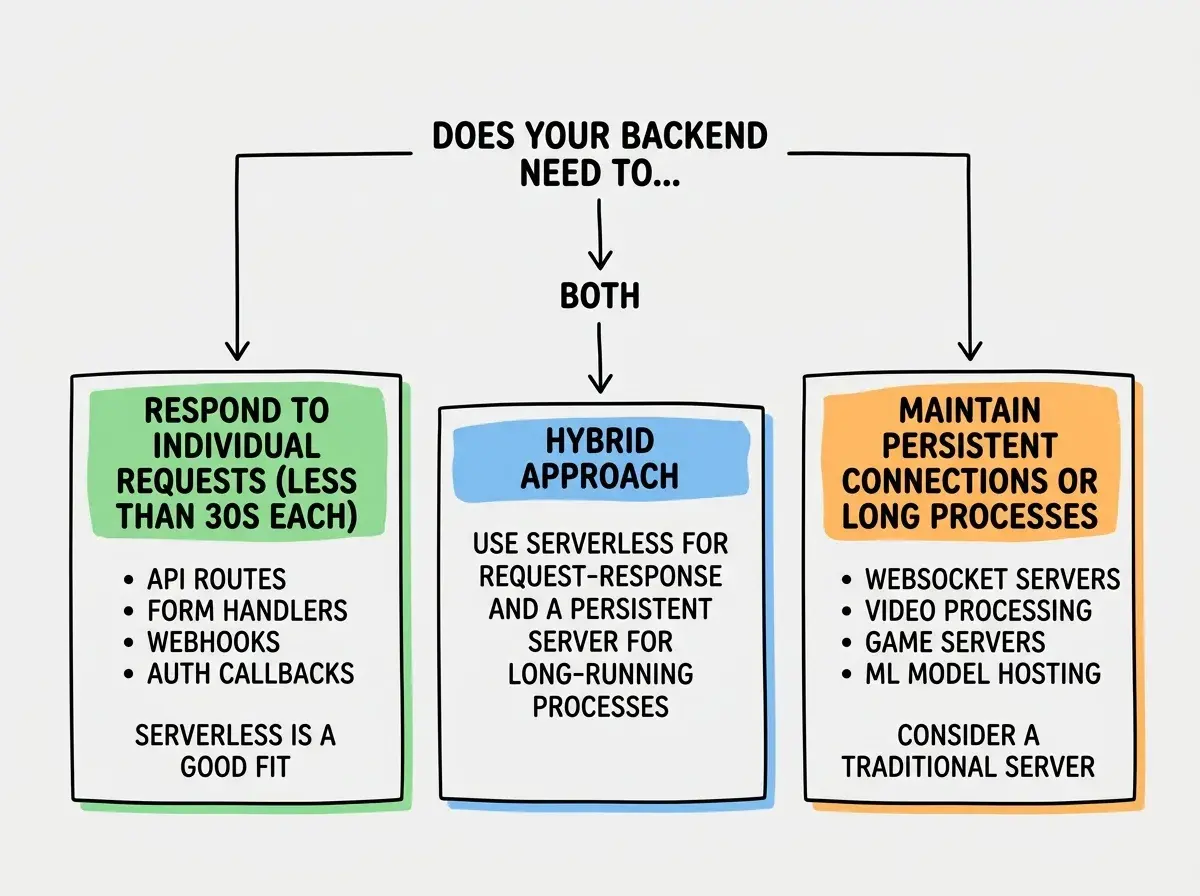
When Serverless Is the Wrong Choice
The vending machine has limits. It cannot cook you a five-course meal. It cannot hold a conversation. And it definitely cannot keep a WebSocket connection open for hours.
Long-running processes. Most serverless platforms enforce execution time limits. Vercel caps at 60 seconds on Pro (10 on Hobby). Cloudflare Workers get 30 seconds on the paid plan. If your function needs to process a large video or run a multi-minute workflow, serverless will kill it before it finishes.
WebSocket connections. Serverless functions are request-response. They receive a request, return a response, and die. Real-time features like live chat or collaborative editing need persistent connections that serverless cannot maintain. (Cloudflare Durable Objects are a notable exception, but a different abstraction entirely.)
Heavy compute or large memory. Serverless functions typically get limited memory (128 MB to 1 GB depending on plan). Image processing, PDF generation at scale, or data-intensive computation will either fail or cost more than a dedicated server.
Applications with persistent state. If your function needs to remember something between invocations (an in-memory cache, a running counter), serverless will disappoint you. Each invocation is a clean slate. You need external storage (a database, Redis, or an object store) for anything that persists.
The Cold Start Problem
Here is where the vending machine analogy reveals its weakness. Real vending machines are instant. Serverless functions are not always.
A cold start happens when a serverless function has not been invoked recently. The platform needs to spin up a new execution environment, load your code, initialize dependencies, and run your function. This can add 50ms to several seconds of latency, depending on the platform and how heavy your function is.
Cloudflare Workers have nearly eliminated cold starts. Because they run on V8 isolates (the same engine inside Chrome) rather than containers, startup time is under 5ms. This is the vending machine that is genuinely instant.
Vercel Serverless Functions run on AWS Lambda under the hood. Cold starts range from 200ms to 2+ seconds depending on your function's bundle size and the runtime. Edge Functions on Vercel are faster (they also use V8 isolates) but have a more limited API surface.
Netlify Functions also run on Lambda. Similar cold-start characteristics to Vercel, though Netlify has been investing in their Edge Functions offering to close the gap.
The practical impact: if your app has an API route that users hit after a period of inactivity, the first request will be noticeably slower. Subsequent requests reuse the warm environment and respond quickly.
You can mitigate cold starts by keeping functions warm with scheduled pings, reducing bundle size, or moving latency-sensitive endpoints to edge runtimes. But the best strategy is choosing the right platform for your workload. If sub-10ms matters, Cloudflare Workers win.
Learn which hosting platform fits your project before you commit.
Compare your optionsPricing Comparison That Actually Matters
Serverless pricing looks cheap until it is not. The vending machine charges per coin, and if a million people show up in one day, those coins add up fast.
Vercel charges based on invocations, execution duration, and bandwidth. The Hobby plan gives you 100 GB bandwidth and limited function usage for free. Pro at $20/user/month adds higher limits. But a viral moment can blow through those limits overnight, with surprise bills of $500+ after a single popular post.
Netlify is simpler. Pro at $19/month (flat, not per user) includes 25,000 serverless function invocations. Predictable, but the base invocation limit is low for any app with real traffic.
Cloudflare Workers Paid at $5/month includes 10 million requests. At the same volume, Vercel and Netlify would cost orders of magnitude more. The tradeoff is a rougher developer experience and some API limitations.
For most indie hackers building AI-assisted projects, Cloudflare Workers offers the best value. For teams deep in the Next.js ecosystem who value DX above cost, Vercel is the pragmatic choice. Netlify lands in the middle as the easiest on-ramp you may outgrow.
Choosing a serverless platform based only on its free tier. Free tiers are for validation, not production. Before you launch, calculate your expected request volume and check the per-invocation pricing at that scale. A platform that is free at 1,000 requests per day might cost $200/month at 100,000 requests per day, while another platform handles the same volume for $5 flat.
How AI Tools Generate Serverless Code by Default
When you ask an AI coding tool to "add a contact form with email sending" or "create an API endpoint for user registration," the generated code almost always targets a serverless runtime. This is not accidental. AI tools are trained on modern framework documentation where serverless is the default deployment target.
In Next.js, a file at app/api/contact/route.ts is automatically a serverless function on Vercel. The AI does not need to provision a server, configure Docker, or set up a process manager. It writes a function, exports it, and the framework handles deployment.
This is mostly a good thing. It means AI-generated backends are deployable with zero infrastructure knowledge. But the AI will not warn you when your use case does not fit the serverless model. If you ask it to build a WebSocket chat server and it generates API routes with polling, the result will work but perform terribly. You need enough understanding of serverless boundaries to catch these mismatches.
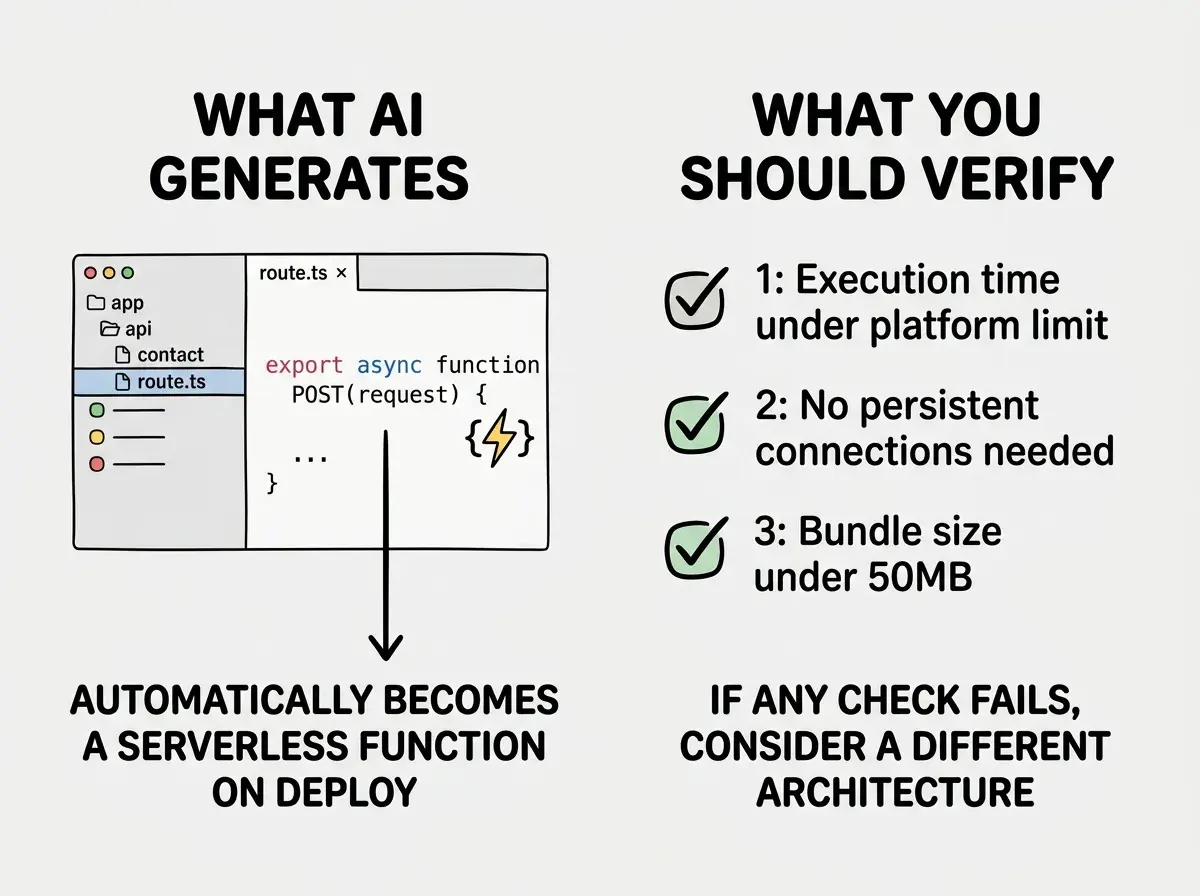
Practical Recommendations
Start serverless. For any new project, API routes and backend logic should be serverless by default. The cost, scaling, and operational benefits are too significant to ignore unless you have a specific reason to run a persistent server.
Monitor invocation counts from day one. Every platform has a dashboard showing function invocations and execution time. Check it weekly. A misconfigured client-side polling loop can generate thousands of unnecessary invocations and inflate your bill.
Keep functions small. Smaller bundles mean faster cold starts. Avoid importing heavy libraries in serverless functions. If you need Sharp for image processing, run it in a build step, not a serverless function.
Use edge functions for latency-sensitive routes. Auth checks, redirects, and A/B test assignments benefit from running at the edge. Vercel Edge Functions and Cloudflare Workers both offer sub-10ms cold starts.
Plan your escape hatch. If your function hits time limits or needs persistent connections, know how to migrate that endpoint to a long-running service (Fly.io, Railway, or Cloudflare Durable Objects) without rewriting your entire app.
The vending machine model works for the vast majority of what AI-assisted developers build. Forms, APIs, webhooks, data fetching, authentication flows. Know the edges of the model, plan for the exceptions, and you avoid the infrastructure complexity that serverless was designed to eliminate.
Start with the fundamentals of AI-assisted development.
Get started