Connecting external APIs is something every developer does, yet most of us get it wrong in the same predictable ways. We fire off a fetch call, assume it works, and move on. Then production traffic hits, a third-party server goes down for twenty minutes, and our app crumbles because we never considered that the other end might not pick up.
Think of every API call like making a phone call. You need the right number (the endpoint), you need to know what to say (the request format), the line might be busy (rate limits), and sometimes you just get disconnected mid-conversation (timeouts). Once you internalize that analogy, the patterns in this guide become obvious. You would never make an important phone call without a backup plan for a dropped connection. Your API integrations deserve the same respect.
With 92% of developers now using AI tools daily, the number of external API calls in a typical app has exploded. You are probably hitting OpenAI, Stripe, Twilio, and a mapping service all from the same codebase. Each one is another phone line that can go dead at any moment.
The Fetch and Axios Decision
JavaScript gives you two main options for making API calls: the built-in fetch API and the axios library. Here is how they compare for real-world use.
// Native fetch - available everywhere, no dependencies
const response = await fetch('https://api.example.com/data', {
  method: 'GET',
  headers: {
    'Authorization': `Bearer ${process.env.API_KEY}`,
    'Content-Type': 'application/json',
  },
});

if (!response.ok) {
  throw new Error(`API returned ${response.status}: ${response.statusText}`);
}

const data = await response.json();
The biggest gotcha with fetch is that it does not throw on HTTP errors. A 500 response is still a "successful" network request from fetch's perspective. You must check response.ok yourself. It is like dialing a number and hearing a recorded message that the office is closed. The call connected, but you did not get what you needed.
// Axios - auto-throws on non-2xx, built-in timeout support
import axios from 'axios';

const { data } = await axios.get('https://api.example.com/data', {
  headers: { 'Authorization': `Bearer ${process.env.API_KEY}` },
  timeout: 5000,
});
Axios throws automatically on error status codes and supports timeouts out of the box. For most projects, start with native fetch wrapped in a utility function. You avoid a dependency and learn what is actually happening. If your project grows to 10+ integrations, axios with interceptors starts earning its keep.

Building a Resilient API Wrapper
Rather than scattering raw fetch calls throughout your codebase, build a single wrapper that handles the common failure modes. Think of it as programming your phone to automatically redial, leave a voicemail, and send a text if the call does not go through.
interface ApiOptions {
  timeout?: number;
  retries?: number;
  retryDelay?: number;
}

async function apiCall<T>(
  url: string,
  options: RequestInit & ApiOptions = {}
): Promise<T> {
  const {
    timeout = 5000,
    retries = 3,
    retryDelay = 1000,
    ...fetchOptions
  } = options;

  for (let attempt = 0; attempt <= retries; attempt++) {
    const controller = new AbortController();
    const timeoutId = setTimeout(() => controller.abort(), timeout);

    try {
      const response = await fetch(url, {
        ...fetchOptions,
        signal: controller.signal,
      });

      clearTimeout(timeoutId);

      if (!response.ok) {
        // Don't retry client errors (4xx) except 429
        if (response.status >= 400 && response.status < 500 && response.status !== 429) {
          const errorBody = await response.text();
          throw new Error(`Client error ${response.status}: ${errorBody}`);
        }
        throw new Error(`Server error ${response.status}`);
      }

      return await response.json() as T;
    } catch (error) {
      clearTimeout(timeoutId);

      if (attempt === retries) throw error;

      // Exponential backoff: 1s, 2s, 4s
      const delay = retryDelay * Math.pow(2, attempt);
      await new Promise(resolve => setTimeout(resolve, delay));
    }
  }

  throw new Error('Unreachable');
}
This wrapper handles three critical things: timeouts (so a slow API does not hang your entire app), retries with exponential backoff (so temporary blips resolve themselves), and smart error classification (so you do not waste retries on permanent failures like a 404).
Never retry 4xx client errors except 429 (rate limited). A 400 Bad Request or 401 Unauthorized will fail the same way every time. Retrying them wastes time and can trigger rate limits. Only retry 5xx server errors and network failures, because those are temporary problems on the other end of the line.
Retries With Exponential Backoff
When a call drops, you do not immediately redial fifty times in a row. You wait a moment, try again, wait longer, and try once more. Exponential backoff follows the same logic.
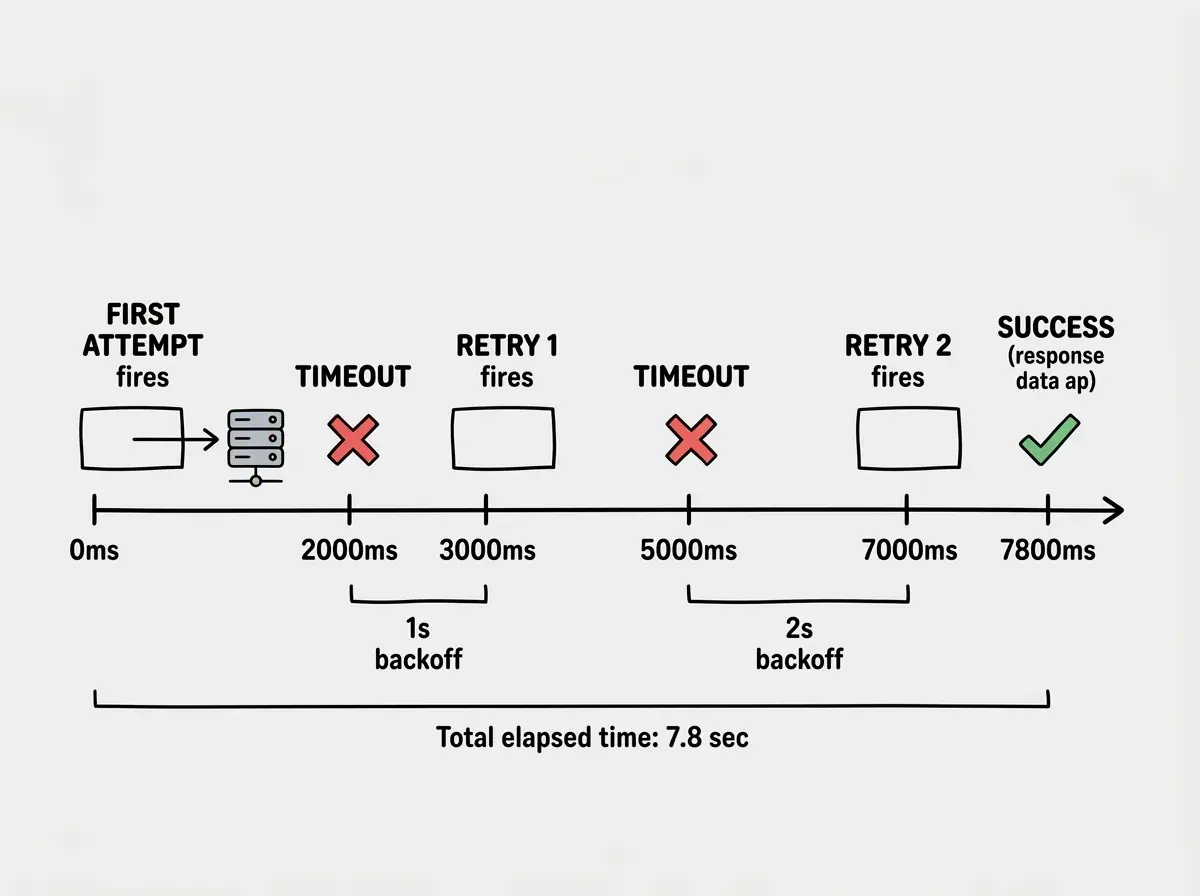
The math is simple: delay = baseDelay * 2^attempt. With a 1-second base delay, your retries fire at 1 second, 2 seconds, and 4 seconds. Adding random jitter prevents the "thundering herd" problem, where hundreds of clients retry at the exact same moment and overwhelm the recovering server.
function getBackoffDelay(attempt: number, baseDelay = 1000): number {
  const exponentialDelay = baseDelay * Math.pow(2, attempt);
  const jitter = Math.random() * 500;
  return exponentialDelay + jitter;
}
Three retries with exponential backoff resolves 95% of temporary API failures. Going beyond three rarely helps. At that point the service has a real outage, and you need a fallback strategy, not more retries.
Keeping API Keys Secure
Your API key is like your phone's PIN. If someone else gets it, they make calls on your dime.
Never put API keys in client-side code. Not in environment variables prefixed with NEXT_PUBLIC_, not in a JavaScript bundle, not in a mobile app. If the key leaves your server, assume it is compromised.
// WRONG - key exposed to the browser
const data = await fetch('https://api.openai.com/v1/chat/completions', {
  headers: { 'Authorization': `Bearer ${process.env.NEXT_PUBLIC_OPENAI_KEY}` }
});

// RIGHT - proxy through your own API route
// Client calls your server
const data = await fetch('/api/ai/generate', {
  method: 'POST',
  body: JSON.stringify({ prompt: userInput })
});

// Server-side API route uses the key
// app/api/ai/generate/route.ts
const response = await fetch('https://api.openai.com/v1/chat/completions', {
  headers: { 'Authorization': `Bearer ${process.env.OPENAI_KEY}` }
});
Always proxy sensitive API calls through your backend. Your server holds the key, validates the request, and forwards it. The user never sees the key, and you get a single place for rate limiting, logging, and cost controls.
Handling Rate Limits Gracefully
Rate limits are the busy signal of APIs. The server is telling you to call back later. Most APIs communicate this through a 429 status code and a Retry-After header.
async function rateLimitAwareCall<T>(url: string, options: RequestInit = {}): Promise<T> {
  const response = await fetch(url, options);

  if (response.status === 429) {
    const retryAfter = response.headers.get('Retry-After');
    const waitMs = retryAfter
      ? parseInt(retryAfter, 10) * 1000
      : 10000; // Default 10 seconds

    console.warn(`Rate limited. Waiting ${waitMs}ms before retry.`);
    await new Promise(resolve => setTimeout(resolve, waitMs));

    return rateLimitAwareCall<T>(url, options);
  }

  if (!response.ok) {
    throw new Error(`API error: ${response.status}`);
  }

  return response.json() as Promise<T>;
}
For high-volume integrations, implement a token bucket on your side so you never hit the limit in the first place. Pacing your calls is always better than getting the busy signal.
Ignoring the Retry-After header and using a fixed delay instead. When a server tells you to wait 30 seconds, waiting only 2 seconds and retrying will get you rate-limited again, and some APIs will temporarily ban your key after repeated violations. Always respect the header when it is present.
Timeout Configuration That Actually Works
Timeouts prevent a single slow API from making your entire app feel frozen. It is the equivalent of deciding "if nobody picks up after five rings, I am hanging up and trying something else."
Different types of API calls need different timeouts. A payment processing call to Stripe might legitimately take 10 seconds. A geocoding lookup should finish in 2 seconds. A health check should respond in under 500 milliseconds.
const TIMEOUTS = {
  fast: 2000,      // Geocoding, feature flags, lookups
  standard: 5000,  // Most CRUD operations
  slow: 15000,     // Payment processing, file uploads
  ai: 30000,       // AI model inference (can be genuinely slow)
} as const;

// Use with the wrapper
const location = await apiCall<GeoResult>(
  'https://api.mapbox.com/geocoding/v5/...',
  { timeout: TIMEOUTS.fast }
);

const completion = await apiCall<AIResponse>(
  'https://api.openai.com/v1/chat/completions',
  { timeout: TIMEOUTS.ai, retries: 2 }
);
Set your default timeout to 5 seconds. That is long enough for nearly every well-built API to respond, and short enough that your users are not staring at a spinner. Adjust per-integration based on what you observe in production, not what you guess during development.
Get the integration patterns right from the start so your app stays reliable at scale.
See all tutorialsHere is what the full retry timeline looks like when all these pieces work together.
Putting It All Together
Here is the complete pattern for a production-ready API integration.
// lib/api-client.ts
export async function callExternalApi<T>(
  url: string,
  options: RequestInit & ApiOptions = {}
): Promise<{ data: T | null; error: string | null }> {
  try {
    const data = await apiCall<T>(url, {
      timeout: 5000,
      retries: 3,
      retryDelay: 1000,
      ...options,
    });
    return { data, error: null };
  } catch (err) {
    console.error(`API call failed: ${url}`, err);
    return {
      data: null,
      error: err instanceof Error ? err.message : 'Unknown error',
    };
  }
}

// Usage in your app
const { data: user, error } = await callExternalApi<User>(
  'https://api.example.com/users/123',
  { headers: { 'Authorization': `Bearer ${token}` } }
);

if (error) {
  // Show fallback UI, cached data, or a helpful error message
  // Never show raw API errors to end users
}
The { data, error } return pattern forces every caller to consider the failure case. No unhandled promise rejections, no "it works on my machine" surprises.
What This Means For You
Connecting external APIs reliably is not about writing perfect code. It is about assuming the phone line will drop and having a plan for when it does. Wrap every external call in a utility with timeouts, retries, and proper error classification. Keep API keys on the server. Respect rate limits. Set timeouts that match the actual performance of each service.
Your app should be the reliable one in the chain, even when every other service is having a bad day.
Explore practical tutorials on shipping production-ready features without the guesswork.
Browse all guides