Server-side rendering vs static generation is the rendering decision that shapes every Next.js application you build. With 92% of developers using AI tools daily, most of us accept whatever rendering strategy our AI coding assistant picks without questioning it. That default choice affects page speed, server costs, and user experience for the lifetime of your app.
Think of it like running a restaurant kitchen. You can cook every dish to order when a customer sits down (server-side rendering). Or you can pre-make meals during off-hours, keep them on a warming tray, and serve them instantly when someone walks in (static generation). Both approaches feed your customers, but the right choice depends on what kind of restaurant you are running.
The Restaurant Kitchen Analogy
Before diving into code, let this analogy settle in because it will frame every decision we cover.
Server-side rendering (SSR) is a cook-to-order kitchen. Every request fires up the stove, gathers fresh ingredients (data), cooks the meal (renders HTML), and serves it. The customer gets the freshest dish but waits while it cooks, and your kitchen needs enough chefs for the dinner rush.
Static generation (SSG) is a pre-made meal service. You cook everything during prep time (the build step), arrange dishes on warming trays (CDN edge nodes), and hand customers a plate instantly. No cooking delay, no bottleneck. But the meals were made hours ago, and changing the menu means going back to the kitchen.
Incremental Static Regeneration (ISR) is the middle ground. You pre-make most meals but put a timer on each one. When the timer expires and someone orders that dish, you serve the existing plate while a chef quietly cooks a fresh version in the background. Next customer gets the updated dish.
Your rendering strategy is not a religious choice. It is a per-page decision. A single Next.js app can use SSR for the dashboard, SSG for marketing pages, and ISR for the blog. The App Router makes mixing strategies straightforward, and the best apps use all three where each one fits.
How SSR Works in the App Router
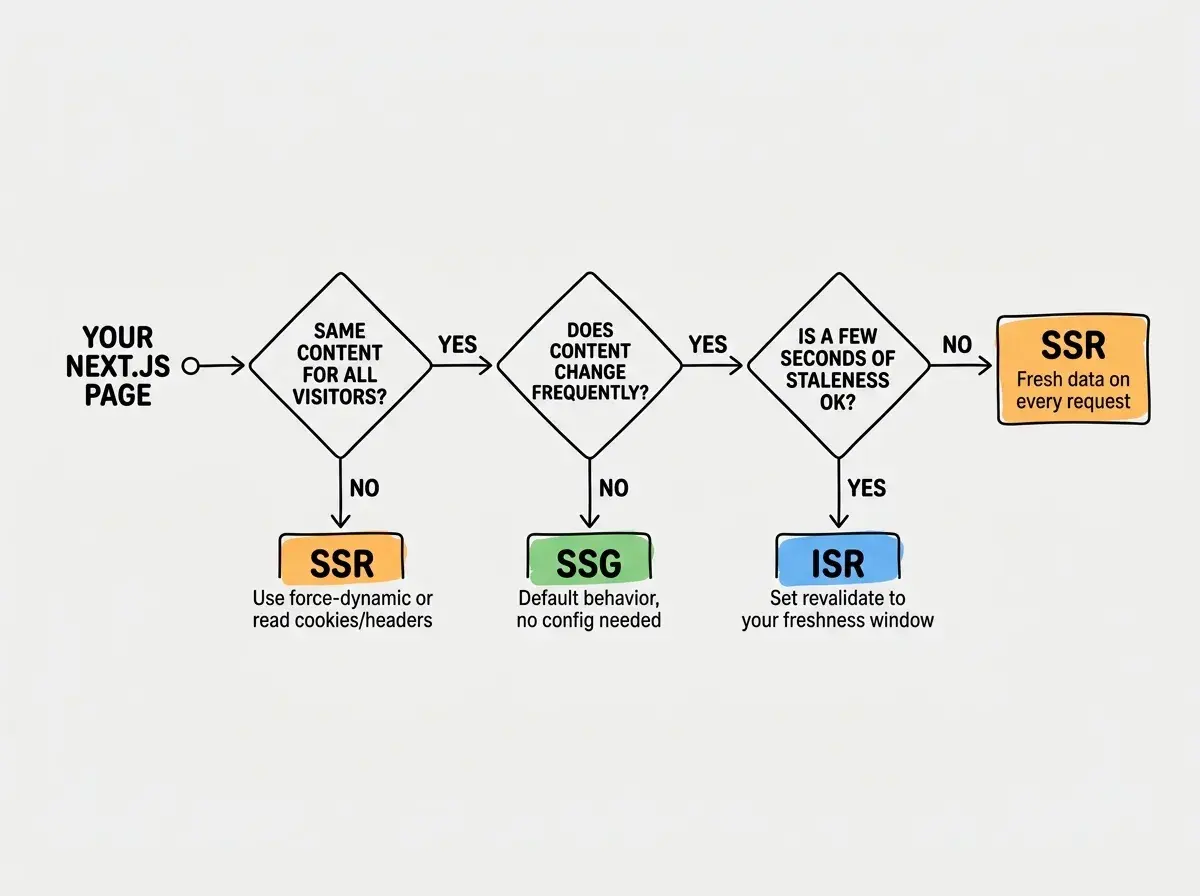
In the App Router, a page becomes server-rendered when it uses dynamic data that cannot be known at build time. This happens automatically when your component calls cookies(), headers(), or uses searchParams. You can also force it explicitly.
// app/dashboard/page.tsx
// This page renders on every request because it reads cookies
import { cookies } from 'next/headers'

export const dynamic = 'force-dynamic'

export default async function DashboardPage() {
  const cookieStore = await cookies()
  const sessionToken = cookieStore.get('session')

  const userData = await fetch('https://api.example.com/user', {
    headers: { Authorization: `Bearer ${sessionToken?.value}` },
  })
  const user = await userData.json()

  return (
    <main>
      <h1>Welcome back, {user.name}</h1>
      <p>Your subscription renews on {user.renewalDate}</p>
    </main>
  )
}
Every time someone hits /dashboard, the server runs this function, fetches fresh user data, and sends back personalized HTML. The cook-to-order kitchen is working.
When SSR is your best choice:
- User-specific pages (dashboards, account settings, personalized feeds)
- Pages that depend on request-time data (cookies, auth tokens, geolocation)
- Real-time data that must never be stale (stock prices, live scores)
- Search results pages where the query changes every request
The tradeoff is latency. Your server does real work on every request. Under heavy traffic, that kitchen gets slammed. You need proper caching headers, edge deployment, or both to keep response times acceptable.
How Static Generation Works in the App Router
Static generation is the default in the App Router. If your component does not use any dynamic functions, Next.js pre-renders it at build time automatically. The result is plain HTML on a CDN, ready to serve in milliseconds.
// app/about/page.tsx
// This page is statically generated at build time
export default function AboutPage() {
  return (
    <main>
      <h1>About Our Company</h1>
      <p>We have been building developer tools since 2024.</p>
    </main>
  )
}
For pages with dynamic routes, generateStaticParams tells Next.js which pages to pre-build.
// app/blog/[slug]/page.tsx
export async function generateStaticParams() {
  const posts = await fetch('https://api.example.com/posts').then(r => r.json())
  return posts.map((post: { slug: string }) => ({ slug: post.slug }))
}

export default async function BlogPost({
  params,
}: {
  params: Promise<{ slug: string }>
}) {
  const { slug } = await params
  const post = await fetch(`https://api.example.com/posts/${slug}`).then(r =>
    r.json()
  )

  return (
    <article>
      <h1>{post.title}</h1>
      <div>{post.content}</div>
    </article>
  )
}
At build time, Next.js fetches every post, renders the HTML, and stores it. When a visitor arrives, the CDN serves the pre-built page instantly. The warming tray is stocked and ready.
When SSG is your best choice:
- Marketing pages, landing pages, and about pages
- Blog posts and documentation that update infrequently
- Product listing pages where content updates happen through deploys
- Any page where the same content serves every visitor
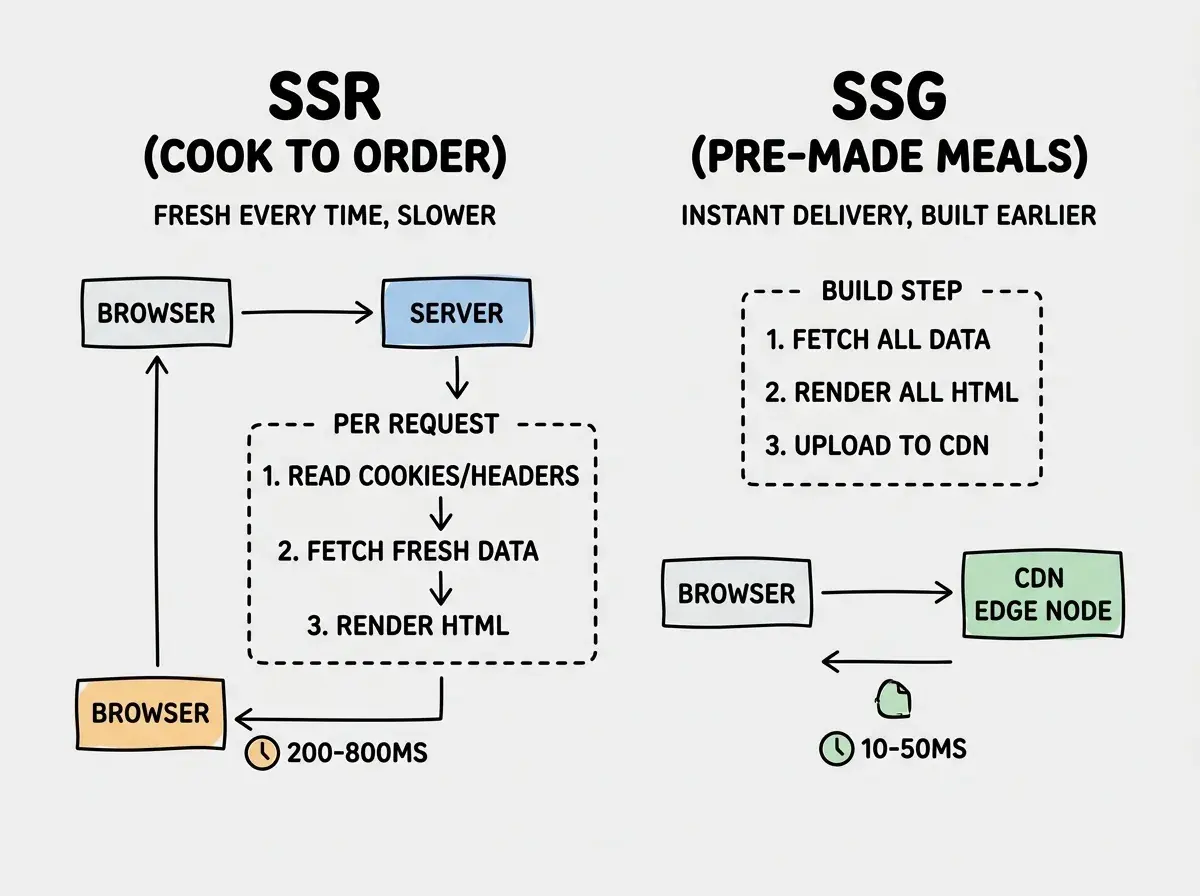
The tradeoff is staleness. If you publish a new blog post, it will not appear until you trigger a new build. For content that changes once a day, that is fine. For content that changes every few minutes, that is a problem.
ISR as the Middle Ground
ISR gives you static speed with a freshness guarantee. You tell Next.js how long a page stays valid, and it handles the rest.
// app/products/[id]/page.tsx
// ISR: revalidate every 60 seconds
export const revalidate = 60

export default async function ProductPage({
  params,
}: {
  params: Promise<{ id: string }>
}) {
  const { id } = await params
  const product = await fetch(`https://api.example.com/products/${id}`).then(
    r => r.json()
  )

  return (
    <main>
      <h1>{product.name}</h1>
      <p>{product.price}</p>
      <p>In stock: {product.inventory}</p>
    </main>
  )
}
Setting revalidate = 60 means the page serves from cache for 60 seconds. After that window, the next visitor gets the cached version (still fast) while Next.js regenerates in the background. The following visitor gets the fresh version. The warming tray refills itself on a timer.
You can also trigger revalidation on demand using revalidatePath or revalidateTag. This is like telling the kitchen "re-prep that dish now" instead of waiting for the timer.
// app/actions.ts
'use server'

import { revalidatePath } from 'next/cache'

export async function updateProduct(id: string, data: ProductData) {
  await fetch(`https://api.example.com/products/${id}`, {
    method: 'PUT',
    body: JSON.stringify(data),
  })

  revalidatePath(`/products/${id}`)
}
When ISR is your best choice:
- E-commerce product pages (prices and inventory change but not every second)
- Blog platforms where posts update occasionally
- News sites where articles are edited after publishing
- Any page where seconds of staleness is fine but hours of staleness is not
Setting revalidate = 0 thinking it means "always fresh." In the App Router, revalidate = 0 actually means the page is dynamically rendered on every request, identical to SSR. If you want ISR, use a positive number. If you want true SSR behavior, use export const dynamic = 'force-dynamic' to make your intent clear instead of relying on a confusing zero value.
How AI Tools Choose Your Rendering Strategy
When you prompt Cursor, Claude Code, or similar tools to "build a blog" or "create a dashboard," the rendering strategy gets chosen implicitly based on the code the AI generates.
AI tools overwhelmingly default to SSR. Most AI-generated Next.js code includes cookies(), headers(), or uncached fetch calls because the training data is full of dynamic examples. The AI is not making an architectural decision. It is pattern-matching against the most common code it has seen.
This means your AI-generated app is probably cooking every page to order even when warming trays would work better. A blog listing page does not need to re-render on every request. A pricing page that changes monthly should not hit your server every time someone loads it.
How to override the defaults:
- After your AI generates a page, ask whether the content is the same for every visitor
- If yes, check whether the component uses
cookies(),headers(), orsearchParams - If the page fetches data that changes periodically, add
export const revalidate = 3600 - If the page is truly personalized per user, SSR is correct
A quick audit of your AI-generated pages can cut server costs significantly. Converting even five SSR pages to SSG eliminates hundreds of thousands of unnecessary server-side renders per month.
Get rendering strategy right from the start with our practical guides.
Explore Next.js guidesMixing Strategies in One App
The real power of the App Router is that rendering strategy is a per-route decision. A production app should use all three.
| Page | Strategy | Why |
|---|---|---|
/ (homepage) | ISR (revalidate: 3600) | Content changes when posts publish, hourly freshness is fine |
/blog/[slug] | SSG with on-demand revalidation | Blog posts rarely change, rebuild only when edited |
/dashboard | SSR | Personalized per user, must read auth cookies |
/pricing | SSG | Changes maybe once a quarter, fully static |
/search | SSR | Depends on query params, different every request |
/products/[id] | ISR (revalidate: 60) | Inventory changes, a minute of staleness is acceptable |
Your restaurant does not need to cook every dish to order if half the menu is better served from the warming tray.
What This Means For You
The rendering decision is a freshness-vs-speed tradeoff, and the right answer changes page by page.
If you are building with AI tools, your first job after generating code is to audit what rendering strategy each page uses. Most AI-generated apps over-use SSR because the training data skews dynamic. Converting pages to SSG or ISR is one of the highest-impact performance optimizations you can make, and it usually takes less than five minutes per page.
Ask the question you would ask in any kitchen. Does this dish need to be cooked fresh for every customer? If not, prep it ahead, keep it warm, and save the stove for meals that truly need it.
Learn how to combine rendering strategies with caching for maximum performance.
Read performance guides