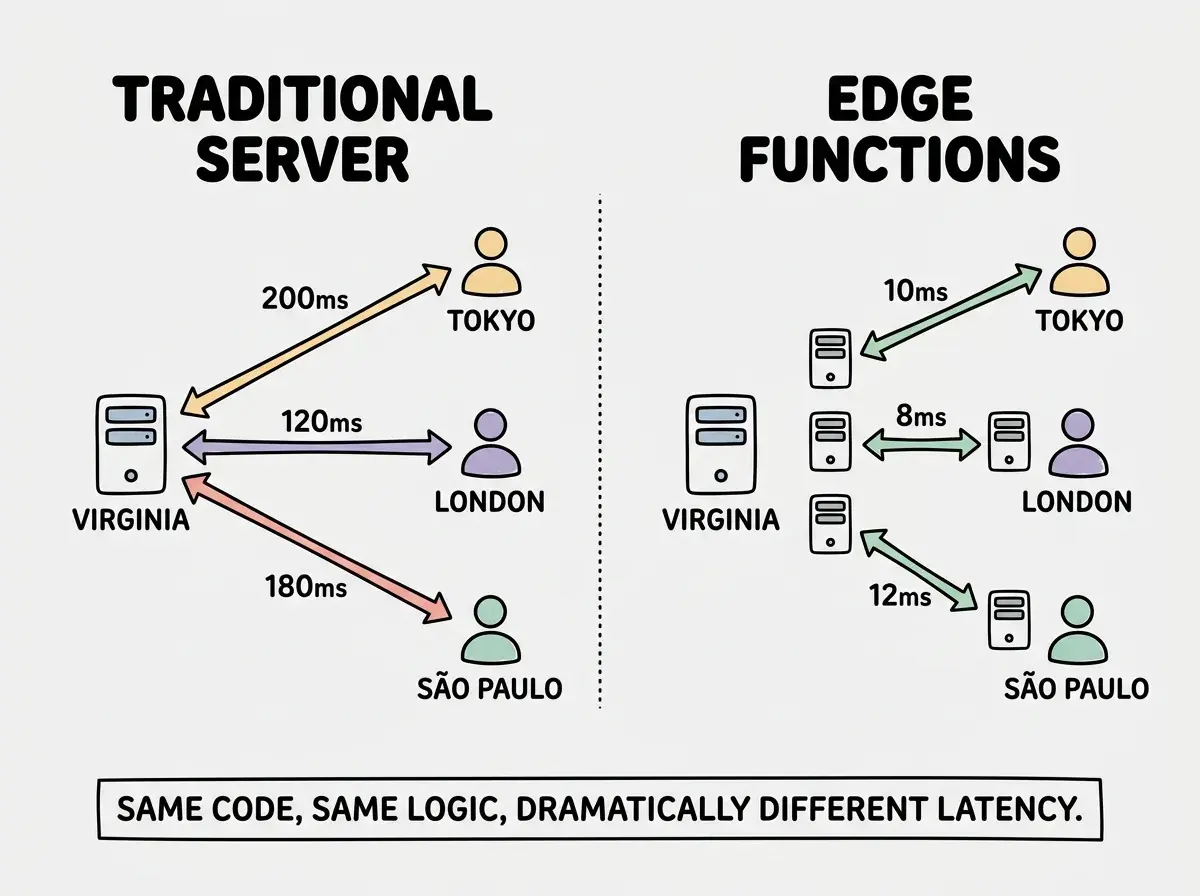
Edge functions are one of those concepts that sound abstract until you see the numbers. A user in Tokyo makes a request. Your server sits in Virginia. That request travels 11,000 kilometers, hits the server, runs your logic, and travels 11,000 kilometers back. Round-trip latency alone is 150 to 200 milliseconds before your code even starts executing. Multiply that by every API call, every page load, every authenticated action, and your app feels sluggish for anyone not near your data center.
Edge functions fix this by running your server-side code on machines distributed across the globe. Instead of one origin server handling everything, your code executes at the nearest edge location. That Tokyo user hits a server in Tokyo. The London user hits London. Response times drop from hundreds of milliseconds to single digits.
Think of it like a chain of local coffee shops versus one central warehouse. A traditional server is the warehouse, shipping every order from one location no matter where the customer lives. Edge functions are like having a barista in every city. The customer walks in, orders, and gets their drink without waiting for cross-country shipment. Same menu everywhere, identical recipes, but the coffee is made right where the customer is standing.
What Edge Functions Actually Do
An edge function is server-side code that runs on a distributed network of servers (often called "points of presence" or PoPs) instead of a single origin. When a request comes in, the network routes it to the nearest PoP, which executes your function and returns the response.
This is different from a CDN serving static files. A CDN caches and delivers pre-generated HTML, CSS, and JavaScript. Edge functions run dynamic logic. They can read cookies, authenticate users, rewrite URLs, fetch data from APIs, personalize content, and return different responses based on geolocation or request bodies.
The key constraint is that edge functions run in a lightweight runtime, not full Node.js. Most edge platforms use V8 isolates (the JavaScript engine from Chrome) rather than containers or VMs. Startup times are measured in milliseconds instead of seconds, but certain Node.js APIs and npm packages are unavailable. More on those limitations later.
92% of developers now use AI coding tools daily, meaning more apps ship faster and default to whatever deployment target the framework provides. If your framework defaults to edge rendering, understanding what that means and where it breaks matters.
The Big Three Platforms Compared
Three platforms dominate the edge function space right now. Each takes a different approach to the same core idea.
Cloudflare Workers
Cloudflare Workers run on 300+ locations worldwide using V8 isolates. Cold starts are effectively zero because isolates spin up in under 5 milliseconds. The free tier gives you 100,000 requests per day, and the paid plan ($5/month) removes most limits.
Workers use a custom runtime that supports Web Standard APIs (fetch, Request, Response, crypto) but not the full Node.js standard library. You cannot use fs, child_process, or packages that depend on them. Cloudflare has been adding Node.js compatibility through their nodejs_compat flag, but gaps remain. Workers pair naturally with Cloudflare's ecosystem: R2 for storage, D1 for SQLite, KV for key-value data, and Durable Objects for stateful coordination.
Going back to the coffee shop analogy, Cloudflare Workers are the chain that already has locations in every city and neighborhood. The infrastructure is everywhere before you even sign up.
Vercel Edge Functions
Vercel Edge Functions are built on Cloudflare's network but wrapped in Vercel's developer experience. Deploy a Next.js app to Vercel, export runtime = 'edge' from a route, and that route runs as an edge function automatically.
The DX is the selling point. You write standard Next.js API routes or middleware, add the edge runtime export, and Vercel handles deployment. The tradeoff is less infrastructure control and a per-invocation pricing model that can scale quickly for high-traffic apps.
Vercel Edge Middleware is particularly useful. It runs before every request, letting you handle authentication, A/B testing, and geolocation routing at the edge without touching your application code.
Deno Deploy
Deno Deploy takes Deno's secure-by-default runtime and distributes it globally. It supports TypeScript natively, uses Web Standard APIs, and runs across 35+ regions. The runtime is closer to a full server environment than Workers, which means broader npm compatibility.
Deno Deploy works well for standalone APIs and microservices. It is less tightly integrated with frontend frameworks, though Fresh (Deno's web framework) deploys to it natively. The free tier includes 1 million requests per month, generous for side projects and prototypes.
If Cloudflare is the massive chain with a location everywhere, Deno Deploy is the boutique roaster that offers a more opinionated experience with a smaller but carefully chosen set of locations.
All three platforms run JavaScript/TypeScript at the edge using lightweight runtimes. The differences are ecosystem integration, pricing, and Node.js compatibility. If you already use Cloudflare for DNS or CDN, Workers are the natural fit. If you deploy Next.js to Vercel, their edge functions integrate with zero config. If you prefer Deno's runtime model, Deno Deploy gives you the most flexibility. Pick the one that matches your existing stack rather than migrating for marginal latency gains.
When Edge Functions Shine
Not every workload belongs at the edge. The best use cases share a common trait: they benefit from low latency and do not depend on a centralized database.
Authentication and session validation. Checking a JWT or session token at the edge means unauthenticated requests never reach your origin. Faster and more secure. The barista checks your loyalty card at the counter instead of calling headquarters to verify it.
Geolocation-based routing. Edge functions know where the request originates. You can serve different content, redirect to regional subdomains, or enforce geographic restrictions without an extra round trip.
A/B testing and feature flags. Running experiment logic at the edge means users get their assigned variant on the first request, no layout shift or flash of default content. The decision happens before the page starts rendering.
API rate limiting and bot detection. Blocking abusive traffic at the edge prevents it from consuming origin resources. Your coffee shop bouncer is at the door, not in the kitchen.
Personalization and content transformation. Rewriting HTML or transforming API responses at the edge reduces time-to-first-byte for personalized experiences.
The Limitations You Will Hit
Edge functions have real constraints, and vibe-coded apps hit them more often because AI tools generate code without considering runtime restrictions.
No filesystem access. You cannot read or write files. If your AI generated code that uses fs.readFileSync to load a config file, it will fail at the edge. Bundle those resources into your code or fetch them from an external store.
Limited Node.js API support. Packages that depend on net, dgram, child_process, or native C++ addons will not work. This rules out many database drivers, image processing libraries (like Sharp), and some auth packages. Always check that your dependencies are edge-compatible before deploying.
Database latency. Your code runs close to the user, but your database probably sits in one region. An edge function in Tokyo querying Postgres in Virginia still incurs that cross-Pacific round trip. The solution is either a globally distributed database (PlanetScale, CockroachDB, Turso) or aggressive caching at the edge using KV stores.
Execution time limits. Most edge platforms cap execution at 30 seconds or less (Cloudflare Workers free tier is 10ms CPU time, paid is 30 seconds). Long-running tasks like PDF generation or video processing need a different approach.
Bundle size limits. Cloudflare Workers have a 3 MiB compressed limit on the free tier (10 MiB paid). Vercel Edge Functions cap at 4 MiB. Heavy dependencies push you over fast, especially if your AI tool pulled in a kitchen-sink utility library.
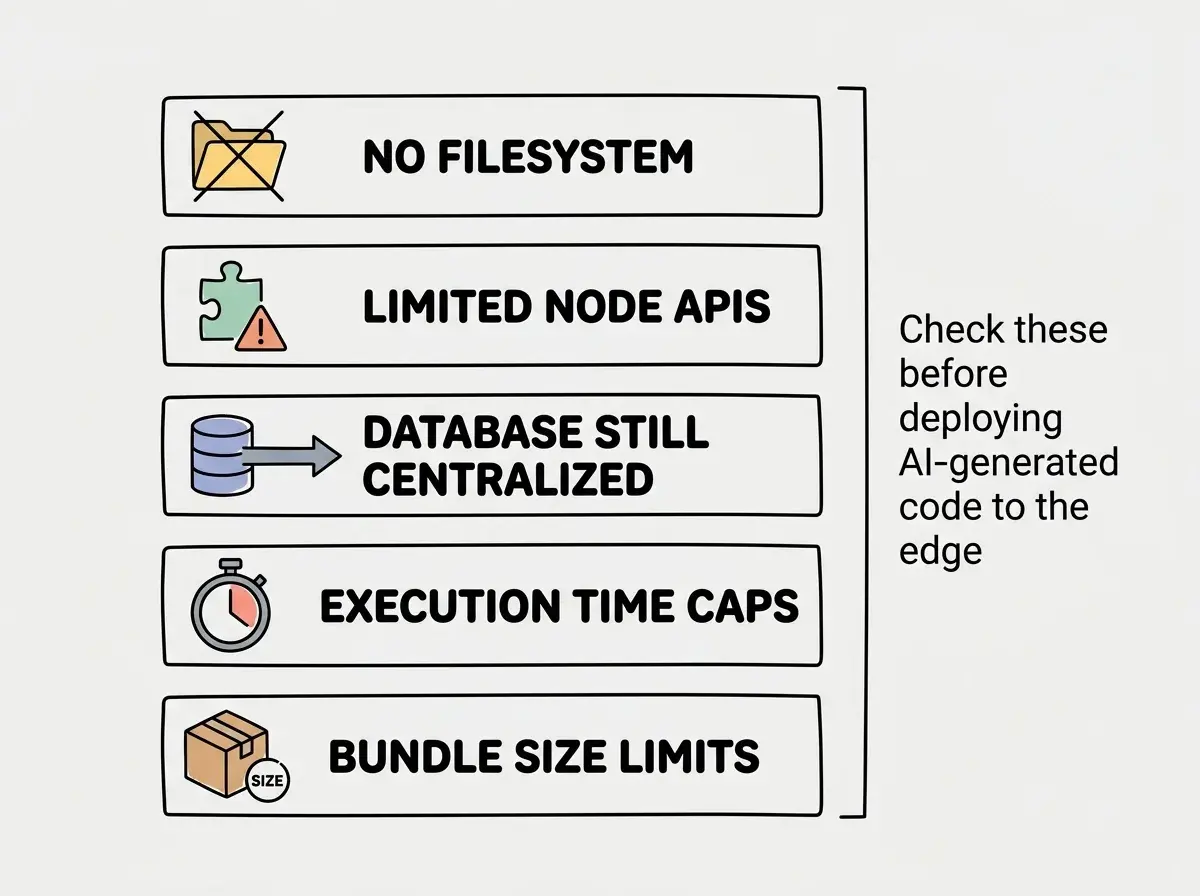
These constraints compound. An AI tool might generate a working API route that imports three packages, each pulling in Node.js-only dependencies. Locally everything runs. On the edge, it falls apart.
Deploying AI-generated API routes to the edge without checking dependencies. Your AI tool does not know whether the packages it chose are edge-compatible. A common failure is importing an ORM like Prisma without the edge adapter, or using a Node.js-only auth library. The build succeeds locally because your machine has full Node.js, but the edge deployment crashes with cryptic errors about missing modules. Always test your edge functions against the actual edge runtime, not just your local dev server.
Making Edge Functions Work in Your Stack
If you are building with Next.js, start with edge middleware for auth checks and geolocation. Keep data-heavy API routes on the Node.js runtime and move stateless, latency-sensitive logic to the edge.
If you are building an API-first app, Cloudflare Workers with D1 or Turso give you a globally distributed stack top to bottom. Both your edge function and database are distributed, so the latency advantage holds for every request.
The general rule: put your edge functions between the user and your origin, not as a replacement for your origin. They are the barista taking orders and making drinks on the menu. Complex custom orders still go to the kitchen.
See how we deploy a Next.js app to Cloudflare Workers with R2 storage and edge caching.
Read the deployment guideWhere This Goes Next
Edge functions are becoming the default, not the exception. Next.js 15+ defaults middleware to the edge. Remix and SvelteKit route loaders can target edge runtimes. Cloudflare and Deno are expanding Node.js compatibility, so the "limited APIs" problem shrinks with every release.
WebAssembly at the edge is the next frontier. Running Rust, Go, or Python compiled to Wasm opens up use cases JavaScript cannot handle efficiently: image processing, ML inference, and data transformation at wire speed.
For vibe coders, this matters because the frameworks your AI tools target are increasingly edge-first. Understanding the tradeoffs means you can review what your AI generates and catch problems before your users do.
What This Means for You
The gap between "works locally" and "fast globally" comes down to where your code runs. Edge functions close that gap by putting logic next to your users instead of behind a single origin.
Start with one edge function. Move your auth middleware to the edge, measure the latency difference, and once you see response times drop from 200ms to 20ms you will understand why every major platform is betting on this model. The baristas are ready in every city. The question is whether you are sending orders to them or still shipping from the warehouse.
Follow our step-by-step guide to deploying on Cloudflare Workers with zero cold starts.
Start building