Every request to your Next.js application passes through a single checkpoint before it reaches any page, API route, or static asset. That checkpoint is middleware. Think of it like the security checkpoint at an airport. Every passenger walks through the same scanners, the same ID verification, the same baggage check, regardless of whether they are heading to gate A1 or gate C47. The checkpoint decides who gets through, who gets redirected to a different terminal, and who gets turned away entirely.
With 92% of developers now using AI daily to build applications, middleware is often the last line of defense that actually runs your logic rather than generated boilerplate. Understanding the patterns that belong in this checkpoint is what separates a production-ready Next.js app from one that leaks data or serves the wrong content.
How Next.js Middleware Actually Works
Next.js middleware runs in a single file: middleware.ts (or middleware.js) at the root of your project. It executes on every matching request before the route handler or page component runs. The runtime is the Edge Runtime, which means you get a subset of Node.js APIs with extremely fast cold starts, but you cannot use Node.js-specific modules like fs or native database drivers.
Here is the minimal structure:
// middleware.ts
import { NextResponse } from 'next/server'
import type { NextRequest } from 'next/server'

export function middleware(request: NextRequest) {
  // Your checkpoint logic here
  return NextResponse.next()
}

export const config = {
  matcher: [
    '/((?!_next/static|_next/image|favicon.ico).*)',
  ],
}
The matcher config is critical. Without it, middleware runs on every single request, including static files, images, and Next.js internal routes. The regex pattern above excludes those, so your middleware only fires on actual page and API requests. This is like setting up your airport checkpoint in the terminal, not at the parking garage entrance.
Auth Middleware for Protected Routes
The most common middleware pattern is authentication gating. You check whether the user has a valid session before letting them reach protected pages. If they do not, you redirect them to the login page.
export function middleware(request: NextRequest) {
  const token = request.cookies.get('session-token')?.value
  const isProtectedRoute = request.nextUrl.pathname.startsWith('/dashboard')

  if (isProtectedRoute && !token) {
    const loginUrl = new URL('/login', request.url)
    loginUrl.searchParams.set('redirect', request.nextUrl.pathname)
    return NextResponse.redirect(loginUrl)
  }

  return NextResponse.next()
}
This pattern preserves the original URL in a redirect query parameter so the login page can send users back to where they were trying to go. The airport analogy holds: if you forgot your boarding pass, security sends you back to the check-in counter, not to the exit.
One important detail: middleware should only verify that a token exists and has a valid format. Heavy operations like database lookups or full JWT verification with remote key rotation should happen in your route handlers or server components. The checkpoint scans your boarding pass. The gate agent verifies your seat assignment.
Keep middleware lightweight. Validate token presence and basic structure at the edge, then do full authorization checks in your route handlers or server components. Middleware runs on every matched request, so expensive operations here multiply across your entire application.
Redirect and Rewrite Patterns
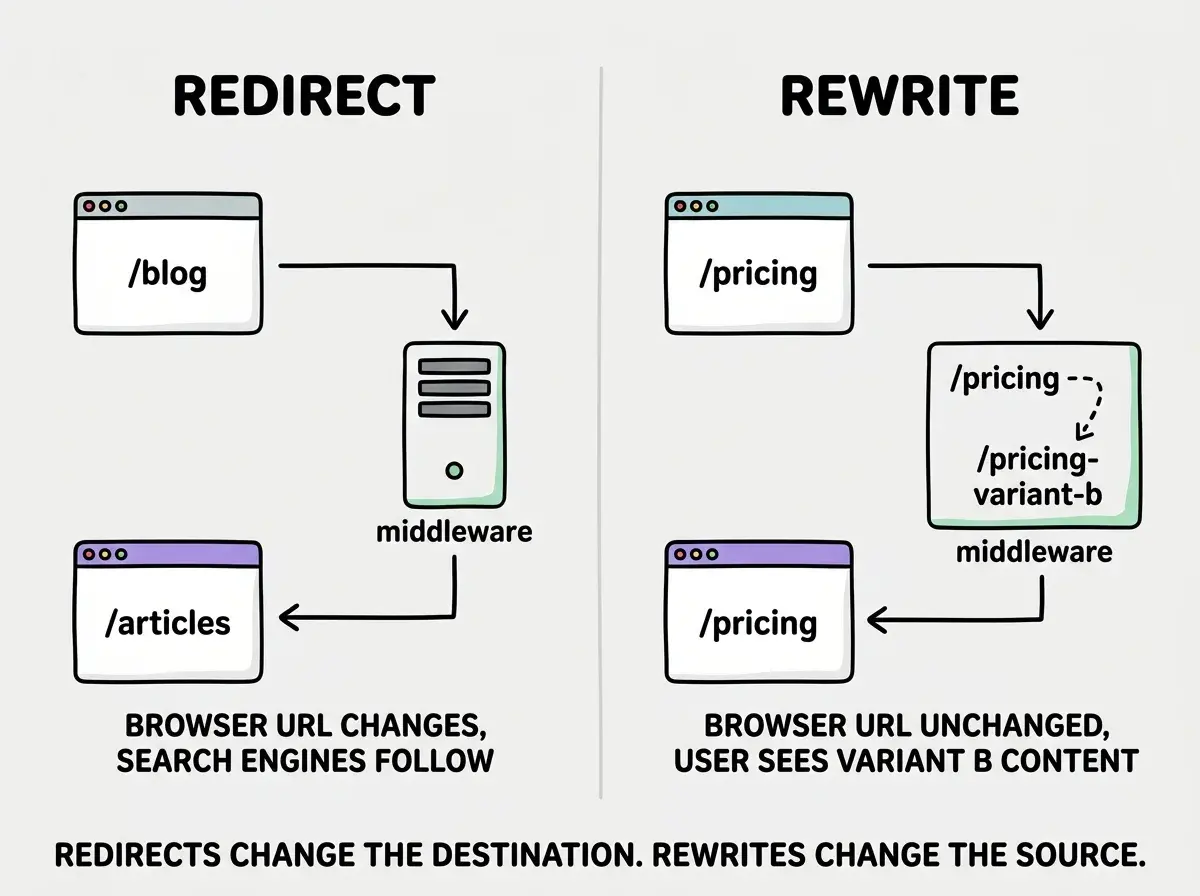
Redirects and rewrites are the second most common middleware pattern. Redirects send the user to a different URL (the browser URL changes). Rewrites serve content from a different URL (the browser URL stays the same).
Both are useful for different scenarios:
export function middleware(request: NextRequest) {
  const { pathname } = request.nextUrl

  // Permanent redirect for old URLs
  if (pathname === '/blog') {
    return NextResponse.redirect(
      new URL('/articles', request.url),
      301
    )
  }

  // Rewrite for A/B testing (URL stays the same)
  if (pathname === '/pricing') {
    const bucket = request.cookies.get('ab-bucket')?.value
    if (bucket === 'b') {
      return NextResponse.rewrite(
        new URL('/pricing-variant-b', request.url)
      )
    }
  }

  return NextResponse.next()
}
Redirects with a 301 status code tell search engines the move is permanent. Use 307 for temporary redirects. Rewrites are invisible to the user and to search engines, making them perfect for A/B testing, feature flags, and gradual rollouts.
Think of redirects as the airport sign that says "Terminal 2 has moved to the new building." Rewrites are more like two different security lanes that both say "General Boarding" but route you through different scanners behind the scenes.
Rate Limiting at the Edge
Rate limiting in middleware protects your application from abuse before requests reach your server-side logic. The challenge is that Edge Runtime does not give you access to a database or Redis, so you need to use simpler strategies or external services.
A basic approach uses headers and the IP address combined with a lightweight in-memory counter or an external rate-limiting API:
const rateLimit = new Map<string, { count: number; timestamp: number }>()

export function middleware(request: NextRequest) {
  if (request.nextUrl.pathname.startsWith('/api/')) {
    const ip = request.headers.get('x-forwarded-for') ?? 'unknown'
    const now = Date.now()
    const windowMs = 60_000 // 1 minute
    const maxRequests = 30

    const entry = rateLimit.get(ip)

    if (entry && now - entry.timestamp < windowMs) {
      if (entry.count >= maxRequests) {
        return NextResponse.json(
          { error: 'Too many requests' },
          { status: 429 }
        )
      }
      entry.count++
    } else {
      rateLimit.set(ip, { count: 1, timestamp: now })
    }
  }

  return NextResponse.next()
}
This approach has limitations. The in-memory Map resets when the edge function cold-starts, and it is not shared across regions. For production applications, consider using an external service like Upstash Redis (which has an Edge-compatible SDK) or Cloudflare's built-in rate limiting. The in-memory approach works well enough for development and low-traffic applications.
Do not rely on in-memory rate limiting for production traffic. Edge functions are ephemeral and region-specific, so your Map resets on cold starts and is not shared across deployment regions. Use Upstash Redis, Vercel KV, or your hosting provider's native rate limiting for anything user-facing.
Geolocation-Based Routing
Next.js middleware has access to geolocation data through the request object. This lets you serve different content, apply region-specific rules, or block traffic from certain countries without any external service.
export function middleware(request: NextRequest) {
  const country = request.geo?.country ?? 'US'

  // Redirect to country-specific version
  if (country === 'DE' && !request.nextUrl.pathname.startsWith('/de')) {
    return NextResponse.redirect(
      new URL(`/de${request.nextUrl.pathname}`, request.url)
    )
  }

  // Add country header for downstream components
  const response = NextResponse.next()
  response.headers.set('x-user-country', country)
  return response
}
The geolocation data is populated by Vercel's edge network (or your hosting provider). In local development, request.geo is usually undefined, so always provide a fallback. Setting custom headers in the response is a useful pattern for passing middleware decisions to your page components without redirecting.
This is the airport checkpoint detecting which airline you are flying and routing you to the correct terminal, all before you even reach the departure board.
A/B Testing Without Client-Side Flicker
One of the most valuable middleware patterns is server-side A/B testing. Traditional client-side A/B testing causes a visible "flicker" as the page loads one variant and then swaps to another. Middleware eliminates this by deciding the variant before any HTML is sent to the browser.
export function middleware(request: NextRequest) {
  if (request.nextUrl.pathname === '/landing') {
    let bucket = request.cookies.get('ab-landing')?.value

    if (!bucket) {
      bucket = Math.random() < 0.5 ? 'control' : 'variant'
    }

    const response = NextResponse.rewrite(
      new URL(
        bucket === 'variant' ? '/landing-variant' : '/landing',
        request.url
      )
    )

    response.cookies.set('ab-landing', bucket, {
      maxAge: 60 * 60 * 24 * 30, // 30 days
      httpOnly: true,
    })

    return response
  }

  return NextResponse.next()
}
The cookie ensures the same user always sees the same variant. The rewrite ensures the URL never changes. And because this runs before any page renders, there is zero flicker. Your analytics can read the cookie to attribute conversions to the correct variant.
Our tutorials walk you through building production features from scratch with AI tools.
Browse tutorialsEdge Middleware vs Server Middleware
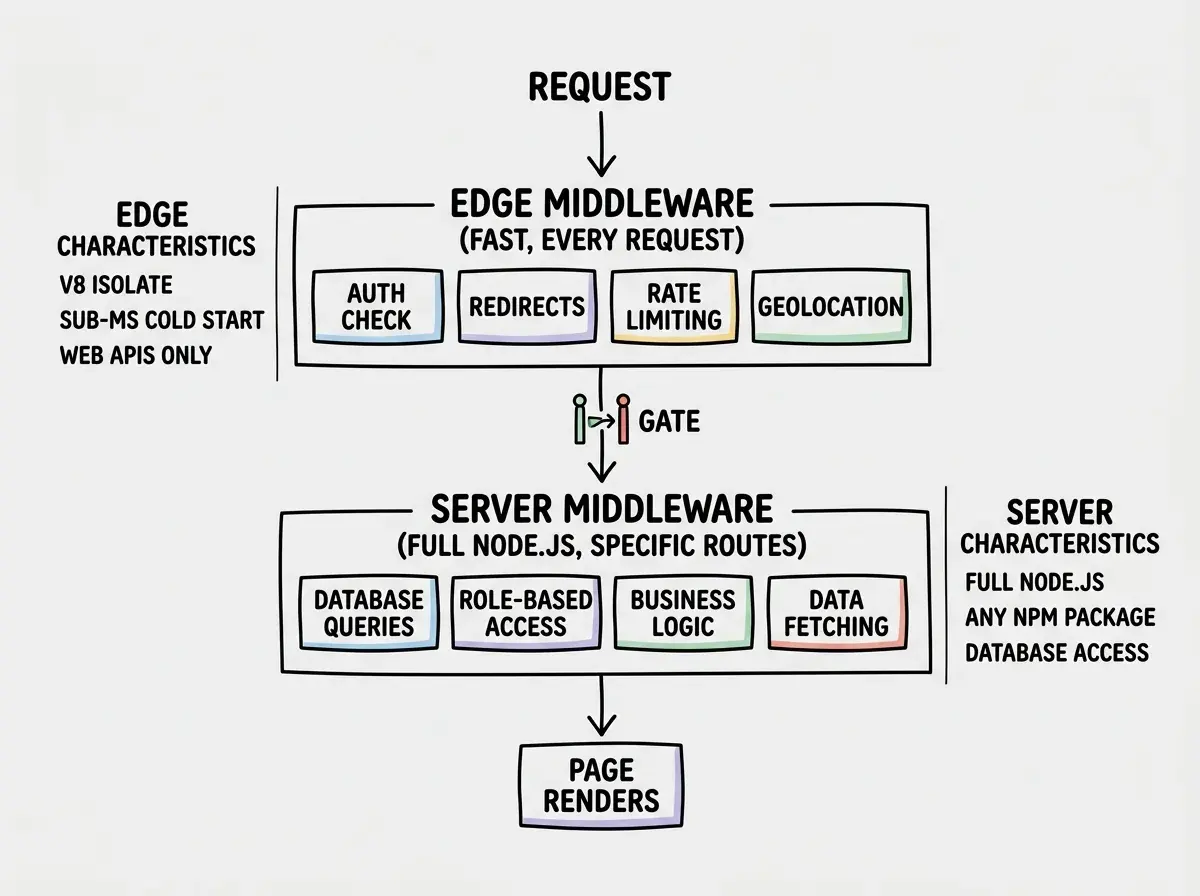
Next.js middleware runs in the Edge Runtime by default. This is fundamentally different from traditional server middleware (like Express middleware) in several important ways.
Edge middleware runs in a V8 isolate, close to the user, with sub-millisecond cold starts. It has access to the Web API surface (fetch, crypto, Headers) but not Node.js-specific APIs. It is ideal for lightweight decisions: routing, auth checks, header manipulation, geolocation.
Server middleware (through route handlers or server components) runs in a full Node.js environment. It can access databases directly, use any npm package, and perform heavy computation. It is ideal for business logic, data fetching, and complex authorization.
The mental model is straightforward. Your airport security checkpoint (edge middleware) handles fast, universal checks: valid ID, no prohibited items, correct terminal. The gate agent (server middleware) handles specific checks: correct boarding group, upgrade eligibility, standby list management.
In practice, a well-structured Next.js app uses both:
// middleware.ts (edge) - fast, universal checks
export function middleware(request: NextRequest) {
  const token = request.cookies.get('session')?.value
  if (!token && isProtectedPath(request.nextUrl.pathname)) {
    return NextResponse.redirect(new URL('/login', request.url))
  }
  return NextResponse.next()
}

// app/dashboard/page.tsx (server) - detailed authorization
export default async function Dashboard() {
  const session = await getSession()
  if (session.role !== 'admin') {
    redirect('/unauthorized')
  }
  const data = await db.query.dashboardStats.findMany()
  return <DashboardView data={data} />
}
This layered approach gives you the best of both worlds: fast edge-level screening for every request, detailed server-level authorization for specific pages.
Composing Multiple Middleware Patterns
Real applications need multiple middleware patterns working together. Since Next.js only supports a single middleware.ts file, you need to compose your patterns into one function.
The cleanest approach is a chain of checks with early returns:
export function middleware(request: NextRequest) {
  // 1. Rate limiting (API routes only)
  if (request.nextUrl.pathname.startsWith('/api/')) {
    const rateLimitResponse = checkRateLimit(request)
    if (rateLimitResponse) return rateLimitResponse
  }

  // 2. Authentication
  const authResponse = checkAuth(request)
  if (authResponse) return authResponse

  // 3. Geolocation routing
  const geoResponse = handleGeoRouting(request)
  if (geoResponse) return geoResponse

  // 4. A/B testing
  const abResponse = handleABTest(request)
  if (abResponse) return abResponse

  return NextResponse.next()
}
Each function returns either a NextResponse (redirect, rewrite, or JSON error) or null to pass through to the next check. This pattern mirrors how airport security works: you pass through the ID check, then the metal detector, then the bag scanner, then the random screening. If any step flags you, you stop there. If you pass all steps, you proceed to your gate.
Practical tutorials for developers shipping real apps with AI coding tools.
Explore all postsDebugging Middleware in Development
Middleware can be tricky to debug because it runs before your pages and does not show up in React DevTools. A few techniques help.
First, add logging. The Edge Runtime supports console.log, and the output appears in your terminal (not the browser console):
export function middleware(request: NextRequest) {
  console.log(`[middleware] ${request.method} ${request.nextUrl.pathname}`)
  // ...
}
Second, use response headers to trace middleware decisions. Set a custom header like x-middleware-action: redirected-to-login so you can see in the browser's network tab exactly what the middleware did.
Third, check your matcher config carefully. A common debugging headache is middleware not running on routes you expect (matcher too restrictive) or running on routes you did not intend (matcher too broad). Start with a broad matcher and add console.log to see every request that hits your middleware.
Middleware in Next.js is one of the most powerful features that many developers overlook. It is the security checkpoint that every request must pass through. By combining auth checks, redirects, rate limiting, geolocation, and A/B testing into a single, well-organized middleware file, you create a robust first line of defense that runs at the edge before any page loads. The patterns in this guide cover the scenarios you will encounter most often in production applications. Start with auth middleware, add patterns as your application grows, and keep the checkpoint fast.