Security logging is the difference between knowing you got breached last Tuesday and finding out three months later when your users' data shows up on a forum. With 92% of developers using AI tools daily and 45% of AI-generated code containing vulnerabilities, your vibe-coded app needs logging to catch attacks before they become disasters.
Most AI-built applications ship with zero security logging. The AI generates functional code, you deploy it, and when something goes wrong you have nothing to look at. No record of who tried to log in and failed. No trace of which admin changed permissions. No evidence of whether the breach happened yesterday or six weeks ago.
This tutorial covers exactly what to log, what never to log, how to structure and store your logs, and how to set up alerts that tell you something useful.
The Events You Must Log
Not every action in your application matters from a security perspective. You do not need to log every page view or button click. You need to log the events that indicate something is wrong or that would be critical evidence during an incident investigation.
Failed login attempts are the single most important security event to capture. A user failing their password once is normal. The same IP address failing fifty times in ten minutes is a brute-force attack. Without logging, those fifty failures look exactly the same as zero failures. You see nothing.
Successful logins from new locations or devices matter because they indicate account takeover. If a user has logged in from Chicago for six months and suddenly logs in from a different country, that deserves attention.
Permission and role changes are critical. When someone upgrades a user to admin or modifies access controls, you need a record. If an attacker compromises an account, one of their first moves is to escalate privileges. Without logs, you will not know it happened.
Data exports and bulk reads flag potential data exfiltration. A user downloading their own profile is normal. A single account pulling every record in a table is a breach in progress.
Admin actions of every kind need logging. Configuration changes, user deletions, feature flag toggles, database migrations. If an admin account is compromised, the audit trail is how you understand the scope of the damage.
API errors and 4xx/5xx responses reveal attack patterns. A spike in 401 Unauthorized responses means someone is probing your endpoints. A surge in 400 Bad Request errors means someone is fuzzing your inputs looking for injection points.
Focus your security logging on five categories: authentication events (failed and successful logins), authorization changes (permission and role updates), data access patterns (exports and bulk reads), admin actions (any configuration or user management), and API anomalies (error spikes and unusual response patterns). These five categories cover the evidence you need for 90% of security incidents.
What You Must Never Log
This is where most developers make a critical mistake, and where AI-generated logging code is especially dangerous. There are things that should never appear in your logs under any circumstances.
Passwords and password hashes must never be logged. Not in plain text, not as hashes, not as "masked" values. If your AI tool generates a login handler that logs the request body, it is logging passwords. Every login attempt. Sitting in plain text in your log storage.
API keys, tokens, and session identifiers should never appear in logs. If an attacker gains access to your logs, they gain access to every active session. Log that a token was used, not the token itself. Log the last four characters if you need to identify which key was involved.
Personally identifiable information like email addresses, phone numbers, and credit card numbers should be excluded or masked. Log a user ID, not their email. Log that a payment was processed, not the card number.
The reason this matters is practical. Logs are often stored with weaker access controls than your primary database. They get shipped to third-party services and shared with team members during debugging. Every piece of sensitive data in your logs has a wider attack surface than the original.
{
  "timestamp": "2026-04-05T14:32:01.847Z",
  "event": "login_failed",
  "userId": null,
  "attemptedUsername": "admin",
  "ip": "203.0.113.42",
  "userAgent": "Mozilla/5.0...",
  "reason": "invalid_credentials",
  "failCount": 12
}
Notice what is in this log entry and what is not. There is a timestamp, the event type, the IP address, and the failure count. There is no password. There is no session token. There is enough information to investigate an attack without creating a new vulnerability.
AI coding tools frequently generate logging middleware that captures the entire request body, including passwords, tokens, and personal data. Before you ship, search your codebase for any logging that records req.body, request.body, or similar full request dumps. Replace them with selective logging that captures only the fields you need for security investigation.
Structured Logging in JSON Format
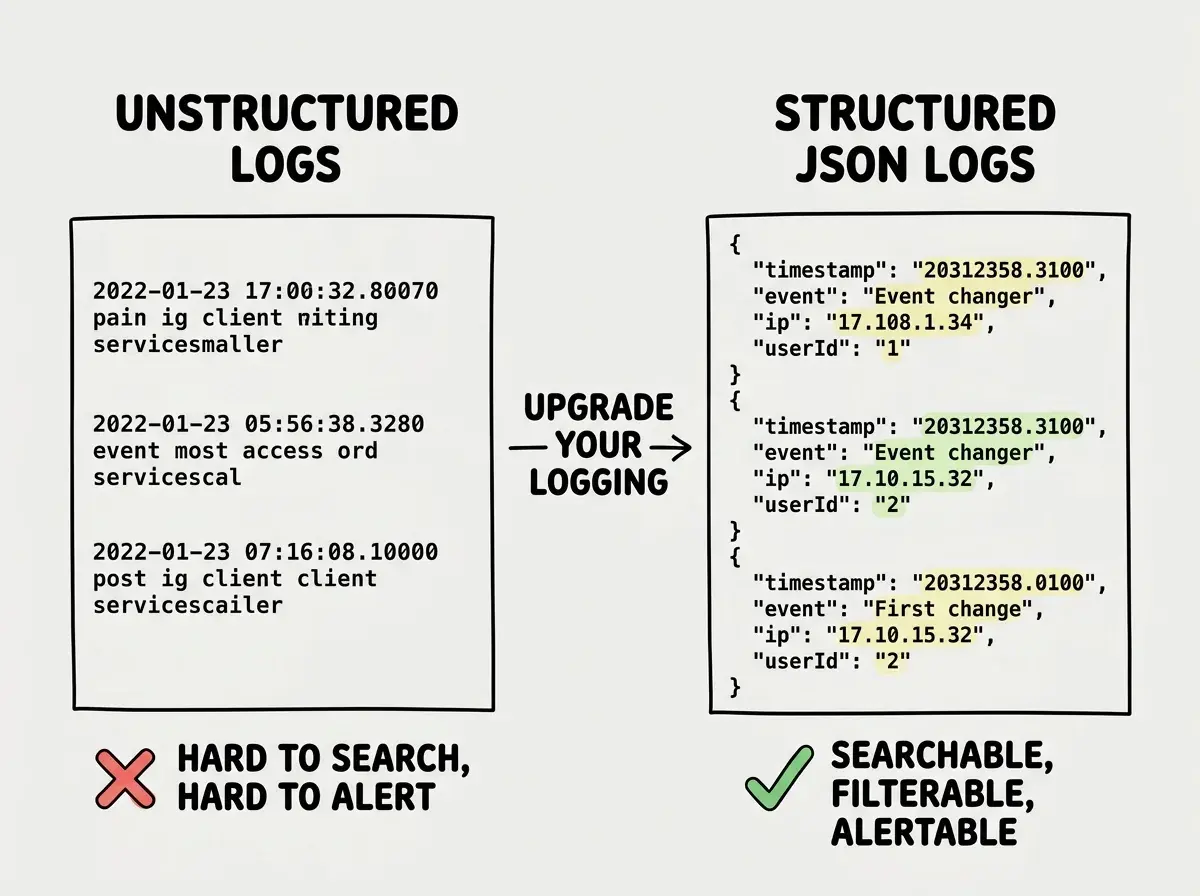
If your application logs unstructured text strings, you are making incident response dramatically harder than it needs to be. Unstructured logs look like this:
[2026-04-05 14:32:01] ERROR: Login failed for user admin from 203.0.113.42
That is human-readable, but it is nearly impossible to search, filter, or alert on programmatically. You cannot easily count how many failed logins came from a specific IP in the last hour. You cannot build a dashboard. You cannot set up automated alerts.
Structured JSON logging solves this. Every log entry is a JSON object with consistent fields. Your logging service can index every field, and you can query them like a database.
{
  "timestamp": "2026-04-05T14:32:01.847Z",
  "level": "warn",
  "event": "auth.login_failed",
  "ip": "203.0.113.42",
  "attemptedUsername": "admin",
  "reason": "invalid_credentials",
  "metadata": {
    "failCountLast10Min": 12,
    "geoCountry": "XX",
    "userAgentHash": "a1b2c3d4"
  }
}
In Node.js, use pino or winston with JSON transport. In Python, use structlog. These libraries handle JSON formatting, log levels, and timestamp generation so you do not need to build it yourself. Ask your AI tool to set up structured logging with pino, and verify the output format matches what your log storage service expects.
Where to Store Your Logs
Here is a rule that matters more than almost anything else in this article: do not store security logs on the same server that runs your application. If an attacker compromises your server, the first thing they do is delete the logs. If the logs are on the same machine, your evidence disappears with one command.
Ship your logs to an external service. For vibe-coded applications, these are the practical options:
Axiom offers a generous free tier with 500 GB of ingest per month. It handles structured JSON natively and has a solid query language. For most indie projects, you will never hit the free tier limit.
Better Stack (formerly Logtail) has a free tier with 1 GB per day and built-in alerting. The setup is straightforward, usually a single environment variable and an HTTP transport in your logging library.
Sentry is primarily an error tracking tool, but it captures enough context around errors to serve as a lightweight security log. If you are already using Sentry for error monitoring, you can extend it to cover security events without adding another service.
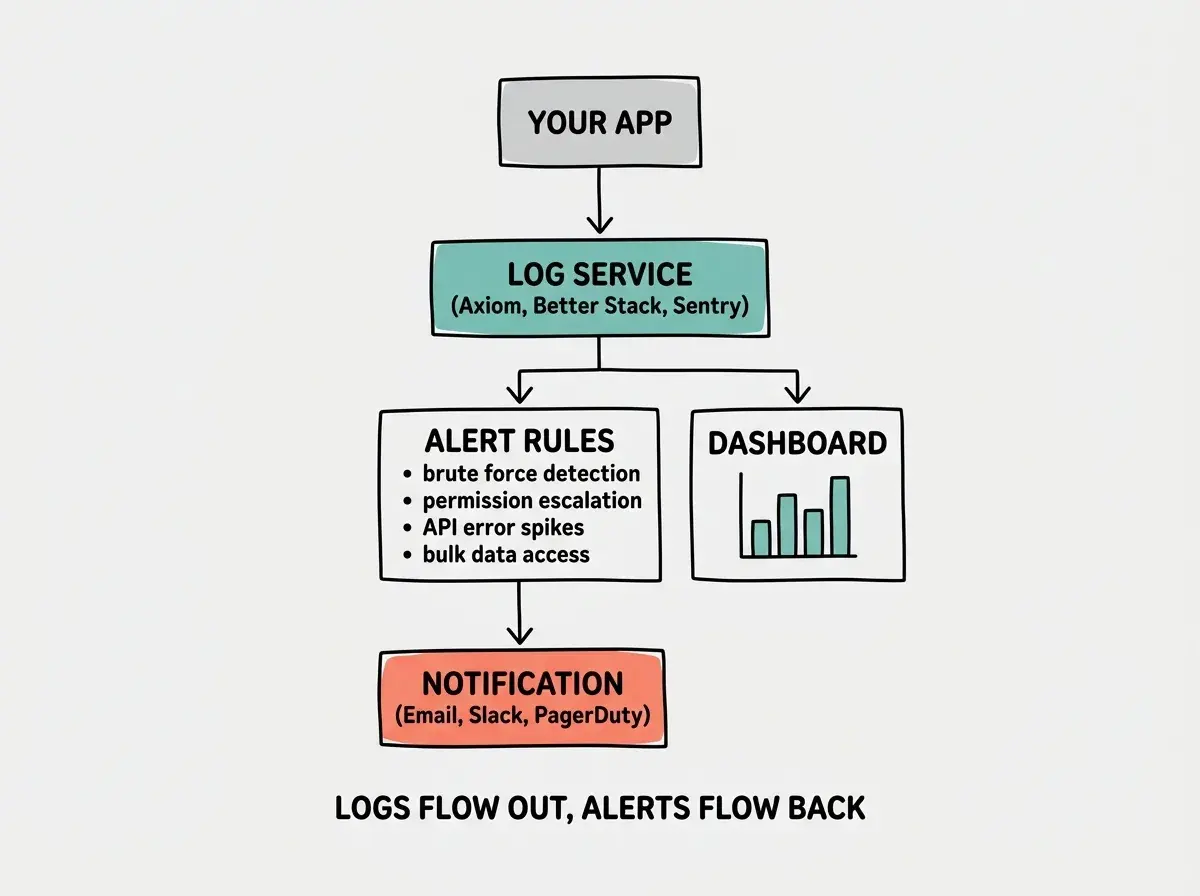
For any of these services, the integration pattern is the same. You configure your logging library to send JSON over HTTPS to the service's ingest endpoint. The service indexes your logs and makes them searchable. Setup takes fifteen minutes.
Security logging is one piece of the ship-safely puzzle. Get the full picture.
Read moreSetting Up Alerts That Actually Matter
Logs without alerts are an archive. You will not sit and watch log streams all day. You need automated alerts that tell you when something abnormal is happening, and those alerts need to be specific enough that you do not ignore them.
Set up alerts for these patterns:
More than 10 failed login attempts from a single IP in 5 minutes. This is a brute-force attack. The threshold depends on your application, but 10 in 5 minutes is a reasonable starting point for most apps.
Any permission escalation to admin. This should trigger an alert every time, no threshold. Admin creation should be rare enough that every instance deserves human review.
More than 100 API errors from a single IP in 10 minutes. This indicates automated probing. Someone is running a scanner against your endpoints looking for vulnerabilities.
Data export or bulk read exceeding normal patterns. If your average user reads 5 records per session and an account suddenly reads 10,000, that is exfiltration.
Every alerting service lets you define rules based on field values and counts over time windows. Start with these four alerts. You can refine the thresholds as you learn what normal traffic looks like for your specific application.
Log Retention and Your Deletion Policy
How long you keep logs matters for both security and compliance. Too short and you lose evidence of slow-moving attacks. Too long and you are storing data you are liable for under privacy regulations.
A practical retention policy for most vibe-coded applications is 90 days for detailed logs and 1 year for aggregated security metrics. The 90-day window covers the average breach detection time. The 1-year aggregated metrics give you trend data without retaining individual request details.
If your application handles data subject to GDPR, HIPAA, or similar regulations, check the specific retention requirements. Some regulations mandate minimum retention periods. Others cap how long you can keep data. The free tiers of most logging services handle retention automatically, purging data after the configured window.
What This Means For You
Security logging is not optional for production applications, especially not applications where nearly half the code may contain vulnerabilities. The setup is not complicated. Pick a structured logging library, configure five event categories, ship logs to an external service, and set up four alerts. The entire process takes an afternoon.
The payoff is that when something goes wrong, and in this threat landscape something eventually will, you have evidence. You know when it happened, what was accessed, and how they got in. You can respond in hours instead of discovering the breach months later. That is the difference between a security incident and a security catastrophe.
Security logging is your early warning system. Set it up before you need it.
Start here