92% of developers now use AI coding tools daily. That number would be encouraging if it were not accompanied by another one: AI-generated code ships 1.7x more major security issues than human-written code. Developer trust in AI-generated output has dropped from 77% to 33% over the past year, and the reason is not that the code does not work. It works fine. It just leaves doors open that nobody asked it to close.
The good news is that security auditing tools exist specifically to find those open doors. Think of them like building inspectors, each with a different specialty. One checks the foundation (your dependencies). Another checks the wiring (your source code patterns). A third walks the perimeter looking for unlocked windows (your running application). No single inspector covers everything, but together they catch the problems that matter.
This comparison covers six tools that every developer shipping AI-generated code should know about, what they inspect, what they cost, and which combinations give you the best coverage for the least effort.
Quick Comparison
| Tool | What It Inspects | Free Tier | Paid Starting At | Best For |
|---|---|---|---|---|
| npm audit | Dependency vulnerabilities | Unlimited | N/A (free only) | Quick dependency checks |
| GitHub Dependabot | Dependencies + secrets | Free on GitHub | N/A (free only) | Automated dependency PRs |
| ESLint Security Plugins | Source code patterns | Unlimited | N/A (free only) | Catching bad patterns early |
| Semgrep | Source code (deep analysis) | Free for individuals | Team at $40/dev/mo | Custom rule enforcement |
| Snyk | Dependencies + code + containers | 5 projects free | Team at $25/dev/mo | Full-stack scanning |
| OWASP ZAP | Running applications | Unlimited | N/A (free only) | Testing deployed apps |
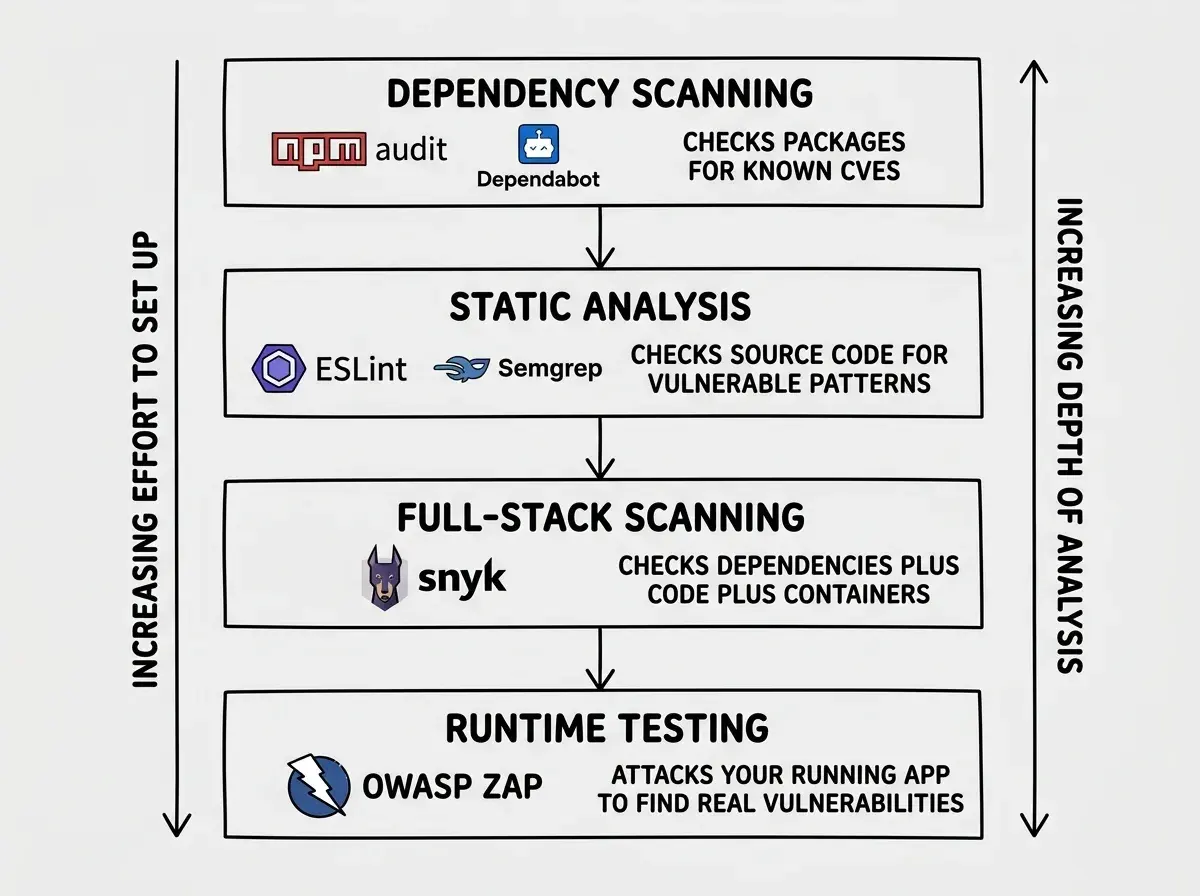
Each tool is a different inspector with a different specialty. Using npm audit alone is like hiring a foundation inspector and skipping the electrical review. You need at least two or three of these working together to get meaningful coverage.
No single security auditing tool covers everything. The strongest setup for AI-generated code combines a dependency scanner (npm audit or Snyk), a source code analyzer (Semgrep or ESLint security plugins), and a runtime tester (OWASP ZAP). Most teams can build this stack for $0 using free tiers. The tools already exist. The gap is that most developers shipping AI code are not using any of them.
npm audit and GitHub Dependabot
These two tools are your foundation inspector. They check whether the packages your AI chose to install have known vulnerabilities. This matters more than you might think, because AI coding tools have a habit of pulling in whatever dependency solves the immediate problem without checking its security history.
npm audit runs locally in seconds. Type npm audit in your terminal and it cross-references your dependency tree against the GitHub Advisory Database. It flags known CVEs with severity ratings and, in many cases, suggests a version bump that fixes the issue. It is free, built into npm, and requires zero configuration. The limitation is that it only checks known vulnerabilities in published packages. It will not catch a vulnerable coding pattern that your AI wrote from scratch.
GitHub Dependabot does the same check automatically, on a schedule. When it finds a vulnerable dependency, it opens a pull request with the fix. You review, merge, and move on. For AI-built projects where you might not remember which packages were installed during a vibe coding session three weeks ago, automated scanning catches what manual checks miss.
Both tools are free. Both are passive. They wait for vulnerabilities to be reported, then alert you. They will not catch zero-day exploits, and they will not analyze your own code. But they catch the low-hanging fruit that accounts for a significant percentage of real-world breaches. If you are not running at least one of these, you are skipping the most basic inspection.
ESLint Security Plugins
Your electrical inspector. ESLint security plugins scan your source code for patterns that are known to cause problems, and they run every time you save a file.
The two plugins worth installing are eslint-plugin-security and eslint-plugin-no-unsanitized. The first catches things like eval() usage, non-literal regular expressions that enable ReDoS attacks, and unsafe object property access. The second specifically targets DOM manipulation patterns that lead to cross-site scripting (XSS).
For AI-generated code, ESLint security plugins catch a specific category of problem that other tools miss. When Claude or Copilot generates a function that uses eval() to parse user input, or builds an SQL query with string concatenation instead of parameterized queries, an ESLint security plugin flags it immediately in your editor. You see the warning before you even run the code.
The limitation is depth. ESLint plugins check patterns, not logic. They can tell you that a function uses eval(), but they cannot tell you whether the data flowing into that function is actually user-controlled. For that level of analysis, you need Semgrep.
Semgrep
Your structural engineer. Semgrep performs static analysis that goes deeper than pattern matching, tracking data flow through your code to find vulnerabilities that simple linters miss.
Where an ESLint plugin flags every use of eval(), Semgrep can determine whether user input actually reaches that eval() call. It traces variables across functions, through assignments, and into dangerous sinks. This is the difference between "this pattern looks dangerous" and "this specific code path is exploitable."
Semgrep's free tier is genuinely useful for individual developers and small teams. You get access to the community rule registry, which includes thousands of rules covering OWASP Top 10 vulnerabilities, framework-specific issues, and language-specific anti-patterns. You can also write custom rules using a YAML-based syntax that is surprisingly approachable.
The paid Team plan at $40/dev/mo adds CI/CD integration, a management dashboard, and priority rules from Semgrep's security research team. For indie hackers and small teams, the free tier is enough. For companies shipping AI-generated code to production at scale, the paid tier pays for itself after preventing one incident.
What makes Semgrep particularly valuable for AI-generated code is the custom rules feature. You can write rules that enforce your project's specific security requirements. If your AI keeps generating Supabase queries without Row Level Security checks, you can write a Semgrep rule that catches that pattern across your entire codebase. The AI makes the same mistakes repeatedly. Semgrep catches them just as repeatedly.
Start with the security fundamentals before you deploy.
Read the basicsSnyk
Your general contractor who coordinates multiple inspections. Snyk combines dependency scanning, source code analysis, container scanning, and infrastructure-as-code checks into a single platform.
The free tier gives you five projects with unlimited tests. For a solo developer or small team with a handful of repositories, that is enough to cover your active projects. Snyk scans your dependency tree (similar to npm audit but with a larger vulnerability database), analyzes your source code for security issues (similar to Semgrep but with less customization), and monitors your projects continuously for newly disclosed vulnerabilities.
The paid Team plan at $25/dev/mo removes the project limit and adds features like license compliance checking, priority scoring that factors in whether a vulnerability is actually reachable in your code, and Jira integration for tracking remediation.
Snyk's strength for AI-generated code is the breadth of coverage in one tool. Instead of configuring npm audit plus ESLint plugins plus Semgrep separately, you get dependency scanning, code analysis, and monitoring from a single dashboard. The tradeoff is that Snyk's code analysis is not as deep or customizable as Semgrep's, and the free tier's five-project limit means you will hit a paywall faster than with the other tools.
For indie hackers running one or two projects, Snyk's free tier plus npm audit gives solid coverage with minimal setup. For teams with more than five repositories, you are choosing between Snyk's paid tier for convenience or assembling a free stack from the individual tools.
Running a single scanning tool and assuming your code is secure. AI coding tools produce vulnerabilities across multiple layers, from insecure dependencies to flawed source code patterns to misconfigured runtime behavior. A dependency scanner will not catch an SQL injection your AI wrote from scratch. A source code analyzer will not catch a vulnerable transitive dependency four levels deep. You need tools at multiple layers, not one tool that covers one layer well.
OWASP ZAP
Your building inspector who actually tries to break in. OWASP ZAP (Zed Attack Proxy) is different from every other tool on this list because it tests your running application, not your source code. It sits between your browser and your deployed app, intercepting requests and sending malicious payloads to find real, exploitable vulnerabilities.
ZAP performs automated scanning that tests for XSS, SQL injection, directory traversal, session management issues, and dozens of other attack types. It also has a manual testing mode where you can explore specific endpoints. It is completely free, open source, and maintained by the OWASP Foundation.
For AI-generated code, ZAP catches the problems that static analysis misses. Your AI might generate an API endpoint that looks correct in the source code but actually accepts SQL injection through a parameter that the static analyzer did not trace. ZAP finds it because it does not read code. It attacks the running application the same way a real attacker would.
The limitation is that ZAP requires a running application to test. You cannot run it against source code or during a CI build (without a deployed preview environment). It is best used as a pre-launch check or on a staging environment. Run ZAP against your staging URL before every production deploy, and you will catch the runtime vulnerabilities that every other tool in this list misses.
Building Your Stack
The right combination depends on your situation and budget.
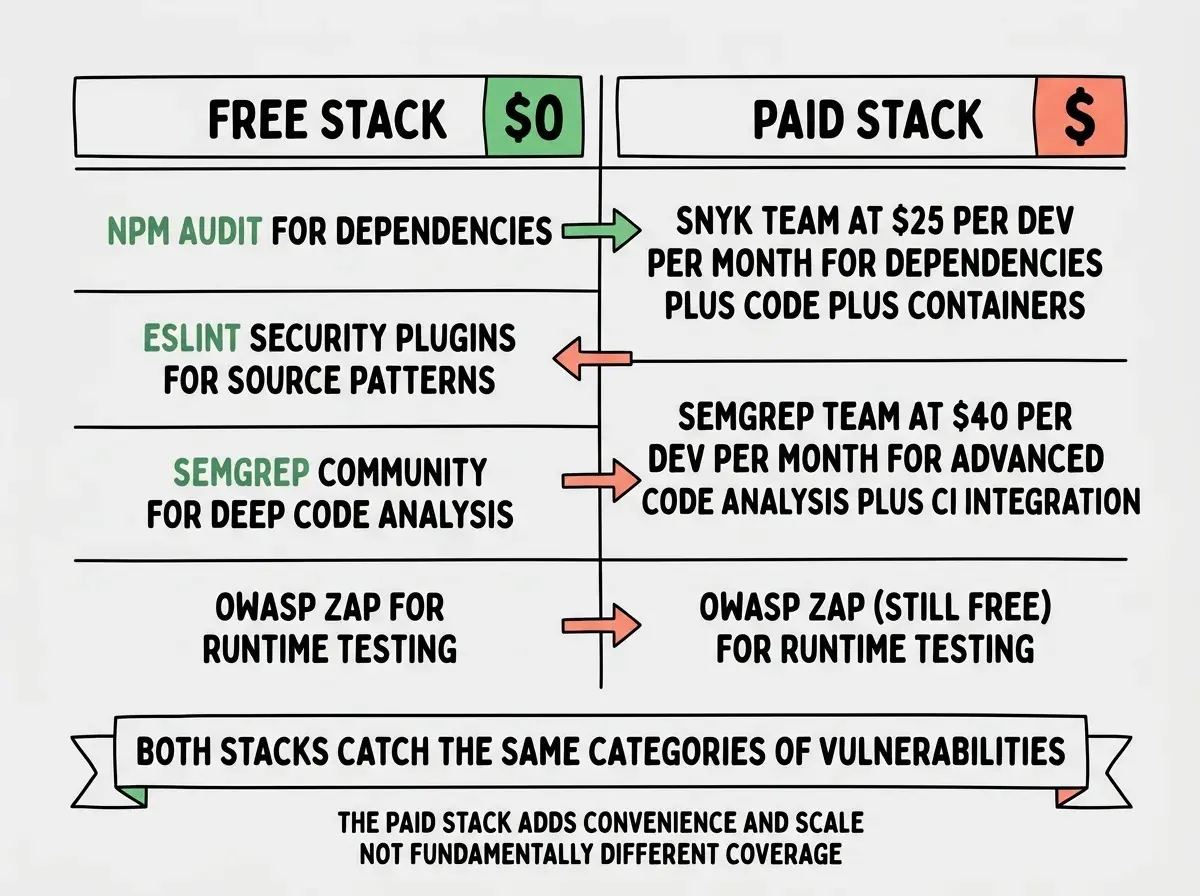
If you are an indie hacker with zero budget, start with npm audit, eslint-plugin-security, and OWASP ZAP. This covers dependencies, source code patterns, and runtime behavior for $0. Add Semgrep's free tier when you want deeper code analysis. This stack catches the majority of vulnerabilities that AI coding tools introduce.
If you are a senior dev on a small team, Snyk's free tier replaces npm audit with better coverage and monitoring. Add Semgrep's free tier for custom rules that catch your AI's repeated mistakes. Run OWASP ZAP against staging before each release. Total cost is still $0 but with significantly better coverage than the solo stack.
If you are shipping at scale, Snyk Team or Semgrep Team give you CI/CD integration, dashboards, and the ability to enforce security policies across multiple repositories. At $25-40/dev/mo, they cost less than the engineering time you would spend manually coordinating free tools across a team. OWASP ZAP stays free regardless.
Understand the risks before choosing your tools.
See the full pictureWhat This Means For You
The building inspector analogy holds all the way through. You would not move into a house that only had its plumbing checked. You would not skip the electrical inspection because the foundation looked solid. AI-generated code needs the same layered approach.
The tools are available, most of them free, and they take minutes to set up. The 1.7x higher vulnerability rate in AI-generated code is not a permanent condition. It is the result of shipping code without inspection. These tools are the inspection.
Run npm audit today. Add an ESLint security plugin this week. Schedule a ZAP scan before your next deploy. Each layer you add reduces your exposure, and none of them require you to stop using AI coding tools. They just require you to verify what the AI built before your users find the problems first.