Secure coding patterns have existed for decades, but AI coding tools skip them with remarkable consistency. 92% of developers now use AI tools daily, yet Veracode found 45% of AI-generated code introduces security vulnerabilities and GitClear's data shows 41% gets reverted. The patterns that prevent breaches are well-documented. AI just does not generate them.
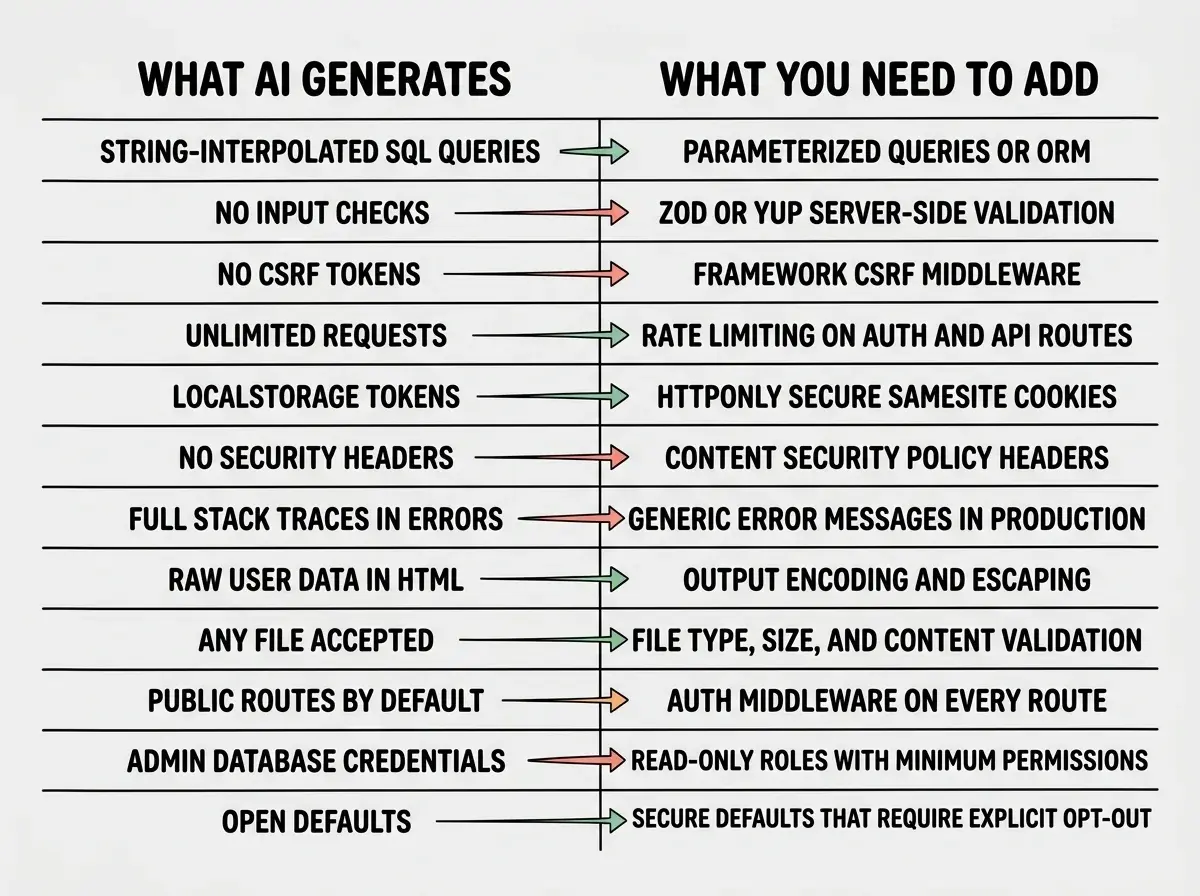
This checklist covers twelve specific secure coding patterns that AI tools should include by default but routinely omit. Each one is a concrete thing you can check and fix before shipping. None of them are exotic. All of them are missing from the code your AI just wrote.
1. Parameterized Queries
AI tools love string interpolation for database queries. You ask for a user lookup feature, and you get something like `SELECT * FROM users WHERE id = ${userId}`. That works. It also lets attackers inject arbitrary SQL into your database.
Parameterized queries separate the query structure from the data, so the database never interprets user input as code. Every major database library supports them. ORMs like Prisma and Drizzle handle this automatically.
What to check: Search your codebase for template literals or string concatenation inside database calls. If user input touches a query string directly, replace it with parameterized syntax or switch to an ORM.
2. Input Sanitization
Your AI builds a contact form and wires it to an API endpoint. It does not validate any inputs. The form accepts a 50,000-character name, an email field containing JavaScript, and a message with embedded HTML.
Input sanitization means validating that data matches expected formats and stripping anything dangerous. Use Zod or Yup on the server side. Frontend validation is for UX. Server-side validation is for security.
What to check: Trace every form submission and API endpoint. Verify inputs are validated for type, length, and format on the server before they reach your database.
3. CSRF Token Protection
Cross-Site Request Forgery lets an attacker trick a logged-in user into making requests they did not intend. Tenzai tested multiple AI-built applications and found every single one lacked CSRF protection. Not most. Every one.
CSRF tokens are unique, server-generated values embedded in forms that prove the request came from your application. Most frameworks have built-in CSRF middleware. Next.js API routes need explicit CSRF protection because the framework does not add it automatically.
What to check: If your app has authenticated forms or state-changing API routes, verify CSRF tokens are generated, included in requests, and validated server-side.
4. Rate Limiting
AI tools never add rate limiting. They build login forms, payment endpoints, and API routes with zero throttling. An attacker can try ten thousand passwords per second or drain your third-party API credits overnight.
Rate limiting caps how many requests a user or IP can make in a given time window. Express has express-rate-limit. Next.js apps can use Upstash Ratelimit. Even a basic limit of 60 requests per minute on auth endpoints stops most brute-force attacks.
What to check: Every authentication endpoint and every endpoint that calls a paid third-party API should have rate limiting. If none of them do, start with login and signup.
These twelve patterns are not advanced security concepts. They are baseline protections that have been standard practice for years. AI tools skip them because they optimize for functionality, not safety. You need to add them yourself, every time, before you ship.
5. HttpOnly Cookies for Session Tokens
Ask an AI to build authentication and there is a good chance it stores the session token in localStorage. That means any JavaScript on your page, including injected XSS scripts, can read and steal the token.
HttpOnly cookies cannot be accessed by JavaScript. Combined with the Secure flag (HTTPS only) and SameSite=Strict, they form a significantly harder target than localStorage.
What to check: Open browser dev tools, go to the Application tab, and check where your session token lives. If it is in localStorage or a cookie without the HttpOnly flag, move it to an HttpOnly cookie.
6. Content Security Policy Headers
Content Security Policy (CSP) headers tell browsers which sources of content are allowed to execute on your page. Without CSP, an XSS vulnerability lets an attacker load scripts from anywhere. With a proper CSP, even if an attacker finds an injection point, the browser blocks external script execution.
AI tools never generate CSP headers. They build your frontend, they configure your routes, and they leave your response headers completely default. A basic CSP that restricts script sources to your own domain blocks the most common XSS exploitation techniques.
What to check: Check your response headers in browser dev tools (Network tab, click any request, look at Response Headers). If there is no Content-Security-Policy header, add one. Start with default-src 'self' and loosen it only where needed.
7. Error Message Sanitization
Your AI builds an API, and when something goes wrong, it sends the full error object to the client. Stack traces, file paths, database connection strings, internal function names. All of it. Attackers use this information to map your application architecture and find entry points.
In production, error responses should contain a generic message and a correlation ID for debugging. Log the full error server-side. Send the user "Something went wrong" with a reference number they can share with support.
What to check: Trigger errors in your application intentionally (submit bad data, hit nonexistent routes) and look at the response. If you see file paths, line numbers, or stack traces, your error handling needs a production wrapper.
8. Output Encoding
Input sanitization catches bad data on the way in. Output encoding protects data on the way out. When your app displays user-generated content, it must be encoded so browsers render it as text, not executable HTML or JavaScript.
React handles this automatically for JSX expressions. But the moment you use dangerouslySetInnerHTML, render content outside React, or build server-rendered HTML strings, that protection disappears. AI tools reach for dangerouslySetInnerHTML more often than you might expect.
What to check: Search your codebase for dangerouslySetInnerHTML, innerHTML, or manual HTML string construction. Each instance needs review to ensure user-controlled content is properly encoded.
9. File Upload Validation
AI generates file upload features that accept anything. No type restrictions, no size limits, no content validation. An attacker uploads a .php file to your image upload endpoint, your server saves it to a public directory, and now they have remote code execution.
Proper file upload validation checks the extension, validates the MIME type, enforces a size limit, and verifies file content matches its claimed type. Store uploaded files outside your web root or on a dedicated service like S3 or R2.
What to check: Test upload endpoints with wrong extensions (rename a text file to .jpg), oversized files, and double extensions (.jpg.php). If any succeed, your validation needs work.
10. Authentication on Every Route
AI adds auth to routes you specifically mention and leaves everything else public. You get a login page with proper auth, a profile page that checks the session, and fifteen other routes anyone can access without logging in.
The secure pattern is auth by default. Every route requires authentication unless explicitly marked as public. This is the opposite of how AI builds things.
What to check: List every API route and page. For each one, verify that unauthenticated requests are redirected or rejected. Use middleware that checks for a valid session on every route, with an explicit allowlist of public paths.
Security patterns are just one part of the launch checklist.
See the full guide11. Principle of Least Privilege for Database Roles
AI tools connect to your database with whatever credentials you provide, usually the admin account with full permissions on every table. If your app only reads from users and writes to orders, it should not be able to drop tables.
Create database roles with minimum required permissions. Your web app gets a role that can SELECT, INSERT, and UPDATE on specific tables. Migrations use a separate, privileged role never exposed to the running application.
What to check: Look at your database connection string. If it uses postgres or root, create a restricted role with only the permissions your app needs.
12. Secure Defaults for New Records
When AI creates a database schema, new records get the most permissive defaults. Posts default to public. Files default to world-readable. Sharing defaults to "anyone with the link."
Secure defaults mean new records start in the most restrictive state and require explicit action to open up. New posts should be draft. New files should be private. New users should have zero permissions until roles are assigned.
What to check: Review your schema default values. For every field related to visibility, permissions, or status, verify the default is the most restrictive option.
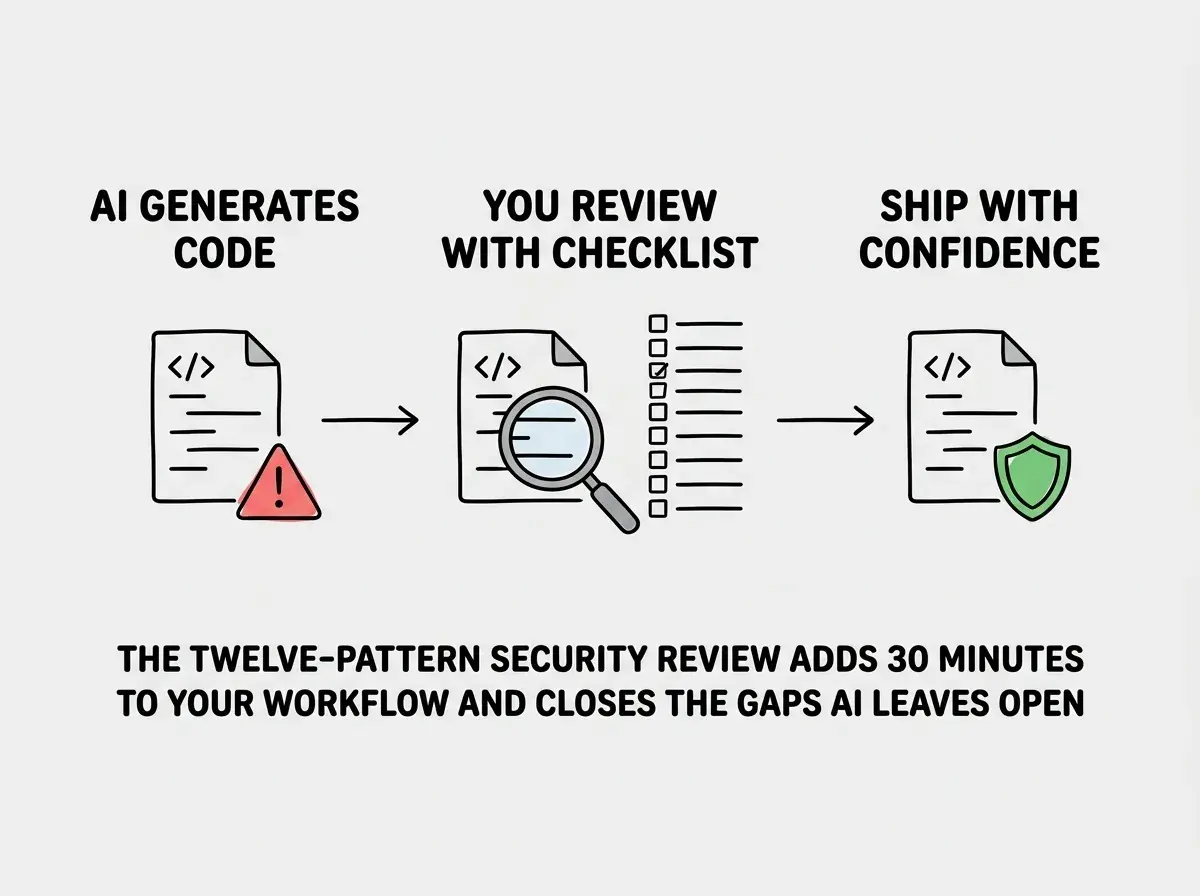
Do not assume that asking your AI to "make it secure" fixes these patterns. AI tools respond to that prompt by adding a few visible security features (maybe input validation on one form, maybe HTTPS) while leaving the structural gaps untouched. You need to check each pattern individually. There is no shortcut prompt that replaces a systematic review.
What This Means For You
Every pattern on this list is something AI tools know how to generate. They have seen these patterns millions of times in training data. They just do not include them unless you specifically ask.
The fix is not to stop using AI. It is to treat every AI generation as a first draft that needs a security pass. Print this list. Run through all twelve patterns before every deployment. It adds thirty minutes to your workflow and closes the gaps that lead to the breaches we keep reading about.
You built the app. You ship the app. You own the security.
Get the full production checklist for AI-built applications.
Read the checklist