Secrets management is the practice of controlling how your application's credentials are stored, accessed, and rotated. With 92% of developers using AI tools daily, API key exposure has become the top security risk for shipped applications. If you are still managing secrets through .env files alone, you are running a system never designed for production security.
Where Environment Variables Break Down
Environment variables were the first upgrade from hardcoded secrets, and they were a good one. Instead of writing const apiKey = "sk_live_abc123" directly in your source code, you reference process.env.STRIPE_SECRET_KEY and keep the real value in a .env file that Git ignores. This keeps secrets out of your repository. For a solo developer shipping a side project, this works fine.
The problems start when your application grows past that point.
No audit trail. When you store secrets in .env files, there is no record of who accessed what, when, or from where. If a key leaks, you cannot trace how it happened. You cannot see which team member last touched the Stripe key or whether someone copied it to their personal machine.
No rotation mechanism. Env files are static. Rotating a key means manually updating every .env file on every machine, every CI pipeline, and every deployment platform. For a solo project with one Vercel deployment, that is manageable. For a team with staging, production, and local environments, it is a recipe for missed updates and broken deploys.
Shared in plain text. When a new team member joins, how do they get the secrets? Usually through Slack, email, or a shared document. Your production database password ends up in a Slack DM with no expiration, no access control, and no way to revoke it. GitGuardian's 2025 report found that secrets shared through messaging platforms account for 27% of all credential leaks.
No environment isolation. A .env file does not distinguish between development, staging, and production secrets. Developers accidentally use production keys in development all the time, especially when AI tools generate configuration that references whatever values are available.
Environment variables solve one problem well: keeping secrets out of source code. They do not solve access control, audit logging, rotation, or secure sharing. Once you have more than one environment or more than one person touching your secrets, .env files become a liability rather than a solution.
The Secrets Management Maturity Ladder
Think of secrets management as a ladder with three rungs. You do not need to jump straight to the top, but you should know which rung you are on and when to climb.
Rung 1: Environment variables. Secrets live in .env files locally and in your hosting platform's settings. This is where most vibe coders start, and it is appropriate for solo projects with a single deployment target. The critical requirement is that your .env file is in .gitignore and you never commit it.
Rung 2: Secrets manager. Secrets live in a centralized service with access control, audit logging, environment separation, and secure team sharing. Tools like Doppler, Infisical, and 1Password Secrets Automation sit at this level. Move here when you add a second team member, a staging environment, or more than ten secrets.
Rung 3: Vault with dynamic secrets. Secrets are generated on demand with automatic expiration. HashiCorp Vault is the standard. Instead of storing a static database password, the vault generates a temporary credential that expires after a set period. This is enterprise-grade and overkill for most indie projects, but it is where companies with compliance requirements end up.
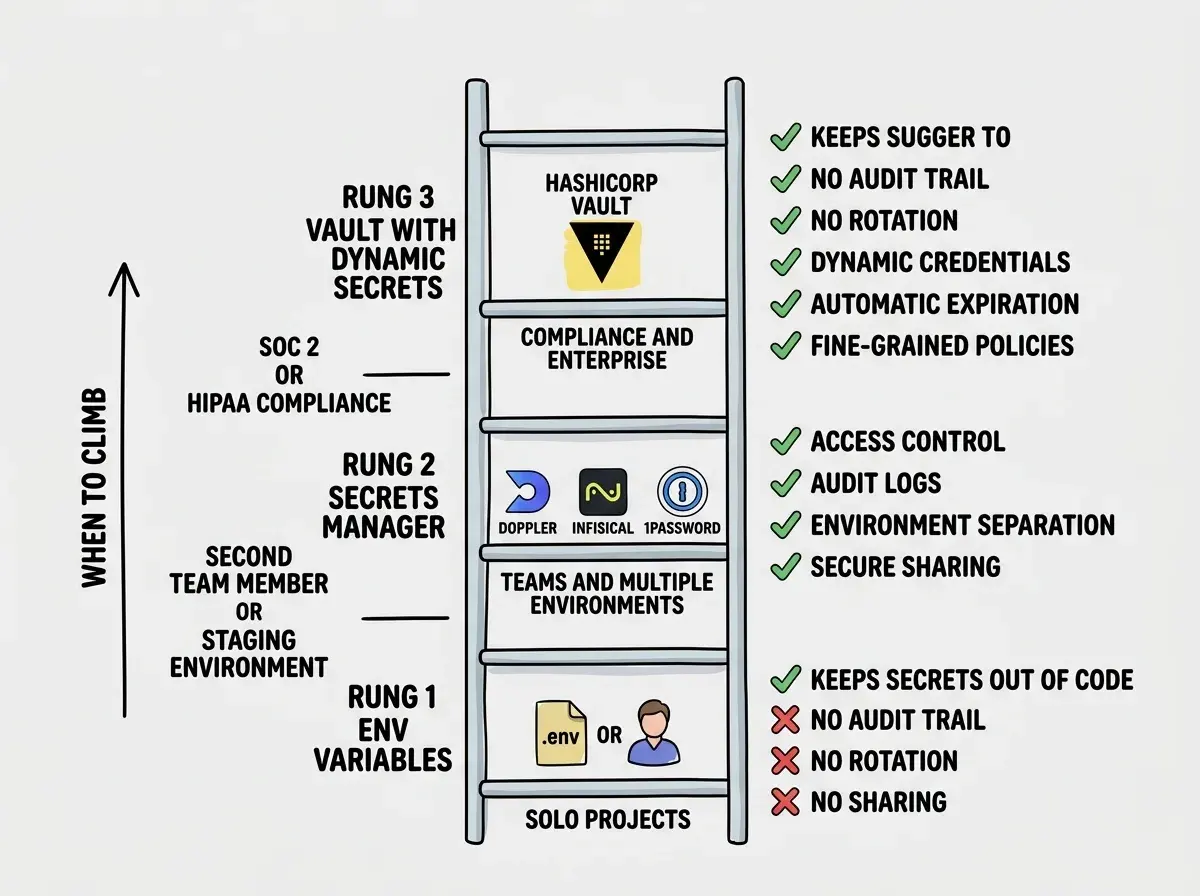
Most readers should aim for rung 2. It takes 15-30 minutes to set up, costs nothing for small teams, and eliminates the entire class of problems that .env files create.
Setting Up a Secrets Manager
The three most practical options for indie hackers and small teams are Doppler, Infisical, and 1Password Secrets Automation. All three follow the same pattern: store secrets in a centralized dashboard, organize by environment, and your application pulls them at runtime or build time.
Doppler is the most straightforward option for teams deploying to Vercel or Cloudflare. You create a project, add secrets through the web dashboard, and install the Doppler CLI. Instead of maintaining .env files, you run doppler run -- npm run dev and Doppler injects the correct secrets for your environment. For production, Doppler integrates directly with Vercel, Netlify, and most CI platforms.
Infisical is the open-source alternative. You can self-host it or use their cloud service. The workflow is similar to Doppler, but you get the option to run the entire infrastructure on your own servers. For teams that need secrets within their own network, Infisical is the strongest choice.
1Password Secrets Automation extends the password manager you might already use. If your team shares credentials through 1Password, their Secrets Automation product lets applications pull those same credentials at build or deploy time, eliminating the "copy from 1Password, paste into Vercel dashboard" step that introduces human error.
The setup for any of these follows the same pattern. Create an account, install the CLI tool, import your existing secrets from your .env file, and update your scripts to pull secrets from the manager instead of reading a local file.
Read our guide on how AI tools accidentally commit your secrets and how to scan your repos.
Read the guideHow Key Rotation Actually Works
Key rotation means replacing an active secret with a new one on a regular schedule, then revoking the old one. It limits the damage window. If a key leaks but you rotate weekly, the attacker has at most seven days before the stolen key stops working.
Manual rotation follows three steps in order. Generate a new key from the service provider's dashboard. Update the new key in your secrets manager or hosting platform. Revoke the old key after confirming the new one works. The order matters: generate, deploy, revoke. If you revoke before deploying, your app goes down.
Automated rotation is where secrets managers earn their value. Doppler and Infisical can trigger webhooks when secrets change, so your application picks up the new value without a redeploy. AWS Secrets Manager offers built-in rotation for RDS database credentials, where new passwords are generated and applied on a schedule you define.
For most indie projects, manual rotation on a quarterly schedule is reasonable. It takes five minutes per service. The goal is reducing the window of exposure from "forever" to "a few months," eliminating the most common attack scenario where a leaked key works indefinitely.
Generating a new key but forgetting to revoke the old one. Both keys remain active until you explicitly delete the compromised one. Rotation without revocation is not rotation at all. It just means you now have two valid keys instead of one, and the leaked key still works.
When You Need a Vault vs When Env Vars Are Fine
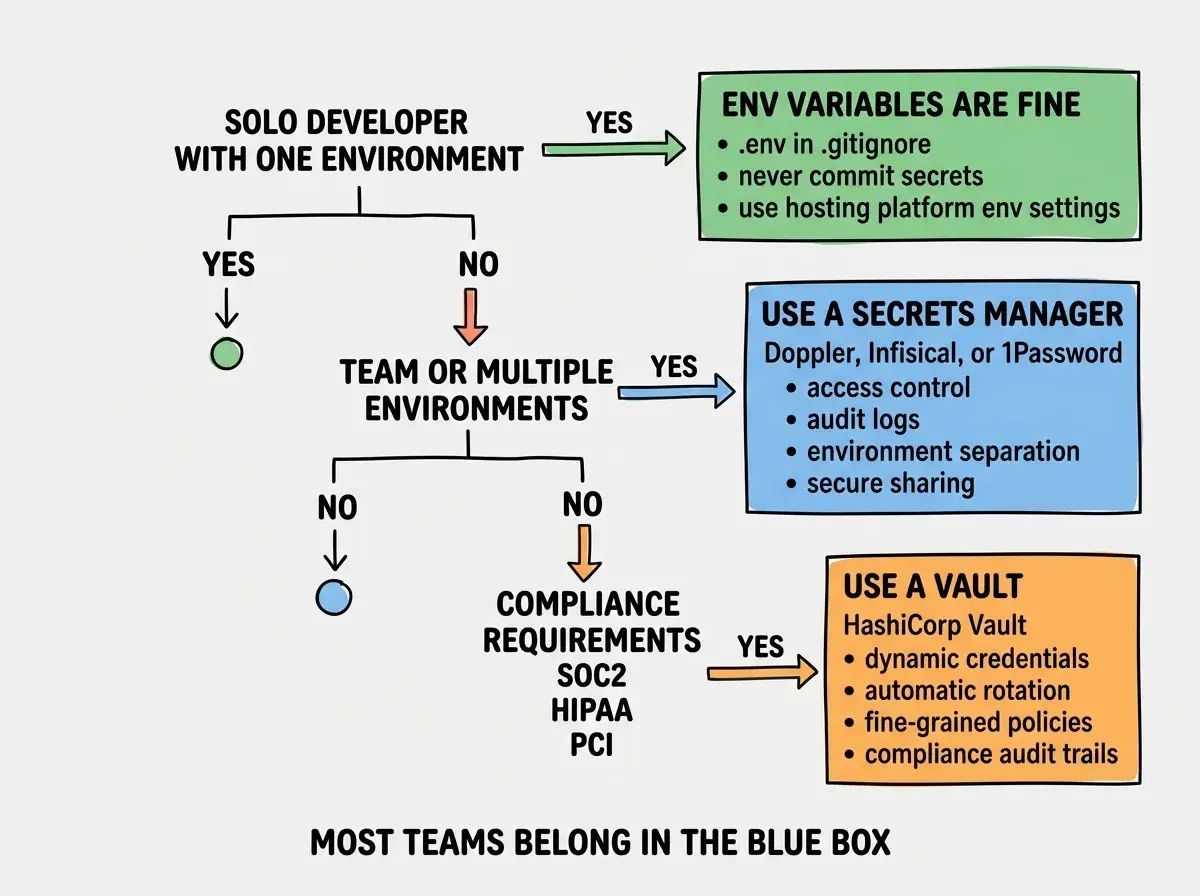
Not every project needs HashiCorp Vault or a dedicated secrets manager. Here is a practical decision framework.
Env vars are fine when you are a solo developer with one production environment, fewer than ten secrets, no shared credentials, and your project does not handle sensitive user data like payment information or health records.
A secrets manager is necessary when two or more people need access to secrets, you maintain separate development, staging, and production environments, you need to know who accessed which secret and when, or you need to rotate keys without manually updating files everywhere.
A vault is necessary when you need dynamic, short-lived credentials, you are subject to compliance frameworks requiring audit trails and automatic rotation (SOC 2, HIPAA, PCI DSS), or you manage hundreds of services with thousands of credentials.
Most vibe coders should move from rung 1 to rung 2 and stop there. A secrets manager like Doppler or Infisical handles 95% of the security concerns that .env files leave unaddressed.
Practical Steps to Move Beyond Env Vars Today
If you are ready to graduate from .env files, here is the fastest path.
Audit your current secrets. Open every .env file in your project and list every secret. Check your hosting platform's environment settings too. Most projects have 5-15 secrets scattered across 2-3 locations.
Choose and set up a secrets manager. For most indie hackers, Doppler is the fastest to set up. Sign up, create a project, and import your secrets. Their free tier covers small teams. Replace npm run dev with doppler run -- npm run dev and remove the local .env file.
Connect your deployment platform. Doppler and Infisical both offer native integrations with Vercel, Netlify, Cloudflare, and most CI platforms. Set this up so secrets sync automatically and remove the manually entered environment variables from your hosting dashboard.
Set a rotation schedule. Pick a cadence (quarterly is reasonable) and set calendar reminders. When the reminder fires, generate new keys, update them in your secrets manager, and revoke the old ones.
Get tutorials on security, deployment, and shipping real applications with AI tools.
Browse all tutorialsWhat This Means For You
The gap between "my app works" and "my app is secure" often comes down to how you handle secrets. Environment variables got you started, and they deserve credit for that. But they were designed for a simpler time when one developer shipped one app to one environment. The moment your project outgrows that, you need a system that provides access control, audit trails, and rotation.
Moving to a secrets manager takes an afternoon, not a week. The security improvement is immediate. You go from "secrets scattered across Slack messages and .env files with no visibility" to "centralized, access-controlled, and auditable."
Start with a secrets audit this week. List every secret your project uses and where it lives. That single step will show you exactly how exposed you are and what needs to change.