Imagine posting a photo of your house key on social media. Not your house, not your address, just the key. Anyone who sees that photo can copy the key, figure out which lock it opens, and walk right in. You would never do that on purpose. But if you are using AI coding tools, there is a real chance your app just did the digital equivalent without you knowing.
API keys and secrets are the house keys to every service your application connects to. Your Stripe key authorizes real charges. Your database password gives full access to every piece of user data. When these keys end up in your code and that code gets pushed to GitHub, you have posted your house key on the most public bulletin board on the internet.
An Escape.tech scan of 5,600 applications found over 400 exposed secrets and 175 instances of exposed personally identifiable information. Those are everyday projects built by people who had no idea their keys were visible.
How AI Tools Hardcode Your Secrets
The AI is not being malicious. It is being helpful in a way that creates a serious problem.
When you start a project, you create an .env file with your API keys. This is correct. But your AI tool can see this file. It knows your Stripe key is sk_live_abc123 and your database URL starts with postgres://admin:password@....
You ask the AI to add a payment feature. Somewhere in the generated code it writes const stripeKey = "sk_live_abc123" instead of const stripeKey = process.env.STRIPE_SECRET_KEY. The AI copied the actual value instead of referencing the environment variable, because hardcoding is the fastest way to make the code work.
The AI sometimes hardcodes just one key while properly referencing others. The result is a codebase where some secrets are hidden and others are sitting in plain text, with no way to tell which is which without checking every file.
AI tools hardcode your secrets because they optimize for working code, not secure code. They see real values in your .env file and sometimes copy those directly into source files. You cannot rely on AI to keep your secrets safe. You need a systematic way to catch exposure before it reaches your repository.
Secrets also leak through configuration files. AI tools generate docker-compose.yml, config.js, and setup scripts that contain real credentials. These feel like infrastructure, not code, so builders do not think to check them. But they get committed just like any other file.
Why .gitignore Fails You
Every project has a .gitignore file that tells Git which files to skip. Your .env should be listed there, and if it is, Git will never track it. Problem solved, right?
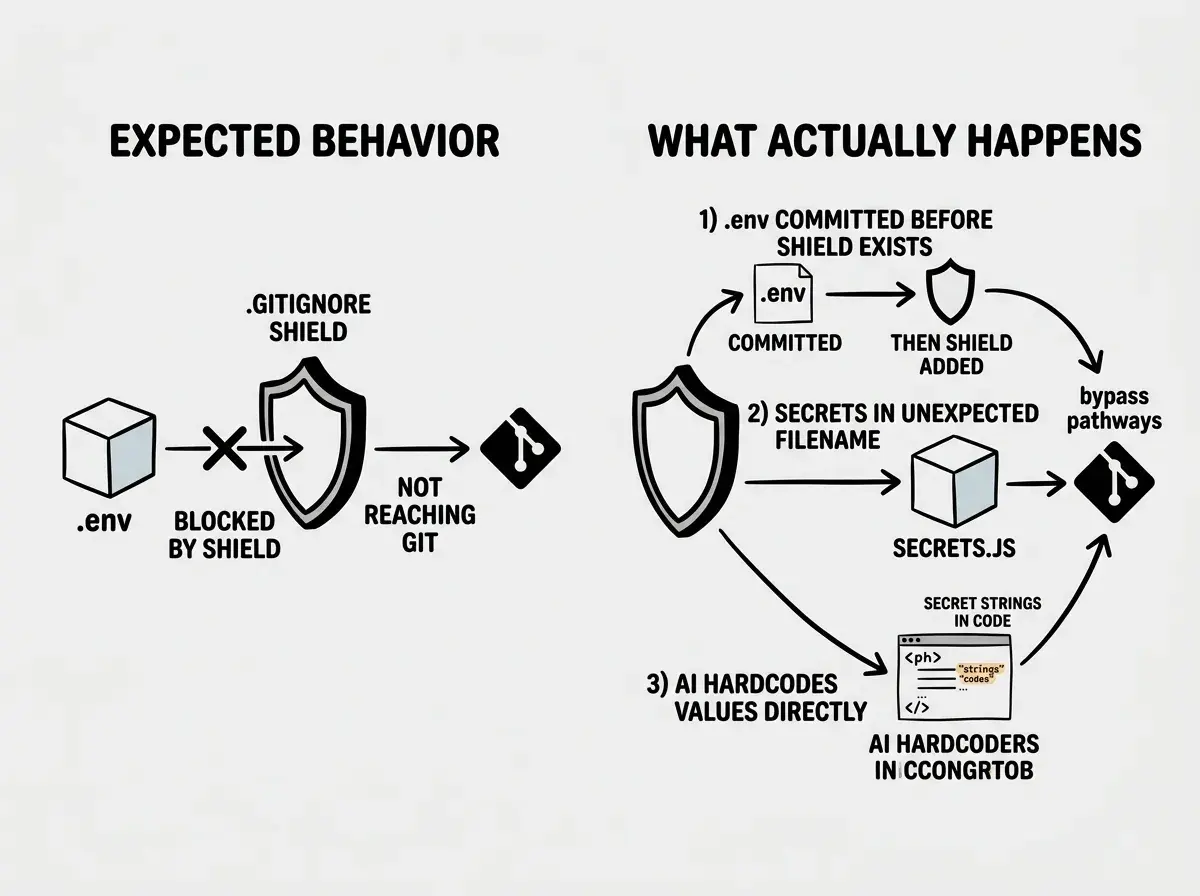
Not quite. There are three ways this breaks down.
The .env file gets committed before .gitignore is configured. If your AI tool generates files in a certain order, the .env might get tracked before .gitignore excludes it. Once Git tracks a file, adding it to .gitignore later does not remove it from history.
The AI creates secrets in unexpected files. Your .gitignore excludes .env, but the AI puts secrets in .env.local, config/secrets.js, or docker-compose.override.yml. If those filenames are not in your .gitignore, they get committed.
You commit before the .gitignore exists. In the rush of building, you run git add . and git commit before your project has a proper .gitignore. Everything goes into the repository. You add the .gitignore later, but the damage is done.
Going back to the house key analogy: .gitignore is like a rule that says "do not photograph the keys." If someone already took the photo before the rule existed, the photo is still out there.
GitHub Search Makes Committed Secrets Public
Here is where the house key analogy gets worse. You did not just post the photo on social media. You posted it on a platform that indexes every photo for search.
GitHub indexes the contents of public repositories. Anyone can search for strings like sk_live_, AKIA (AWS access keys), or mongodb+srv:// (database connection strings with embedded passwords). Automated bots do exactly this, scanning GitHub continuously for newly committed secrets.
GitGuardian found that 10 million new secrets were exposed on GitHub in 2022 alone. Within minutes of pushing a commit containing an AWS key, bots can find it, spin up cryptocurrency mining servers, and leave you with a bill running into thousands of dollars.
Private repositories are not fully safe either. If your repository ever becomes public, or if someone compromises your GitHub account, every secret in your commit history is exposed.
How to Scan Your Repository With Gitleaks
You do not need to search your code manually. A free, open-source tool called gitleaks scans your entire repository, including all Git history, and flags any committed secrets.
Installing gitleaks. On macOS, run brew install gitleaks in your terminal. On Windows, use choco install gitleaks. On Linux, download the binary from the gitleaks GitHub releases page.
Running your first scan. Navigate to your project folder and run gitleaks detect --source . to scan current code. To scan your entire Git history (where most hidden secrets live), run gitleaks detect --source . --log-opts="--all". The scan takes seconds.
Reading the results. Gitleaks outputs findings with file path, line number, secret type, and the commit where it was introduced. A clean scan shows zero findings. If you see findings, do not panic, but act immediately.
Running gitleaks only on your current files and assuming you are safe. Secrets that were committed and later deleted still exist in your Git history. Anyone who clones your repository can access every previous version of every file. Always use the --log-opts="--all" flag to scan your complete history.
You can also set up gitleaks as a pre-commit hook that automatically scans every time you commit. If it detects a secret, it blocks the commit. Run gitleaks protect --staged as part of your pre-commit workflow. This catches secrets before they ever enter your Git history.
How to Rotate Compromised Keys
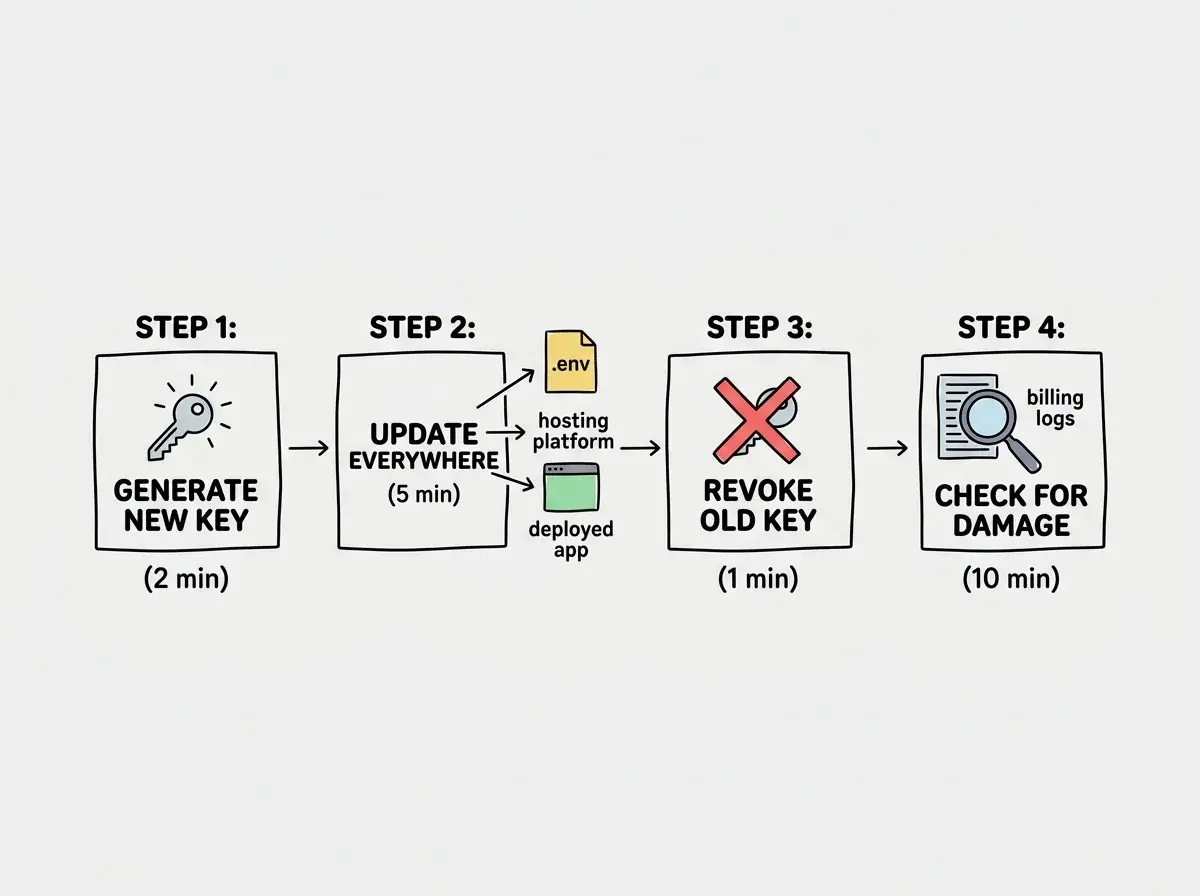
If gitleaks found secrets in your repository, here is exactly what to do. The order matters.
First, generate new keys. Go to the dashboard for whatever service was exposed (Stripe dashboard under Developers, OpenAI API keys page, AWS IAM console). Generate the new key, but do not delete the old one yet.
Second, update your environment variables. Put the new key into your .env file and into your hosting platform's environment variables (Vercel, Netlify, Cloudflare, wherever your app runs). Deploy with the new key and verify everything works.
Third, revoke the old key. Once your app runs on the new key, go back to the service dashboard and delete the compromised key. This is the step that actually locks the attacker out. Generating a new key does not disable the old one. Both work until you explicitly revoke.
Fourth, check for damage. Review usage logs and billing for the affected service. Look for API calls you did not make or charges you do not recognize. For AWS, check for EC2 instances or S3 buckets you did not create. Attackers who find AWS keys often spin up cryptocurrency mining within minutes.
Back to the house key analogy: once the photo is out there, you cannot un-post it from every device that saved it. The only real fix is changing the lock. That is what key rotation does. The old key, still visible in your Git history, no longer opens anything.
Preventing Secrets From Leaking in the First Place
Rotating keys is the emergency fix. Prevention is the better strategy. Here is how to set up your projects so secrets never reach your repository.
Start every project with a proper .gitignore. Before you write any code, create a .gitignore that includes .env, .env.local, .env.production, and .env.*. GitHub maintains templates for every major framework. Use one.
Search for hardcoded key patterns. Stripe keys start with sk_live_ or sk_test_. AWS keys start with AKIA. OpenAI keys start with sk-. If you find any of these in a source file, replace them with environment variable references like process.env.STRIPE_SECRET_KEY.
Install gitleaks as a pre-commit hook. This is the safety net that catches everything else. Even if the AI hardcodes a key, even if your .gitignore missed a file, the pre-commit hook blocks the commit before the secret enters your history. Five minutes to set up, and it protects every future commit.
Tell your AI tool explicitly. Include instructions like "Never hardcode API keys. Always use environment variables." This does not guarantee compliance, but it reduces the frequency of hardcoded values. One layer of defense in a multi-layer system.
Understand environment variables, the system that keeps your secrets out of your code.
Learn about environment variablesWhat This Means For You
One in 14 apps has at least one leaked credential. If you have built more than a few projects with AI tools, the probability that at least one has an exposed secret is uncomfortably high. Scan your repositories today, not next week.
- If you are a founder: A leaked API key is not just a technical problem. It is a business risk. A compromised Stripe key means someone can issue refunds or make charges on your behalf. A leaked database URL means every piece of user data you have collected is accessible. Run gitleaks on your production repository today, rotate anything it finds, and set up the pre-commit hook before your next commit. Thirty minutes of effort now versus a potentially fatal breach later.
- If you are a career changer: This is one of the most practical security skills you can learn and one of the easiest to demonstrate. Add gitleaks to your workflow and mention it in interviews. Hiring managers notice when candidates take security seriously, because most junior developers do not. Understanding how secrets leak and how to prevent it sets you apart immediately.
API keys are one piece of the puzzle. Cover all your bases before you ship.
Read the security survival guide