Environment variables in production are where most vibe-coded apps break for the first time. You built something that works perfectly on your laptop, you deploy it, and the whole thing falls apart with cryptic errors about undefined values. Missing env vars cause roughly 80% of first-deploy failures, and that number is not shrinking as more people build with AI tools.
This is not a beginner mistake. It is a systems problem. Your local .env file does not travel with your code when you deploy. Every hosting platform handles environment variables differently. And the line between "configuration" and "secret" matters more than most builders realize, because getting it wrong does not just break your app. It can drain your bank account.
With 92% of US developers now using AI tools daily, more apps are being deployed by people who have never managed production secrets. This tutorial covers what you need to know and what happens when you skip steps.
What Is the Difference Between Secrets and Environment Variables
Environment variables are any key-value pairs that configure how your app behaves. Your site URL, the name of your database, the port your server listens on. These are configuration values. They change between environments but they are not sensitive. If someone sees your NEXT_PUBLIC_SITE_URL, nothing bad happens.
Secrets are a specific subset of environment variables that grant access to something. Your Stripe secret key authorizes real charges. Your database connection string includes a password. Your OpenAI API key lets anyone who has it make calls on your account. The word "secret" is not a metaphor. These values are literally keys to your money, your data, and your users' trust.
The practical difference matters because of how you handle each category.
Configuration values like NODE_ENV=production can safely appear in build logs and frontend bundles. Secrets like DATABASE_URL and STRIPE_SECRET_KEY must never appear in any of those places. If your build step logs your environment variables and one of them is a database password, that password is now sitting in your CI provider's log storage, accessible to anyone on your team.
# Configuration (safe to expose)
NODE_ENV=production
NEXT_PUBLIC_SITE_URL=https://myapp.com
NEXT_PUBLIC_APP_NAME=My App

# Secrets (must be protected)
DATABASE_URL=postgresql://user:password@db.example.com:5432/myapp
STRIPE_SECRET_KEY=sk_live_abc123def456
OPENAI_API_KEY=sk-ant-xyz789
The naming convention helps. In Next.js, anything prefixed with NEXT_PUBLIC_ gets bundled into client-side JavaScript and is visible to every user who opens your app. That prefix is a deliberate signal: only put non-sensitive values there. If you see NEXT_PUBLIC_STRIPE_SECRET_KEY in a codebase, something has gone very wrong.
Where Should Secrets Be Stored
Not in your code. Not in your Git repository. Not in a Slack message. Not in a Notion doc.
Secrets belong in exactly two places: your local .env file (which is in .gitignore and never committed) and your hosting platform's secrets manager. Every major platform provides one.
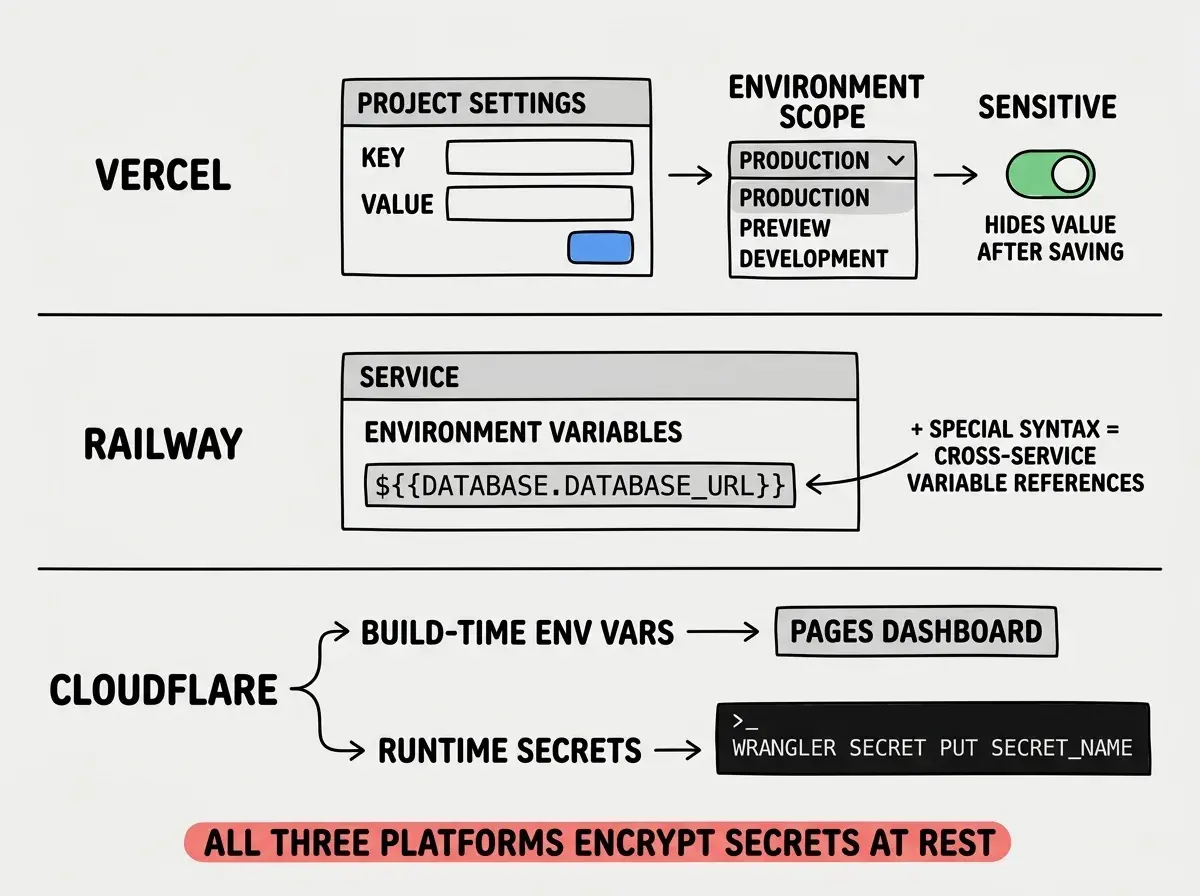
Vercel has an Environment Variables panel in project settings. You paste each key-value pair, select which environments it applies to (Production, Preview, Development), and Vercel encrypts and injects them at build time and runtime. Vercel also supports "Sensitive" toggling, which hides the value after you save it so even team members with dashboard access cannot read it back.
Railway stores environment variables per service and per environment. You can reference variables from other services using ${{service.VARIABLE}} syntax, which is useful when your API server needs the database URL from your Postgres service. Railway encrypts everything at rest.
Cloudflare Pages uses environment variables for build-time values and Workers secrets (via wrangler secret put) for runtime values. The distinction matters because Pages build logs are visible to your team, but Workers secrets are encrypted and only available at runtime.
The .env.example pattern. Your repository should include a .env.example file that lists every required variable with placeholder values. This file gets committed to Git. When someone clones your project, they copy it to .env and fill in real values. The template travels with the code; the secrets never do.
# .env.example (committed to Git)
DATABASE_URL=your_database_url_here
STRIPE_SECRET_KEY=your_stripe_key_here
OPENAI_API_KEY=your_openai_key_here
NEXT_PUBLIC_SITE_URL=https://yoursite.com
Without this file, new team members or your future self after a fresh clone will spend hours figuring out which variables the app needs.
Secrets belong in two places only: your local .env file (never committed) and your hosting platform's encrypted secrets manager. If a secret exists anywhere else, including Slack messages, Notion docs, or email threads, treat it as compromised and rotate it immediately. API key exposure is one of the top security risks for vibe-coded apps.
Why Shouldn't You Use Env Variables for Secret Data
This question comes up in security discussions, and the answer is nuanced. Environment variables are the standard way to pass secrets to applications, but they have real limitations that you should understand.
The core problem is that environment variables are available to every process running in the same environment. If your app spawns a child process, that process inherits all environment variables by default. If a dependency in your node_modules is compromised and starts reading process.env, it can access every secret your app has. This is not theoretical. Supply chain attacks on npm packages have done exactly this.
Environment variables can also leak through crash dumps, debug logs, and error reporting tools. If your app crashes and your error tracker captures the full process state, your secrets might end up in Sentry or LogRocket's servers.
For most vibe-coded apps, environment variables are still the right choice. Dedicated secrets managers like HashiCorp Vault or Doppler add complexity not justified until you are managing dozens of secrets across multiple services. But you should follow defensive practices regardless.
Never log process.env. If you need to verify a variable exists, log its length or a boolean check, never the value itself. Write console.log('DB URL exists:', !!process.env.DATABASE_URL) instead of console.log('DB URL:', process.env.DATABASE_URL).
Validate at startup. Check that every required secret exists when your app boots. If one is missing, crash immediately with a clear error message instead of letting the app run in a broken state.
// validate-env.ts
const required = [
  'DATABASE_URL',
  'STRIPE_SECRET_KEY',
  'OPENAI_API_KEY',
] as const;

for (const key of required) {
  if (!process.env[key]) {
    throw new Error(
      `Missing required environment variable: ${key}. ` +
      `Check your .env file or hosting platform settings.`
    );
  }
}
Instead of a vague "Cannot read property of undefined" buried in your payment logic, you get an immediate, specific message telling you exactly what to fix.
Minimize secret scope. Read secrets once at startup, validate them, and pass them explicitly to the modules that need them. Do not scatter process.env.STRIPE_SECRET_KEY throughout your codebase.
Logging process.env during debugging and forgetting to remove it before deploying. A single console.log(process.env) in production dumps every secret to your logging provider's servers. Use targeted checks like !!process.env.SECRET_NAME instead of ever logging actual values.
Managing Secrets Across Multiple Environments
Most apps run in at least three environments: local development, staging/preview, and production. Each needs its own set of secrets, and mixing them up has consequences.
The most common mix-up is using production API keys in development. You test a payment flow with your live Stripe key and accidentally charge a real credit card. These are not hypothetical scenarios. They happen regularly.
Local development should use test or sandbox credentials for every service that offers them. Stripe has test mode keys. Most email providers have sandbox domains.
Preview/staging should use its own credentials too. If your preview environment shares production database credentials, a bug in a preview deployment can corrupt production data.
Production gets the real keys, and those keys should have the minimum permissions necessary. If your app only reads from the database, the database user should have read-only access.
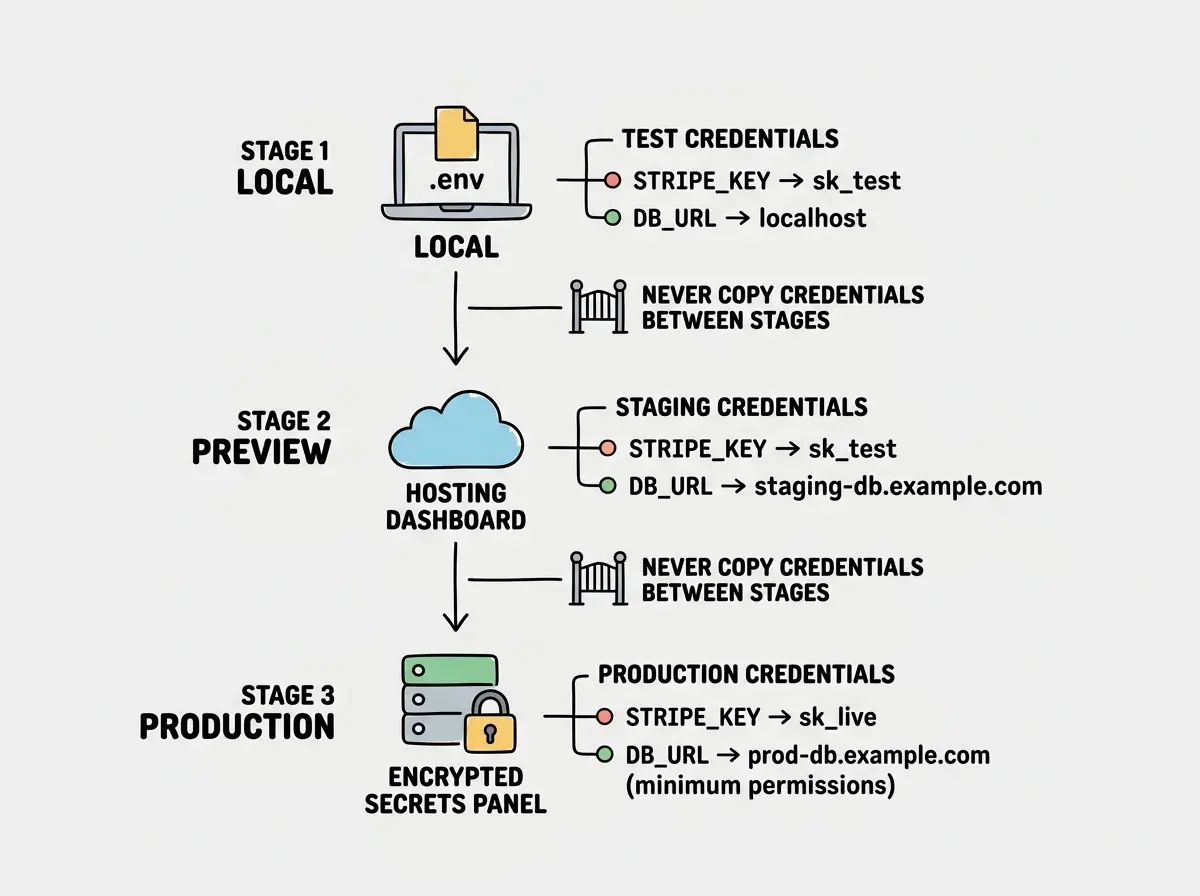
Getting this separation right is the difference between a minor test bug and a production incident involving real money.
Understand what actually happens when your code goes from your laptop to the internet.
Learn about deploymentThe Startup Validation Pattern
The single most effective pattern for managing environment variables in production is validating them the moment your app starts. Not when the first database query runs. Not when someone tries to check out. At startup.
Here is a more complete version using Zod, which many Next.js projects already include as a dependency.
import { z } from 'zod';

const envSchema = z.object({
  DATABASE_URL: z.string().url(),
  STRIPE_SECRET_KEY: z.string().startsWith('sk_'),
  OPENAI_API_KEY: z.string().min(1),
  NEXT_PUBLIC_SITE_URL: z.string().url(),
  NODE_ENV: z.enum(['development', 'production', 'test']),
});

export const env = envSchema.parse(process.env);
If any variable is missing or malformed, Zod throws an error with a detailed message before your app serves a single request. This turns "mysterious 500 error after deploy" into "deploy failed because STRIPE_SECRET_KEY is missing," which is infinitely easier to fix.
Zod also catches subtle bugs like a STRIPE_SECRET_KEY that accidentally starts with pk_ (the publishable key) instead of sk_. These mistakes pass a simple existence check but cause confusing failures at runtime.
Rotating Secrets Without Downtime
At some point you will need to rotate a secret. Maybe a team member left. Maybe you accidentally logged a key.
The order matters. First, generate the new key in your provider's dashboard without deleting the old one. Second, update the new key in your hosting platform's environment variables and deploy. Third, verify the app works. Fourth, revoke the old key.
If you revoke before deploying the new one, production goes down. If you forget to revoke after deploying, the compromised key still works.
What This Means For You
Environment variables in production are not complicated, but they are unforgiving. A missing variable, a leaked secret, or a mixed-up environment can take your app down or worse, cost you real money.
- If you are shipping a product: Set up startup validation today. It takes ten minutes and prevents the most common class of deployment failures. Use your platform's secrets manager, not Slack threads or shared docs, for distributing credentials.
- If you are an indie hacker moving fast: Speed is not an excuse to skip
.env.examplefiles and.gitignorerules. The five minutes you save by hardcoding a key becomes five hours of incident response when that key leaks. Build the habit now, while the stakes are low.
Environment variables are one piece of the security puzzle. Cover the rest before real users show up.
Read more tutorials