App scaling for beginners starts with a good problem. Your thing is working. People are using it. Traffic is climbing. And then something breaks. The page loads slowly, the database stops responding, or your serverless bill triples overnight. Every successful vibe-coded app hits this moment, and it is far less scary than it sounds.
Think of your app like a water pipe system. When you built it, you were the only person turning on the faucet. The pipes were big enough and water flowed smoothly. Now imagine a hundred people turning on their faucets at the same time. Then a thousand. The pressure drops. Some faucets get a trickle. Eventually, a pipe bursts at its weakest joint. Scaling is finding those weak joints and reinforcing them before they burst. That is all it is.
With 92% of US developers now using AI tools daily, more apps are being built faster than ever. Pieter Levels built a flight simulator in 3 hours that now generates over $1M per year. Plinq reached 10,000 users and $456K ARR. These apps all had to deal with scaling. None of them had it figured out on day one.
The Five Things That Break First
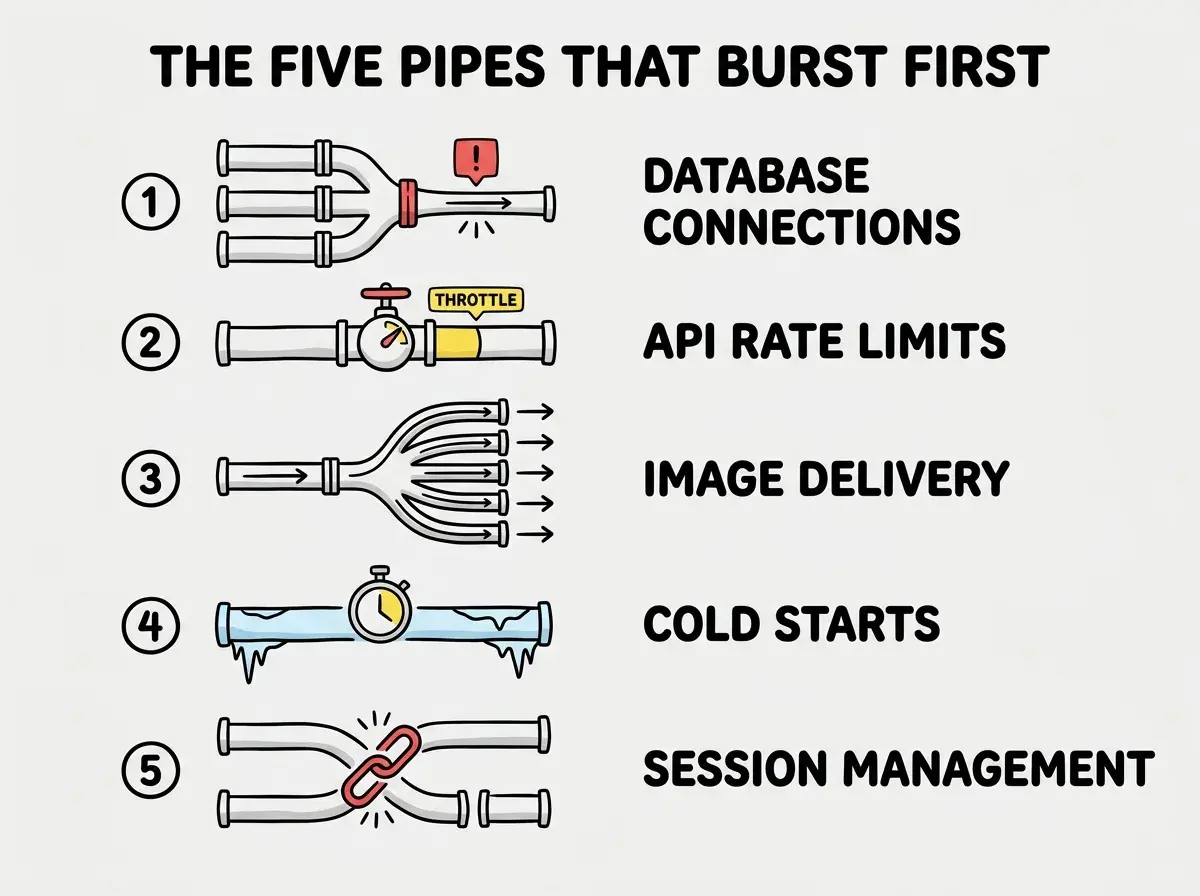
Every app has the same weak points. The order might vary, but these five things are where the pipes burst first when traffic spikes.
1. Database connections run out. Your database has a maximum number of simultaneous connections. On Supabase's free tier, that limit is around 60. When 60 users hit your app at the same time and each request opens a database connection, user 61 gets an error. This is the single most common scaling failure for vibe-coded apps. The fix is connection pooling, which lets hundreds of requests share a smaller number of database connections. Supabase has a built-in connection pooler you can enable with one setting change.
2. API rate limits kick in. If your app calls third-party APIs (Stripe, OpenAI, Google Maps), those services have rate limits. When your users exceed those limits, the API returns errors instead of data. The fix is queuing requests and adding retry logic with exponential backoff, which means waiting longer between each retry attempt.
3. Images and assets load slowly. When a hundred users load your page simultaneously, your server is delivering the same hero image a hundred times. Without a CDN (Content Delivery Network), every request goes back to your origin server. A CDN caches your images on servers around the world so users get them from the nearest location. If you are on Vercel or Cloudflare, you already have a CDN. If your images are still slow, they are probably too large and need compression.
4. Serverless function cold starts pile up. Serverless functions shut down when idle and restart when needed. That restart takes 100 to 500 milliseconds. When traffic spikes, many functions start cold at once, and users experience delays. Vercel offers a "fluid compute" option on paid plans that keeps functions warm. Cloudflare Workers start faster by design because they use a lighter runtime.
5. Session management breaks under load. If your app stores user sessions in memory (the default for many frameworks), each serverless function instance has its own memory. User A logs in and hits function instance 1. Their next request hits function instance 2, which has no idea who they are. They get logged out randomly. The fix is storing sessions in a shared store like Redis, a database, or using stateless JWT tokens that carry the session data in the token itself.
When to Actually Worry About Scaling
Here is the uncomfortable truth. You should not worry about scaling until you have a scaling problem. Most vibe-coded apps will never have one. The average SaaS product has fewer than 100 active users in its first year. If you are spending weeks optimizing for millions of users before you have a hundred, you are solving imaginary problems instead of building features that attract real users.
The time to worry is when you see specific symptoms. Your database dashboard shows connection counts near the limit. Your error logs show rate limit errors. Your hosting bill spikes unexpectedly. Users report slow pages or random logouts. These are real signals. Everything else is premature optimization.
Your app going viral is a good problem to have. Do not engineer for a million users when you have ten. Fix scaling issues when they appear, not before. The five weak points listed above cover 90% of what will actually break, and each one has a straightforward fix that takes hours, not weeks.
Pieter Levels runs his million-dollar products on simple tech stacks and fixes performance issues as they come up. He ships, watches the metrics, and patches the leaks. This works because you are making decisions based on real data instead of hypothetical load.
Horizontal vs Vertical Scaling, Simply
When something does need to get bigger, there are exactly two ways to do it.
Vertical scaling means making your existing machine more powerful. Bigger database. More memory. Faster CPU. In the water pipe analogy, this is replacing a narrow pipe with a wider one. If your Supabase database is struggling, upgrading from free to Pro is vertical scaling. You are making the one pipe bigger.
Horizontal scaling means adding more machines. Instead of one big server, you run three smaller ones and distribute traffic among them. In the pipe analogy, this is running three pipes side by side. This is what Vercel and Cloudflare do automatically with serverless functions. When traffic spikes, they spin up more instances. You do not manage this yourself.
For most vibe-coded apps, vertical scaling for your database and horizontal scaling for everything else. Your hosting platform handles the horizontal part automatically.
The "Do Nothing Until It Hurts" Principle
This principle is not about being reckless. It is about being efficient with your time and money. Here is what it looks like in practice.
Day one through day ninety. Deploy on free tiers. Use Supabase's default connection settings. Do not add Redis. Do not configure a CDN beyond what your hosting platform provides. Focus entirely on building features and finding users.
When you get your first hundred users. Check your database connection count. Check your API usage against rate limits. Look at your Lighthouse performance score. If everything is green, change nothing. If something is yellow, make a note. If something is red, fix that one thing.
When you get your first thousand users. Enable connection pooling on your database. Add caching for your most expensive API calls. Compress your images if you have not already. These three changes handle the vast majority of scaling needs for apps in the 1,000 to 10,000 user range.
When you get ten thousand users. Now architecture decisions matter. Consider a dedicated database server, a Redis cache for sessions, and background job processing for heavy tasks. Your hosting costs are now real business expenses, and you should be generating enough revenue to cover them.
Before you scale, make sure your foundation is solid. Understand what things cost at every stage.
See the cost guideReal Apps That Scaled Without Over-Engineering
The pattern across successful vibe-coded apps is consistent. They all started simple and added complexity only when forced to.
Plinq reached $456K ARR with 10,000 users before doing any serious infrastructure work. Standard Next.js on Vercel with Supabase. When database connections became an issue, they enabled connection pooling. When API calls got slow, they added caching. Each fix took a day, not a sprint.
Pieter Levels' projects (PhotoAI, InteriorAI, the flight simulator) run on remarkably simple stacks. They serve millions of requests because he optimizes the bottlenecks that real traffic reveals, not the ones he imagines might happen.
None of these builders waited for a perfect architecture. They shipped with the simplest thing that worked and upgraded the parts that actually broke.
Over-engineering your infrastructure before you have users. Adding Redis, message queues, microservices, and load balancers to an app with 50 users is not preparation. It is procrastination disguised as engineering. Every hour spent on infrastructure you do not need yet is an hour not spent on the product features that will actually attract users.
A Simple Scaling Checklist
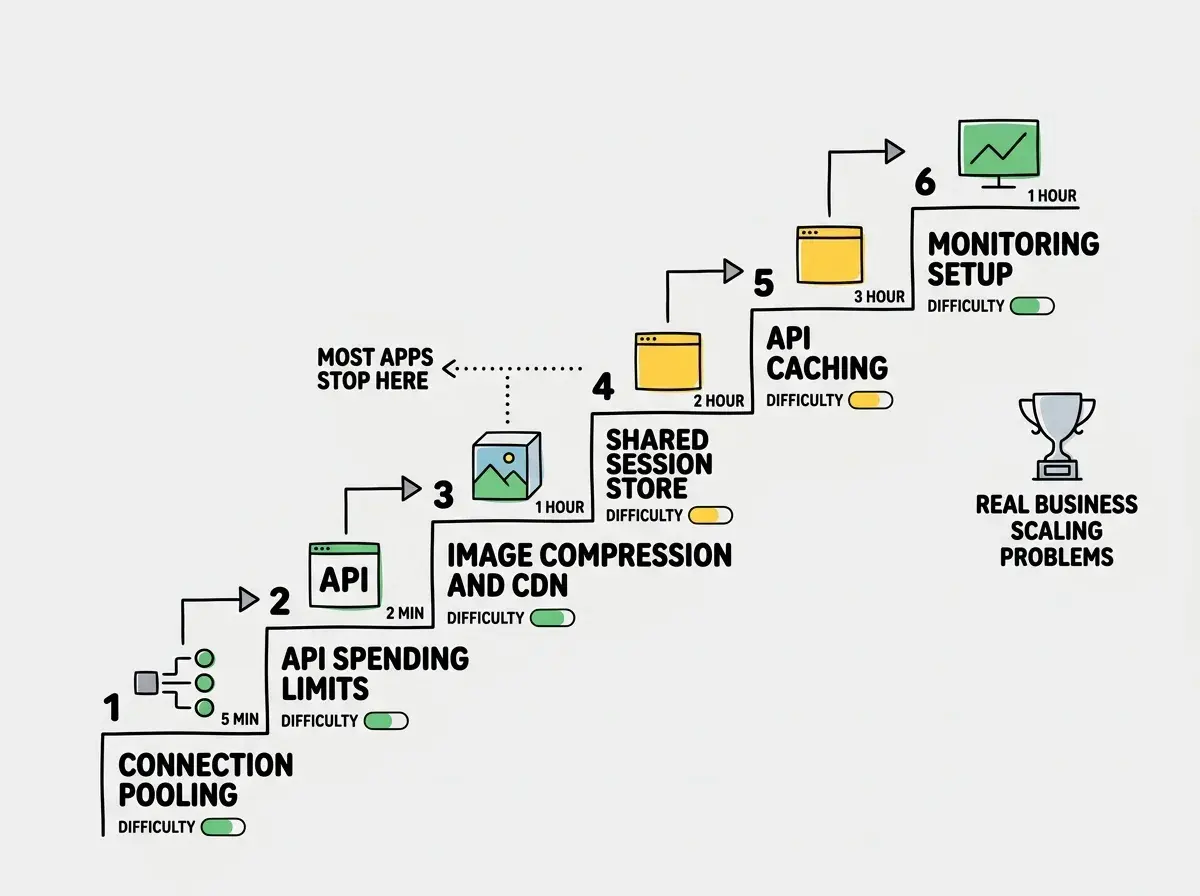
When traffic starts growing, check these in order. Stop as soon as everything looks healthy.
- Enable database connection pooling (five-minute fix on most platforms)
- Add a spending limit on your AI API accounts (prevents runaway bills)
- Compress images to WebP and use your platform's built-in CDN
- Move session storage from memory to a shared store (database or Redis)
- Add caching for expensive API calls and database queries
- Set up basic monitoring so you see problems before users report them
Most apps never get past step three. If you pass step six, you have a real business and can afford to hire someone who specializes in infrastructure.
What This Means For You
Your app does not need to be built for a million users on day one. It needs to be built for the users you have right now, with an awareness of what will break next. The five weak points (database connections, API rate limits, image loading, cold starts, and session management) are your checklist. When one of them starts showing strain, you fix it. When they are all green, you go back to building features.
The vibe coders who succeed ship fast, watch the metrics, and fix what actually breaks. Scaling is not a mountain you climb before launch. It is a series of small repairs you make as the building gets taller. Your app getting popular is the best problem you will ever have.
Scaling comes after shipping. Get your app live first and handle growth as it comes.
See all guides