Think of your application as an office building. Every person who walks through the front door gets a badge. But not every badge opens every door. The admin badge opens every room on every floor, from the server closet to the executive suite. A regular employee badge opens their own floor and the shared kitchen. A visitor badge gets them into the lobby and the conference room, nothing else. That is role-based access control in a single mental model, and it is exactly what your AI-built application needs.
92% of developers now use AI daily to write code. These tools are incredible at generating features fast. But they consistently produce apps where every logged-in user gets the admin badge. Everyone can open every door. Your paying customer and your free-tier trial user see the same dashboard. Your team member and your external contractor can delete the same records.
RBAC fixes this by assigning different badge levels to different people, then checking the badge before every door opens.
What RBAC Actually Means in Practice
Role-based access control is a simple idea. Instead of managing permissions for each individual user, you group permissions into roles and assign roles to users. The three moving pieces are users, roles, and permissions.
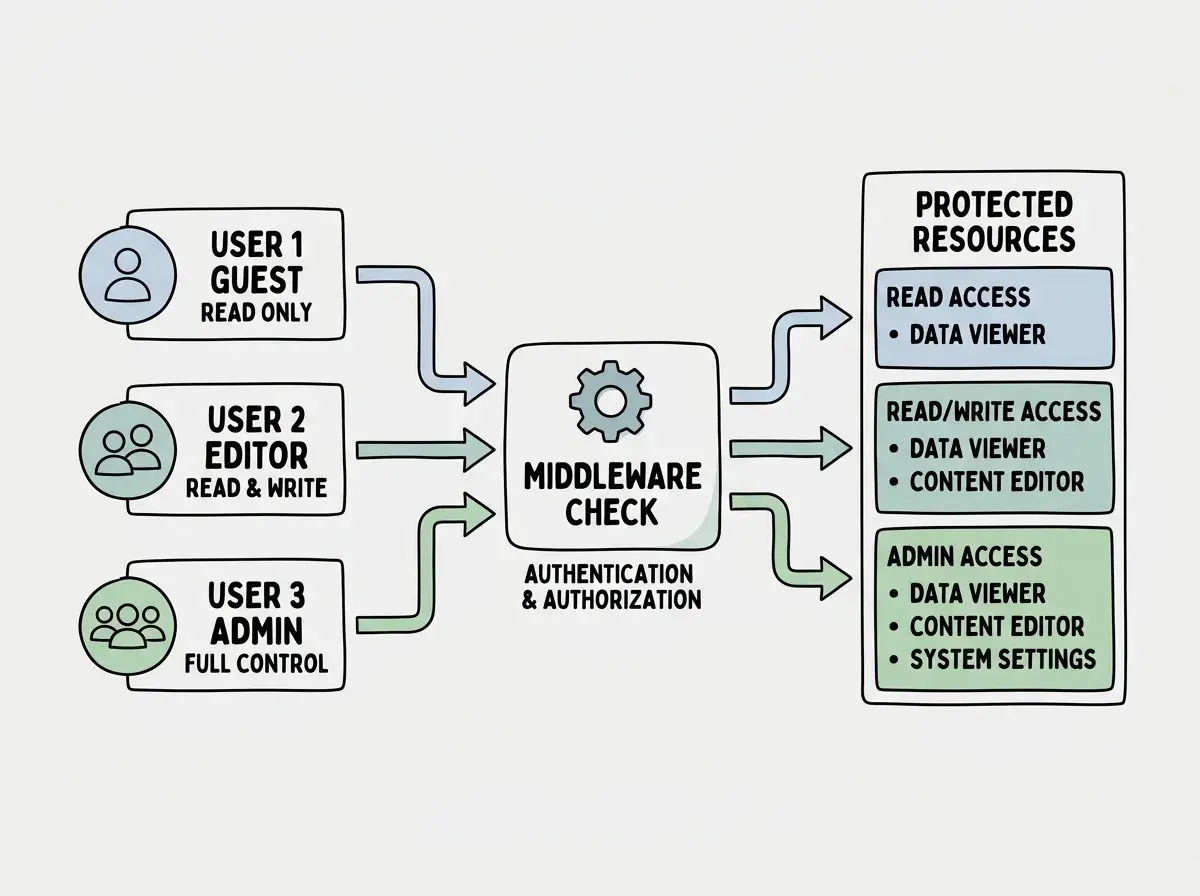
A typical SaaS application needs at least three roles. An admin who can manage users, billing, and settings. A member who can create and edit their own content. A viewer who can browse but not modify anything. Think of these as three different badge colors in our office building. Gold for admins (opens everything), blue for members (opens their floor), and green for visitors (opens the lobby).
When you hire a new employee, you do not configure 47 individual permissions. You hand them a blue badge and all the right doors open automatically. When someone gets promoted, you swap their blue badge for a gold one. When someone leaves, you deactivate the badge.
// Define your roles and what they can do
const permissions = {
  admin: ['create', 'read', 'update', 'delete', 'manage_users', 'manage_billing'],
  member: ['create', 'read', 'update_own', 'delete_own'],
  viewer: ['read'],
} as const;

type Role = keyof typeof permissions;
This is the foundation. Every feature in your app checks the user's role before allowing an action. The question is where and how you enforce those checks.
Implementing RBAC with Next.js Middleware
The first layer of defense is middleware. In our office building analogy, this is the badge scanner at the elevator. Before anyone reaches a floor, the elevator checks their badge. In Next.js, middleware runs before the request reaches any page or API route.
Here is a practical middleware setup that checks roles on every request:
// middleware.ts
import { NextResponse } from 'next/server';
import type { NextRequest } from 'next/server';

// Define which badge opens which doors
const routePermissions: Record<string, string[]> = {
  '/admin': ['admin'],
  '/dashboard': ['admin', 'member'],
  '/api/users': ['admin'],
  '/api/posts': ['admin', 'member'],
  '/reports': ['admin', 'member', 'viewer'],
};

export function middleware(request: NextRequest) {
  const { pathname } = request.nextUrl;

  // Find the matching route permission
  const matchedRoute = Object.keys(routePermissions).find(
    route => pathname.startsWith(route)
  );

  if (!matchedRoute) return NextResponse.next();

  // Get user role from session (stored in cookie or token)
  const userRole = request.cookies.get('user_role')?.value;

  if (!userRole) {
    return NextResponse.redirect(new URL('/login', request.url));
  }

  const allowedRoles = routePermissions[matchedRoute];

  if (!allowedRoles.includes(userRole)) {
    return NextResponse.redirect(new URL('/unauthorized', request.url));
  }

  return NextResponse.next();
}

export const config = {
  matcher: ['/admin/:path*', '/dashboard/:path*', '/api/:path*', '/reports/:path*'],
};
This middleware acts as the elevator badge scanner. When a viewer (green badge) tries to access /admin (executive suite), they get redirected before the page even loads. The server never renders the admin panel for them. The door simply does not open.
But middleware alone is not enough. It handles route-level access, which is like controlling floor access in our building. You also need room-level access, controlling what happens within each page and API endpoint.
// lib/auth.ts - Helper for checking roles inside API routes
export function requireRole(userRole: string, allowedRoles: string[]) {
  if (!allowedRoles.includes(userRole)) {
    throw new Error('Forbidden');
  }
}

// app/api/posts/[id]/route.ts
export async function DELETE(request: Request, { params }: { params: { id: string } }) {
  const session = await getSession();

  if (!session) {
    return Response.json({ error: 'Not authenticated' }, { status: 401 });
  }

  try {
    requireRole(session.user.role, ['admin', 'member']);
  } catch {
    return Response.json({ error: 'Not authorized' }, { status: 403 });
  }

  // Members can only delete their own posts
  if (session.user.role === 'member') {
    const post = await db.posts.findById(params.id);
    if (post.authorId !== session.user.id) {
      return Response.json({ error: 'Not authorized' }, { status: 403 });
    }
  }

  await db.posts.delete(params.id);
  return Response.json({ success: true });
}
Notice the layered checks. First, is the user authenticated at all? (Do they have any badge?) Second, does their role allow this action? (Does the badge color match?) Third, for members, is this their own resource? (Is this their office on this floor, or someone else's?)
Middleware handles route-level gating, but you must also enforce role checks inside individual API routes and server components. Think of it as two checkpoints. Middleware is the elevator badge scanner that controls floor access. API-level checks are the individual room locks. Both must exist because attackers can craft direct API requests that bypass middleware entirely.
Enforcing RBAC at the Database Level with Supabase RLS
Middleware and API-level checks are great, but they rely on your application code being correct. If an AI tool generates a new API route and forgets the role check, that route is wide open. This is like installing a new door in the office building and forgetting to connect it to the badge system.
This is where Supabase Row Level Security becomes your safety net. RLS policies run inside the database itself. Even if your application code has a gap, the database enforces the rules.
First, store the user's role in a column:
-- Add a role column to your users table
ALTER TABLE users ADD COLUMN role TEXT DEFAULT 'viewer'
  CHECK (role IN ('admin', 'member', 'viewer'));

-- Enable RLS on the posts table
ALTER TABLE posts ENABLE ROW LEVEL SECURITY;
Now create policies that match our badge system:
-- Admins (gold badge) can do everything
CREATE POLICY "Admins have full access"
  ON posts FOR ALL
  USING (
    EXISTS (
      SELECT 1 FROM users
      WHERE users.id = auth.uid() AND users.role = 'admin'
    )
  );

-- Members (blue badge) can read all, modify their own
CREATE POLICY "Members modify own posts"
  ON posts FOR UPDATE
  USING (
    auth.uid() = author_id
    AND EXISTS (
      SELECT 1 FROM users
      WHERE users.id = auth.uid() AND users.role = 'member'
    )
  );

-- Viewers (green badge) can only read published posts
CREATE POLICY "Viewers read published"
  ON posts FOR SELECT
  USING (
    posts.status = 'published'
    AND EXISTS (
      SELECT 1 FROM users
      WHERE users.id = auth.uid() AND users.role = 'viewer'
    )
  );
These policies are the locks on every filing cabinet in every room. Even if someone gets past the elevator scanner and the room door, the cabinet itself checks their badge before opening.
RBAC is one piece of the security puzzle. Explore more practical guides for shipping safe, AI-built applications.
Browse the blogThe Role Assignment Problem
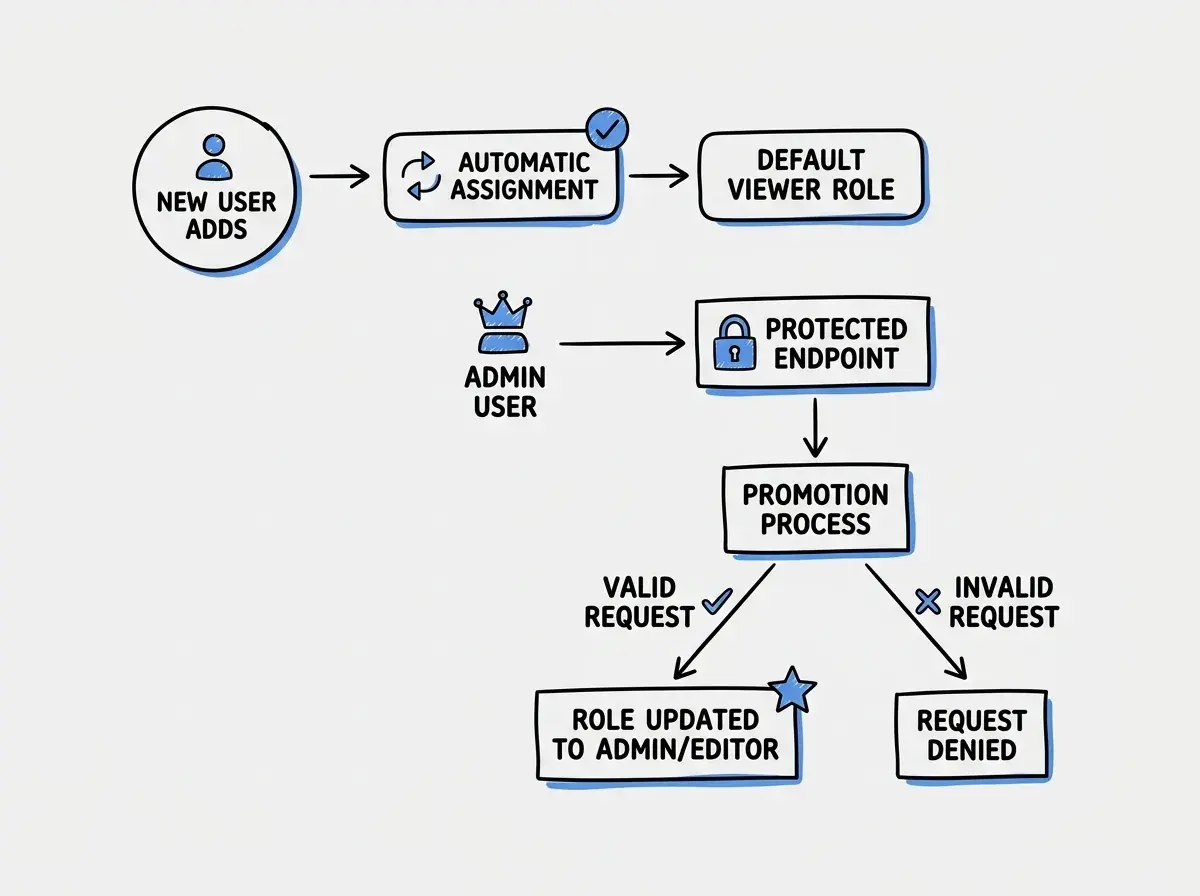
Here is where most RBAC implementations break down. The roles and policies are solid, but the mechanism for assigning roles is insecure. This is like leaving a box of gold admin badges on the reception desk for anyone to grab.
Never let users set their own role. This sounds obvious, but AI-generated signup flows sometimes include a role field in the registration form. Or the user profile update endpoint accepts a role parameter without checking who is sending it.
// WRONG - Any user can make themselves admin
app.post('/api/signup', async (req, res) => {
  const { email, password, role } = req.body; // role from user input!
  await db.users.create({ email, password, role });
});

// RIGHT - Role is always set by the system
app.post('/api/signup', async (req, res) => {
  const { email, password } = req.body;
  await db.users.create({ email, password, role: 'viewer' }); // default role
});

// Only admins can change roles
app.patch('/api/users/:id/role', async (req, res) => {
  const session = await getSession(req);
  if (session.user.role !== 'admin') {
    return res.status(403).json({ error: 'Only admins can assign roles' });
  }
  const { role } = req.body;
  await db.users.update(req.params.id, { role });
});
New users always get the lowest-privilege role (green visitor badge). Only an admin can upgrade someone to a higher role. This is the principle of least privilege, and it matters more in AI-built apps because AI tools love to accept every field from the request body without filtering.
AI tools frequently generate user creation endpoints that accept a role field directly from the request body. This means any user can sign up as an admin by adding "role": "admin" to their registration request. Always hardcode the default role for new signups and create a separate, admin-only endpoint for role changes.
Once your role assignment is locked down, the next step is making the UI match the permissions each role actually has.
Hiding UI Elements by Role
RBAC is not just about blocking unauthorized API requests. The user interface should reflect what each role can actually do. Showing a "Delete" button to a viewer who will get a 403 error when they click it is bad UX.
In React and Next.js, create a simple component that conditionally renders based on role:
function RoleGate({ allowedRoles, children }: {
  allowedRoles: string[];
  children: React.ReactNode;
}) {
  const { user } = useSession();

  if (!user || !allowedRoles.includes(user.role)) {
    return null;
  }

  return <>{children}</>;
}

// Usage
<RoleGate allowedRoles={['admin']}>
  <button onClick={handleDelete}>Delete User</button>
</RoleGate>

<RoleGate allowedRoles={['admin', 'member']}>
  <button onClick={handleEdit}>Edit Post</button>
</RoleGate>
If your green visitor badge does not open the server room, you do not even see the server room on the floor directory. The UI matches the permissions. But UI hiding is a convenience feature, not a security feature. A determined user can inspect your JavaScript and call API endpoints directly. The middleware checks and database policies are the actual locks. UI gating just makes the experience cleaner.
Putting It All Together
A complete RBAC implementation has three layers, just like our office building has three security checkpoints:
Layer 1 (the elevator) is Next.js middleware. It blocks unauthorized users from reaching protected routes. Fast, efficient, handles the majority of access control.
Layer 2 (the room locks) is API-level role checks inside each route handler. It enforces ownership checks like "members can only edit their own posts."
Layer 3 (the filing cabinets) is Supabase RLS policies. Even if Layers 1 and 2 have gaps, the database itself refuses to return unauthorized data.
Most AI-built applications have zero of these layers. If you implement all three, you are ahead of the vast majority of projects shipping today. Start with Layer 3 (RLS) because it is the hardest to bypass, then add Layer 1 (middleware) for performance, then Layer 2 (API checks) for granular control.
Your users do not all need the same badge. Build the badge system, install the scanners, and lock the cabinets.
Start with the role definitions, add middleware, then lock down the database. Your app's security depends on it.
Explore more tutorials