Every company eventually builds internal tools. Admin dashboards, customer support panels, order management screens, data entry forms. The kind of software that employees need daily but customers never see. Most teams either cobble these together with spreadsheets or sink weeks of engineering time into custom React apps that nobody maintains after the original developer leaves.
Retool for internal tools is the pitch that you can skip all of that. Think of it like pre-built office furniture. You could build every desk, shelf, and filing cabinet from raw wood. Or you could buy well-designed, modular furniture that you assemble and customize to fit your office. It arrives with the hard parts already solved. You just configure it for your space.
That furniture analogy runs through every aspect of Retool, from the drag-and-drop builder to the database connectors to the new AI features. The question is whether the pre-built pieces fit your office, or whether your setup is unusual enough that you need raw wood.
What Retool Actually Does
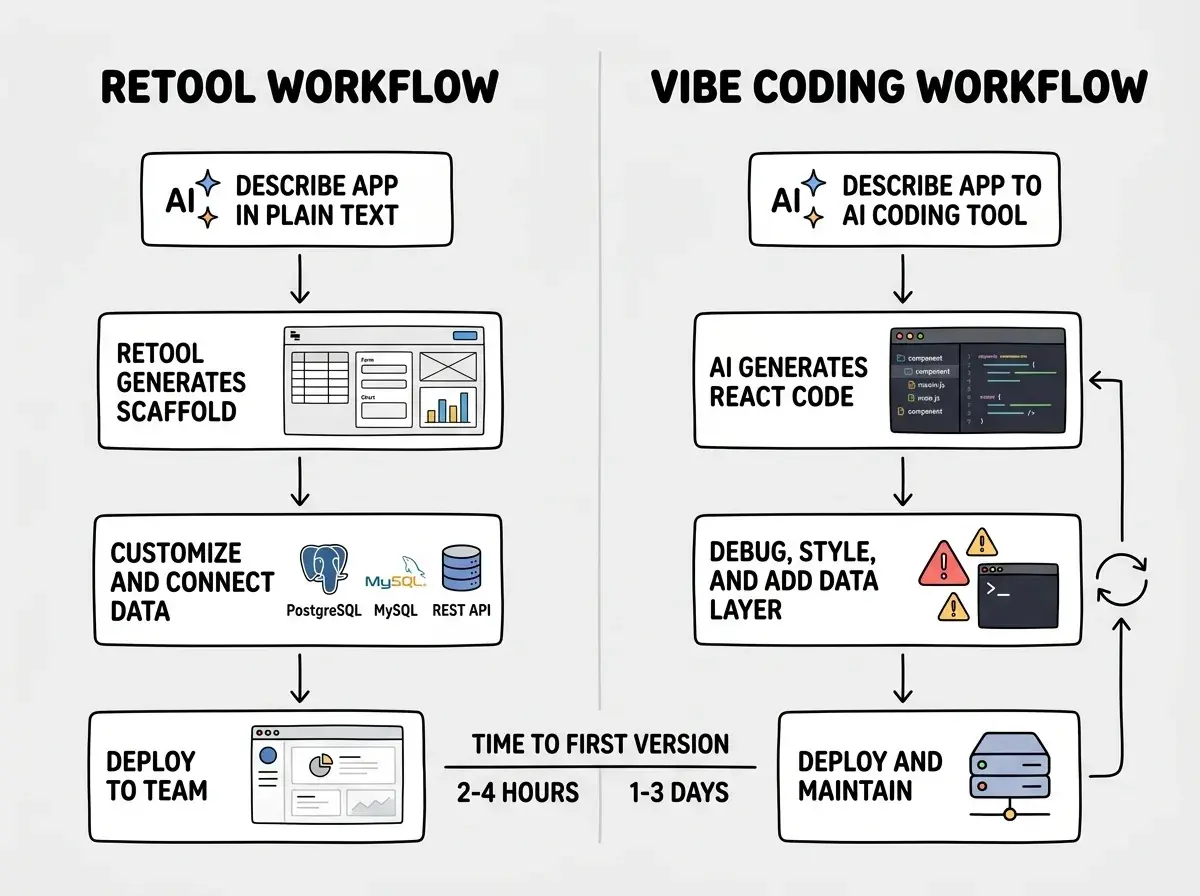
Retool is a low-code platform for building internal applications. You drag components onto a canvas (tables, forms, buttons, charts), connect them to your data sources, and write small JavaScript snippets to handle business logic. The result is a functional internal tool built in hours rather than weeks.
The component library covers most internal tool needs. Tables with sorting, filtering, and pagination. Forms with validation. Modal dialogs. File uploads. Chart components for basic analytics. Each component exposes properties and event handlers that you wire together visually.
Database connectors are where Retool saves the most time. It connects natively to PostgreSQL, MySQL, MongoDB, SQL Server, Snowflake, BigQuery, and about thirty other data sources. You also get REST API and GraphQL integrations. Setting up a connection takes about two minutes. Writing a query takes another five. Displaying the results in a sortable, searchable table with inline editing takes maybe ten more. That same workflow from scratch in React takes a full day minimum.
Retool is not a general-purpose app builder. It is specifically designed for internal tools that employees use, not customer-facing products. The UI components look functional, not beautiful. The deployment model assumes authenticated internal users, not public traffic. If you are trying to build something your customers will see, Retool is the wrong tool entirely.
The AI Features Worth Knowing About
With 92% of developers now using AI tools daily, Retool has added its own AI capabilities. These fall into two categories that matter and one that is mostly marketing.
AI-assisted app generation lets you describe what you want in plain English and Retool scaffolds a starting point. You type "build an order management dashboard with status filters and a detail panel" and it generates a layout with the right components and pre-wired queries. The output is not production-ready, but it saves 30-60 minutes of initial setup. Think of it as the furniture being partially assembled when it arrives.
AI-powered query generation is more practically useful. You describe what data you need in natural language, and Retool writes the SQL for you. For product managers who know their data but do not write SQL fluently, this removes a real bottleneck. You describe what you need and iterate on the results directly.
AI components for end users let you embed AI features into the tools you build. A customer support agent could highlight a ticket and get an AI-generated summary. A data entry operator could paste unstructured text and get structured fields extracted automatically. These components connect to OpenAI, Anthropic, or other LLM providers.
The AI features are genuinely useful but they do not change the fundamental nature of the platform. Retool with AI is still Retool. The furniture is the same. It just comes with better assembly instructions now.
The Database Connector Advantage
The single strongest argument for Retool is the database connector ecosystem. Internal tools almost always start with "show me the data in this database, let me filter it, and let me edit some records." Retool makes this trivially easy.
You add your database credentials once. You write queries (or let AI write them). You bind query results to table components. You wire event handlers for row clicks and form submissions to write-back queries. The entire read-edit-save cycle that takes a full-stack developer a day to build properly comes together in Retool in under an hour.
For teams with multiple databases, this advantage compounds. A single Retool app can query your PostgreSQL production database, your MongoDB analytics store, and a third-party REST API, then display all three in a unified interface. In Retool, that is just three data source configurations and some JavaScript to merge the results.
When Retool Beats Building From Scratch
The furniture analogy helps clarify where Retool wins and where it does not.
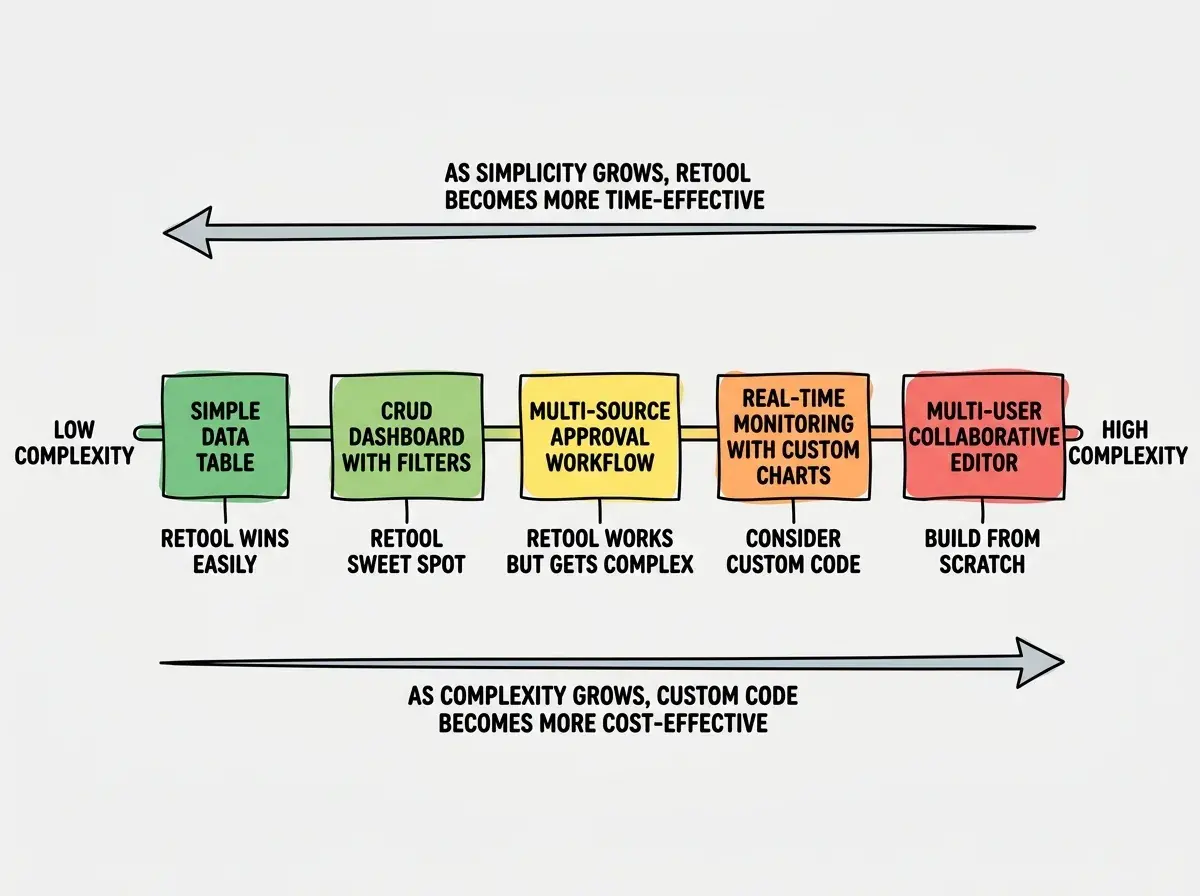
Standard office layouts win with pre-built furniture. If your internal tool needs are common (CRUD dashboards, data tables with filters, approval workflows, form-based data entry), Retool delivers faster and cheaper than custom code.
Retool wins on maintenance. When you build a custom internal tool, someone has to maintain it. Dependencies need updating. The developer who built it leaves. Retool handles infrastructure, component updates, and security patches. Your furniture manufacturer handles the recalls so you do not have to.
Non-engineer builders thrive in Retool. Product managers and operations leads can build functional tools without engineering support. This unblocks entire teams that would otherwise sit in a queue waiting for developer availability.
Building your first internal tool in Retool and then trying to use it for everything, including customer-facing features. Retool's component library is designed for internal use. The styling options are limited and the performance assumes dozens of concurrent users, not thousands. Companies that stretch Retool into a customer-facing product always regret it and rebuild later.
When Vibe Coding From Scratch Wins
Unusual office layouts need custom furniture. If your internal tool has complex, multi-step workflows with branching logic or deeply customized visualizations, Retool's component model feels constraining. You spend more time working around limitations than you save by using it.
Highly interactive tools resist low-code. Drag-and-drop map editors, real-time monitoring dashboards with WebSocket streams, or tools that need pixel-perfect custom UIs are all poor fits. When your pattern is not standard, the pre-built pieces do not fit your space.
Long-term cost at scale favors custom code. Retool's Team plan costs $10/user/month. The Business plan runs $50/user/month. For a team of 50 on Business, that is $30,000/year. A senior developer could build and maintain several custom tools for that budget, and you would own the code.
Full control matters for regulated industries. If your compliance requirements dictate where data flows and what audit trails exist, Retool's managed infrastructure adds a compliance surface you need to evaluate. Self-hosted Retool exists but adds complexity that partially defeats the purpose.
Pricing Breakdown
| Plan | Cost | Best For |
|---|---|---|
| Free | $0 (up to 5 users) | Trying it out, solo projects |
| Team | $10/user/month | Small teams, standard needs |
| Business | $50/user/month | Larger teams, SSO, audit logs |
| Enterprise | Custom | Compliance, self-hosting, SLA |
The free tier is genuinely useful for evaluation. Five users can build real tools and test the platform before committing budget. The jump from Team to Business is steep, so understand whether you actually need SSO, granular permissions, and audit logs before upgrading.
Limitations You Should Know
JavaScript only. All custom logic in Retool is written in JavaScript. If your team is primarily Python or another language, the learning curve is steeper than it appears.
Version control is limited. Retool has its own versioning system, but it is not Git. You cannot review changes in pull requests the way you would with code. For teams with strong code review practices, this is a friction point.
Performance with large datasets. Retool works well for tables with hundreds or low thousands of rows. Past tens of thousands of rows with complex filtering, performance degrades. You need to push that logic into your database queries rather than relying on client-side processing.
Vendor lock-in is real. Your Retool apps live in Retool. If you decide to leave, you are rebuilding from scratch. The furniture does not come apart into reusable pieces. Unlike vibe-coded tools where you own every line of source code, Retool apps are tied to the platform.
Internal tools are one piece of the puzzle. Get the full picture.
Explore more tool reviewsWho Should Use Retool
Product managers who need internal dashboards without waiting for engineering sprints. The AI query generation and drag-and-drop builder make Retool accessible to non-engineers who understand their data.
Engineering teams drowning in internal tool requests. Retool handles the standard admin panels so your engineers can focus on customer-facing product work.
Startups with small teams where every engineer's time is precious. Building custom internal tools when you have five engineers and a hundred features to ship is a poor allocation of resources.
What This Means For You
Retool for internal tools fills a real gap. It is not the right choice for every team, but for building data-driven internal applications quickly, it delivers on its promise.
Start with the free tier. Build one real tool your team actually needs. If the pre-built furniture fits your office, you just saved yourself weeks of woodworking. If it does not fit, you will know within a few hours and can pivot to building from scratch with full confidence.
The worst decision is spending three weeks building a custom admin panel that Retool could handle in an afternoon. The second worst is forcing complex workflows into Retool when they clearly need bespoke code. Now you know which situation you are looking at.
See how other low-code and AI-assisted tools compare for your workflow.
Browse tool comparisons