Resend vs SendGrid vs Postmark is the email infrastructure decision that 92% of developers using AI tools daily will face the moment their app needs to send a transactional email. A password reset, an order confirmation, a welcome sequence. Every app eventually needs reliable email, and the service you pick shapes your developer experience for months to come.
Think of it like choosing between three courier services. Resend is the modern startup courier with a slick app. SendGrid is the established logistics company that can ship anything anywhere. Postmark is the boutique service that guarantees your package arrives faster than anyone else, every single time.
Quick Verdict
| Resend | SendGrid | Postmark | |
|---|---|---|---|
| Best for | Modern stacks, React Email, clean DX | High volume, complex workflows, marketing + transactional | Mission-critical transactional email, highest deliverability |
| Price | Free to 3K emails/mo, then $20/mo for 50K | Free to 100/day, then $20/mo for 50K | Free to 100/mo, then $15/mo for 10K |
| Strength | React Email components, beautiful API design | Massive scale, marketing automation, battle-tested | 99%+ inbox placement, dedicated IP from day one |
| Weakness | Newer platform, smaller feature set | Cluttered dashboard, aging API design | No marketing email, higher per-email cost |
The table gives you the snapshot. The rest of this article breaks down what actually matters when you are building with these tools day to day, especially when AI is generating your email integration code.
Your choice between Resend, SendGrid, and Postmark should be driven by what kind of email your app sends. If you are building a modern app with React and want the cleanest developer experience, Resend fits naturally. If you need both marketing campaigns and transactional email under one roof at massive scale, SendGrid covers both. If every email absolutely must land in the inbox and you do not need marketing features, Postmark has the best deliverability track record in the industry.
Developer Experience and API Design
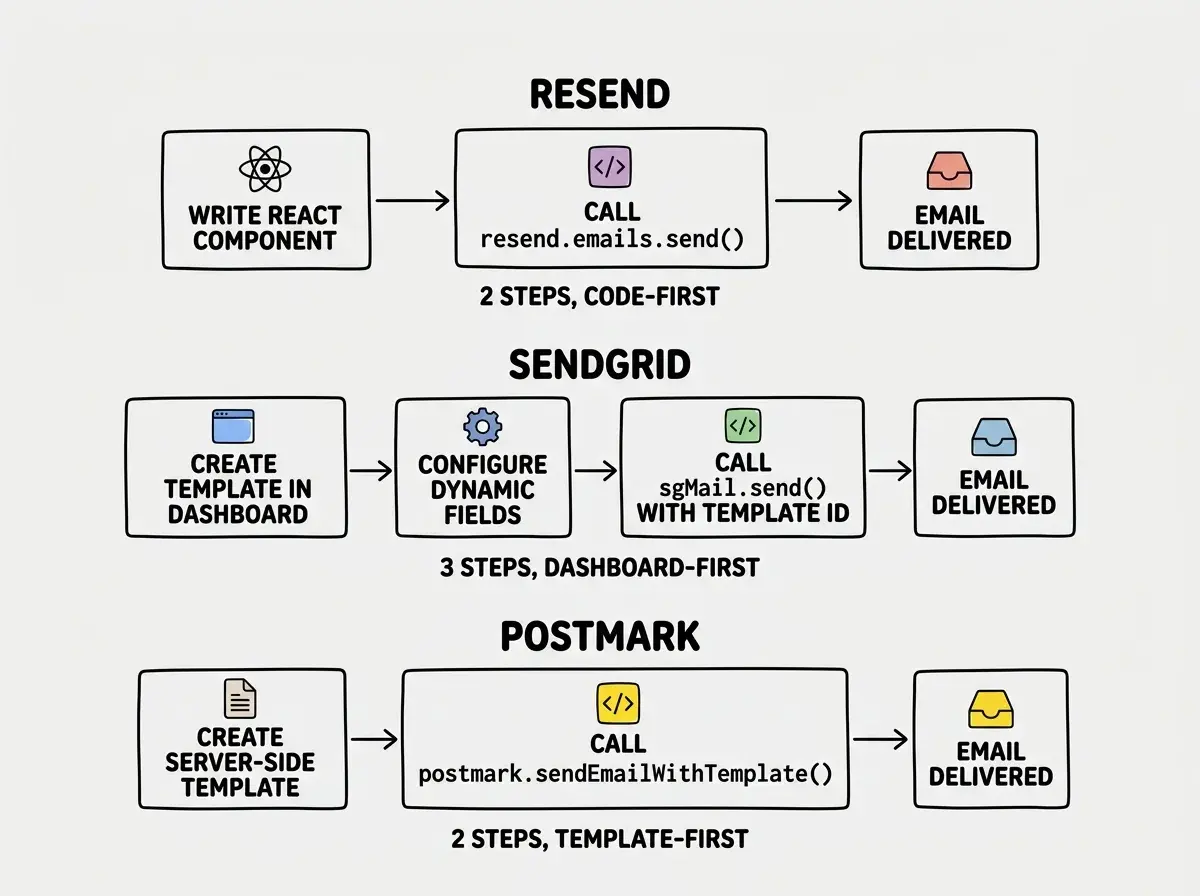
Resend was built by developers who were frustrated by existing email APIs. The API surface is tiny and intentional. Sending an email is a single POST request with a JSON body. No XML, no legacy SMTP configuration, no multi-step setup ritual. The Node.js SDK feels like it was designed alongside the API rather than bolted on afterward. You import Resend, instantiate it with your API key, and call resend.emails.send(). That is it. The startup courier hands you a clean app, you tap "send," and the package is on its way.
SendGrid's API reflects two decades of evolution. The v3 API is capable and well-documented, but it carries the weight of every feature added since 2009. You will encounter "dynamic templates," "suppressions," "IP pools," and "subuser management" before you send your first email. The logistics company has every routing option, but the shipping form has 47 fields and you only needed three.
Postmark's API sits between the two. Clean, purposeful, and focused exclusively on transactional email. The documentation is some of the best in the email space with clear examples and honest explanations of deliverability concepts. The boutique courier gives you a focused service with clear instructions and nothing extraneous.
Where Resend pulls ahead for modern stacks is React Email support. You write your email templates as React components, render them server-side, and pass the JSX directly to the send function. No separate template language, no Handlebars, no pasting HTML into a dashboard editor. Your templates live in your codebase, get version-controlled with git, and benefit from TypeScript type checking.
Deliverability
Deliverability is the metric that separates email services from each other more than any API design ever could. Sending an email is easy. Getting it into the inbox instead of the spam folder is the hard part.
Postmark leads the industry on deliverability. They publish their delivery stats publicly and consistently report 99%+ inbox placement rates. Postmark achieves this by refusing to handle marketing email entirely. Their servers only send transactional messages, so their IP reputation stays pristine. The boutique courier only delivers important documents, so every recipient opens the door.
SendGrid's deliverability is solid but variable. On shared IPs (the default for lower-tier plans), your deliverability depends partly on what other customers are sending from those same IPs. Dedicated IPs are available on higher plans, but they require gradual warmup. SendGrid's deliverability tools are excellent if you invest time in configuring them.
Resend is newer and still building its reputation. Their deliverability is good and improving, backed by proper DKIM, SPF, and DMARC configuration tools. But they do not yet have the multi-year track record that Postmark and SendGrid have established with ISPs. For most applications, Resend's deliverability is perfectly adequate. For mission-critical emails like financial notifications, Postmark's proven track record carries weight.
Webhook Reliability and Event Tracking
Email does not end when you call the send function. You need to know whether the email was delivered, opened, bounced, or marked as spam.
Resend's webhook system is clean and modern. Events arrive as JSON with consistent schemas, covering delivery, open, click, bounce, and complaint notifications. Integration with Svix for webhook reliability adds an extra layer of delivery guarantees.
SendGrid's Event Webhook is powerful but complex. Events arrive in batches rather than individually, which is efficient at scale but requires batch processing logic on your end. Configuration lives in the dashboard's "Mail Settings" section, which can be hard to find.
Postmark's webhooks are straightforward. Each event type gets its own webhook URL, making routing clean and simple. Bounce handling is particularly good, with detailed classifications that help you understand why a delivery failed.
Pick the right email service before your AI tool picks one for you.
Explore more toolsDashboard UX and Management Tools
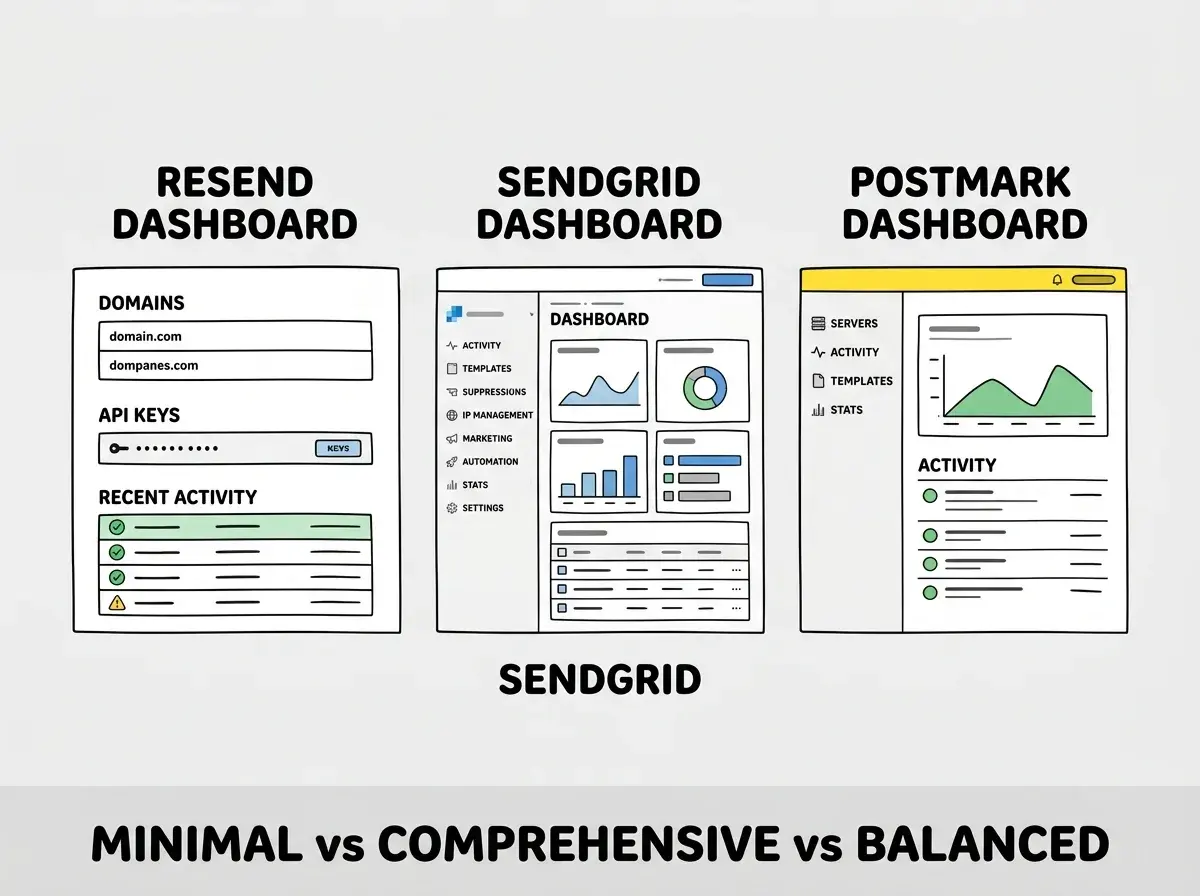
Resend's dashboard is minimal and purposeful. Domains, API keys, recent sends, and analytics on clean pages with no clutter. Adding a domain takes about 30 seconds. It feels like a developer tool rather than an enterprise sales platform.
SendGrid's dashboard is comprehensive to the point of overwhelming. Email activity, template management, suppressions, IP management, marketing campaigns, automation flows, sender authentication, and more. The power is real, but the learning curve is steep. If you just need to send password resets, you are wading through features you will never touch.
Postmark's dashboard strikes a practical balance. The "Servers" concept organizes your email by project. Each server shows its activity, templates, and stats in a focused view. The deliverability section shows bounce rates, spam complaints, and reputation scores at a glance.
Pricing at Real Scale
The free tiers tell you very little about long-term costs. Here is what each service costs when your app is actually sending meaningful volume.
At 50,000 emails per month. Resend's Team plan runs $20/mo. SendGrid's Essentials plan runs roughly $20/mo. Postmark charges $50/mo. At this volume, Resend and SendGrid are comparable, while Postmark costs more per email but delivers measurably better inbox placement.
At 500,000 emails per month. Resend's Business plan runs $80/mo. SendGrid's Pro plan runs about $90/mo. Postmark charges around $275/mo. The gap widens, but if 2% more of your emails land in the inbox and drive revenue, the math can favor Postmark despite the higher price.
At 2 million+ emails per month. SendGrid becomes the clear cost leader with volume discounts that neither competitor can match. The logistics company thrives at scale. Postmark becomes expensive. Resend falls in between with enterprise pricing on request.
Choosing an email service based only on the free tier limits. SendGrid's free plan allows 100 emails per day, which sounds generous until you realize that is a hard daily cap, not a monthly average. Postmark's free tier is only 100 emails per month total. Resend's 3,000 per month free tier is the most practical for development and testing. But none of these free tiers reflect what you will actually pay in production. Model your real send volume before committing to a provider.
What AI Tools Generate
When you ask Cursor, Claude Code, or Bolt to "add email sending," the generated code reflects what each tool has seen most in training data. SendGrid appears in the most examples because it has been around the longest. Resend appears increasingly in modern Next.js and React examples. Postmark appears less frequently but generates cleaner integration code when it does show up.
The important pattern is that AI tools generate the simplest possible integration with hardcoded HTML strings. They rarely generate proper template systems, bounce handling, or webhook processing on the first pass. Plan to build those layers yourself or with targeted follow-up prompts.
Which Service Fits Your App
Choose Resend if you are building with React/Next.js, value clean API design, and want templates in your codebase as React components. The startup courier is perfect for modern stacks.
Choose SendGrid if you need marketing email alongside transactional, expect to scale past millions of sends, or need advanced features like IP pool management. The logistics company handles anything you throw at it.
Choose Postmark if every email your app sends genuinely matters. Password resets, two-factor codes, payment receipts, legal notifications. The boutique courier is worth the premium when reliability is non-negotiable.
See how the best tools compare across every category for AI-built applications.
Browse tool comparisonsFinal Thoughts
Resend vs SendGrid vs Postmark is not a question with one correct answer. It is a question about what your app needs from email. The startup courier, the logistics company, and the boutique delivery service each serve different use cases well. Pick intentionally, test deliverability early, and build your webhook handling before you need it.