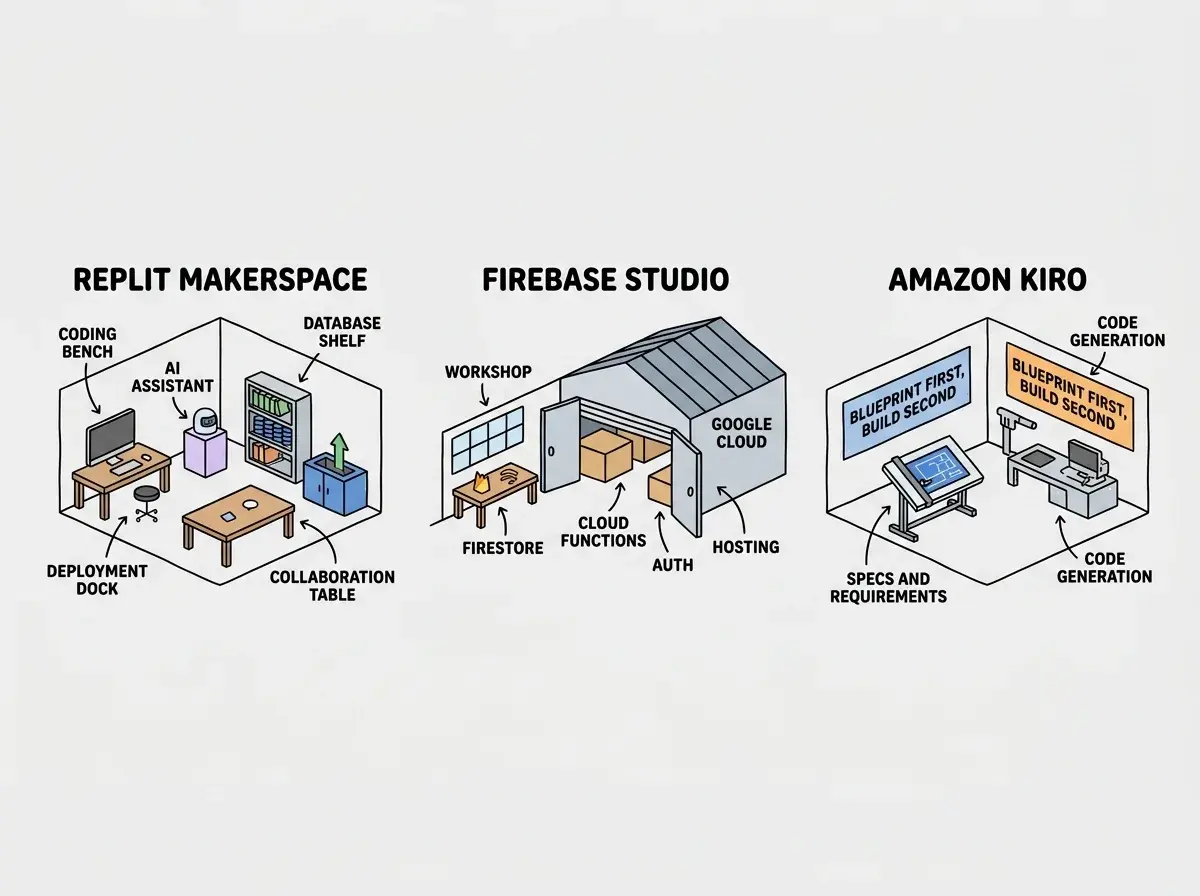
Picking a cloud IDE in 2026 is like choosing a workshop for building furniture. Replit is the makerspace with every tool bolted to the workbench and a friendly instructor standing by. Firebase Studio is the industrial workshop backed by a massive supply chain. Amazon Kiro is the architect's studio where you draft blueprints before touching any wood. Each builds furniture. Each assumes you care about different parts of the process.
The choice between them shapes not just how you write code, but how you think about building software.
Is Firebase Studio Better Than Replit
Firebase Studio, Google's cloud development platform (evolved from Project IDX), integrates deeply with the Google Cloud ecosystem. It runs on a Nix-based environment, supports Gemini AI for code generation, and connects natively to Firebase services including Firestore, Cloud Functions, Authentication, and Hosting. If you are building on Google's stack, the integration is seamless.
Replit has been in the cloud IDE space longer and shows it. Over 50 programming languages, a built-in database (Replit DB), deployment through Replit Deployments, and an AI agent that builds entire applications from descriptions. Replit's multiplayer editing makes collaboration simple, and its community of millions means help is always available.
The workshop analogy clarifies the difference. Replit gives you everything in one room. Firebase Studio assumes you want access to Google's industrial supply chain. The tools are more powerful individually, but the setup requires more intentional choices.
For straightforward projects where you want to go from idea to deployed app with minimal friction, Replit wins on simplicity. For projects that need enterprise-grade infrastructure from day one, Firebase Studio wins on capability. The gap between them is narrowing as both platforms add features, but their philosophies remain distinct.
What Is Better Than Firebase Studio
This depends entirely on what "better" means for your project. If Firebase Studio's strength is deep Google Cloud integration, its weakness is that it ties you to Google's ecosystem. Alternatives that avoid that lock-in include Replit for general-purpose cloud development and Gitpod or GitHub Codespaces for teams that want cloud IDEs connected to their existing Git workflows.
Amazon Kiro takes a completely different approach. Rather than competing on IDE features or cloud integrations, Kiro focuses on the process of turning ideas into software. You describe what you want to build, and Kiro generates detailed specifications including user stories, acceptance criteria, and technical requirements before writing any code. This spec-driven approach catches misunderstandings early, which is where most AI-generated projects go wrong.
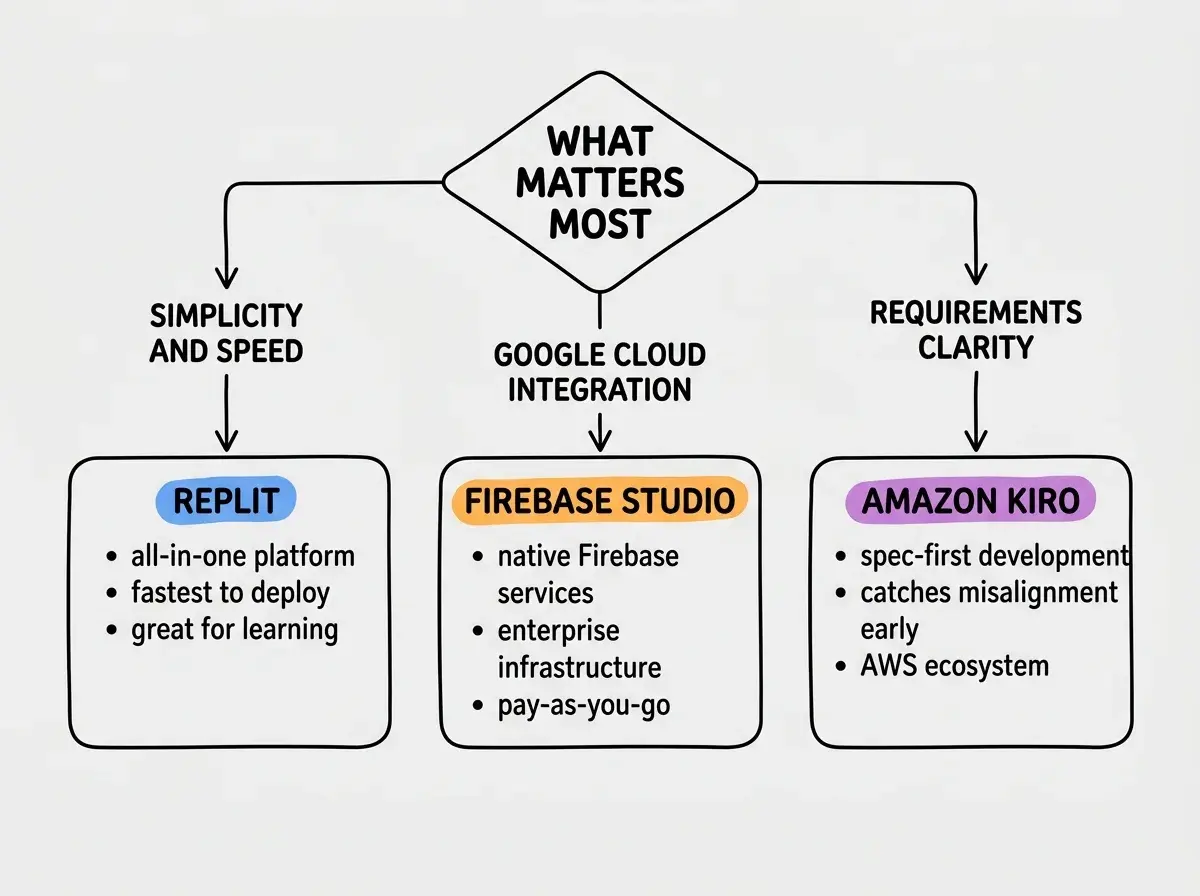
For students and learners, Replit is probably better than Firebase Studio because of its gentler learning curve and larger community. For enterprise teams already on AWS, Kiro's spec-driven workflow and AWS integration make it compelling. For teams on Google Cloud, Firebase Studio remains the obvious choice because the ecosystem integration eliminates configuration work that would take hours elsewhere.
The honest answer to "what is better" is that these tools have stopped competing on the same axis. They each optimize for a different part of the development experience.
The best cloud IDE is the one that matches your infrastructure decisions, not your feature wishlist. If you are on Google Cloud, Firebase Studio eliminates friction. If you want self-contained simplicity, Replit delivers. If you want AI to help you think before you build, Kiro's spec-driven approach catches mistakes early. Choosing based on cloud provider alignment will save you more time than choosing based on editor features.
Does Replit Use Firebase
No. Replit has its own infrastructure for hosting, databases, and deployment. Replit DB is a built-in key-value store, and Replit Deployments handles hosting on Replit's own servers. There is no Firebase dependency or integration by default.
You can, however, use Firebase services from a Replit project by installing the Firebase SDK and configuring credentials. This hybrid approach works for builders who like Replit's coding environment but want Firebase's database infrastructure.
Firebase Studio, by contrast, has Firebase services built in at a fundamental level. Creating a new project automatically provisions Firebase services. Replit's makerspace does not come with a lumber yard, but you can drive to any lumber yard you choose. Firebase Studio's workshop has Google's lumber yard attached to the building.
The Spec-Driven Difference With Kiro
Amazon Kiro deserves special attention because its approach is genuinely different from both Replit and Firebase Studio. While those two platforms focus on making coding faster, Kiro focuses on making sure you are building the right thing before writing any code.
When you start a project in Kiro, the AI generates a requirements document. User stories, acceptance criteria, technical constraints, and architectural decisions appear as a structured document you can review and edit. Only after you approve the spec does Kiro generate code. This mirrors how professional software teams work at companies like Amazon, where a six-page document precedes any engineering sprint.
For experienced developers and teams, this workflow catches the single most expensive mistake in software development: building the wrong thing. For beginners and solo builders, the spec step adds friction that can feel unnecessary when you just want to see something on screen.
Dismissing Kiro's spec-first approach as "too slow" misses the math. A spec review takes 15 minutes. Rebuilding an app because the AI misunderstood your requirements takes days. If your project is a quick prototype you plan to throw away, skip the spec. If your project is something you plan to maintain and grow, the 15-minute spec review is the highest-leverage time investment in the entire development process.
Pricing Compared
Each platform approaches pricing differently, reflecting their different target users.
| Feature | Replit | Firebase Studio | Amazon Kiro |
|---|---|---|---|
| Free Tier | Limited compute | Yes (with limits) | Free during preview |
| Paid Plans | $25/mo (Hacker) | Pay-as-you-go | TBD (AWS pricing) |
| AI Agent | |||
| Built-in Database | Replit DB | Firestore | DynamoDB access |
| Deployment | Built-in | Firebase Hosting | AWS services |
| Spec Generation | |||
| Collaboration | Real-time multiplayer | Git-based | Git-based |
| Language Support | 50+ languages | Major languages | Major languages |
| Offline Support | |||
| Mobile Coding |
Replit's free tier gives you limited compute for learning. The Hacker plan at $25/month adds resources and always-on hosting. For deployed apps, compute charges can add up, as the viral $607 bill story demonstrates.
Firebase Studio's IDE is free. You pay for Firebase and Google Cloud services consumed. Cheap for small projects (Firebase's free tier is generous), potentially expensive at scale.
Amazon Kiro is free during its preview period. Expect AWS-style pay-as-you-go pricing at general availability.
The Verdict for Different Builders
For students and beginners: Replit is the clear winner. The free tier is functional enough to learn on, the community provides help when you get stuck, the AI agent can build starter projects you learn from, and you can code from any device including a phone. Firebase Studio and Kiro both assume more technical knowledge than most beginners have.
For startup founders building MVPs: Replit gets you to a deployed prototype fastest. Firebase Studio is better if you already know your app will need Google Cloud infrastructure (global database, serverless functions, Google Auth). Kiro is worth considering if your product is complex enough that getting requirements right before coding saves significant rework.
For enterprise teams: Firebase Studio or Kiro, depending on your cloud provider. Google Cloud shops benefit from Firebase Studio's native integration. AWS shops benefit from Kiro's spec-driven workflow and AWS service access. Replit is less common in enterprise settings, though its simplicity makes it useful for internal tools and hackathons.
For educators and bootcamps: Replit remains the standard. Multiplayer editing works for live coding sessions, and the platform runs in a browser with zero local setup.
The best workshop is the one where you can actually build what you need. Pick the workshop that matches the furniture you are trying to make.
Learn which platform and workflow fits your skill level and goals.
Start herePick the workshop that matches the furniture you are trying to make, and get building.
Guides for getting started with cloud development platforms at every experience level.
Explore the guides