Amazon Kiro is a new AI development tool from AWS that takes a fundamentally different approach to building software. Instead of jumping straight to code like Cursor or Bolt, Kiro generates detailed requirements and specifications first, then writes code from those specs. This Amazon Kiro review covers whether that spec-driven workflow actually produces better results, or just slows you down.
With 92% of developers now using AI tools daily, most of those tools optimize for speed. Kiro bets that slowing down at the start leads to better outcomes at the finish. That is a bold claim worth examining carefully.
What Amazon Kiro Actually Is
Kiro is a VS Code-based AI development environment built by Amazon Web Services. It launched in mid-2025 as an invite-only preview and opened to general availability in early 2026. The editor looks and feels familiar if you have used VS Code or Cursor, but the underlying workflow is completely different.
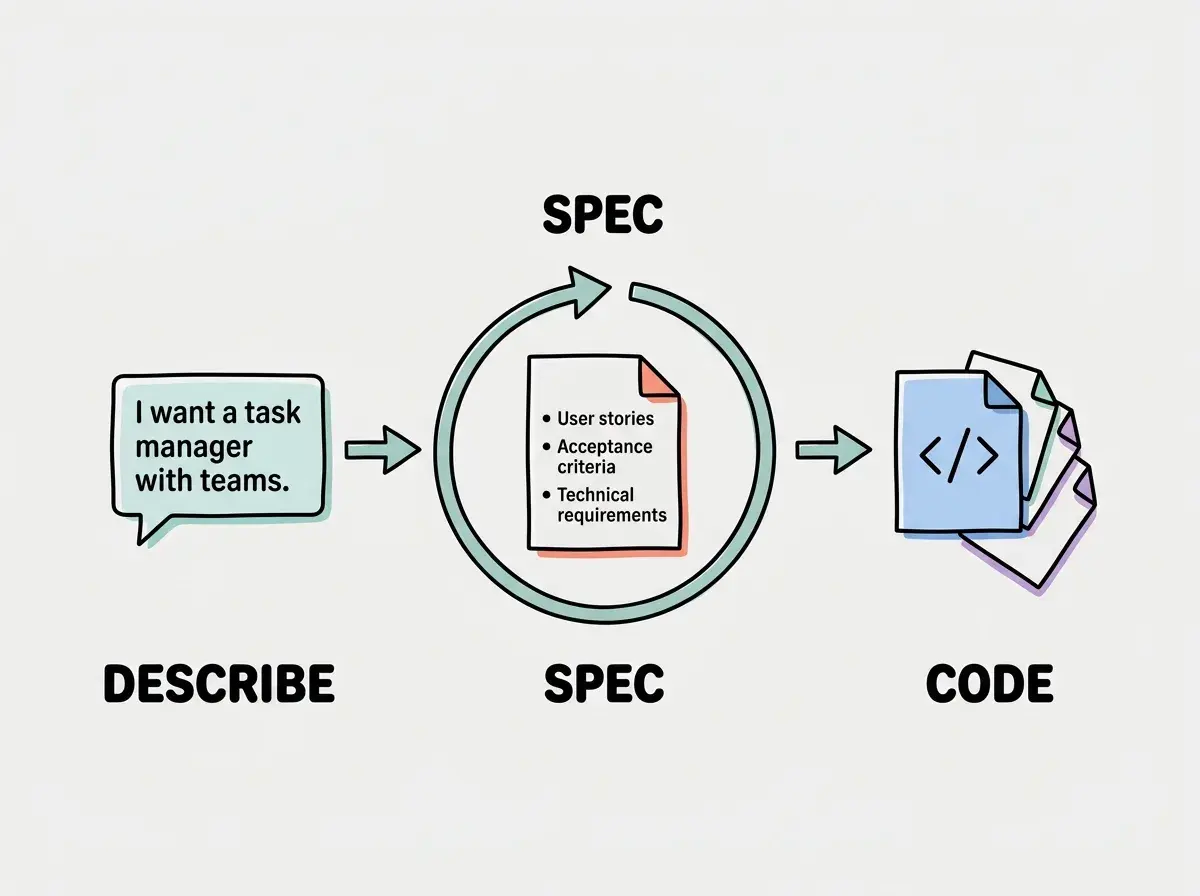
Where other AI coding tools take your prompt and immediately start generating files, Kiro introduces an intermediate step. You describe what you want to build, and Kiro generates a structured specification document before writing a single line of code. This spec includes user stories, acceptance criteria, technical requirements, and architectural decisions. You review the spec, make adjustments, and only then does Kiro proceed to code generation.
Amazon calls this "spec-driven development," and it is the core philosophy behind everything Kiro does. The tool is designed around the idea that most AI coding failures happen not because the model writes bad code, but because the model misunderstands what you actually want. By making requirements explicit and reviewable, Kiro tries to catch misalignment before it becomes a problem.
How the Spec-First Workflow Works
Here is what a typical Kiro session looks like. You open the tool, start a new project, and describe what you want to build. Say you type: "Build a project management app with team workspaces, task assignments, due dates, and a kanban board view."
In Cursor or Bolt, that prompt would immediately produce code. Kiro does something different. It generates a requirements document that breaks your request into discrete user stories, each with acceptance criteria. The technical section specifies the database schema, API endpoints, component hierarchy, and state management approach. You get a structured document that reads like something a product manager and senior engineer would produce together.
This is where the magic (or friction, depending on your perspective) happens. Kiro presents this spec for review. You can modify user stories, add edge cases it missed, change tech stack choices, or remove features you did not actually want. The spec is a living document you collaborate on with the AI before any code exists.
Once you approve the spec, Kiro generates code that traces directly back to requirements. Every component, API route, and database query maps to a specific user story. If something does not work, you can trace the failure back to the spec and determine whether the problem was in the requirements or the implementation.
Where Kiro Gets It Right
The biggest advantage of spec-driven development is architectural consistency. When you build with Bolt or Lovable, the AI generates code reactively. You ask for a feature, it creates files, you ask for another, it creates more. Over time, the codebase accumulates structural inconsistencies because each generation step had limited awareness of the whole picture.
Kiro avoids this because the spec captures the entire system design before implementation begins. The database schema accounts for all features, not just the one you asked about first. The API design is consistent across endpoints. The component hierarchy makes sense as a complete system rather than a collection of independently generated pieces.
The second strength is fewer rewrites. Projects built with Kiro require significantly less rework than equivalent projects built with prompt-to-code tools. The spec review step catches "wait, the user should also be able to..." moments before those oversights are baked into code. Adding a requirement to a spec is trivial. Retrofitting one into generated code often means rewriting multiple files.
Kiro's spec-driven approach works best for projects where you know roughly what you want but have not thought through every detail. The spec generation process surfaces decisions you would have had to make eventually, and it is much cheaper to make those decisions in a document than in code. If you are building anything beyond a simple prototype, the time spent reviewing specs saves multiples of that time in avoided rewrites.
The third strength is that Kiro produces code that is easier to maintain. Because every piece of code traces back to a requirement, you (or a future developer) can understand why each file exists and what it is supposed to do. This traceability is something you almost never get from other AI coding tools.
Where Kiro Falls Short
The most obvious weakness is speed. If you want to go from idea to working prototype in five minutes, Kiro is not your tool. The spec generation and review process adds ten to twenty minutes at the start of every project. For founders validating ideas or developers at a hackathon, that delay is a real cost.
Kiro is also newer and less battle-tested than Cursor, Bolt, or Claude Code. The community is smaller, meaning fewer tutorials, fewer shared prompts, and fewer people to ask when something goes wrong. AWS is investing heavily, but the ecosystem is still maturing.
The AWS-centric tendency is worth mentioning. Kiro does not force you into AWS services, but its defaults lean toward DynamoDB, Lambda, Amplify, and other Amazon products. If you prefer Supabase, Vercel, or Cloudflare, you will find yourself overriding suggestions frequently. The tool respects your choices when you specify them, but the defaults reveal its origins.
Skipping the spec review step to save time. Some developers approve Kiro's generated specs without reading them carefully, treating the spec phase as a loading screen rather than a collaboration step. This defeats the entire purpose of the tool. The spec review is where you catch misunderstandings, remove unnecessary complexity, and ensure the AI is building what you actually need. Rush through it, and you end up with a well-structured app that solves the wrong problem.
Kiro also struggles with experimental projects where you do not know what you want until you see it. The spec-first approach assumes you can articulate requirements upfront. If your process is exploratory, where you build, react, and iterate based on what feels right, Kiro's structured workflow feels constraining.
Pricing and Access
Kiro offers a free tier with limited spec generations and code outputs per month. The Pro tier runs $19 per month and includes generous limits for individual developers. The Team tier at $39 per seat per month adds collaboration features, shared spec libraries, and admin controls.
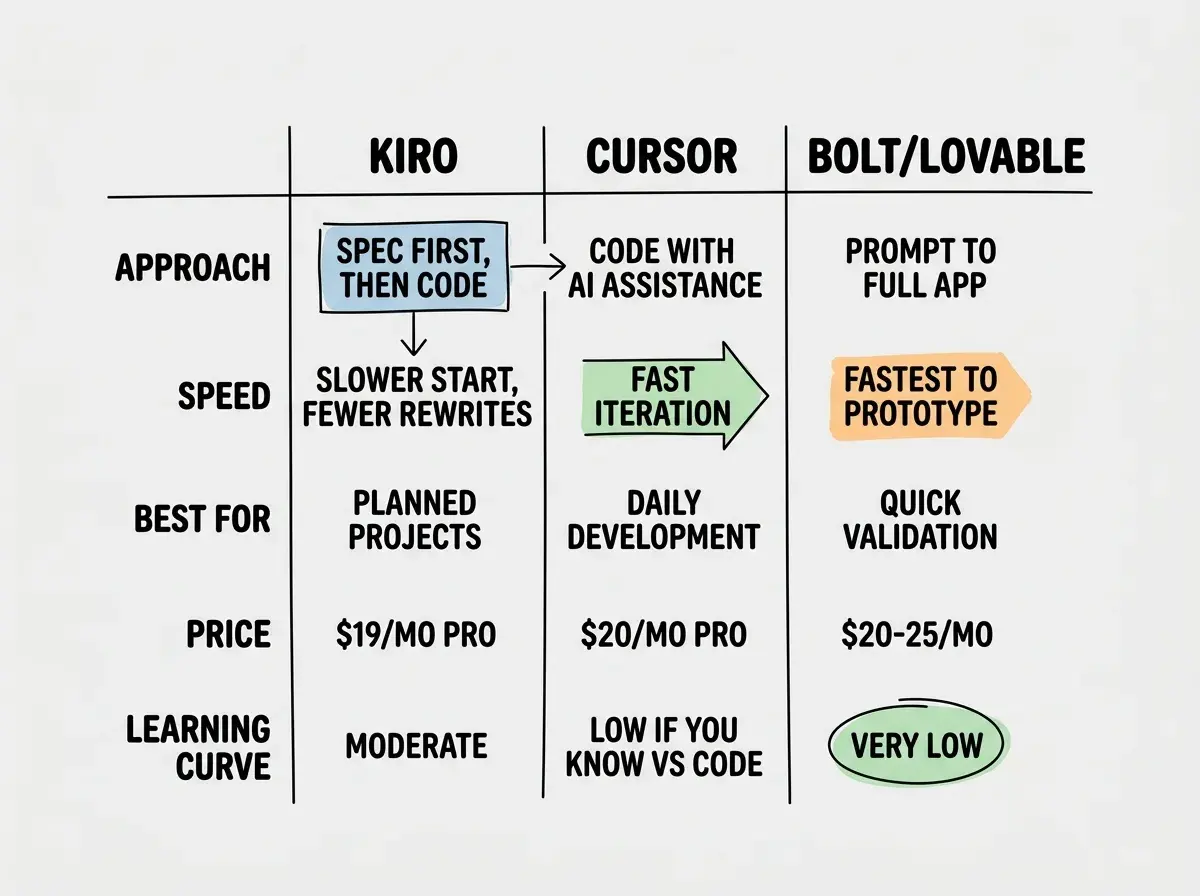
Compared to Cursor at $20 per month and Bolt at $20 to $25 per month, Kiro's pricing is competitive. The value proposition is different though. You are paying for better code generation through structured requirements, not faster generation. Whether that tradeoff is worth it depends on what you are building and how you work.
How It Compares to Other Tools
Kiro occupies a unique position in the AI coding landscape. It is not competing directly with Cursor, a general-purpose AI code editor for daily work. It is not competing with Bolt or Lovable, which optimize for getting a prototype live fast. Kiro targets the space between, projects too complex for a quick prototype but where you still want AI doing the heavy lifting.
Think of it this way. Bolt is for "I have an idea, let me see if it works." Cursor is for "I am building this, help me write the code." Kiro is for "I want to build this right the first time, help me plan and then build it." Each approach has its place, and experienced developers will use different tools for different situations.
If you already use Claude Code or Cursor for daily coding and want something for larger, more structured projects, Kiro is worth evaluating. If you want the fastest path to a working app, Bolt or Lovable remain better choices.
Learn the fundamentals before choosing your first tool.
Start learningWho Should Use Kiro
Kiro is ideal for senior developers and technical founders building production applications, not throwaway prototypes. If you have experience writing requirements documents or technical design docs, Kiro's workflow will feel natural. You already know that investing time in planning pays off during implementation, and Kiro automates the tedious parts of planning while keeping you in control of the decisions that matter.
Solo founders building SaaS products should seriously consider Kiro. The spec-driven approach prevents the architectural drift that plagues projects built incrementally with AI tools. When you are the only developer, maintaining structural consistency is critical because there is nobody else to catch inconsistencies.
Kiro is less ideal for beginners still learning what code does. The spec documents assume familiarity with database schemas, API design, and component architecture. If those terms are not meaningful to you yet, the spec review phase will be confusing rather than helpful. Start with Cursor or Lovable instead.
Compare AI coding tools and find what fits your experience level.
Compare toolsWhat This Means For You
Amazon Kiro represents a meaningful evolution in how AI tools approach software development. Automating spec generation while keeping humans in the review loop is a genuinely fresh approach.
- If you are a senior developer building production apps: Kiro deserves a serious evaluation. The spec-driven workflow aligns with how experienced engineers already think about software, and it produces more maintainable codebases than prompt-to-code tools. Try it on your next greenfield project.
- If you are a founder with a clear product vision: Kiro translates your product thinking into structured requirements and then into code. The time reviewing specs is time you would have spent rewriting AI-generated code that missed the point. At $19 per month, it is worth a one-month trial.
- If you are exploring and experimenting: Stick with faster tools for now. Kiro's value emerges when you know what you want to build. For rapid prototyping and "let me see what happens" sessions, Bolt, Lovable, or Cursor will serve you better.