Replit is a brilliant co-working space. You walk in, grab a desk, and start building. Everything is there: the computer, the WiFi, the coffee machine, even the deployment pipeline. For prototyping and learning, there is nothing faster. But at some point, you outgrow the co-working space. Maybe you got hit with a $607 bill you did not expect. Maybe your app is sluggish because it shares resources with thousands of other tenants. Maybe you need infrastructure the co-working space does not offer. That is when you start shopping for your own office.
This guide walks you through the entire move from Replit to dedicated hosting on Vercel (for frontend and Next.js apps) or Railway (for full-stack apps with backends and databases). Think of Vercel as a sleek, purpose-built office for your customer-facing storefront, and Railway as a fully equipped workshop where you can run servers, databases, cron jobs, and anything else behind the scenes.
With 92% of developers now using AI tools daily, more people than ever are building production apps on Replit and discovering the same thing: the tool that helped you build fast is not always the tool that helps you run cheap or scale well.
When It Is Time to Leave the Co-Working Space
Not every Replit project needs to migrate. If you are prototyping, learning, or running a personal tool that only you use, Replit is perfectly fine. Stay there. But three signals tell you it is time to get your own office.
Your bills are climbing unpredictably. Replit's pricing model charges for compute cycles, and heavy usage or always-on deployments can spike your bill without warning. The $607 Replit bill incident that went viral is an extreme example, but smaller surprises of $50 to $150 are common among founders running production apps. Vercel's free tier and Railway's usage-based pricing both give you more predictable costs.
Your app feels slow. Replit's shared infrastructure means your app competes for resources with every other project on the platform. Cold starts can take several seconds, which is painful for user-facing apps. Vercel's edge network serves your frontend from the nearest data center, and Railway gives your backend its own container with dedicated resources.
You need infrastructure Replit does not offer. Custom domains with full DNS control, specific database engines, background workers, WebSocket connections, cron jobs, or integration with services like Cloudflare or AWS. Once your app needs more than a web server and a database, the co-working space starts feeling cramped.
Migrating from Replit is not about Replit being bad. It is about your project outgrowing what a general-purpose platform can efficiently provide. The best time to migrate is when you have paying users or real traffic, not before. Do not move for theoretical reasons.
Exporting Your Code From Replit
The first step in any office move is packing up your stuff. Replit stores your code in its own environment, but getting it out is straightforward.
Open your Replit project and go to the "Version Control" tab in the sidebar. If you have been using Git (Replit enables this by default for most projects), you can push your code directly to a GitHub repository. Click "Connect to GitHub," authorize the connection, and push. Your entire codebase, including file structure and commit history, lands on GitHub.
If you have not been using Git, download your code as a ZIP file from the three-dot menu on the "Files" panel. Then create a new GitHub repository, unzip the files locally, and push them up. You lose your commit history this way, but you keep all your code.
Before you move on, open the code and look for Replit-specific files and configurations. Delete the .replit file and replit.nix if they exist. These configure Replit's environment and are meaningless on other platforms. Also check for any hardcoded references to .repl.co domains in your code. Search your codebase for "repl.co" and "replit" to catch these.
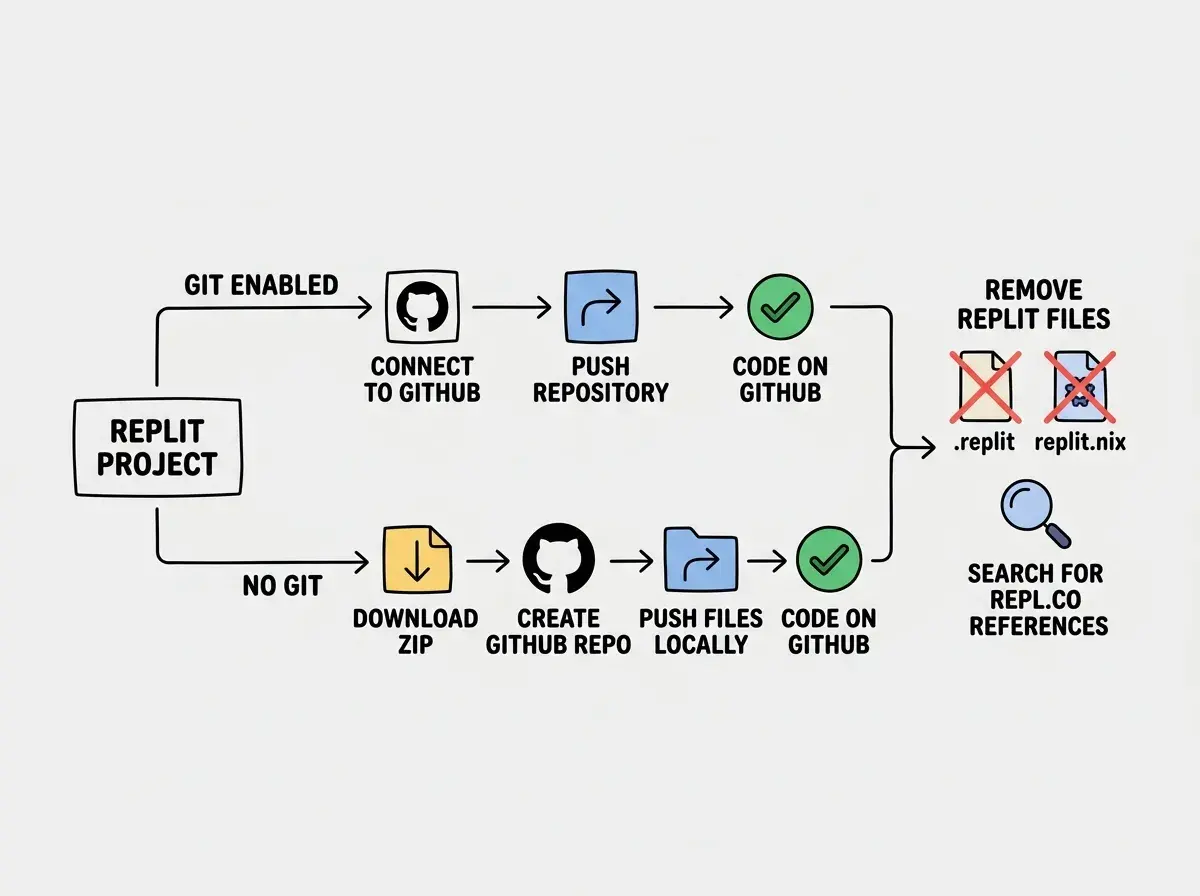
One more thing before you leave: copy every environment variable from your Replit project. Go to "Secrets" in the Replit sidebar and write down every key-value pair. You will need these when setting up your new hosting. Missing a single environment variable is the number one cause of failed migrations.
Setting Up on Vercel for Frontend and Next.js
If your Replit project is a Next.js app, a React app, or any frontend-focused project, Vercel is your new office. It was built specifically for this kind of work, and the setup takes about five minutes.
Go to vercel.com and sign up with your GitHub account. Click "Add New Project" and import the repository you just pushed from Replit. Vercel auto-detects Next.js projects and fills in the build settings for you. For a standard Next.js app, you should not need to change anything.
The critical step is environment variables. Scroll down on the configuration screen and add every single variable you copied from Replit's Secrets. Do not skip variables you think are optional. A missing API key does not always cause a build failure. Sometimes the app deploys fine, then breaks when a user hits the feature that needs that key.
Click "Deploy" and watch the build logs. The most common failures after a Replit migration are missing dependencies (Replit installs packages globally that you might not have in your package.json) and Node.js version mismatches. Add missing packages with npm install locally, commit, and push. For version mismatches, add an engines field to your package.json specifying the Node version your app needs.
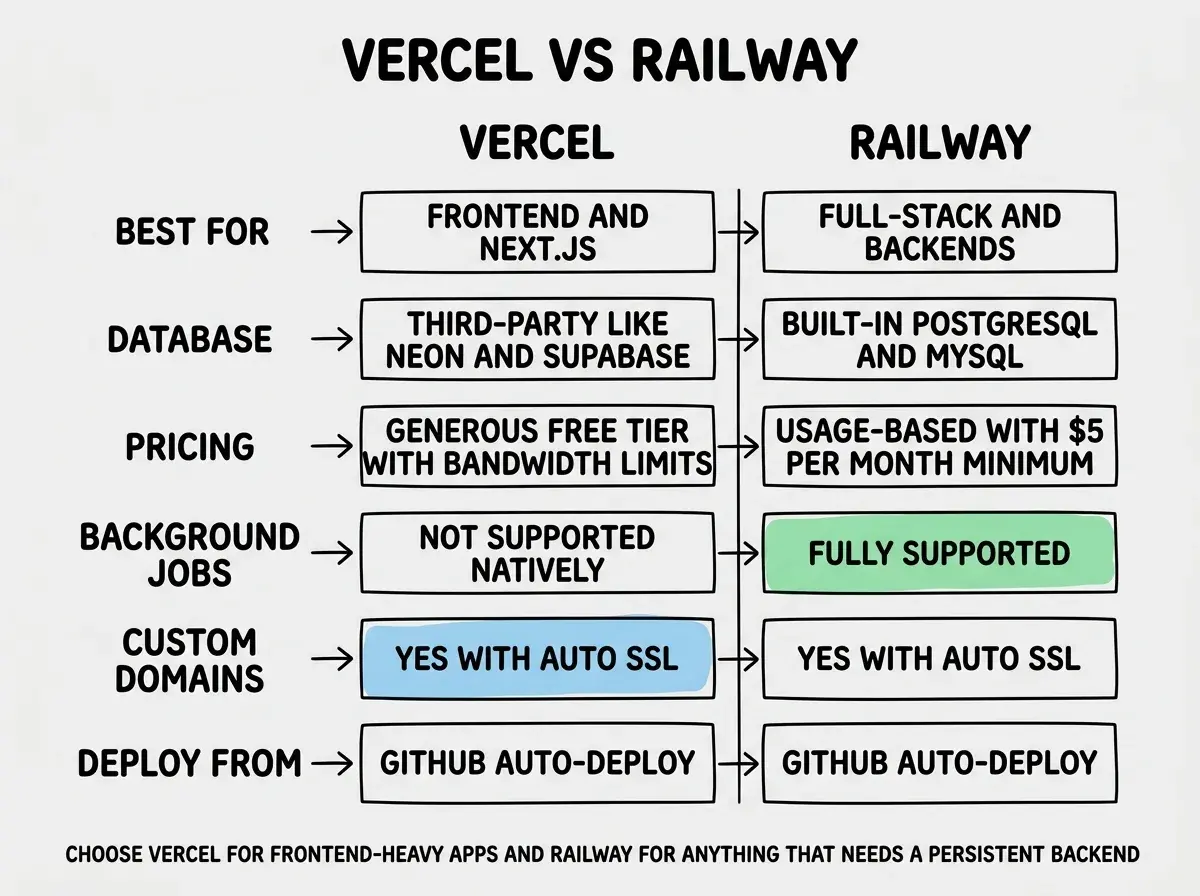
Once deployed, Vercel gives you a .vercel.app URL immediately. Add a custom domain later through the Vercel dashboard. Vercel handles SSL certificates automatically.
Setting Up on Railway for Full-Stack Apps
If your Replit project has a backend server, uses a database, runs background jobs, or is anything more complex than a static frontend, Railway is your workshop. It handles full-stack deployments the way Vercel handles frontends.
Go to railway.app and sign up with your GitHub account. Click "New Project" and select "Deploy from GitHub repo." Choose your repository. Railway will detect your project type and suggest a build configuration.
Railway works differently from Vercel in one important way. Instead of a single deployment, Railway lets you create multiple services within one project. Your web server is one service. Your database is another. A background worker can be a third. This modularity is exactly what you need when leaving Replit's all-in-one environment, because it lets you scale each piece independently.
Railway usually detects the start command from your package.json or Procfile. If it does not, add a start command in the Railway dashboard. For a Node.js app, this is typically npm start or node server.js. For Python, it might be gunicorn app:app.
Add your environment variables in the Railway service settings. Same rule as Vercel: every single variable from Replit's Secrets needs to be here. Railway also supports shared variables across services, which is useful when your web server and background worker both need the same database URL.
Understand the full landscape of hosting options before committing to a platform.
Explore all guidesMoving Your Database
This is the part of the office move where you have to carry the filing cabinets, and it is where most things go wrong if you rush.
If your Replit project uses Replit's built-in database (Replit DB), you need to export that data before migrating. Replit DB is a simple key-value store, so the export is usually a JSON dump. Write a quick script that reads all keys and values and saves them to a file, then download it.
For your new home, Railway offers managed PostgreSQL and MySQL databases that you can add with one click. Vercel does not run databases directly, but it integrates with Neon (Postgres), PlanetScale (MySQL), and Supabase.
If your Replit project was already using an external database like Supabase, PlanetScale, or MongoDB Atlas, the migration is much simpler. Your database stays where it is. You just update the connection string in your new hosting environment's variables. The database does not care where the app that connects to it is running.
The tricky part is Replit DB to a relational database. Replit DB is key-value; PostgreSQL is relational. You will need to design a schema and write a migration script that transforms your key-value data into rows and columns. This is tedious but not complicated. Take an afternoon, do it carefully, and test with a copy of your data before running it against production.
Common Pitfalls and How to Avoid Them
After helping several founders through this exact migration, I have seen the same mistakes repeat. Here are the ones that waste the most time.
Forgetting Replit-specific dependencies. Replit pre-installs certain system packages and Python libraries that your code might use without explicitly declaring them. After migrating, run your app locally first (outside of Replit) before deploying. If it fails locally, it will fail on your new hosting too.
Hardcoded URLs. Search your entire codebase for any Replit domain references. Also check for localhost URLs that should be environment variables. Your new deployment URL is different, and anything hardcoded will break.
Missing build steps. Replit handles build commands implicitly. Vercel and Railway need explicit instructions. Make sure your package.json has a proper build script and a start script. For Next.js apps, these should be next build and next start.
Running your database migration script against production data without testing it first. Always test with a copy. Export your Replit DB data, import it into a staging database, run your migration script, and verify that the data looks correct in the new schema. Only then run it against your production database. One bad migration can corrupt data that took months to collect.
Not setting up CI/CD. On Replit, you edit code and it deploys automatically. Both Vercel and Railway support automatic deployments from GitHub pushes, but you need to enable this. Connect your GitHub repository in the platform settings so that every push to main triggers a new deployment.
Ignoring the .env file in Git. Make sure your .gitignore includes .env. When you pushed your code from Replit to GitHub, your secrets might have been included. Check your repository on GitHub and make sure no API keys or passwords are visible. If they are, rotate those keys immediately.
After the Move
Once your app is running on its new platform, take thirty minutes to set up the things you did not have in the co-working space. Add a custom domain. Set up error monitoring with a free Sentry account. Configure spending alerts so you never get a surprise bill again.
The move from Replit to dedicated hosting feels daunting before you do it, but most founders I have talked to say the same thing afterward: "I should have done this sooner." Your app is faster, your bills are predictable, and you have the flexibility to build whatever your product needs next.
You are not leaving Replit behind forever. It remains an excellent prototyping environment. Use it to spin up quick experiments and proof-of-concepts. But when the experiment becomes a product, move it to its own office. That is the natural progression of every serious project.
Start with the right foundation and you will know exactly when it is time to scale.
Start building