Firebase Studio is Google's entry into the AI app builder space, combining Gemini-powered code generation with the Firebase ecosystem that already runs millions of production apps. This Firebase Studio review answers the question every builder is asking: does Google's infrastructure give it a real advantage over Lovable, Replit, and Bolt.new, or is it just another prompt-to-app tool?
I spent several weeks building projects in Firebase Studio to find out. The answer is more nuanced than the launch hype suggests.
What Firebase Studio Actually Is
Firebase Studio is a browser-based development environment built on Google's Cloud Workstations infrastructure. Unlike Lovable or Bolt.new, which abstract away code or run lightweight browser sandboxes, Firebase Studio gives you a full cloud VM with a VS Code-based editor, a terminal, and direct file system access. Think of it as Replit's approach but backed by Google Cloud and deeply integrated with every Firebase service.
The AI layer runs on Gemini, Google's foundation model. You describe what you want, and Gemini generates the code, configures Firebase services, and sets up deployment. But you can also write code directly, use the terminal, and install packages. The AI is a collaborator, not a gatekeeper.
This hybrid approach matters. With Lovable, you are locked into the chat interface. With Bolt.new, the environment is constrained. Firebase Studio gives you the full toolkit, scaling from "build me an app from a description" to "I need to debug this Cloud Function's cold start time."
How Gemini Handles Code Generation
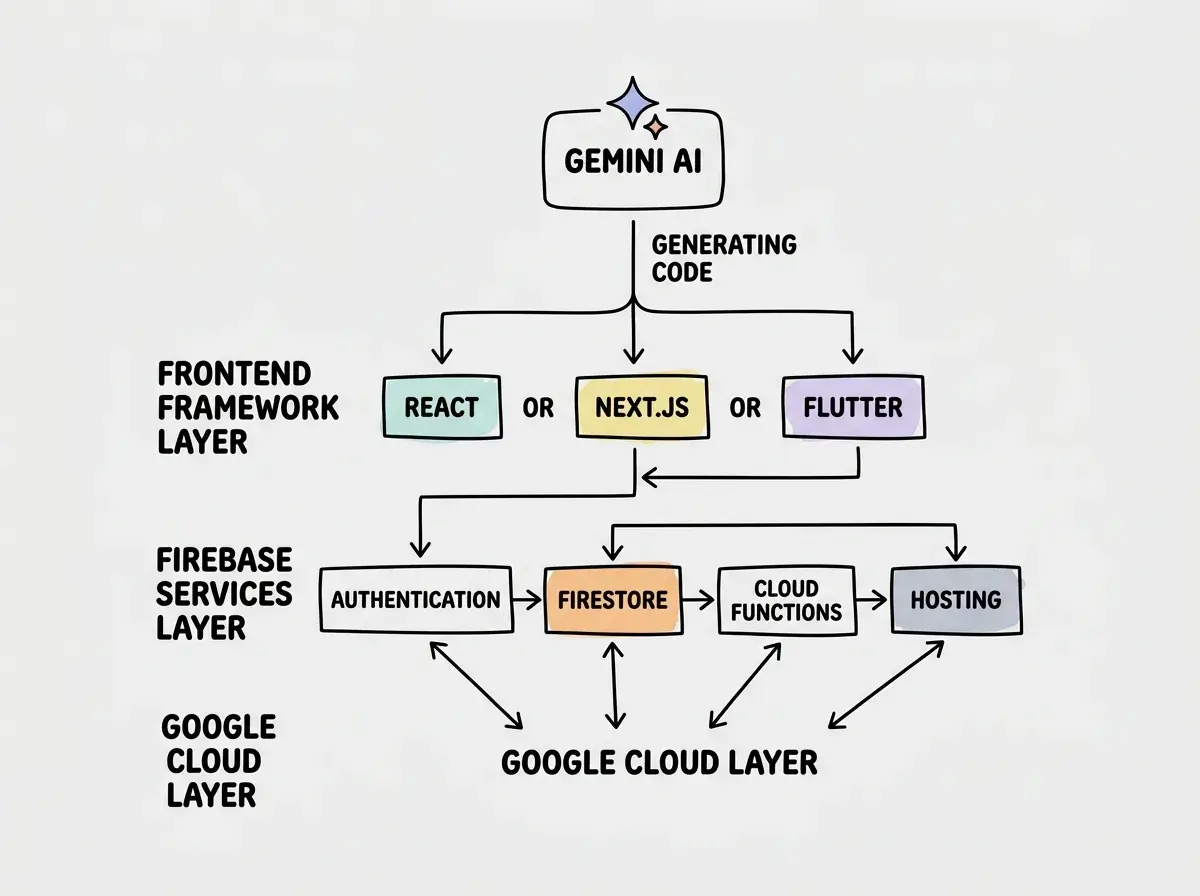
Gemini is the engine behind Firebase Studio's AI capabilities, and it works differently from the models powering competitors. When you describe an app, Gemini generates a complete project scaffold with the appropriate Firebase services already configured. Ask for an app with user accounts, and it sets up Firebase Authentication. Mention storing data, and it creates Firestore collections with security rules. Need file uploads, and it configures Cloud Storage. This contextual awareness of the Firebase ecosystem is where Google's integration advantage shows up most clearly.
I tested this by asking Gemini to build a project management tool with team workspaces, task assignments, and real-time updates. It generated a Next.js frontend, set up Firestore with properly structured collections, configured Firebase Authentication with Google sign-in, and wrote real-time listeners so changes appeared instantly across browser tabs. The initial generation included proper data modeling and security rules that restricted access by workspace membership.
Where Gemini falls short compared to Claude (which powers Cursor and some features of Replit) is in handling complex refactoring and debugging. When I asked it to restructure the data model after initial generation, it sometimes generated code that conflicted with existing patterns. The model is strong at greenfield generation but needs more back-and-forth for iterative changes. Google ships Gemini improvements rapidly, so this gap may narrow, but as of early 2026 it is noticeable.
Built-in Firebase Services That Matter
The real differentiator for Firebase Studio is not the AI. It is what the AI connects to. Firebase is not a toy backend. It is a suite of production services used by apps with millions of users, and Firebase Studio gives you access to all of them from day one.
Firebase Authentication handles user sign-up and login with email/password, Google, Apple, GitHub, and phone number providers. The AI generates both the auth flows and the Firestore security rules that restrict data access based on the authenticated user.
Cloud Firestore is a NoSQL document database with real-time sync built in. When one user changes data, every connected client sees the update instantly without additional code. For collaborative tools, dashboards, and chat apps, this is significant.
Cloud Functions lets you run server-side code triggered by events without managing servers. The AI generates functions for backend logic like payment processing and email sending.
Firebase Hosting deploys your frontend to Google's global CDN with automatic SSL and custom domains. Going from "works in the editor" to "live on a URL" is a single click.
Firebase Studio's advantage is not just AI code generation. It is that the generated code connects to battle-tested production services from the start. You are not building on a prototype backend that you will need to replace later. The Firebase services underneath are the same ones running at massive scale.
How Firebase Studio Compares to Lovable, Replit, and Bolt.new
Each of these tools makes different tradeoffs, and understanding them helps you pick the right one.
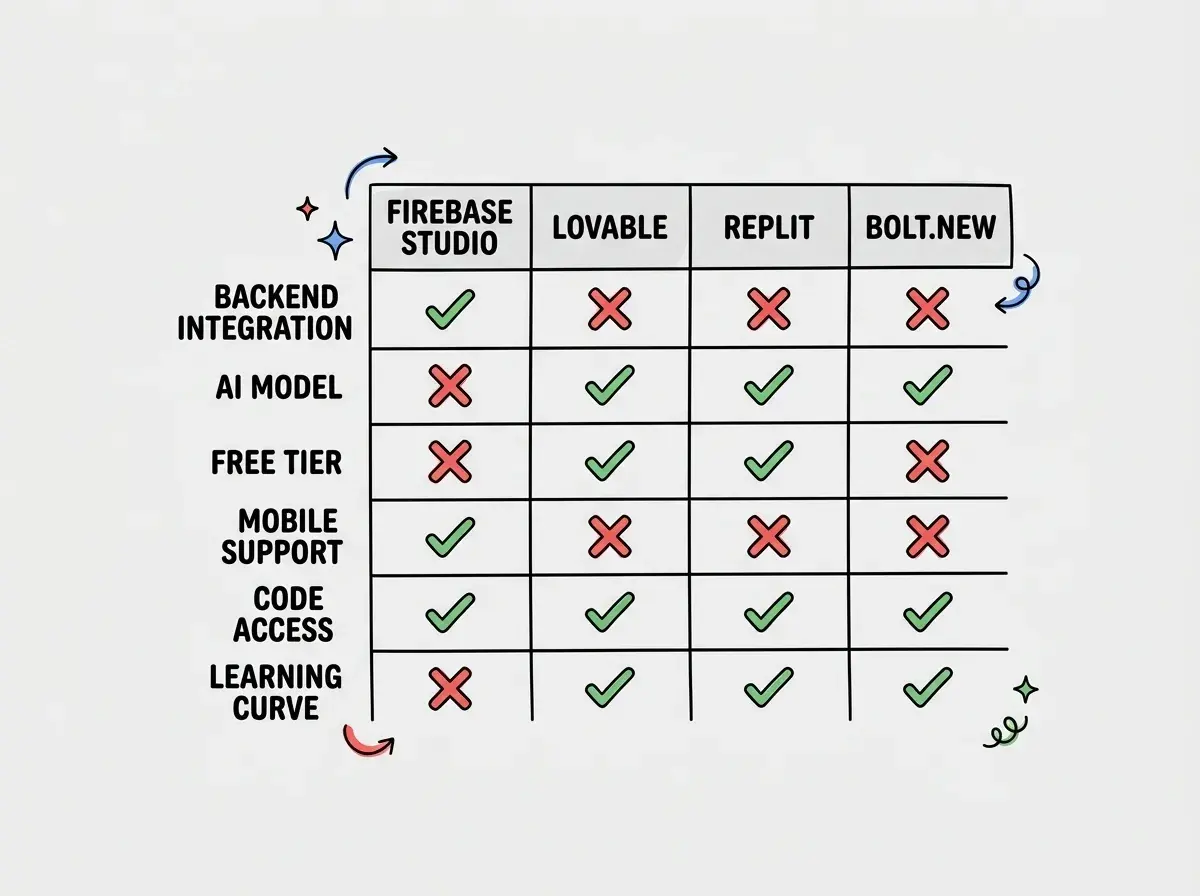
Lovable is the most accessible option for non-technical users. You describe what you want and get a React app connected to Supabase without ever seeing code. Firebase Studio is not designed for people who want to avoid code entirely. It gives you a full development environment, more powerful but also more complex.
Bolt.new runs a JavaScript environment in your browser using StackBlitz's WebContainers. It is fast for frontend-heavy projects but lacks integrated backend services. Firebase Studio includes the backend, database, auth, and hosting as first-class features.
Replit is the closest comparison. Both offer full development environments with AI assistance and integrated deployment. Replit supports more languages and has a larger community, but Firebase Studio's tight integration with Google's services gives it an edge for apps that need authentication, real-time data, and scalable infrastructure.
Firebase Studio itself is free to use. You pay only for Firebase service consumption, and the free tier covers most prototypes. For a founder validating an idea, this "pay only for what you use" model can be significantly cheaper than fixed monthly subscriptions from competitors.
Strengths Worth Knowing About
The Google ecosystem integration runs deep. Firebase Studio is not just a code editor with Firebase APIs. It understands the relationships between services. When you add authentication, it automatically generates the Firestore security rules that reference the authenticated user. When you add Cloud Functions, it sets up the correct IAM permissions. This interconnectedness reduces the configuration work that trips up developers in other tools.
The free tier is genuinely generous. Firebase's Spark plan includes 50K auth verifications per month, 1 GiB of Firestore storage, and 20K document reads per day. You can build, test, and soft-launch without spending anything.
Flutter support is a differentiator. Firebase Studio generates Flutter applications alongside web apps, meaning you can build for iOS and Android from the same environment. None of the other AI app builders offer native mobile app generation at this level.
App Prototyping from anything. Firebase Studio includes an App Prototyping agent that takes a text description, image sketch, or PDF wireframe and generates a full-stack Firebase app with a working backend. It creates the Firestore schema, writes security rules, generates Cloud Functions, and deploys to Hosting.
Weaknesses and Honest Concerns
Firebase Studio is still new. It launched in 2025 and became generally available in early 2026. The community is small compared to Replit's established user base, which means fewer tutorials, fewer example projects, and less collective knowledge about workarounds for common problems. When you hit an issue, Stack Overflow may not have an answer yet.
Gemini's code generation has gaps. While it handles Firebase services well, it sometimes produces suboptimal patterns for complex frontend logic. State management, form validation, and performance optimization are areas where AI-generated code needs manual improvement.
Vendor lock-in is real. Building on Firebase means building on Google Cloud. Firestore is not a standard SQL database you can migrate easily. Cloud Functions use Google's runtime. Authentication data lives in Firebase. If you decide to switch providers, migration is a significant engineering project. The deep integration that makes Firebase Studio powerful also makes you more dependent on Google.
Assuming that Firebase's free tier will cover your app at scale. The Spark plan is generous for prototyping, but production apps with real users can generate costs quickly through Firestore reads, Cloud Functions invocations, and bandwidth. Monitor your usage dashboard from the start and set billing alerts before you launch.
NoSQL is not always the right choice. Firestore is a document database that works well for many app types but poorly for others. If your app needs complex queries across related data (like a marketplace with products, sellers, reviews, and inventory), a relational database would be more appropriate. Firebase Studio will build your app on Firestore regardless, and you may not realize the limitation until you are deep into development.
Pricing Breakdown
Firebase Studio itself is free. You pay only for Firebase service consumption on the Blaze plan (pay-as-you-go) once you exceed the Spark plan's free limits.
On the Blaze plan, Firestore charges $0.06 per 100K reads and $0.18 per 100K writes. Cloud Functions charge based on invocations and compute time. A small production app might cost $5 to $25 per month. An app with thousands of active users could hit $50 to $200 per month.
Compare this to Lovable ($20 to $50/month plus Supabase), Bolt.new ($20 to $50/month with token limits), and Replit ($25 to $100/month). Firebase Studio is cheaper at small scale but can surprise you at high scale.
Who Should Use Firebase Studio
Founders building MVPs who want a real backend from day one. The free tier lets you validate without spending, and Firebase services scale with you if the idea works.
Senior developers who want AI assistance but need full control. If Lovable feels too restrictive and Bolt too lightweight, Firebase Studio hits a good middle ground.
Teams already in the Google ecosystem. If you use Google Cloud or already have Firebase projects, Firebase Studio integrates naturally with your existing infrastructure.
Mobile app builders. Flutter support makes Firebase Studio the only AI app builder that generates real native mobile applications, not just responsive web apps.
It is not the right choice if you need a relational database, want to avoid vendor lock-in, or are completely non-technical.
Compare the full landscape of tools for building apps with AI.
See all toolsWhat This Means For You
Firebase Studio represents Google doing what Google does best: integrating existing services into a cohesive platform at a price point that undercuts competitors. The result is an AI app builder that connects to production-grade services from the start, with a free tier that legitimately lets you build and test without spending money.
The tradeoff is ecosystem commitment. The Firebase services that make it powerful are the same services that make it hard to leave. For many apps, that is worth it. But go in with your eyes open about what you are committing to.
If you are evaluating AI app builders in 2026, Firebase Studio deserves a serious look. It is not the most polished experience (Lovable wins for simplicity, Replit wins for community), but it may be the most practical one if you need an app that can grow from prototype to production without switching platforms.
Understand the fundamentals before choosing your tools.
Start learning