Replit Agent is one of the most talked-about autonomous AI coding tools in 2026, and this Replit Agent review covers what it actually delivers. With 92% of builders now using AI tools daily and Replit surpassing 40 million users, the platform's autonomous Agent has become a genuine test case for whether AI can build software without human intervention.
I have spent weeks testing Agent on real projects, tracking costs, measuring output quality, and pushing it to its limits. The results are a mix of genuinely impressive autonomous building and some serious gotchas that every builder needs to understand before committing time and money.
What Replit Agent Actually Does
Replit Agent is not a chatbot that suggests code snippets. It is an autonomous system that takes a natural language description and works through the entire development process on its own. You describe what you want, and Agent creates files, installs packages, writes application logic, sets up databases, configures servers, runs the app, reads error messages, fixes bugs, and deploys to a live URL. All without you touching a single line of code.
The "autonomous" part is what separates Agent from tools like GitHub Copilot or even Cursor's AI features. Those tools assist you while you drive. Agent drives. You sit in the passenger seat and watch it work, occasionally giving directions when it takes a wrong turn.
To test this properly, I gave Agent a moderately complex task: "Build a project management tool with user authentication, task boards with drag-and-drop, due dates with email reminders, and a team dashboard showing progress metrics. Use Python with Flask and PostgreSQL." Agent worked for about six minutes. It scaffolded the project, set up the database schema with proper migrations, built the authentication system, created the task board interface, wired up the drag-and-drop functionality, and deployed a working version. The result was functional. Not production-ready, but functional.
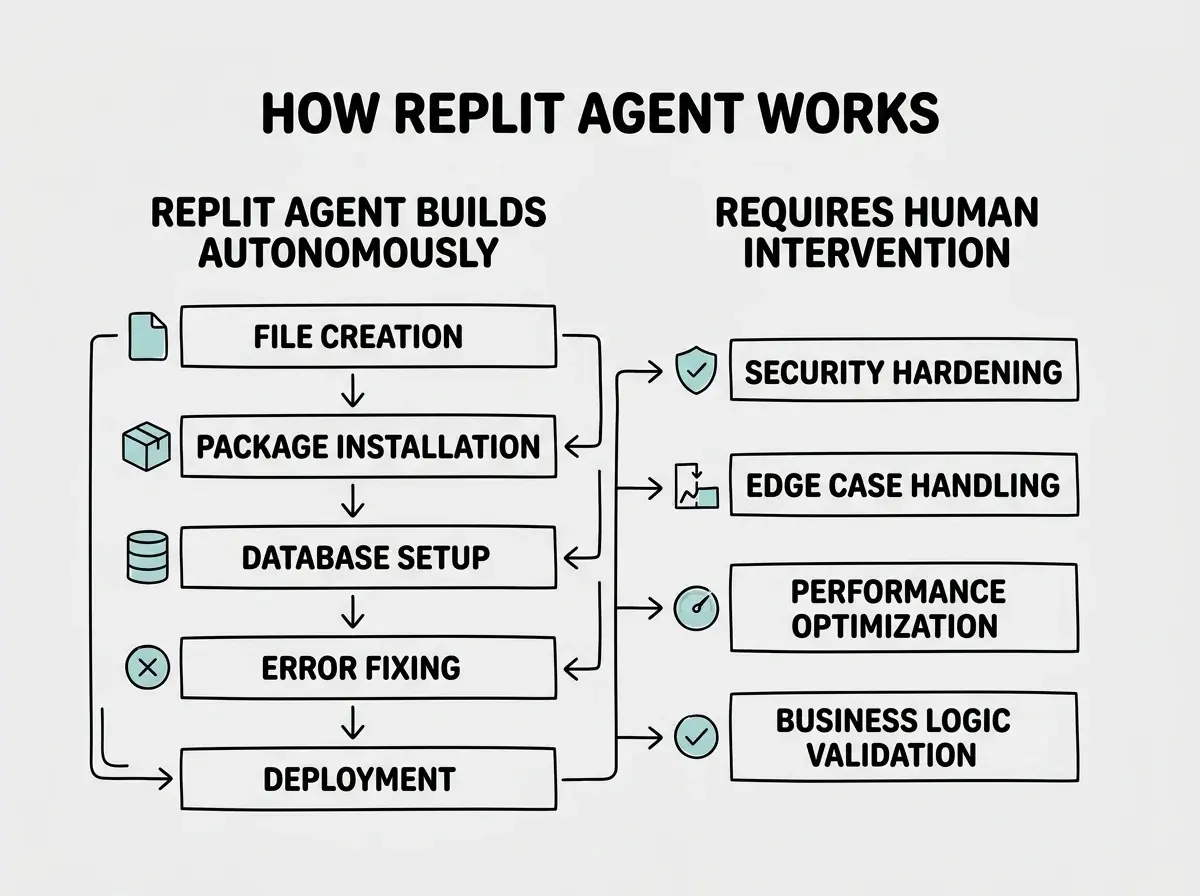
That distinction between "functional" and "production-ready" is the central tension of this entire review.
The Build Quality You Can Expect
Agent produces code that works for the happy path. The main features function, the basic user flows are complete, and the app runs without crashing under normal use. For prototypes, demos, and internal tools, this is genuinely valuable. You can go from idea to working software in minutes instead of days.
Where quality breaks down is in the details that separate a demo from a real product. In my project management tool test, Agent built working authentication, but it stored session tokens in a way that would not survive a basic security audit. The drag-and-drop worked, but it did not handle concurrent edits from multiple users. The email reminders were configured, but there was no retry logic for failed sends and no rate limiting to prevent spam.
These are not failures of Agent. They are the natural boundary of what autonomous generation can deliver today. Agent optimizes for getting something working, not for making it bulletproof.
The code structure itself is generally clean and conventional. Agent follows common patterns for whichever framework it uses, and the file organization is logical. This makes the code readable and modifiable after generation, which matters when you inevitably need to add security measures and handle edge cases.
The Cost Reality
This is where the Replit Agent review gets uncomfortable. Replit's pricing starts at $25 per month for the Hacker tier (which includes Agent access) and $45 per month for Pro. Those base prices are reasonable and competitive. The problem is what happens above those base prices.
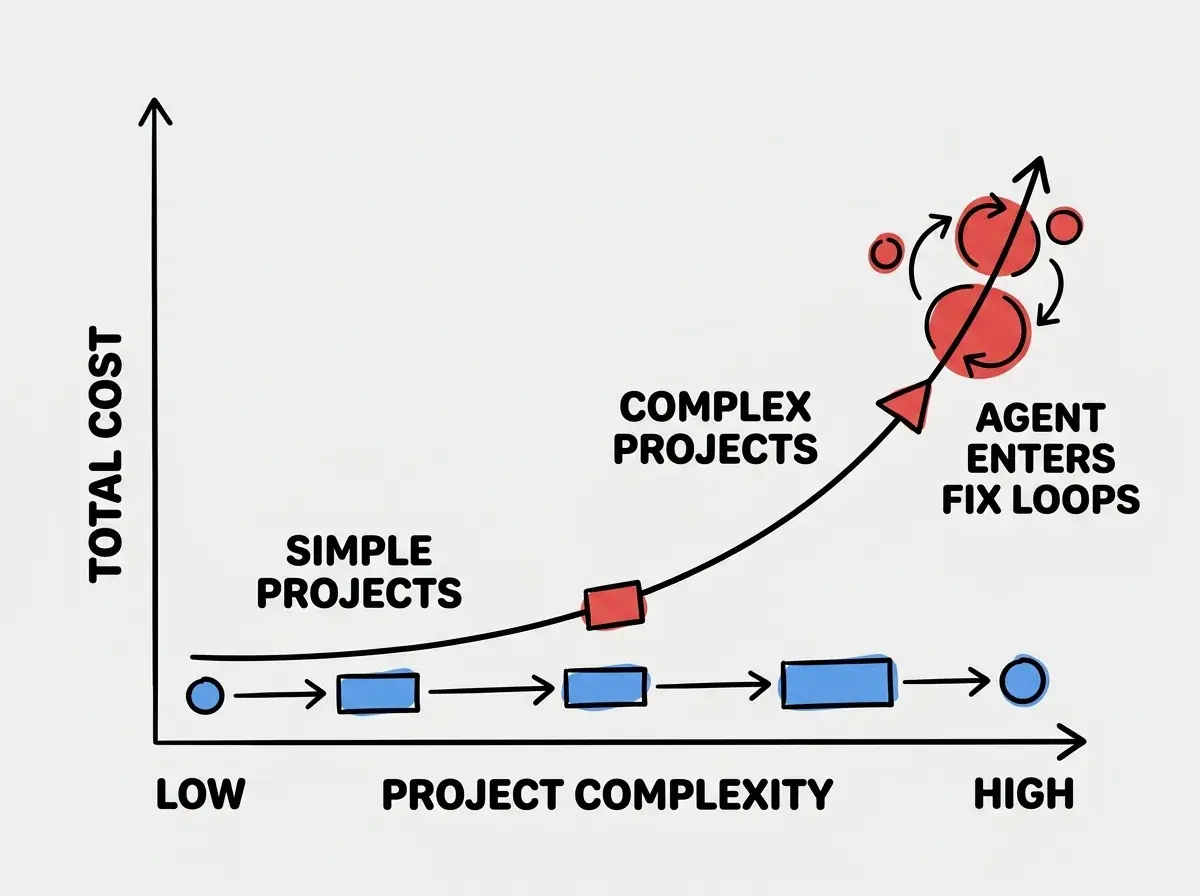
Agent consumes compute while it works. Every minute it spends creating files, installing packages, running your app, reading errors, and fixing bugs costs compute credits. For simple apps that Agent builds in two or three minutes, the cost is negligible. For complex projects where Agent iterates through multiple approaches, encounters tricky bugs, or goes down wrong paths, costs climb quickly.
The most cited example is the $607.70 bill that went viral on social media. A user building an ambitious project let Agent run intensively over several days, and the compute charges accumulated far beyond the base subscription. This is not a fabricated outlier. I have seen similar reports from multiple users, and my own testing confirmed that a single complex session can burn through $50 to $100 in compute if Agent gets stuck in a loop of attempting fixes that do not work.
Set a hard spending limit in your Replit account settings before your first Agent session. Replit provides this feature, and it is the single most important thing you can do to avoid bill shock. Decide your maximum monthly spend, set the cap, and treat it as non-negotiable. Agent's autonomous nature means it will keep consuming resources until something stops it, and that something should be your spending limit, not your bank account balance.
The unpredictability is the real issue. Two seemingly similar projects can have wildly different costs depending on whether Agent finds a clean path to a solution or gets stuck trying alternatives. You cannot reliably estimate costs before starting, which makes budgeting for Agent-heavy workflows genuinely difficult.
Where Agent Excels
Agent is strongest when building apps that follow well-established patterns. CRUD applications, REST APIs, standard web apps with forms and dashboards, data visualization tools, and simple SaaS products all fall within Agent's comfort zone. For these patterns, it has seen thousands of examples in its training data, and the results are consistent and fast.
Multi-language support is a significant advantage. Unlike Bolt.new (JavaScript only) or Lovable (React plus Supabase), Replit Agent can build with Python, Node.js, Ruby, Go, Java, and many other languages. If your project needs a Python backend with a React frontend, Agent handles that without breaking a sweat.
The integrated environment matters too. After Agent builds your app, you are inside a real IDE with a terminal, file browser, package manager, and deployment tools. You can manually edit any file, run commands, install additional packages, and debug issues directly. This is not a locked-down preview; it is a full development environment.
Where Agent Struggles
Agent has real trouble with projects that require unusual integrations, niche libraries, or architectures that deviate from common patterns. When I asked it to build something using a less popular Python framework instead of Flask or Django, the quality dropped noticeably. The AI works best with tools it has seen extensively in training data.
Complex state management is another weak point. Apps that need sophisticated client-side state, real-time synchronization between multiple users, or intricate data flows between components tend to produce buggy results that require significant manual cleanup.
Treating Agent as fully autonomous and walking away during a build session. Agent works best when you monitor its progress and intervene early if it starts going in circles. Watching Agent attempt the same failing approach three or four times while burning compute credits is an expensive lesson that most users learn exactly once. Stay in the loop, redirect when needed, and think of yourself as Agent's manager, not its customer.
The self-correcting behavior that makes Agent impressive also creates its biggest cost problem. When Agent encounters an error, it tries to fix it. If the fix creates a new error, it tries again. This loop can continue through many iterations, each consuming compute. A human developer would recognize a fundamentally wrong approach after two failed attempts and pivot. Agent sometimes persists through ten or fifteen attempts before arriving at the same conclusion.
How Replit Agent Compares
Against Cursor and Claude Code, Agent trades control for convenience. Cursor and Claude Code give you more precise control over what the AI does, making them better for experienced developers who want AI assistance within their existing workflow. Agent gives you more autonomy, making it better for non-technical builders or rapid prototyping where speed matters more than precision.
Against Bolt.new and Lovable, Agent offers more depth. Bolt runs in the browser and is limited to the JavaScript ecosystem. Lovable generates React apps with Supabase backends. Agent runs on real cloud VMs with any language and framework, making it suitable for a wider range of projects. The tradeoff is that Bolt and Lovable are simpler to use and have more predictable costs.
The fundamental question is whether you want an AI assistant or an AI agent. Assistants help you build. Agents build for you. Neither approach is universally better. The right choice depends on your technical comfort level and what you are building.
Compare the full landscape of AI coding tools for 2026.
Explore the toolsMaking Agent Work For You
The builders who get the most value from Replit Agent follow a consistent pattern. They start with clear, detailed prompts that specify the tech stack, features, and structure they want. They set spending limits before starting. They monitor Agent's progress and intervene within the first few minutes if it takes a wrong direction. And they treat Agent's output as a first draft that needs human review, not a finished product.
Breaking complex projects into smaller phases also helps. Instead of asking Agent to build an entire SaaS product in one prompt, build the authentication system first, then the main feature, then the dashboard. Each phase is simpler, Agent handles it more reliably, and you can review between phases.
Finally, plan for the handoff. Agent builds your v1. You (or a developer you hire) review security, handle edge cases, and add the polish that turns a prototype into a product.
What This Means For You
Replit Agent represents a genuine step forward in autonomous AI development, and it delivers real value for the right use cases. It is not a replacement for understanding what you are building, and it is not free from meaningful risks around cost and code quality.
- If you are a founder building an MVP: Agent can get your first version live in hours. Use it for rapid prototyping and investor demos, set strict spending limits, and plan to have the code reviewed by a developer before taking on real users. The speed advantage is legitimate. The risk is shipping insecure or fragile code without realizing it.
- If you are a career changer learning to build: Agent is a powerful learning tool because you can watch it work and study the code it produces. Start with simple projects to understand Agent's patterns, and resist the temptation to build something ambitious before you understand the cost dynamics. The free and base tier give you enough to learn without financial risk.
- If you already use other AI tools: Agent fills a specific niche for autonomous building and rapid prototyping. It complements rather than replaces tools like Cursor or Claude Code that give you more control. Keep Agent in your toolkit for quick experiments and first drafts, and use your primary tools for projects where precision and cost control matter more.
Start with the fundamentals that apply across every AI coding tool.
Begin here