You hit an error. A wall of red text fills your terminal. Without reading a single word, you select all, copy, paste it into ChatGPT, and ask "what's wrong?" Sound familiar? You are not alone. A 2024 Stack Overflow survey found that 92% of developers use AI tools daily, and for many vibe coders, the default workflow is to treat every error like a black box that only AI can open.
But here is the thing. Error messages are not written in an alien language. They follow a predictable, readable format. And learning to read them yourself, even partially, will make you faster at fixing bugs, better at prompting AI when you do need help, and far more confident as a builder.
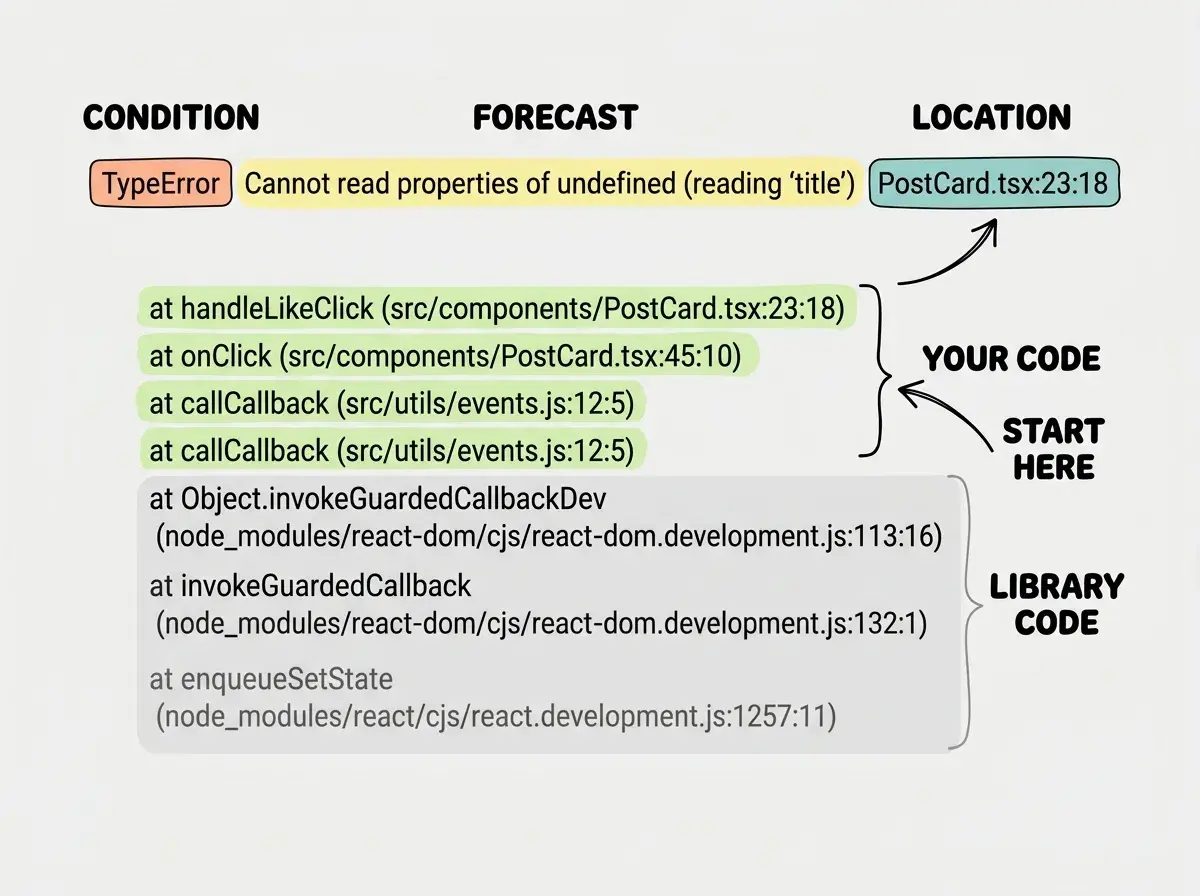
Think of error messages like weather reports. A weather report has a standard structure: a location (which city), a condition (rain, snow, sunny), and a forecast (what to expect next). Error messages work the same way. They tell you the location (which file and line number), the condition (what type of error occurred), and the forecast (what will happen if you do not fix it). Once you learn to read the forecast, you stop getting caught in the rain.
What a Stack Trace Actually Tells You
A stack trace is the most intimidating part of any error message, and the most useful. It is that tall block of text that lists file paths and function names, sometimes dozens of lines long. Most beginners scroll right past it. That is like ignoring the radar map on a weather report and only reading the headline.
Here is a simplified stack trace you might see in a Next.js project:
TypeError: Cannot read properties of undefined (reading 'title')
    at PostCard (src/components/PostCard.tsx:23:18)
    at PostList (src/components/PostList.tsx:47:12)
    at HomePage (src/app/page.tsx:15:8)
    at renderWithHooks (node_modules/react-dom/...)
    at mountIndeterminateComponent (node_modules/react-dom/...)
The key trick with stack traces is to focus on the top. The first line is the actual error. The lines below show the path the code traveled to get there, like breadcrumbs. The top is where the problem surfaced. The lines further down show what called what.
In our weather report analogy, the first line is the current condition ("thunderstorm warning"), and the lines below are the atmospheric layers that produced it. You care most about the storm itself, not the jet stream patterns five layers up.
Look at the first three lines of that stack trace. They all reference files in src/, which is your code. The last two reference node_modules/, which is library code. That distinction matters enormously, and we will come back to it.
The Four Error Types You Will See Every Week
Just like weather has categories (sunny, cloudy, rain, snow), errors have types. You do not need to memorize every error type in JavaScript. You need to recognize four of them, because they account for the vast majority of what you will encounter.
TypeError is the most common. It means the code expected one kind of data but got something else. The classic "Cannot read properties of undefined" falls here. In weather terms, this is like expecting sunshine but getting fog. The code tried to use something that does not exist yet. Usually this means data has not loaded, a variable is misspelled, or a function received the wrong input.
ReferenceError means the code tried to use a variable or function that has never been defined anywhere. This is different from TypeError. TypeError means the thing exists but is the wrong type. ReferenceError means the thing does not exist at all. In weather terms, you asked for the forecast in a city that is not on the map.
SyntaxError is the simplest to fix. The code has a typo or structural mistake, like a missing bracket, an extra comma, or a misspelled keyword. Your app will not even start when a SyntaxError is present. This is the weather equivalent of the forecast system being offline entirely. Nothing works until you fix the structural problem.
Network errors are a separate category. These show up as "Failed to fetch," "404 Not Found," "500 Internal Server Error," or "CORS error." They mean your app tried to communicate with another service and the conversation failed. The status code tells you why. 404 means the URL is wrong. 401 means your authentication is bad. 500 means the other service broke, not you. 403 means you do not have permission. These are like weather alerts from a neighboring city. The problem might not be in your code at all.
You only need to recognize four error types to handle most bugs: TypeError (wrong data shape), ReferenceError (thing does not exist), SyntaxError (structural typo), and network errors (communication failure). Each one points you toward a different kind of fix, and knowing which type you are dealing with cuts your debugging time significantly.
File Paths and Line Numbers Are Your GPS Coordinates
Every error message includes a file path and a line number. This is your GPS coordinate. It tells you exactly where the problem occurred, down to the specific line and sometimes the specific character.
When you see src/components/PostCard.tsx:23:18, that means file PostCard.tsx, line 23, character 18. You can open that file, jump to line 23, and see exactly what the code is doing at the point where it broke. This is the "location" portion of your weather report, and it is the single most actionable piece of information in any error message.
But not all locations are equally useful. This brings us to one of the most important distinctions in debugging.
Your Code vs. Library Code
When you look at a stack trace, you will see two kinds of file paths. Some start with your project directory (like src/ or app/). Others start with node_modules/, which is where third-party libraries live.
This distinction is like the difference between a weather problem in your city versus one three states away. A thunderstorm in your city requires action. A thunderstorm three states away is context, but you probably cannot do anything about it directly.
When the error points to a file in node_modules/, the bug is usually not in the library itself. Libraries used by thousands of developers are well-tested. What is far more likely is that your code is calling the library incorrectly or passing it bad data. The fix almost always lives in your code, even when the error surfaces in library code.
So when you see a stack trace, scan from the top for the first line that references your project files. That is where you start investigating. The library lines below it explain the chain of events, but your fix will almost always be in your own code.
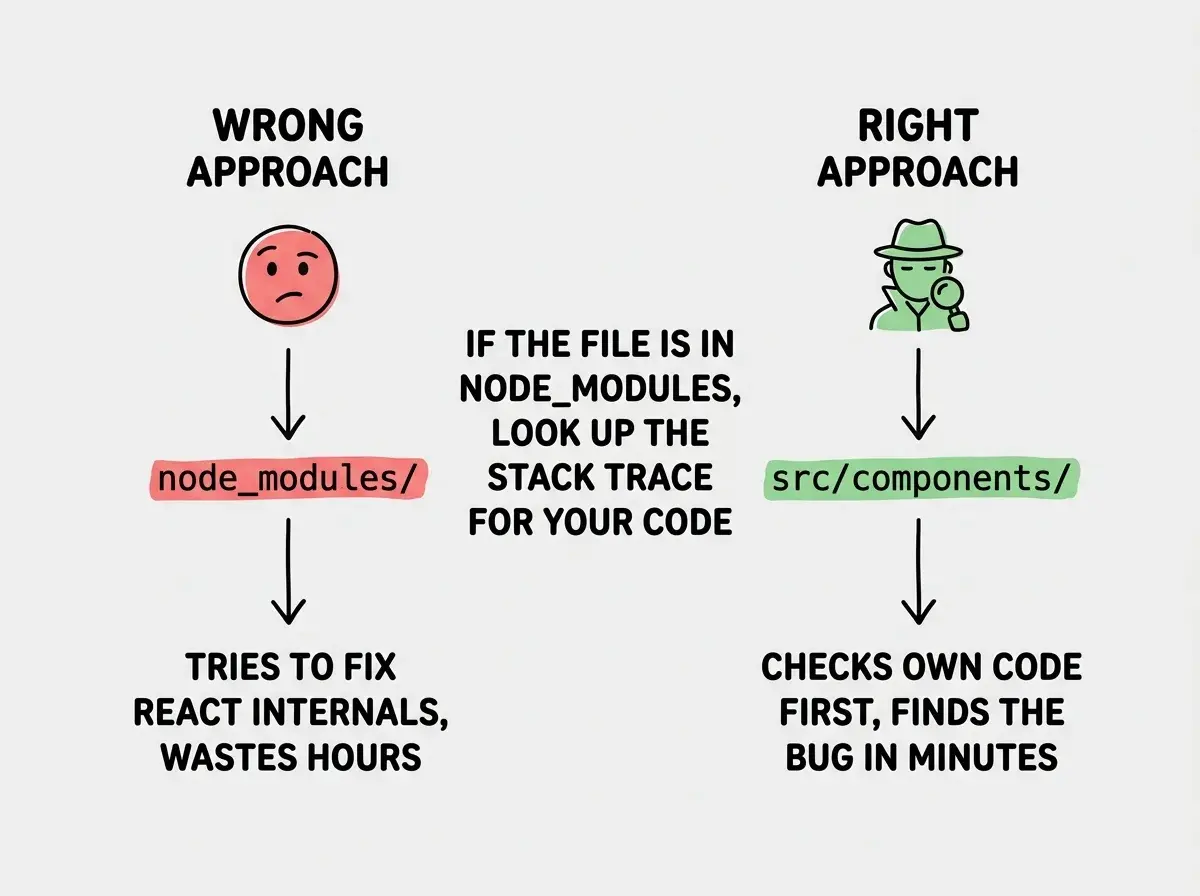
Seeing an error that mentions a library file (like something in node_modules or react-dom) and assuming the library is broken. In almost every case, the real problem is in how your code calls that library. Scroll up in the stack trace to find the first file that belongs to your project. That is where the fix lives.
Building the Habit of Reading Before Pasting
Here is the workflow that separates confident builders from frustrated ones. When an error appears, spend 30 seconds reading it before you paste it anywhere. That is it. Thirty seconds.
In those 30 seconds, answer three questions using the weather report framework:
- Location. Which file and line number? Is it your code or library code?
- Condition. What type of error is it? TypeError, ReferenceError, SyntaxError, or a network error?
- Forecast. What does the description say happened? Even if you only understand half the words, you will get a general direction.
This tiny habit changes everything. When you do paste the error into AI, you can say "I have a TypeError on line 23 of PostCard where it tries to read a title property from undefined" instead of "my app is broken, here is a wall of text." The first prompt gives AI exactly what it needs. The second forces it to do detective work you could have done yourself.
And sometimes, after those 30 seconds, you will realize you do not need AI at all. A SyntaxError on line 12 with a missing bracket? You can fix that yourself. A 404 on an API call? Check the URL. A ReferenceError on a variable name? You probably misspelled it.
A Quick Reference for Common Error Messages
Here are the errors vibe coders hit most often, decoded through the weather report lens:
"Cannot read properties of undefined (reading 'map')" means your code tried to loop through a list that does not exist yet. Location tells you which component. Forecast: add a check that says "only loop if data exists."
"Module not found: Can't resolve './ComponentName'" means the file path is wrong or the file does not exist. Forecast: check the spelling and the file location.
"CORS policy: No 'Access-Control-Allow-Origin' header" means a browser security rule blocked your API call. Forecast: the API server needs to allow requests from your domain.
"429 Too Many Requests" means you are calling an API too fast. Forecast: add a delay between requests or upgrade your API plan.
Each of these follows the pattern. Condition, location, forecast. Once you train yourself to see it, error messages become informative instead of terrifying.
From Passenger to Pilot
Every time you read an error message before pasting it into AI, you learn something. Maybe you learn what a TypeError is. Maybe you learn that line numbers exist. Maybe you learn that not all errors are in your code. Each small lesson compounds. After a month of this habit, you will find yourself fixing simple bugs without help at all.
That does not mean you should stop using AI for debugging. AI is incredible for complex errors and unfamiliar libraries. But there is a difference between using AI as a co-pilot and using it as a replacement for your own understanding. The best vibe coders treat error messages as their weather report, scan for location, condition, and forecast, and then decide whether they need AI or whether they already have enough to act.
You already read weather reports, traffic alerts, and medical results without a degree in meteorology or medicine. Error messages are the same. They look intimidating until you learn the format. Then they become the most helpful thing your app gives you.