Railway deployment is the fastest way to get a full-stack vibe-coded app live on the internet without learning DevOps. It handles servers, databases, environment variables, and SSL automatically, giving you a live URL in under five minutes. If your AI tool built something with a backend, Railway is probably the right home for it.
Most hosting guides start with Vercel or Netlify. Those are excellent for frontend-only apps. But if your AI tool generated a project with a database, a backend server, or background jobs, those platforms get complicated fast. Railway was built for exactly this scenario. It deploys your entire stack, not just the frontend, without asking you to configure Docker or understand networking.
Here is the honest truth about where vibe-coded projects die. 92% of US developers now use AI coding tools daily, and 46% of all new code is AI-generated. The tools get you 70% of the way to a working product. But that last 30%, the deployment, the environment configuration, the database connection strings, is where projects get abandoned. Railway shrinks that gap down to something manageable.
Why Railway Works for AI-Built Apps
Think of deployment platforms like moving companies. Vercel moves your living room furniture perfectly but tells you to hire someone else for the kitchen appliances. Railway is the full-service crew that moves everything, hooks up the appliances, and makes sure the water is running before they leave.
Railway auto-detects your project type (Node.js, Python, Go, Ruby, or just about anything else), installs dependencies, builds your app, and deploys it. If your project needs a PostgreSQL database, you click one button and Railway provisions it, generates the connection string, and injects it as an environment variable. No copying database URLs between dashboards. It just works.
This matters because AI tools love generating full-stack apps. Lovable (where 60% of users are non-developers) frequently generates projects with Supabase or PostgreSQL backends. Cursor and Bolt regularly scaffold Express or FastAPI servers. If you are building with these tools, you need a host that understands the whole stack.
Setting Up Your Railway Account
Go to railway.app and sign up with your GitHub account. Using GitHub signup is important because it connects the two services and lets Railway access your repositories directly. You get a free trial with $5 of credit, enough to run a small app for several weeks while you validate your idea.
After signing up, you land on the Railway dashboard. It looks different from other platforms because Railway thinks in "projects" that contain multiple "services." A project might contain your web app, a PostgreSQL database, and a Redis cache, all connected and deployed together. This is Railway's superpower for full-stack apps.
Deploying from GitHub
Click "New Project" on the dashboard. Railway gives you several options. Choose "Deploy from GitHub repo." Select the repository your AI tool pushed code to, and Railway begins analyzing it.
Railway reads your project files, detects the language and framework, generates a build configuration, and starts deploying. For a Next.js app, it detects next.config.ts and runs npm install followed by npm run build. For a Python Flask app, it finds requirements.txt and sets up a Python environment. You do not need to tell it what to do.
The first deploy takes two to five minutes. Railway shows you real-time build logs. If something goes wrong, the answer is right there in the output.
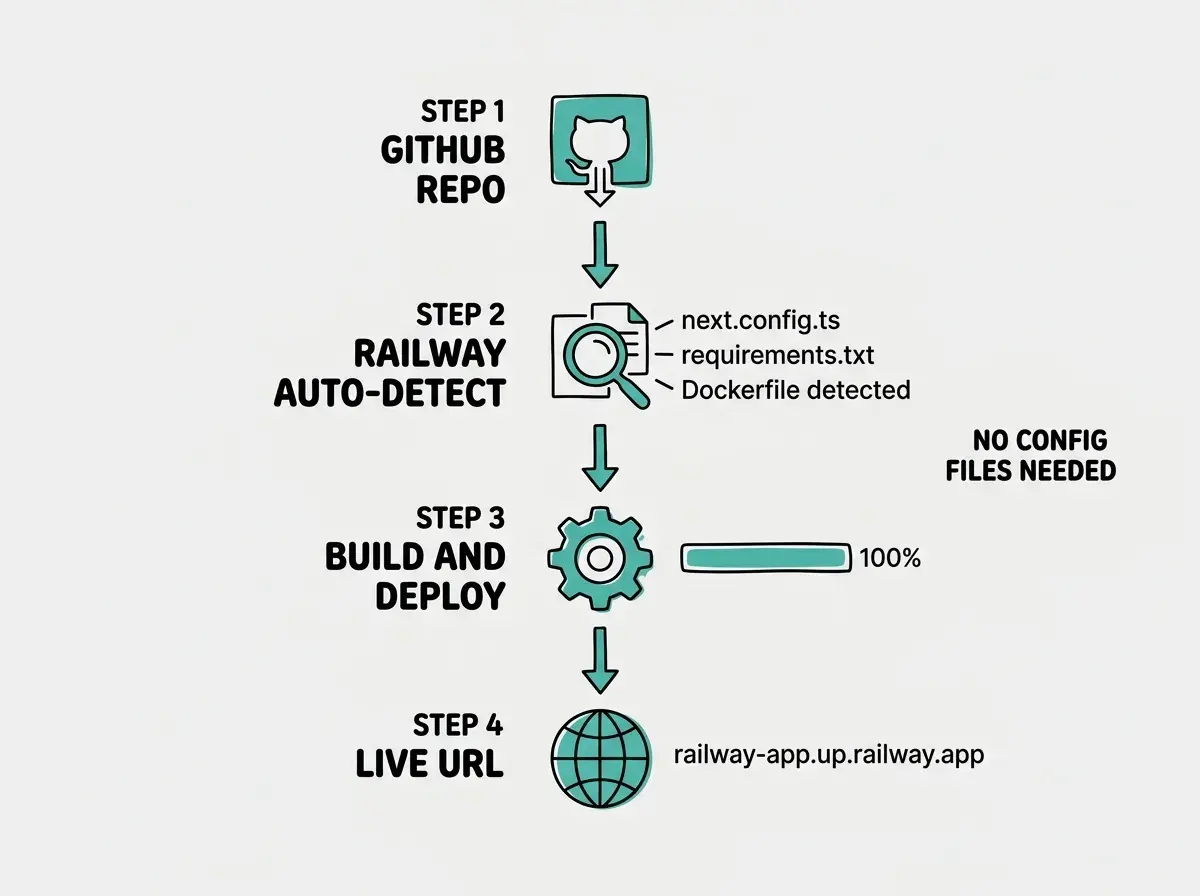
Once the deploy completes, Railway assigns your app a URL like your-project.up.railway.app. Click it. If your app loads, you just deployed to production.
Using the Railway CLI
The dashboard works fine, but the Railway CLI is faster for iteration. Install it:
npm install -g @railway/cli
Then authenticate:
railway login
This opens a browser window to confirm your identity. Then link your project folder:
railway link
Railway asks you to select a project and service. From here, deploy directly from your terminal:
railway up
That uploads your code, builds it on Railway's servers, and deploys it. No git push required, no waiting for GitHub webhooks. When you are iterating quickly, railway up is the fastest loop available.
You can also tail your project's logs:
railway logs
And pull your production environment variables locally:
railway variables
Understand what actually happens when your code goes from laptop to live URL.
Learn deployment basicsAdding a Database in One Click
This is where Railway genuinely shines. Click "New" inside your project, choose "Database," and select PostgreSQL (or MySQL, MongoDB, or Redis). Railway provisions the database in about ten seconds and automatically creates environment variables like DATABASE_URL that your app can reference.
Your AI tool probably generated code that reads DATABASE_URL from the environment. On Railway, that variable exists the moment you add the database. No manual copying, no pasting connection strings. Railway wires the database and your app together automatically.
If your app needs to run database migrations on deploy, add a start command in your Railway service settings. For a typical Node.js app with Prisma:
npx prisma migrate deploy && npm start
Railway runs this command every time your app deploys, ensuring your database schema stays in sync with your code.
When Your Deploy Fails (And It Will)
I have hit every one of these. Here is what they mean and how to fix them.
"Error: Could not detect a framework or language." Railway could not figure out what your project is. This usually means your package.json or requirements.txt is missing from the root directory. AI tools sometimes nest these files in a subdirectory. Make sure the dependency file is at the root level, or set "Root Directory" in your Railway service settings to the correct subfolder.
"npm ERR! Missing script: start." Railway built your app successfully but does not know how to run it. Add a start script to your package.json:
{
  "scripts": {
    "start": "next start -p $PORT"
  }
}
The $PORT variable is critical. Railway assigns a random port, and your app must listen on it. Hardcoding 3000 will cause the deploy to hang and eventually time out.
"Error: connect ECONNREFUSED 127.0.0.1:5432." Your app is trying to connect to a local database instead of Railway's. Your code has a hardcoded database URL or your .env file still references localhost. Remove the hardcoded value and make sure your app reads DATABASE_URL from the environment. Railway sets that variable automatically when you add a database.
Build succeeds but the app shows "Application failed to respond." The build worked but health checks are failing. Two common causes: your app is not listening on the PORT environment variable, or it crashes after starting due to a missing variable. Check railway logs for the actual error.
The $PORT variable is the single biggest gotcha for Railway deployments. Railway assigns a dynamic port, and your app must listen on it. If you hardcode port 3000 (which most AI tools do by default), your app will build successfully but never respond to requests. Change your start command to use $PORT and save yourself an hour of confused debugging.
Railway Templates for Common Stacks
If you want to skip configuration entirely, Railway offers templates. These are pre-configured projects that deploy in one click. Go to railway.app/templates and search for your stack. There are templates for Next.js with PostgreSQL, Flask with Redis, Express with MongoDB, and dozens more.
Deploy the template, verify it works, then replace the template code with your AI-generated code. This way, you know the deployment configuration is correct before you introduce your own code. When something breaks, you know the problem is in your code, not the deployment setup.
How Much Does Railway Cost
Railway's pricing is usage-based. Good because you only pay for what you use. Bad because it can be unpredictable if you are not watching it.
The free trial gives you $5 of credit. After that, the Hobby plan costs $5 per month and includes $5 of usage. A small app with a database typically uses $3 to $7 per month total. If your app sits idle, it costs almost nothing because Railway scales resources down.
For comparison, running the same setup on AWS would cost $15 to $30 per month minimum, plus hours of configuration. Railway's pricing is higher per unit of compute, but the time savings are enormous.
Leaving Railway services running after you stop working on a project. Unlike Vercel's free tier (which is truly free for static sites), Railway charges for compute time. If you deployed a test project three months ago and forgot about it, you are still being billed. Go to your Railway dashboard, check for old projects, and delete anything you are not actively using. Set a calendar reminder to check monthly.
Railway vs Vercel vs Netlify
The honest comparison: if your app is a frontend-only Next.js site with no backend, use Vercel. It is free and purpose-built for that use case. If your app is a static site or Jamstack project, Netlify is excellent.
Railway wins when your project has a backend server, a database, or both. It also wins when your project is not JavaScript. Python Flask app? Railway handles it. Go API? Railway handles it. AI tools generate increasingly diverse stacks, and Railway does not care what language your code is in.
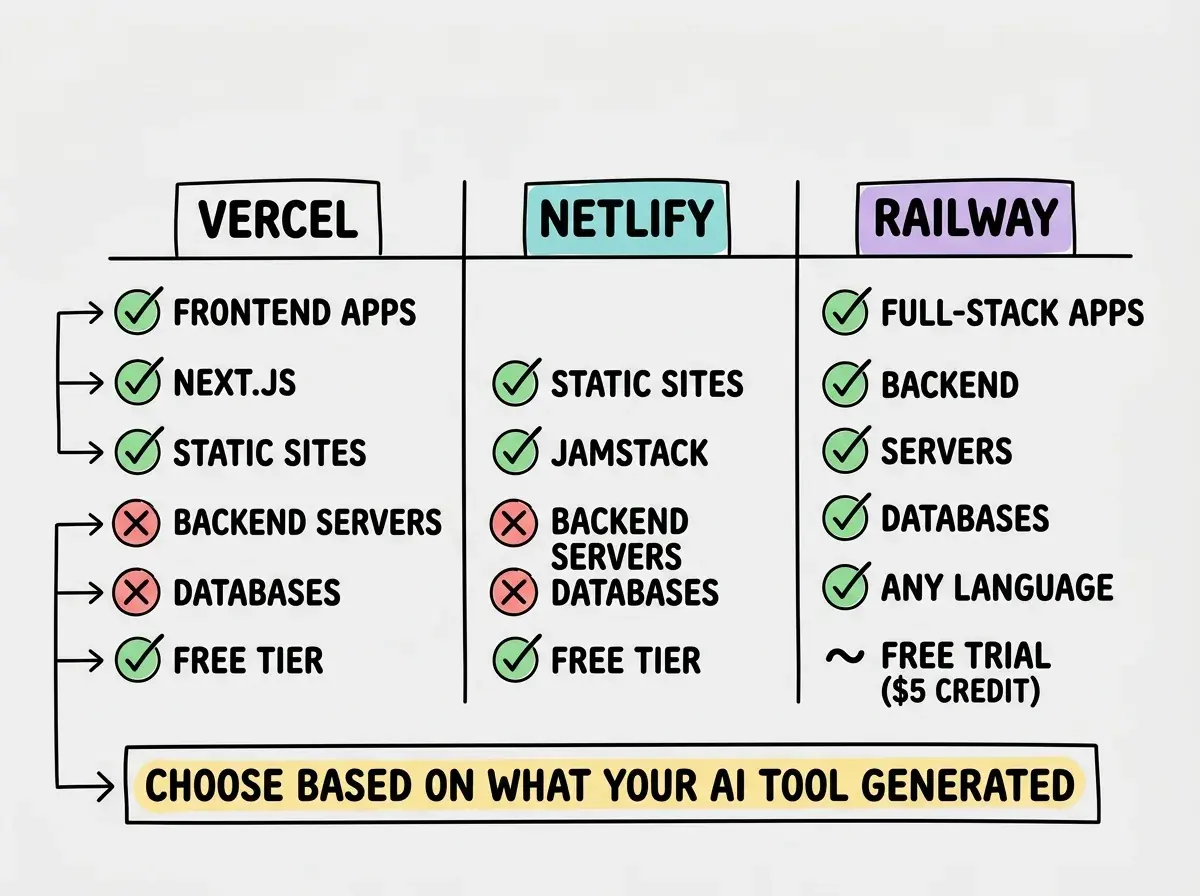
The other advantage is that Railway handles GitHub deploys the same way Vercel does. Push to your main branch, and Railway automatically rebuilds and redeploys. You get the same push-to-deploy workflow without sacrificing backend support.
What This Means For You
Railway removes the biggest excuse for not shipping. The deployment step, where 70% of AI-built projects die, becomes a five-minute task instead of a weekend-long struggle.
- If you are a founder building an MVP: Railway lets you deploy your full-stack prototype (frontend, backend, database) in one place for under $10 per month. Deploy today, share the URL with ten potential customers tomorrow, and iterate based on what they tell you.
- If you are a career changer building a portfolio: A live full-stack app is dramatically more impressive than a GitHub repository. Railway makes it possible to deploy projects with real databases and real backends. Add your Railway-deployed URLs to your portfolio and LinkedIn.
- If you are a student learning to build: Railway's $5 trial credit is enough to deploy several projects. Understanding deployment early gives you a massive advantage over peers who only know how to run things locally.
Railway handles the infrastructure. You handle the idea.
Start building