Queue-based architecture is the pattern that separates apps surviving traffic spikes from apps crashing under them. 92% of developers use AI tools daily to build faster than ever, and shipping quickly means your app can jump from zero to thousands of users overnight. Without a queue between your users and your processing logic, every spike becomes a potential outage.
Think of it like a restaurant kitchen. When the dinner rush hits, every table places orders simultaneously. If those orders went directly to the cook with no buffer, the kitchen collapses. Nobody gets food, plates pile up, and the whole system locks. But restaurants solved this long ago with a ticket rail. Orders go on the rail, and the kitchen works through them at a sustainable pace. Customers wait a bit longer during peak, but every order gets fulfilled. Queue-based architecture is that ticket rail for your application.
Why Your App Crashes During Spikes
Most web applications follow a synchronous request-response pattern. A user makes a request, your server does all the work (database writes, email sends, image processing, third-party API calls), and responds when done. This works fine at steady traffic.
The problem arrives when traffic multiplies suddenly. A Product Hunt launch. A viral tweet. A marketing email that converts too well. Suddenly your server is processing hundreds of heavy operations simultaneously. Database connections max out. Memory spikes. API rate limits hit. Your application falls over, and every user gets errors.
If your server is the cook doing everything to order, adding more customers does not just slow things down. It creates cascading failure where even simple requests cannot complete because resources are locked up by heavy ones.
Message Queues Are Your Ticket Rail
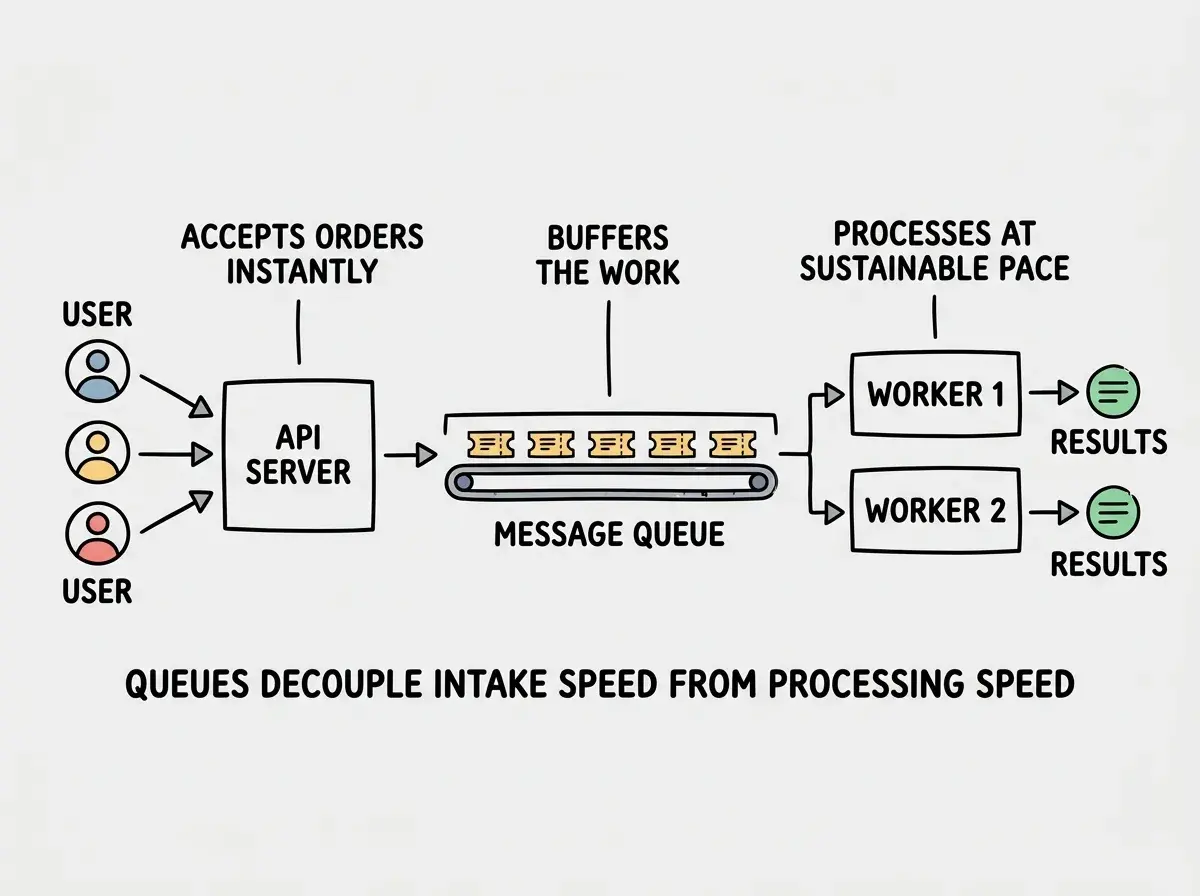
A message queue sits between the part of your app that accepts work and the part that does work. When a user triggers something expensive (email, payment, report generation), your API drops a message on the queue and responds immediately. A separate worker picks up messages and processes them at whatever pace it can sustain.
Your API stays fast because it is only accepting orders and putting tickets on the rail. Workers process at a steady rate. If a spike produces more messages than workers can handle, the messages wait in the queue until workers catch up.
The practical options depend on your stack. Amazon SQS is the most battle-tested, with nearly unlimited throughput and built-in retry logic. Cloudflare Queues integrates natively with Workers and Pages, excellent for edge-first architectures. Upstash QStash offers a serverless HTTP-based queue that works with any deployment target and requires zero infrastructure management. Different pricing and latency, but the core pattern is identical.
Here is what a basic queue integration looks like.
// API route - accepts the order, puts it on the rail
export async function POST(request: Request) {
  const { userId, reportType } = await request.json()

  if (!userId || !reportType) {
    return Response.json({ error: 'Missing fields' }, { status: 400 })
  }

  // Drop a message on the queue (fast)
  await queue.send({
    type: 'generate-report',
    userId,
    reportType,
    requestedAt: Date.now(),
  })

  // Respond immediately - the kitchen will handle it
  return Response.json({ status: 'queued', message: 'Report is being generated' })
}
The user gets an instant response. The heavy work happens asynchronously.
Back-Pressure Keeps Workers Healthy
Back-pressure is what happens when your queue fills faster than workers drain it. In our restaurant, this is when the ticket rail is completely full and the host needs to decide whether to keep seating people.
Good queue-based architecture handles back-pressure at multiple levels. At the worker level, you control concurrency. Each worker processes one message at a time, and adding workers scales throughput linearly. Queue systems let you configure visibility timeouts and batch sizes so workers only pull what they can handle.
At the API level, monitor queue depth. If the queue has 50,000 pending messages, start returning "please try again shortly" for non-critical operations instead of piling on.
// Worker - processes tickets from the rail at its own pace
export async function handleMessage(message: QueueMessage) {
  const { type, userId, reportType } = message.body

  try {
    // Do the heavy work (database queries, calculations, file generation)
    const report = await generateReport(userId, reportType)
    await saveReport(report)
    await notifyUser(userId, report.id)

    // Acknowledge the message - remove it from the queue
    message.ack()
  } catch (error) {
    // Don't ack - the message returns to the queue for retry
    console.error(`Failed to process report for ${userId}:`, error)
    message.retry()
  }
}
The beauty here is that if the worker fails, the message goes back on the queue. Back in the kitchen, if a cook drops a plate, the ticket goes back on the rail. Nothing is lost.
Queue-based architecture is not about making your app faster. It is about making your app survivable. The queue absorbs traffic spikes so your processing layer never sees them. Your workers run at exactly the pace they can sustain, regardless of how much traffic hits your API. This is the single most important pattern for handling unpredictable load.
Dead Letter Queues Catch Permanent Failures
Some messages will never succeed no matter how many retries. A corrupted payload. A deleted user account. A third-party API that permanently rejects a request. Without a plan for these, your queue clogs with poison messages that retry endlessly.
Dead letter queues (DLQs) solve this. After a message fails a configured number of retries (typically 3 to 5), it moves to a separate DLQ instead of retrying forever. The DLQ gives your team visibility into what is failing and why, without blocking the main queue.
In the restaurant, this is a ticket for a dish requiring an out-of-stock ingredient. Instead of the cook trying over and over, the ticket goes into a "needs attention" pile for a manager to resolve.
Every queue system supports DLQs natively. SQS has them built in. Cloudflare Queues supports retry limits with dead letter routing. Upstash lets you configure max retries per message. Set up DLQs from day one.
Idempotency Makes Workers Safe to Retry
Here is a subtle problem that catches teams. If a worker processes a message, succeeds at the main task (charging a credit card), but crashes before acknowledging the message, the queue redelivers it. Without idempotency, you charge the customer twice.
Idempotent workers produce the same result whether they process a message once or five times. Include a unique ID in every message and check whether that ID was already processed before doing the work.
async function handlePayment(message: QueueMessage) {
  const { paymentId, amount, userId } = message.body

  // Check if we already processed this exact payment
  const existing = await db.payment.findUnique({ where: { paymentId } })
  if (existing) {
    // Already done - just acknowledge and move on
    message.ack()
    return
  }

  // Process the payment
  await chargeCustomer(userId, amount)
  await db.payment.create({ data: { paymentId, amount, userId, status: 'completed' } })

  message.ack()
}
This pattern is essential for any operation with real-world consequences. Sending emails, processing payments, updating inventory, and calling external APIs should all be idempotent. The message ID is your deduplication key, the database your source of truth.
Assuming messages will only be delivered once. Every major queue system offers "at least once" delivery by default, which means duplicates are not just possible but expected. If your worker is not idempotent, you will eventually process the same message multiple times. Design for duplicate delivery from the start, not after you discover double-charges in production.
When You Actually Need Queues vs Serverless Auto-Scaling
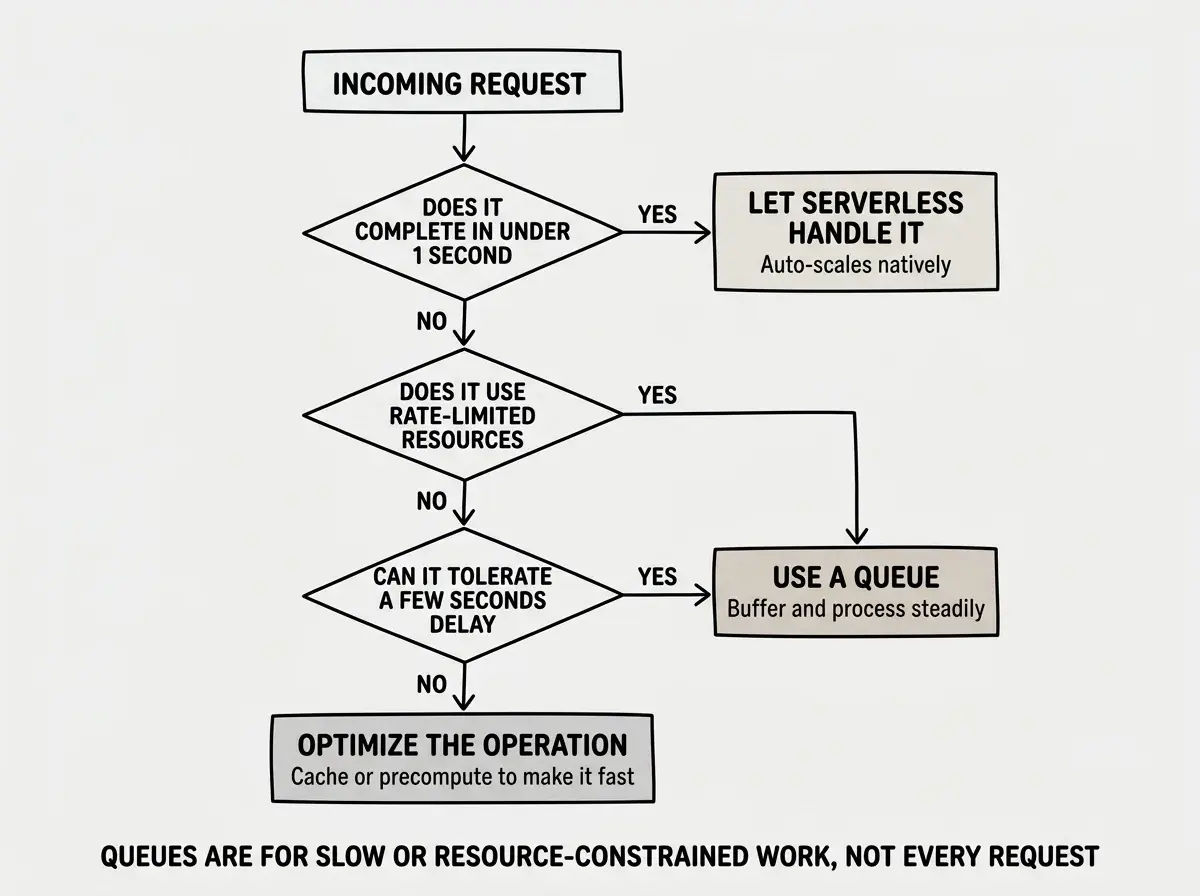
Not every spike requires a queue. Serverless platforms like Vercel, Cloudflare Workers, and AWS Lambda scale horizontally by default. If your endpoint is lightweight (read from cache, return JSON), serverless handles spikes natively.
You need queues when processing is slow (more than a few seconds), depends on shared resources with connection limits (databases, rate-limited APIs), must not be duplicated (payments, notifications), or can tolerate slight delays. If a request completes in under one second using scalable resources, let serverless handle it. If it triggers slow or constrained work, put it on a queue.
Event-Driven Processing Beyond Simple Queues
Once you have a queue, you are already doing event-driven processing. The pattern extends further. A user signs up and that single event triggers three independent processes: a welcome email through the email queue, an analytics event through the tracking queue, a workspace setup through the provisioning queue. Each runs, scales, and fails independently.
Queues evolve from a scaling pattern into an architectural pattern. Adding functionality means subscribing a new worker to existing events, not modifying existing code paths.
Queues are just one part of building apps that scale. See what else top builders are shipping.
Explore moreWhat This Means For Your Architecture
Queue-based architecture is not something you add after you crash. It is a design decision you make early for any operation that does not need to be synchronous.
- If you are preparing for a launch: Identify your heaviest operations (emails, image processing, third-party API calls). Put those behind a queue before launch day. Your API stays responsive even at 10x baseline traffic.
- If you are already experiencing timeouts: Look at your longest-running API routes. Every one that takes more than a second is a candidate for queue-based processing. Migrating the heaviest operations to async processing often eliminates most reliability issues.
- If you are building for scale from the start: Design with events in mind. Every significant user action produces an event, processed through queues. Adding features means adding workers, not modifying the critical path.
The busiest restaurants do not hire enough cooks to handle peak demand instantly. They use a ticket rail, manage the flow, and deliver every order. Your application deserves the same approach.
Scaling patterns, deployment strategies, and architecture decisions for serious builders.
Keep building