Understanding horizontal vertical scaling is the difference between an app that survives its first traffic spike and one that crashes at the worst possible moment. With 92% of developers now using AI tools daily, more apps are launching faster than ever, and most builders hit scaling decisions before they are ready for them.
This guide breaks down both approaches with real costs, real tradeoffs, and a clear framework for choosing. Just the numbers and decisions that matter when your app starts getting popular.
The Kitchen Analogy
Think of your app as a restaurant kitchen. When orders start piling up and the kitchen cannot keep pace, you have exactly two options.
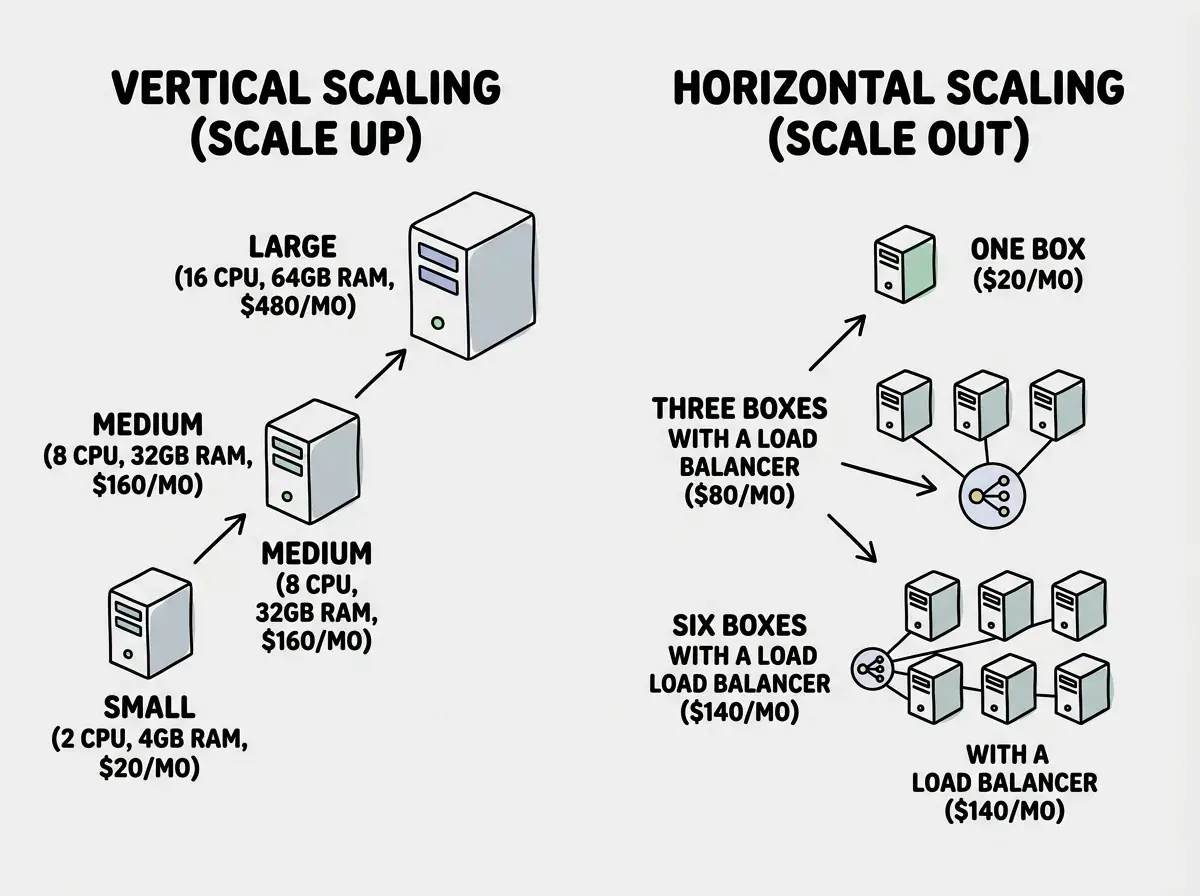
Vertical scaling is getting a bigger kitchen. You knock out walls, install a second oven, upgrade to a commercial-grade stove, and add more counter space. One kitchen, but significantly more powerful. This is what happens when you upgrade your server from 2 CPU cores and 4 GB of RAM to 16 cores and 64 GB of RAM.
Horizontal scaling is opening more kitchens. Instead of making your single kitchen bigger, you open a second location across town. Then a third. Each kitchen is the same size, but together they handle more total orders. This is what happens when you add more server instances behind a load balancer.
Both approaches get more food to more customers. But the costs, complexity, and failure modes are completely different. A bigger kitchen still has one point of failure. Multiple kitchens need a system for routing customers and keeping menus consistent.
Vertical Scaling in Practice
Vertical scaling means upgrading the hardware on your existing server. More CPU, more RAM, faster storage. It is the simplest scaling strategy because nothing about your application code needs to change. If your app runs on one server today, it runs on a bigger server tomorrow with zero modifications.
Here are real prices from major cloud providers in 2026 for general-purpose instances:
| Configuration | AWS (m7g) | DigitalOcean | Hetzner |
|---|---|---|---|
| 2 vCPU / 8 GB | $60/mo | $48/mo | $7/mo |
| 4 vCPU / 16 GB | $120/mo | $96/mo | $14/mo |
| 8 vCPU / 32 GB | $240/mo | $192/mo | $28/mo |
| 16 vCPU / 64 GB | $480/mo | $384/mo | $55/mo |
| 32 vCPU / 128 GB | $960/mo | $768/mo | $110/mo |
Notice the pattern. Every time you double the resources, the cost roughly doubles. That linear relationship holds until you hit the ceiling, and every provider has one. AWS maxes out around 192 vCPUs and 768 GB of RAM on a single instance. DigitalOcean caps at 32 vCPUs. After that, vertical scaling simply is not an option anymore.
Where vertical scaling wins:
- Databases. Most relational databases (PostgreSQL, MySQL) strongly prefer vertical scaling because they rely on shared state and locking mechanisms that get complicated across multiple machines.
- Small to medium traffic. If your app handles under 50,000 monthly active users, a single well-sized server is almost always simpler and cheaper than a multi-server setup.
- Stateful applications. Anything that keeps user session data in memory, maintains WebSocket connections, or runs long-lived processes benefits from staying on one powerful machine.
Where vertical scaling fails:
- There is always a ceiling. You cannot add CPUs forever. The biggest server in the world still has a maximum configuration.
- Zero redundancy. One server means one point of failure. If that server goes down, your entire app goes down with it.
- Downtime during upgrades. Resizing a server usually requires a restart. That means minutes of downtime every time you scale up.
Vertical scaling is the right first move for 90% of apps. It requires zero code changes, zero architectural complexity, and costs scale linearly. Switch to horizontal scaling only when you are approaching the limits of your current machine or when you need high availability with zero downtime.
Horizontal Scaling in Practice
Horizontal scaling means running multiple copies of your application behind a load balancer that distributes traffic across them. Each copy (called an instance or a node) is identical. If one goes down, the others keep serving requests.
The cost math looks different:
| Setup | Instances | Config Each | Monthly Cost | Capacity |
|---|---|---|---|---|
| Starter | 2x | 2 vCPU / 4 GB | $40-80/mo | ~2,000 req/sec |
| Growth | 4x | 2 vCPU / 4 GB | $80-160/mo | ~4,000 req/sec |
| Scale | 8x | 4 vCPU / 8 GB | $320-640/mo | ~12,000 req/sec |
| Large | 16x | 4 vCPU / 8 GB | $640-1,280/mo | ~24,000 req/sec |
The numbers reveal an important advantage. You can scale capacity incrementally. Need 20% more throughput? Add one more instance. With vertical scaling, you often have to jump to the next tier and pay for capacity you do not fully use.
Where horizontal scaling wins:
- High availability. With multiple instances, losing one server means losing a fraction of your capacity, not all of it. Your app stays online.
- Virtually unlimited scale. You can keep adding instances as long as your architecture supports it. There is no hardware ceiling.
- Cost efficiency at scale. Eight small servers often outperform and cost less than one massive server with equivalent total resources.
- Geographic distribution. You can place instances in different regions so users in Tokyo get served by a nearby server instead of one in Virginia.
Where horizontal scaling gets expensive and complicated:
- Load balancers cost money. AWS Application Load Balancer runs about $22 per month plus data transfer fees. That is a fixed cost that does not exist in the vertical model.
- Session management. If a user logs in on Instance A, Instance B does not know about it unless you set up shared sessions through Redis or a database. This adds complexity and another service to maintain.
- Database becomes the bottleneck. You can run 20 app servers, but if they all connect to one database, that database becomes your new scaling problem. Database replication and sharding are among the hardest problems in software engineering.
- Deployment complexity. Every deploy needs to update all instances with rolling updates to avoid downtime.
The most common horizontal scaling mistake is splitting your app across multiple servers before optimizing what runs on one server. Adding caching, optimizing database queries, and serving static assets through a CDN can multiply your single-server capacity by 5x to 10x. Scale your code before you scale your infrastructure.
The Real Decision Framework
Forget the theoretical debates. Here is how to decide based on where your app actually is today.
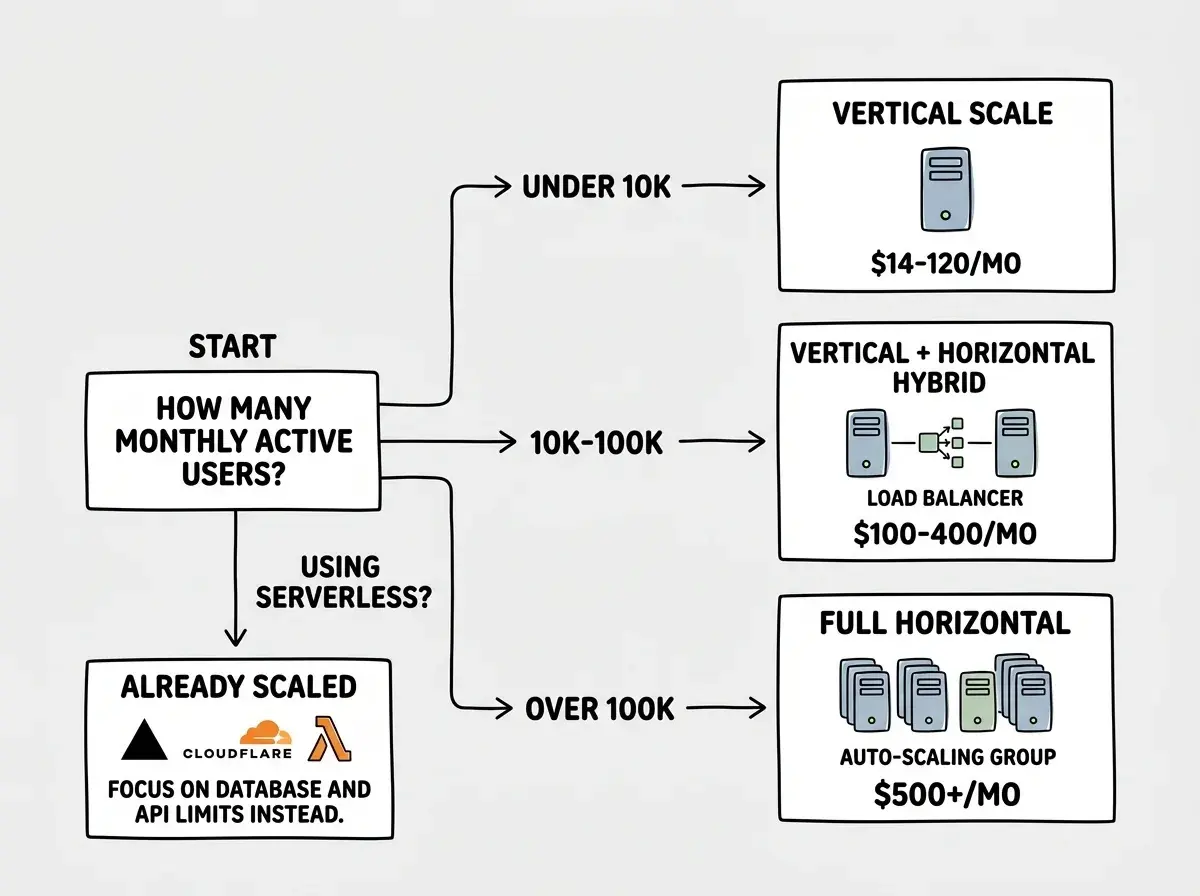
Under 10,000 monthly active users: Vertical scale. Pick a server with 4 vCPUs and 16 GB of RAM. This handles most apps comfortably. Cost: $14 to $120 per month depending on your provider.
10,000 to 100,000 monthly active users: Start vertical, then add horizontal for availability. Run two instances behind a load balancer so you have redundancy, and keep your database on a managed service like Supabase or RDS that handles its own scaling. Cost: $100 to $400 per month.
Over 100,000 monthly active users: Horizontal scaling with auto-scaling. Set up auto-scaling groups that add instances when CPU hits 70% and remove them when it drops below 30%. Use managed databases with read replicas. Cost: $500+ per month, scaling with traffic.
If you are using serverless (Vercel, Cloudflare Workers, AWS Lambda): You are already horizontally scaled by default. The platform handles instance management automatically. Your scaling concern shifts from servers to database connections and API rate limits.
The Numbers Most Builders Get Wrong
There is a persistent myth that horizontal scaling is always cheaper. The numbers tell a different story at small to medium scale.
Consider an app that needs 8 vCPUs and 32 GB of RAM total. On Hetzner, one server with those specs costs about $28 per month. Four servers with 2 vCPUs and 8 GB each (the same total resources) cost $28 per month in compute, plus $10 to $25 for a load balancer, plus engineering time to manage the distributed setup. At this scale, horizontal is more expensive and more complex for identical performance.
The crossover point, where horizontal becomes cheaper per unit of compute, typically happens around 32 to 64 vCPUs of total capacity. Below that threshold, vertical almost always wins on cost. Above it, horizontal wins because the largest single servers carry premium pricing.
For serverless platforms, the math is different again. Vercel and Cloudflare Workers handle scaling automatically, but you pay per invocation. An app making 10 million serverless function calls per month on Vercel Pro costs roughly $20 in function execution. The same load on a self-managed horizontal setup would cost $100 to $200 in server costs alone.
The Serverless Middle Ground
Most vibe coders will never manually configure either scaling approach. If you are building on Vercel, Cloudflare Pages, or AWS Amplify, your app already scales horizontally at the compute layer without you thinking about it.
Your real scaling concerns on serverless are database connection limits (Supabase free tier caps at 60 concurrent connections, so use connection pooling), third-party API rate limits (1,000 concurrent users will hit external API limits before your infrastructure struggles), and cold starts (100ms to 500ms startup delay on idle functions during traffic spikes).
These are the real bottlenecks for AI-built apps in 2026. Not the servers, but the services they connect to.
Real cost analysis and scaling strategies for AI-built apps.
Browse All Grow ArticlesWhat This Means For You
If your app is live and handling real traffic, start with vertical scaling. It is cheaper, simpler, and requires zero architectural changes. Optimize your code first: add caching, optimize queries, use a CDN for static assets. These changes often deliver 5x to 10x more capacity from the same hardware.
Move to horizontal scaling when you need high availability (your app cannot afford to go down) or when you have genuinely outgrown the biggest server available on your provider. For most vibe-coded apps, that transition happens somewhere between 50,000 and 100,000 monthly active users, if it happens at all.
And if you are on a serverless platform, stop worrying about server scaling entirely. Focus on database connections, API rate limits, and cost optimization instead. Those are the real constraints that will hit you first.
Cost breakdowns, deployment guides, and scaling playbooks for builders.
Read More Grow Articles