92% of developers now use AI coding tools daily, and most of them are shipping slow code without realizing it. AI performance prompts are the missing layer between "it works" and "it works fast." The default output from every AI tool optimizes for correctness and readability, not for speed, and that gap compounds into real problems at scale.
Why AI Generates Slow Code By Default
AI models are trained on millions of code examples, and the vast majority of those examples prioritize clarity over performance. When you ask for a "function that fetches user data," the AI reaches for the simplest implementation. That means loading everything at once, no pagination, no caching, and often an N+1 query pattern that multiplies database calls as your data grows.
This is not a bug. It is a feature of how language models work. The most common pattern in training data wins. And the most common pattern for fetching related data is a loop that makes one query per item instead of a single batched query. The most common pattern for displaying a list is rendering everything at once instead of virtualizing. The most common pattern for loading components is importing them all upfront instead of lazy loading.
The result is code that works perfectly in development with ten records and falls apart in production with ten thousand. Your local environment hides every performance problem because there is no network latency, the database is on the same machine, and your test data fits in memory.
The Performance Constraint Suffix
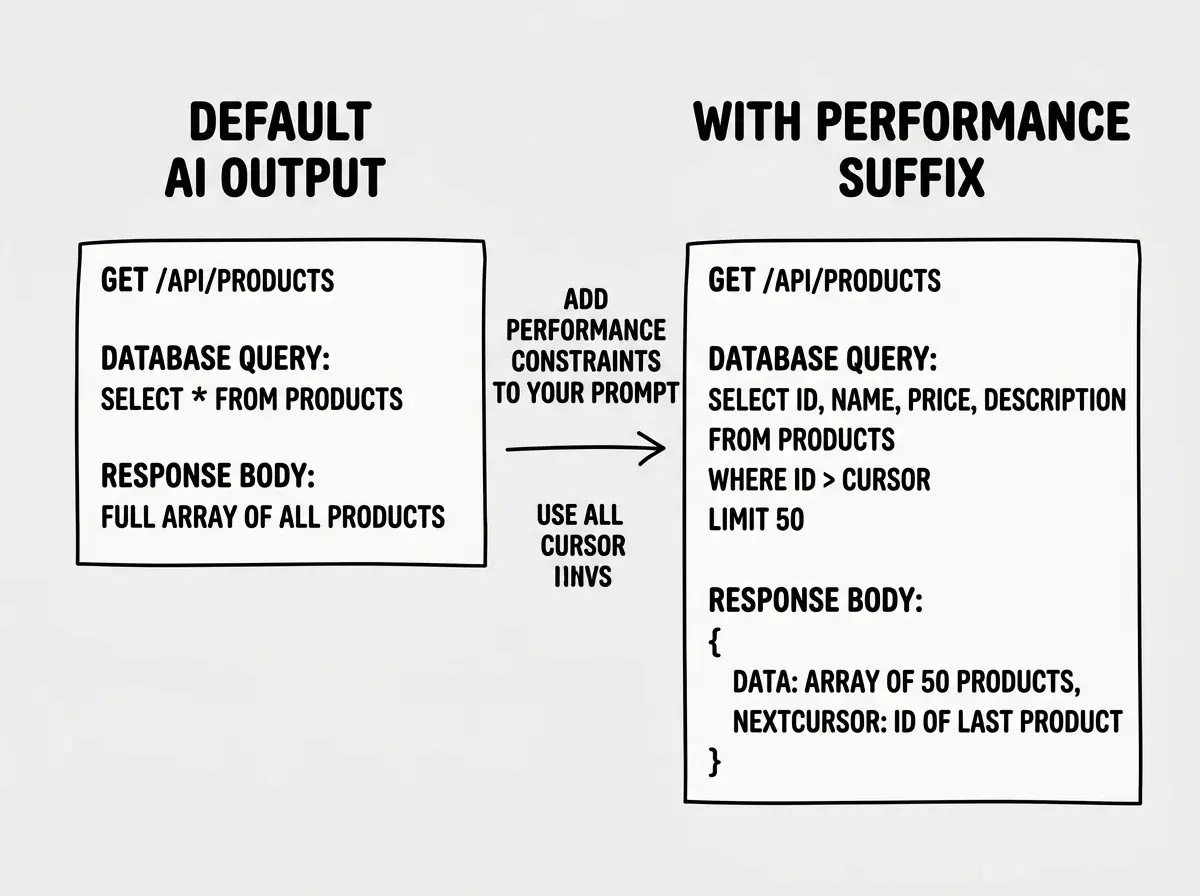
The simplest technique for getting faster code from AI is adding a performance constraint suffix to your prompts. This is a short addition at the end of any prompt that tells the AI to optimize for specific performance characteristics.
Instead of "Create an API endpoint that returns a list of products," you write "Create an API endpoint that returns a list of products. Optimize for response time under 200ms with 100k+ rows. Use cursor-based pagination, select only needed columns, and add appropriate database indexes."
That suffix changes everything about the generated code. The AI switches from "what is the simplest way to do this" to "what is the most efficient way to do this within these constraints." You get pagination by default, selective column queries, and index suggestions that would have taken three rounds of debugging to discover otherwise.
Here is a general-purpose performance suffix you can adapt: "Optimize for production scale. Assume 100k+ records, concurrent users, and slow network conditions. Use pagination, lazy loading, memoization, and selective data fetching where appropriate."
Database Query Optimization Prompts
Database queries are where the biggest performance wins live, and where AI makes the most expensive mistakes. The classic N+1 problem shows up constantly in AI-generated code. You ask for "a page that shows users and their recent orders" and the AI writes a loop that queries orders for each user individually. With 50 users on the page, that is 51 database queries instead of 2.
Your prompts need to explicitly call out query patterns. "Fetch users and their recent orders using a single JOIN query or a batched IN query, not individual queries per user. Include EXPLAIN analysis expectations." When the AI knows you care about query count, it reaches for JOINs, subqueries, and batched operations instead of the simple loop.
For any prompt involving database reads, include these constraints: the expected data volume, whether you need all columns or specific ones, how results should be paginated, and what indexes you expect to exist. "Query the orders table (5M+ rows) for orders belonging to a specific user. Select only id, status, total, and created_at. Use the existing user_id index. Return results paginated with 20 items per page using cursor-based pagination."
The difference between "get orders for this user" and that prompt is the difference between a query that takes 3 seconds and one that takes 30 milliseconds.
React Rendering Performance
React applications have their own category of performance problems, and AI tools generate every single one of them. Unnecessary re-renders, missing memoization, inline function definitions inside render loops, and uncontrolled component trees that re-render hundreds of children when one piece of state changes.
When prompting for React components, specify rendering behavior explicitly. "Create a product list component that renders 500+ items. Use React.memo on the list item component. Memoize event handlers with useCallback. Virtualize the list so only visible items are in the DOM. Do not pass new object references as props on each render."
For forms and interactive components, the key phrase is "minimize re-renders." The AI needs to know that you want controlled updates scoped to the specific field being edited, not the entire form re-rendering on every keystroke. "Build a settings form with 15+ fields. Use React Hook Form or a similar library to avoid re-rendering the entire form on each input change. Only the active field should re-render during typing."
State management prompts should include scope constraints. "This component receives a list of 200 notifications. The read/unread toggle should only re-render the affected notification item, not the entire list. Structure the state to allow granular updates."
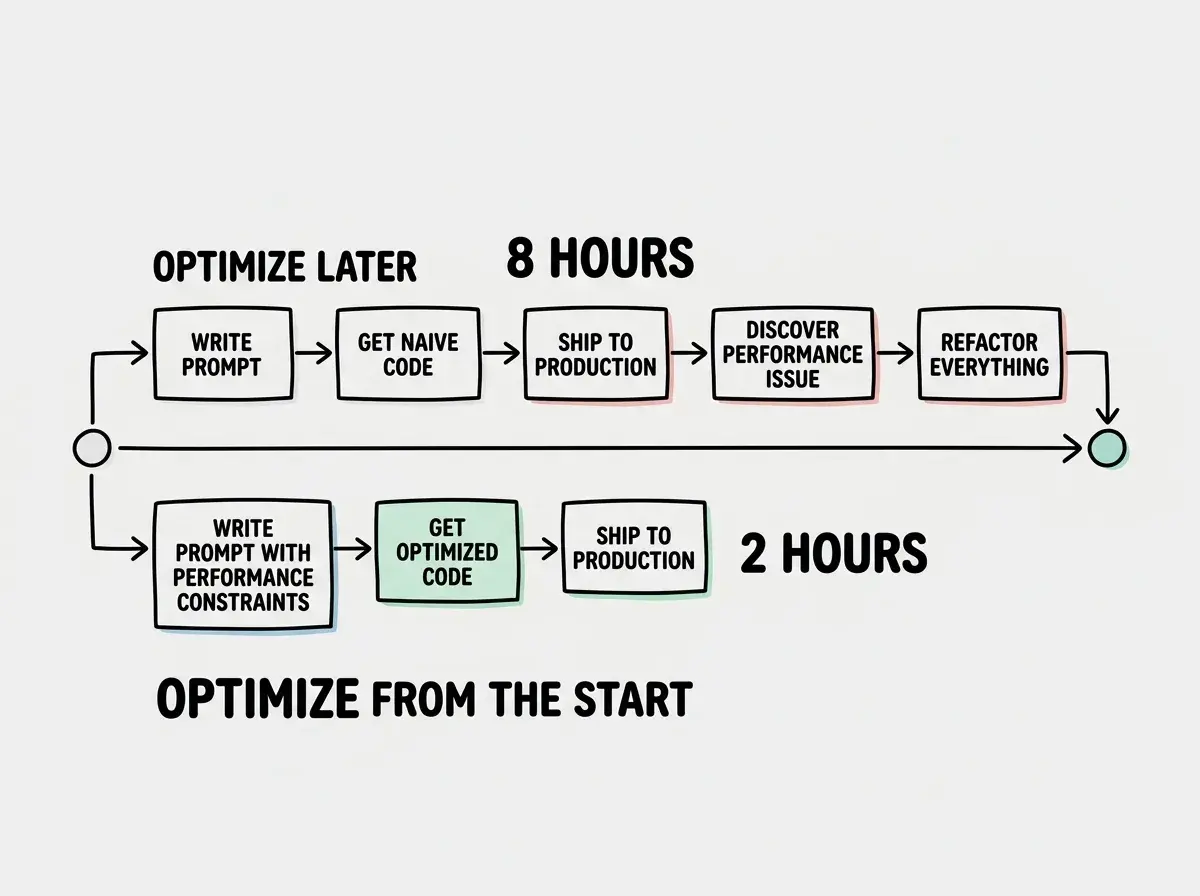
Every performance problem in AI-generated code traces back to a missing constraint in the prompt. The AI is not lazy. It just optimizes for the criteria you give it. If you do not mention performance, it optimizes for readability and simplicity. Adding three sentences about performance expectations to your prompt prevents hours of optimization work later.
Bundle Size and Lazy Loading
Bundle size is the performance dimension most vibe coders ignore completely, and it has the most visible impact on user experience. When your AI generates imports, it pulls in entire libraries by default. "Import moment" brings in 300KB of JavaScript. "Import lodash" brings in the full utility belt. The AI does not think about what ships to the browser unless you tell it to.
Your prompts should specify bundle awareness. "Build a date formatting utility. Do not use moment.js or date-fns. Use the native Intl.DateTimeFormat API. If a library is truly needed, use a tree-shakeable import like import { format } from 'date-fns/format', never the barrel import."
For route-level components, always prompt for code splitting. "Create the dashboard page component. This page should be lazy loaded using React.lazy and Suspense with a loading skeleton. Heavy sub-components like the analytics chart and data table should also be lazy loaded independently."
Dynamic imports are another area where explicit prompting matters. "The rich text editor component is only used by 10% of users. Load it dynamically with next/dynamic and ssr: false. Show a loading placeholder until the editor is ready." Without that context, the AI imports the editor at the top of the file and adds it to the main bundle where every user pays the cost.
Caching Strategy Prompts
Caching is the performance multiplier that AI almost never implements unprompted. When you ask for an API endpoint, you get fresh database queries on every request. When you ask for a data fetching hook, you get raw fetch calls with no cache layer. The AI does not add caching because it cannot assume your cache invalidation requirements.
Make caching explicit in your prompts. "Create an API endpoint for the product catalog. Results should be cached in Redis for 5 minutes with a cache key based on the query parameters. Include a cache invalidation function that runs when products are updated via the admin API."
For client-side caching, specify the tool and strategy. "Fetch the user's dashboard data using React Query with a staleTime of 30 seconds and a cacheTime of 5 minutes. Implement optimistic updates for the favorite toggle so the UI responds instantly while the mutation runs in the background."
HTTP caching headers are another missed opportunity. "Set Cache-Control headers on this API response. Public, cacheable data like the category list should use max-age=3600 with stale-while-revalidate=86400. User-specific data should use private, no-cache with ETag validation."
Adding performance optimization after the code is written instead of prompting for it from the start. Retrofitting pagination into a component that was built to load everything at once requires restructuring the data flow, the UI state, and often the API contract. Building it in from the first prompt takes one sentence of extra context and saves a full refactor.
Putting It All Together
Here is a complete prompt that demonstrates every technique from this article working together.
"I need an API endpoint at /api/dashboard/metrics that returns analytics data for the admin dashboard. The metrics table has 10M+ rows. Requirements: (1) Query only the columns needed for the dashboard cards (total_users, active_users, revenue, conversion_rate) using a materialized view or pre-aggregated table, not raw event scanning. (2) Cache the response in Redis for 2 minutes since this data does not need to be real-time. (3) Use cursor-based pagination for the time-series chart data with 30-day default window. (4) Set Cache-Control headers with stale-while-revalidate for CDN caching. (5) The response should be under 5KB gzipped. (6) Include TypeScript types for the response shape."
That single prompt produces code that would survive production traffic. Without those constraints, the same request generates a SELECT * from a 10M-row table with no caching, no pagination, and no CDN headers. The only difference is thirty seconds of typing performance constraints.
Performance is a prompt engineering skill. Learn the patterns that top builders use.
Explore moreDig deeper
A few hand-picked sources if you want to go further.
What This Means For You
Performance is not something you bolt on after launch. It is something you prompt for from the very first line of code. The patterns in this article, constraint suffixes, explicit query patterns, rendering boundaries, bundle awareness, and caching strategies, are not complex. They are just specific. And specificity is what separates AI-generated code that demos well from code that scales.
- If you are a senior developer using AI tools: You already know these optimization patterns from experience. The shift is learning to articulate them in prompts instead of implementing them manually. Every performance pattern you have internalized over the years becomes a prompt constraint that makes AI output match your standards from the start.
- If you are building a product that needs to scale: Performance constraints in your prompts are cheaper than performance engineers on your payroll. Start with the database query patterns and caching strategies first. Those two areas alone eliminate 80% of the performance problems that hit production applications.
Stop optimizing after the fact. Start prompting for performance.
Keep learning