Project planning before AI coding is the difference between a smooth build and hours of wasted prompts. A 2025 Stack Overflow survey found that 92% of developers use AI tools daily, yet the most common complaint is still "it built the wrong thing." The fix is not better prompting. It is planning before you prompt at all.
Most people open their AI coding tool, type something like "build me a SaaS dashboard," and hope for the best. Twenty prompts later they have a Frankenstein app that does not match what they imagined. The missing step is almost always the same one: they skipped the plan.
Why Most AI Projects Fail Before the First Prompt
Here is a pattern that plays out thousands of times a day. Someone has a great idea for an app. They open Lovable, Cursor, or Bolt. They type a big, ambitious first prompt. The AI generates something that looks impressive for about thirty seconds, until they realize it made a dozen assumptions they never intended. The login page uses email-only when they wanted Google sign-in. The database stores data they do not need. The homepage layout has nothing to do with their actual business.
This is not the AI's fault. The AI did exactly what it was told, which was almost nothing specific. Without a plan, every prompt is a guess, and the AI interprets your guesses with its own guesses stacked on top. The result is a compounding chain of wrong assumptions that gets harder to fix with every new prompt.
The real cost is not just wasted time. It is wasted context. AI coding tools have limited context windows, and every prompt you spend correcting course is a prompt you could have spent building forward. The 30% rule for AI (spend 30% of your time on setup and planning, 70% on execution) exists precisely because front-loaded planning pays exponential dividends during the build phase.
The number one reason AI-built projects stall is not bad AI output. It is unclear input. A ten-minute planning exercise before your first prompt eliminates the majority of "that is not what I meant" moments that drain your time, your token budget, and your enthusiasm.
Think of it this way: the AI is extraordinarily fast at building, but it has zero opinions about whether it is building the right thing. That judgment is entirely yours, and the system sketch is how you capture it.
The Blueprint Analogy for AI-Assisted Building
Imagine hiring a contractor to build your house. You show up on day one and say, "I want a nice house with some rooms and a kitchen. Make it modern." The contractor is skilled, motivated, and fast. They start building immediately. Two weeks later you walk in and discover three bathrooms (you wanted two), no garage (you assumed they would add one), and the kitchen faces north when you specifically wanted morning sunlight.
The contractor did not fail. You failed to give them a blueprint.
AI coding tools are that contractor. They are incredibly capable builders who will start working the instant you say go. But "go" without a blueprint produces a house you did not want. A system sketch is your blueprint. It is not a fifty-page requirements document or a formal spec. It is a single page that answers the five questions your AI tool will otherwise answer for you, usually wrong.
The beauty of a one-page plan is that it takes ten minutes. Not an hour, not a day. Ten minutes of thinking before you type your first prompt will save you hours of rewriting, debugging, and starting over. Every experienced vibe coder has learned this lesson the hard way. You can learn it the easy way, right now.
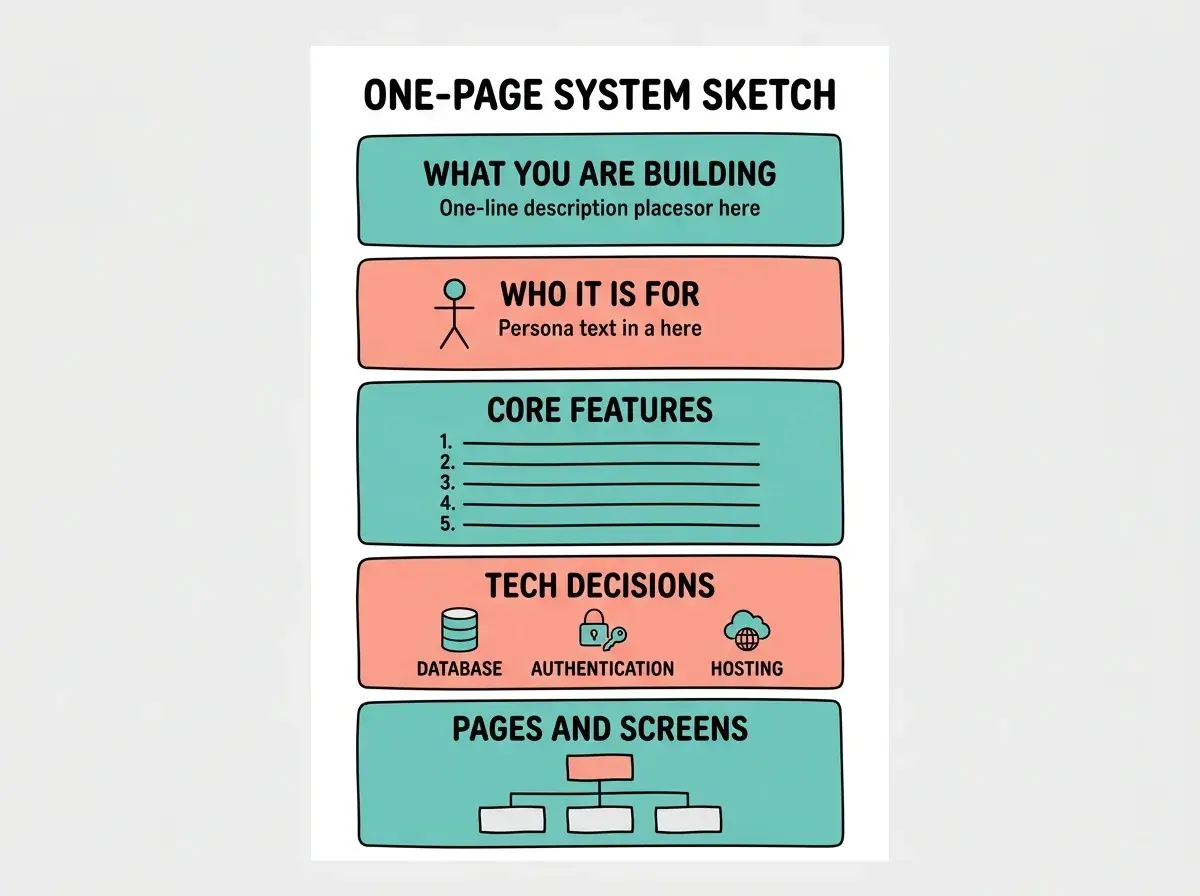
The sketch does not need to be pretty. It does not need to be complete. It needs to exist. A rough plan beats no plan every single time.
The One-Page System Sketch Template
Here is the template, section by section. Walk through each one before you open your AI tool. You can write this on paper, in a notes app, or in a text file. The format does not matter. The thinking does.
1. What You Are Building (one sentence)
Force yourself into a single sentence. "A job board where indie companies post remote roles and candidates can filter by salary and timezone." If you cannot say it in one sentence, your idea is either too vague or too complex for a first build. Trim it down. The AI needs a north star, not a novel.
2. Who It Is For (one persona)
Pick one primary user. Not "everyone." Not "small businesses and enterprise." One person. "A non-technical founder who wants to validate a SaaS idea in a weekend." This shapes every design and feature decision the AI will make. When the AI knows who it is building for, it makes better default choices about layout, language, and complexity.
3. Core Features (maximum five)
List the features your app absolutely must have on day one. Five is the ceiling, not the target. Three is even better. A job board might need: post a job, browse jobs with filters, apply to a job. That is three. Not "AI-powered matching," not "Stripe billing," not "admin analytics dashboard." Those come later. The 5 P's of prompting (purpose, persona, parameters, preferences, and priorities) all flow naturally when you have constrained your feature list to what actually matters.
4. Tech Decisions (three choices)
You only need to decide three things: where does data live (database or no database), how do users log in (authentication method or none), and where will this be hosted. For most first projects, the answers are simple. Supabase for data, Google sign-in for auth, Vercel for hosting. Write them down so the AI does not pick for you.
5. Pages and Screens (simple list)
Write out every page your app will have. Homepage, login, dashboard, settings, individual post page. That is it. This list becomes your sitemap, and it prevents the AI from inventing pages you did not ask for or forgetting ones you need.
Learn the foundational skills that make every prompt and every project more successful.
Start with the basicsOnce you have all five sections filled in, you have your system sketch. It should fit on one page. If it does not, you are overcomplicating your first version.
From Sketch to First Prompt
Now comes the satisfying part. Your system sketch translates directly into your first prompt. Instead of opening your AI tool and improvising, you paste your sketch (or a clean version of it) as context for the AI.
Here is what that looks like in practice. Say your system sketch reads: "A habit tracker for busy professionals. Core features: add habits, log daily completions, see a weekly streak view. Tech: Supabase, no auth for MVP, deploy on Vercel. Pages: landing page, tracker dashboard, settings."
Your first prompt becomes: "Build a habit tracker web app for busy professionals. It should have three pages: a landing page explaining the app, a tracker dashboard where users can add habits and log daily completions with a weekly streak view, and a simple settings page. Use Supabase for the database. No authentication for the MVP. Style it with a clean, minimal design using a white background and blue accent colors."
That prompt works because it is not creative writing. It is a translation. Every decision was already made in your sketch. The AI gets a clear, specific target instead of a vague wish. The difference in output quality is dramatic.
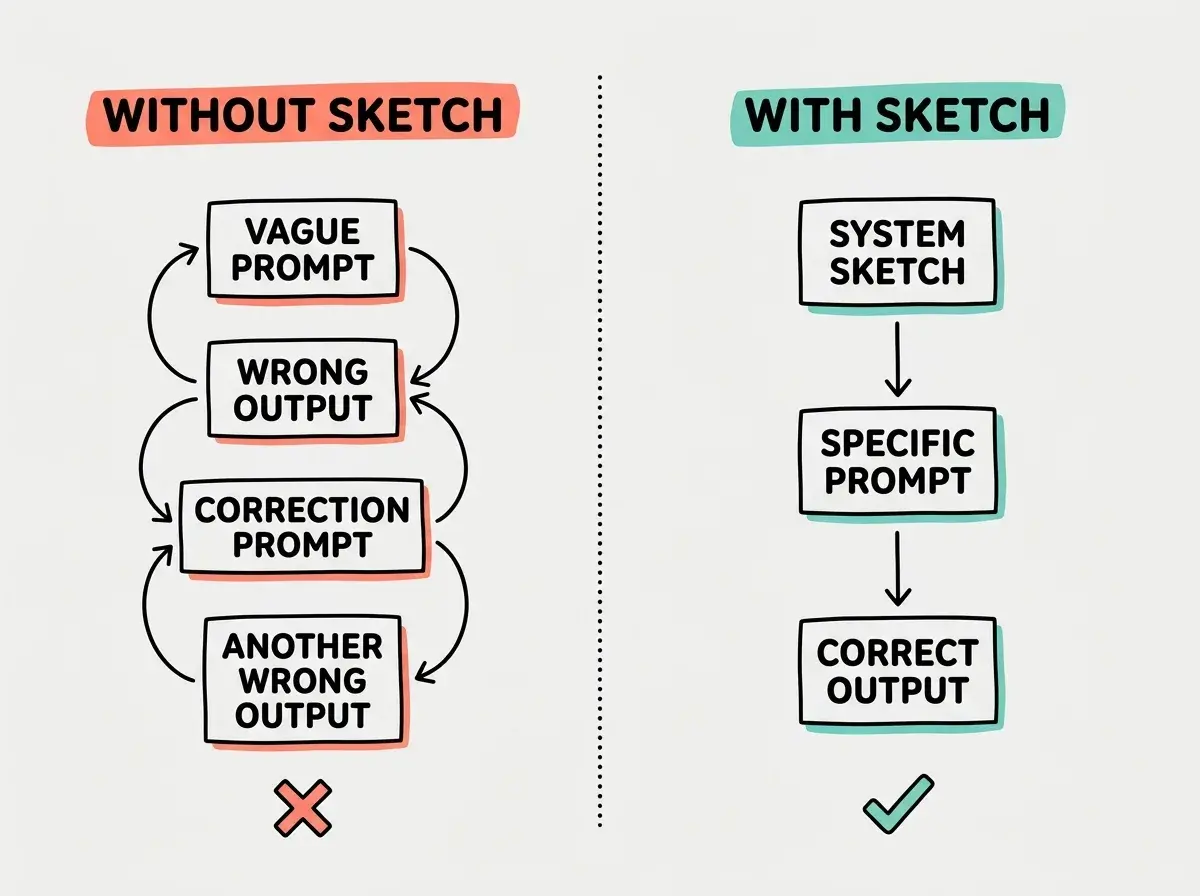
Notice how the prompt with a sketch behind it reads almost like a brief to a contractor. That is not a coincidence. The system sketch forces you to make decisions before the AI starts building, which is exactly when those decisions are cheapest to make.
Do not confuse your system sketch with your first prompt. The sketch is for you. It captures your thinking. The prompt is for the AI. It communicates your thinking in a format the tool can act on. Some people paste the sketch directly and that can work, but translating it into natural language usually produces better results because the AI processes conversational instructions more reliably than bullet-point specs.
The sketch also becomes your reference document for the rest of the build. When you are ten prompts deep and the AI suggests adding a feature you did not plan for, glance at your sketch. Is it in the five core features? No? Then it waits for version two. This discipline alone prevents the scope creep that kills most AI projects.
Dig deeper
A few hand-picked sources if you want to go further.
What This Means For You
The system sketch works differently depending on where you are coming from, but it works for everyone.
- If you are a founder, the sketch doubles as your MVP definition. You can share it with co-founders, advisors, or investors before writing a single line of code. Ten minutes of planning replaces a week of building the wrong thing.
- If you are a career changer, the sketch builds a professional habit that separates you from other AI-first builders. Hiring managers and clients notice when someone plans before they build. It signals competence beyond the tools.
- If you are a student, the sketch is training wheels for systems thinking. Every software project you work on in the future, whether AI-built or not, will benefit from the habit of writing down what you are building before you start building it.
Grab the system sketch template and start building with clarity from prompt one.
Start building