A deployment checklist is the difference between a smooth launch and a 2 AM incident. Pilots do not skip their pre-flight checks, even after ten thousand flights, because the cost of missing one item is catastrophic. Deploying an AI-built application to production works the same way. The stakes are lower than aviation, but the principle is identical. Every item on this list exists because someone skipped it and paid the price.
I built this checklist after shipping multiple vibe-coded projects and watching each one fail in predictable, preventable ways. The failures were never exotic. They were always the same handful of mistakes repeated across projects, frameworks, and hosting platforms. Veracode's 2025 research found that 45% of AI-generated code contains security vulnerabilities. That is the baseline quality when nobody is checking.
Why AI-Built Apps Need a Different Checklist
Standard deployment checklists assume a developer wrote the code and understands every line. Vibe-coded applications break that assumption. When an AI generates your backend, it might hardcode a localhost URL that works perfectly in development and silently fails in production. It might install a dependency you never asked for that opens a security hole. It might skip rate limiting entirely because you never mentioned it in your prompt.
These are not hypothetical problems. They are the specific, recurring failure modes of AI-generated codebases. A traditional deployment checklist catches some of them. This one targets the failures unique to AI-assisted development.
The most dangerous deployment failures in AI-built apps are not build errors or syntax mistakes. They are silent configuration problems that pass every automated check and only surface when real users hit the broken path. This checklist targets those silent failures specifically.
Think of your deployment like a pre-flight checklist before takeoff. A pilot does not just check that the engines start. They verify fuel levels, instrument readings, control surfaces, communication systems, and weather conditions. Each check takes seconds. Skipping any single one is a gamble with compounding odds. Your application has the same categories of risk, and they deserve the same systematic attention.
Environment and Configuration
This section catches the failures that account for the majority of broken deployments. Work through every item before you touch the deploy button.
Check every environment variable against production values. Open your .env file and your hosting platform's environment variables side by side. Verify that every key exists in production and that the values are correct for your production environment. AI tools frequently generate .env.example files that are incomplete, missing variables that the code actually uses.
Search for hardcoded localhost URLs. Run a search across your entire codebase for localhost, 127.0.0.1, and 0.0.0.0. AI-generated code loves to hardcode development URLs in API calls, WebSocket connections, and OAuth redirect URIs. These work flawlessly on your machine and break completely in production with no useful error message.
Verify your build command matches your hosting platform. If you are using Next.js, confirm whether your platform expects next build or next build && next export. If you are using a monorepo, confirm the root directory is set correctly. AI tools sometimes generate build configurations that assume a specific hosting platform that is not the one you are using.
Confirm your .gitignore is complete. AI tools sometimes create files that should be ignored but are not listed in .gitignore. Check for .env files, node_modules, build output directories, editor config files, and any local database files. One misplaced .env file in your repository means your secrets are on GitHub, and GitHub's search index means they are effectively public.
Security
Security failures in AI-generated code are not rare exceptions. They are the default. Treat every item in this section as mandatory.
Scan for exposed secrets in code and Git history. Search your codebase for API keys, tokens, and passwords hardcoded instead of referenced through environment variables. Then check your Git history, because a secret that was committed and later removed still exists in every previous commit. Tools like gitleaks automate this. If you find an exposed secret, rotate it immediately.
Verify authentication on every API route. Open each API endpoint and confirm it checks for a valid session or API key before executing. AI-generated backends frequently create routes that work without authentication. For each endpoint, ask: "If someone calls this without being logged in, what happens?" If the answer is anything other than a 401 response, fix it.
Set security headers. Your application should return Content-Security-Policy, X-Content-Type-Options, X-Frame-Options, and Strict-Transport-Security headers. AI tools almost never add these. Visit securityheaders.com after deployment. Most AI-built apps score D or F on their first deployment.
Enforce HTTPS everywhere. Search your codebase for any http:// URLs in API calls, image sources, and external script references. Most hosting platforms provide HTTPS automatically, but your code might be making insecure requests to external services.
Start with the fundamentals of getting your app from localhost to the internet.
Learn deployment basicsPerformance
Performance problems in AI-generated code are invisible during development and devastating in production. Your local machine is fast and forgiving. A production server serving hundreds of concurrent users is neither.
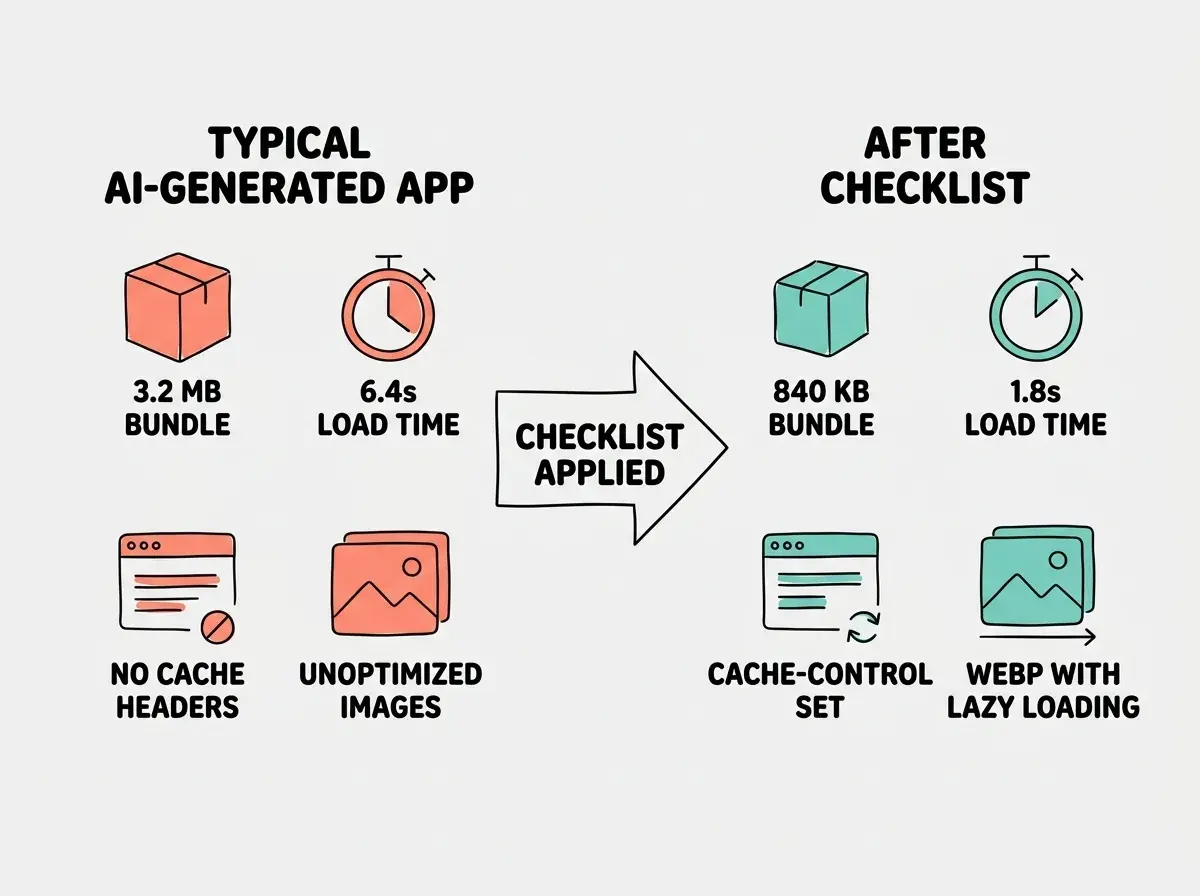
Check your bundle size. Run your framework's build analyzer (for Next.js, use @next/bundle-analyzer) and look for unexpectedly large dependencies. AI tools frequently import entire libraries when only a single function is needed. A 2 MB JavaScript bundle takes 8 seconds on a mobile network.
Verify images are optimized. Check that all images are served in modern formats (WebP or AVIF), have explicit width and height attributes, and use lazy loading for below-the-fold content. AI-generated code often includes unoptimized images that balloon page load times.
Confirm caching is configured. Static assets should have long cache headers. Verify by checking response headers in your browser's dev tools. Look for Cache-Control headers on static assets. If they are missing, your users re-download the same files on every page load.
Database
If your application uses a database, these checks prevent the kind of failures that lose user data. Skip this section only if your app is entirely static.
Run migrations before deploying new code. If your deployment includes database schema changes, those migrations must complete before the new application code goes live. Code that expects a column that does not exist yet will crash on every request that touches that table.
Verify the production connection string. AI tools frequently generate database configurations that point to a local development database. Check that your production environment variables contain the correct host, port, username, password, and database name for your production database. A wrong connection string can mean your production app is accidentally writing to your development database, or failing to connect at all.
Enable backups. Confirm that automated backups are running on your production database before your first real user touches the application. Every managed database provider (Supabase, PlanetScale, Neon, Railway) offers automated backups, but they are not always enabled by default. Check your provider's dashboard.
Deploying database schema changes and application code simultaneously without verifying the migration ran first. AI tools generate migration files alongside feature code, and vibe coders deploy everything at once. If the migration fails silently, the new code hits a database schema it does not expect, and every affected request returns a 500 error. Always confirm migrations completed before deploying the code that depends on them.
Monitoring
A successful deployment is not the end. It is the beginning of the period where you discover problems that no checklist can predict. Monitoring is how you catch them before your users report them.
Set up error tracking before launch. Tools like Sentry, LogRocket, or Vercel's built-in error tracking give you visibility into runtime errors. Without error tracking, you only learn about problems when someone emails you or posts on social media.
Configure uptime monitoring. Use a service like UptimeRobot, Better Stack, or Checkly to ping your application every few minutes. Downtime that you discover in five minutes is an inconvenience. Downtime that you discover eight hours later is a reputation problem.
Verify you can access production logs. Before you need them, confirm you know where your production logs are. Try triggering a deliberate error and finding it in the logs. If you cannot find a known error, you will not diagnose an unknown one during an outage.
The Pre-Flight Sequence
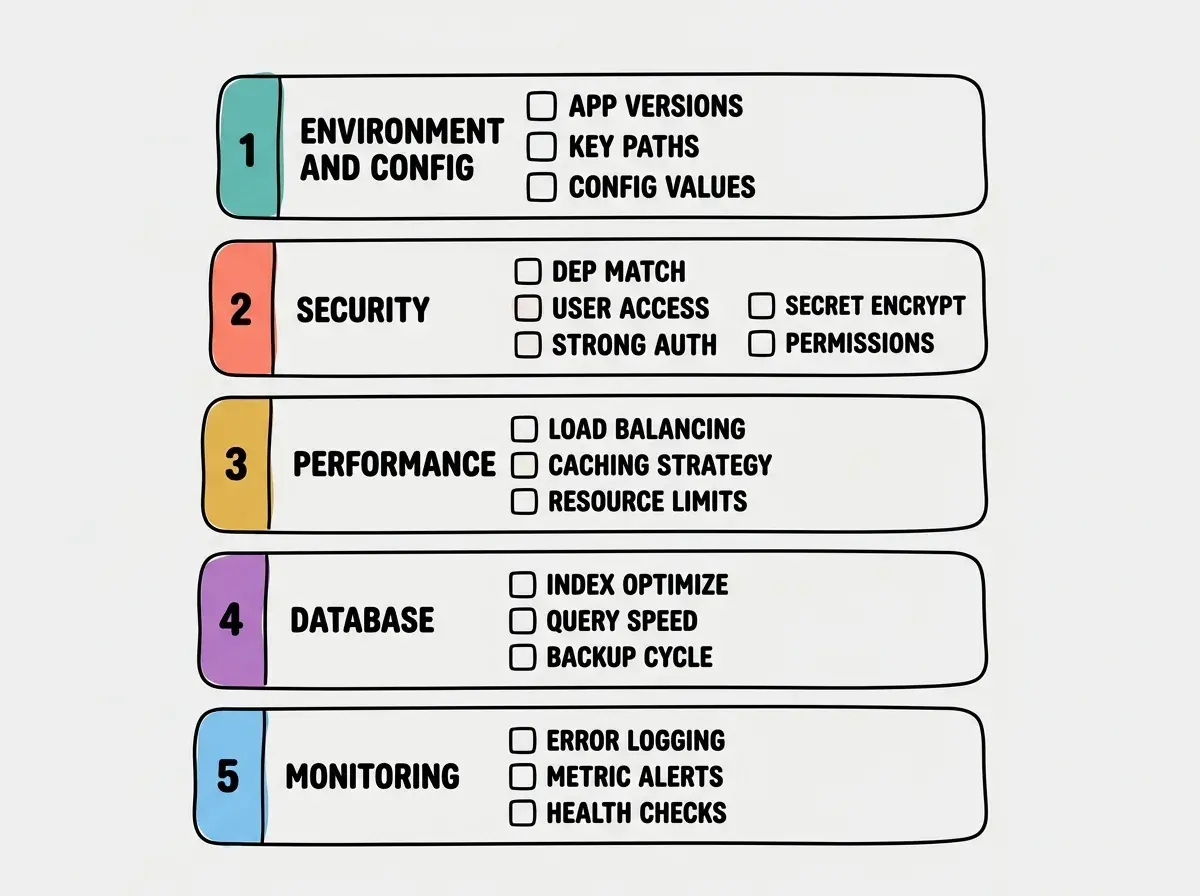
Here is how I run this checklist on every deployment. It takes twenty minutes the first time and five minutes on subsequent deploys. Environment and configuration first, because those catch failures that would make the deployment obviously broken. Then security, because a live app with security holes is worse than an app that is not live yet. Then performance, database, and monitoring in order.
I keep a copy of this checklist in every project repository. The pilots who have flown the most hours are the ones most committed to their checklists. Not because they have forgotten how to fly, but because they have seen what happens when someone skips a step.
Master the deployment fundamentals that make this checklist second nature.
Start hereDig deeper
A few hand-picked sources if you want to go further.
What This Means For You
- If you are a founder: This checklist is your insurance policy against launch-day disasters. Running through it takes twenty minutes. Recovering from a security breach or data loss takes weeks and erodes the trust you are building with early users. Make the checklist part of your deployment process, not something you do when you remember.
- If you are an indie hacker: You are probably deploying fast and often, which is exactly right. But speed without a checklist is recklessness. The fastest way to ship is not to skip checks. It is to make checks so fast and habitual that they do not slow you down. Twenty checks in five minutes is a better investment than five hours debugging a production outage.
- If you are a senior developer: You already know most of these items intuitively. The value of this checklist for you is in the AI-specific items: the hardcoded localhost URLs, the missing rate limiting, the oversized bundles from unnecessary imports. These are the failure modes that your experience with human-written code did not prepare you for, and they are worth checking even when everything else feels routine.