Preview deployments give every branch and pull request its own live URL that you can test on your phone and share with anyone before the code touches production. If you have ever shipped a broken feature because "it worked on localhost," preview deployments are the fix.
The impact is massive. 92% of US developers now use AI tools daily, which means more code is being generated faster than ever. Most of it has never been tested in a real environment before it ships. Preview deployments create a checkpoint between "AI generated this" and "users see this." That checkpoint catches bugs, layout problems, and broken API calls before they become production incidents.
How Preview Deployments Work
The mechanism is the same across every major platform. When you push code to a branch that is not your main branch, the hosting platform detects the push, runs a full build of your project using that branch's code, and deploys the result to a unique, temporary URL.
That URL is not your production site. It is an isolated copy of your app built from the branch's code. If your production site is myapp.com, the preview might live at something like my-feature-branch-abc123.vercel.app or deploy-preview-42--myapp.netlify.app. Different platforms use different naming conventions, but the principle is identical.
The preview deployment uses its own build. If the build fails, you find out before merging. If a page looks wrong, you see it before your users do. If an API call breaks because you changed a data format, the preview catches it.
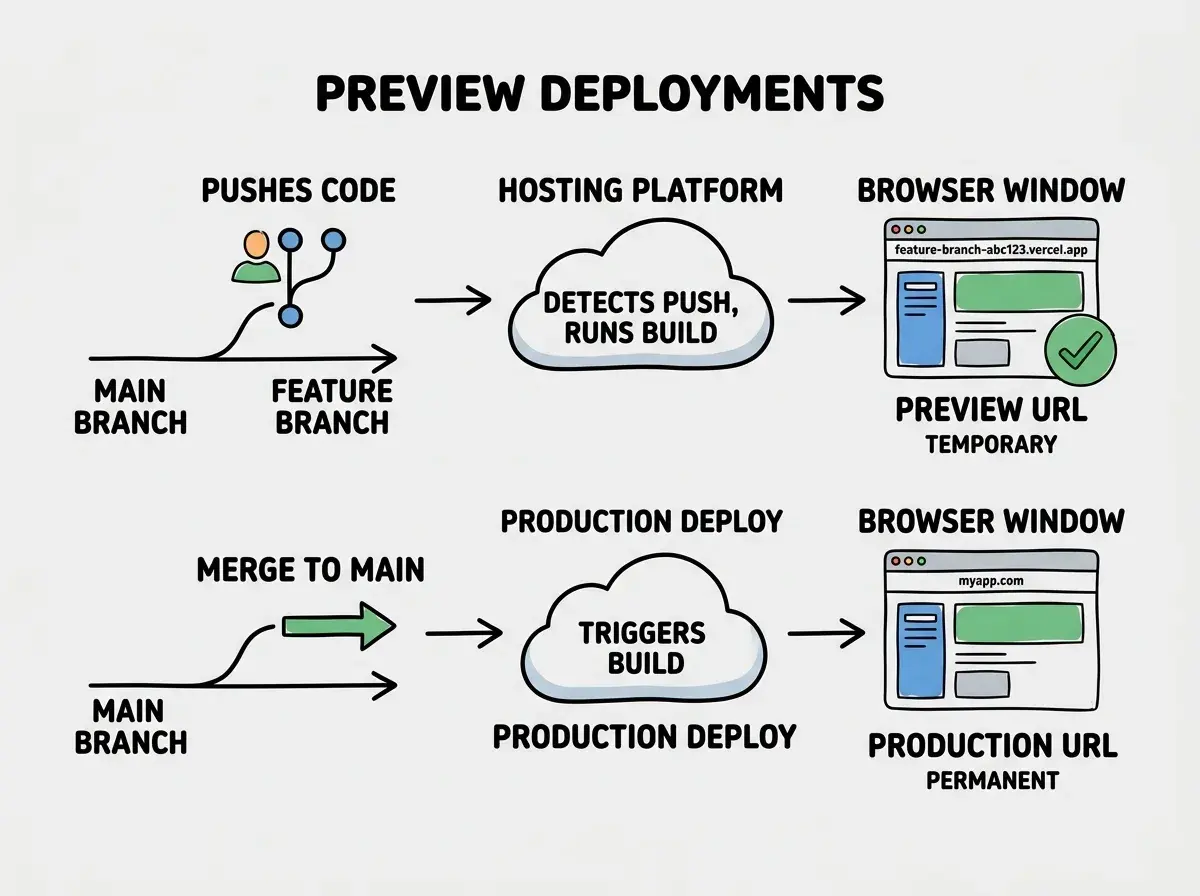
When you are working locally, your development server runs on your machine with your files, your environment variables, and your specific browser configuration. Preview deployments run on the same infrastructure your production app uses. Problems that hide on localhost show up in previews.
Vercel Preview Deployments
Vercel makes this automatic. Connect a GitHub repository to Vercel, and every push to any non-production branch triggers a preview deployment. No configuration required. No YAML files to write. No buttons to click.
Each preview deployment gets a unique URL and shows up as a status check on the pull request in GitHub. Click the URL directly from the PR page and you are looking at a live version of the code changes. Vercel also adds a comment to the PR with the preview link, screenshots, and build details.
For Next.js apps specifically, Vercel previews support every feature your production app uses. Server components, API routes, middleware, image optimization, ISR. The preview is not a simplified version of your app. It is a full deployment on Vercel's infrastructure, just at a temporary URL.
One thing that catches people off guard is that Vercel creates a new deployment for every single push to the branch. If you push five commits in an hour, you get five separate preview URLs. Each one is accessible and permanent (they do not expire by default), though only the latest one shows as the active preview on the PR.
Preview deployments are not a testing tool you need to set up. On Vercel and Netlify, they are on by default for every connected repository. The work is not in enabling them. It is in actually checking them before you merge. Build the habit of opening the preview URL, testing the change, and only then clicking merge. That single habit prevents most production disasters.
Netlify Deploy Previews
Netlify calls them "deploy previews" and they work almost identically to Vercel's. Every pull request gets a preview URL, a status check on GitHub, and a comment with the link.
Where Netlify differs is in its naming convention and persistence. Netlify preview URLs follow the pattern deploy-preview-{number}--{site-name}.netlify.app, where the number matches the pull request number. The URL stays the same as you push more commits to the same PR, always pointing to the latest build. Unlike Vercel where each push gets a new URL, Netlify keeps one stable URL per PR.
Netlify also includes a deploy preview toolbar at the bottom of the page in preview builds. It shows build information, lets collaborators leave feedback, and links back to the dashboard. For teams where non-technical stakeholders need to review changes, this toolbar is genuinely useful. The main limitation is that Netlify's SSR support is less mature than Vercel's, so if your app relies heavily on server rendering, some preview behavior might differ from production.
Cloudflare Pages Previews
Cloudflare Pages generates preview deployments for every branch push, just like the other two platforms. The preview URLs follow a pattern like {commit-hash}.{project-name}.pages.dev or {branch-name}.{project-name}.pages.dev.
The key difference with Cloudflare Pages is that preview deployments run on the same global edge network as production. Your preview is served from data centers in over 300 cities worldwide, which means performance testing in a preview environment gives you accurate latency numbers.
Cloudflare Pages supports branch-specific configurations through the wrangler.jsonc file, letting you set different environment variables and bindings for preview versus production. This is more manual than Vercel or Netlify but gives you more control.
The DX tradeoff is real. Cloudflare requires more upfront configuration and the PR feedback is less polished. But once configured, the previews are fast and the cost is unbeatable. Unlimited preview deployments on the free tier with no bandwidth limits.
Sharing Preview URLs With Clients and Teammates
Preview deployments change the feedback loop for teams. Instead of describing what changed, you send a URL. Instead of recording a screen share, you send a URL. Instead of asking someone to pull the branch and run it locally, you send a URL.
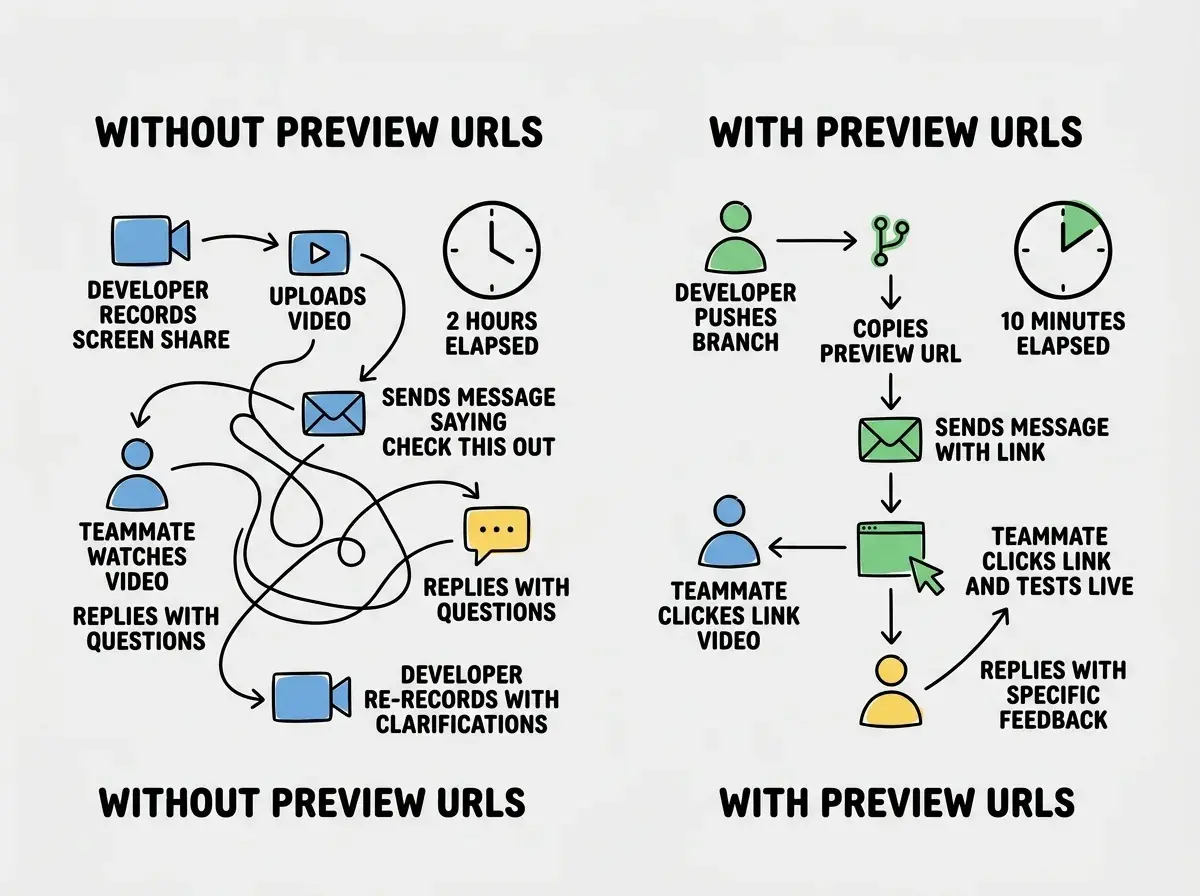
For freelancers and agencies working with clients, preview URLs are transformative. You can show a client the exact change you made, running on real infrastructure, without deploying anything to their live site. The client does not need to install anything. They click a link and see the work.
A practical tip. Do not just send the root URL. Send the specific page that shows the change. If you redesigned the pricing page, send https://preview-url.vercel.app/pricing, not just the root. Add a sentence explaining what to look at. People who receive a bare URL with no context tend to glance at it for three seconds and say "looks good" without actually checking anything.
Environment Variables in Preview vs Production
This is where preview deployments get tricky. Your production app uses production API keys, production database URLs, and production third-party service credentials. Your preview deployments should not use those same values.
Imagine pushing a branch with a new email feature. If your preview uses production email credentials, testing that feature will send real emails to real users. That is not hypothetical. It happens regularly.
All three platforms let you set separate environment variables for preview deployments. On Vercel, each environment variable has a dropdown where you select which environments it applies to: Production, Preview, or Development. On Netlify, you can set context-specific variables in the netlify.toml file or the dashboard. On Cloudflare Pages, you configure preview-specific variables in the Pages settings.
Using production API keys and database credentials in preview deployments. When your preview runs a feature that sends emails, charges payments, or modifies data, it will do those things with real credentials against real services. Always create separate staging credentials for preview environments. Every major platform lets you set different environment variables for preview versus production. Use that separation.
The rule is simple. Production variables point to production services. Preview variables point to staging or sandbox versions. Stripe has test mode. SendGrid has sandbox credentials. Most databases can have a staging instance. Set this up once and every preview deployment is safe to test aggressively.
Using Previews for QA
Preview deployments turn QA from a formal, scheduled activity into something that happens naturally on every pull request. Here is a practical QA workflow that takes less than five minutes per PR.
Check the build status first. If the preview build failed, do not bother testing. Fix the build error. The build failure is itself a caught bug.
Open the preview on your phone. Not a browser device emulator. Your actual phone. Touch targets, scroll behavior, and viewport issues show up on real devices in ways that simulators miss.
Test the specific change. Navigate to the page or feature that changed. Click through the user flow. Fill out forms. Submit data. Check that error states display correctly.
Test one thing the change should not have affected. Regressions hide in places you did not touch. If you changed the checkout flow, spot-check the homepage or the user settings page. A five-second check catches regressions that would otherwise reach production.
Check the network tab. Open browser developer tools on the preview and look for failed requests or slow API calls. Preview environments expose network issues that localhost hides because your local API is milliseconds away.
This entire process takes three to five minutes. That small investment prevents deploying bugs that take hours to diagnose in production.
Learn how deployment works before diving into previews.
Start with the basicsWhen Preview Deployments Are Not Enough
Preview deployments catch most problems but not all. They cannot replicate production traffic patterns or fully test features that depend on production data. They do not replace end-to-end test suites for complex multi-step workflows. But for most projects, preview deployments cover 90% of what you need. That 90% is the difference between shipping confidently and shipping with your fingers crossed.
What This Means For You
Preview deployments are already available on every platform you are likely using. The feature is free, automatic, and requires no setup on Vercel and Netlify. On Cloudflare Pages, it requires minimal configuration. The barrier is not technical. It is behavioral.
- If you are a senior dev: Build preview URL checks into your PR review process. Do not approve a PR without opening the preview. Make it a team standard, not a suggestion. The five minutes spent checking a preview saves the two hours spent debugging a production incident.
- If you are an indie hacker: Preview deployments are your QA team. When you are building alone, it is easy to skip testing because you "know" what you changed. Preview URLs force you to verify in a real environment. Share them with early users for feedback before merging. Free user testing on real infrastructure.
See how the top hosting platforms compare for your next project.
Compare platforms