PostgreSQL is the database that powers most of the apps you use every day, from Instagram to Shopify to the Supabase projects that thousands of vibe coders are building right now. If you have never touched a database before and that sentence already feels intimidating, take a breath. By the end of this article, you will understand exactly what PostgreSQL does, how to talk to it, and why AI coding tools keep recommending it. No computer science degree required.
The biggest misconception beginners have is that databases are complicated. They are not. If you have ever used a spreadsheet, you already understand the core idea. PostgreSQL just gives you a faster, safer, more organized version of what you have been doing in Google Sheets all along.
Think of PostgreSQL as a Giant Filing Cabinet
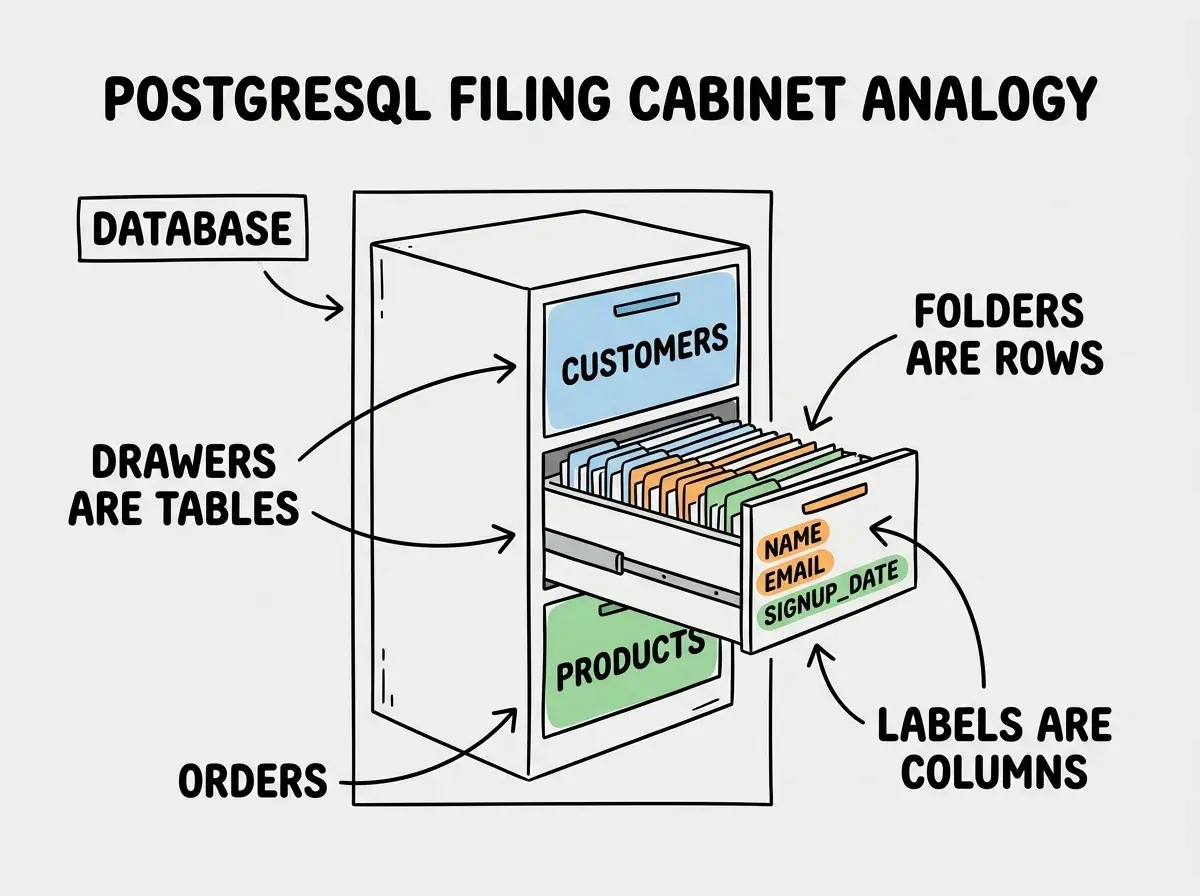
Here is the one analogy that will carry you through this entire article. Picture an organized filing cabinet in an office.
Each drawer in the cabinet holds a different category of information. One drawer for customers, another for orders, another for products. In PostgreSQL, each drawer is called a table.
Inside each drawer, every folder follows the same format. Every customer folder has a name, an email, and a signup date. Each folder is a row in the table, representing one specific record.
The labels on each folder (name, email, signup date) are always the same across every folder in that drawer. Those labels are the columns of your table. They define what kind of information belongs in each slot.
That is it. Tables are drawers, rows are folders, columns are labels. When someone says "query the database," they are just saying "go pull a folder from the filing cabinet." If you can picture opening a drawer, reading a label, and pulling out the right folder, you already understand how PostgreSQL works at a fundamental level.
Is PostgreSQL Difficult to Learn?
This is one of the most common questions beginners ask, and the honest answer is no. PostgreSQL is not difficult to learn for basic usage. The language you use to talk to it (called SQL, pronounced "sequel") reads almost like English.
Want to see every customer in your table? You write:
SELECT * FROM customers;
That translates to "select everything from the customers drawer." Want only customers who signed up after January 2026?
SELECT * FROM customers WHERE signup_date > '2026-01-01';
You are literally writing "select from customers where the signup date is after January 2026." It does not get much more readable than that.
The learning curve steepens when you get into advanced features like indexing, joins across multiple tables, and performance tuning. But here is the thing: you do not need any of that right now. With 92% of developers using AI tools daily, your AI assistant will handle the complex queries for you. Your job is understanding the basics so you can review what AI generates and catch obvious mistakes.
How to Use PostgreSQL for the First Time
You do not need to install anything on your computer. The fastest way to start using PostgreSQL right now is through Supabase, which gives you a free PostgreSQL database with a visual dashboard that feels like a spreadsheet.
Here is the step-by-step process:
Step 1: Create a free Supabase account. Go to supabase.com and sign up. It takes less than a minute.
Step 2: Create a new project. Give it a name and a password. Supabase will spin up a full PostgreSQL database for you in about 30 seconds.
Step 3: Open the Table Editor. This is where the spreadsheet comparison really clicks. You will see a visual grid where you can create tables, add columns, and insert rows by clicking buttons. No SQL required.
Step 4: Create your first table. Click "New Table" and name it tasks. Add three columns: title (text), completed (boolean, meaning true or false), and created_at (timestamp). Supabase automatically adds an id column for you.
Step 5: Add some rows. Click "Insert Row" and fill in a few tasks. You just created your first database records.
That filing cabinet now has a drawer labeled "tasks," with folders inside it, each containing a title, completion status, and timestamp. You did not write a single line of SQL, and you have a real PostgreSQL database running in the cloud.
The Five Data Types You Actually Need
When you create columns in your table (the labels on your folders), PostgreSQL needs to know what kind of information goes in each slot. You would not put a phone number in the "email" slot of a physical folder, and PostgreSQL enforces the same discipline.
Here are the five data types that cover 90% of what you will build:
TEXT stores words and sentences. Names, emails, descriptions, anything that is a string of characters.
INTEGER stores whole numbers. Quantities, ages, counts. No decimal points.
BOOLEAN stores true or false. Is the task completed? Is the user an admin? Is the email verified?
TIMESTAMP stores dates and times. When was the account created? When was the order placed?
UUID stores unique identifiers. Every row gets one so you can tell it apart from every other row, even if two customers have the same name.
That is the entire list you need right now. PostgreSQL supports dozens of other types (arrays, JSON, geometric data), but your AI tool will suggest those when they are relevant. For your first projects, these five will handle everything.
You do not need to memorize SQL syntax or advanced data types to work with PostgreSQL. Learn the filing cabinet model (tables, rows, columns) and the five basic data types. Your AI coding tool handles the rest, and Supabase gives you a visual interface that works like a spreadsheet.
Your First SQL Queries
Once you have data in your table, you can talk to PostgreSQL directly through Supabase's SQL Editor. Here are the four essential operations, mapped back to our filing cabinet.
Adding a new folder to the drawer (INSERT):
INSERT INTO tasks (title, completed) VALUES ('Build landing page', false);
Pulling all folders from the drawer (SELECT):
SELECT * FROM tasks;
Updating a folder (UPDATE):
UPDATE tasks SET completed = true WHERE title = 'Build landing page';
Removing a folder (DELETE):
DELETE FROM tasks WHERE completed = true;
These four operations (Insert, Select, Update, Delete) map to the acronym CRUD (Create, Read, Update, Delete). Every app you build, from a simple todo list to a complex marketplace, ultimately performs these same four operations on the database. When you describe features to your AI coding tool, thinking in CRUD terms helps you give more precise instructions.

What AI Gets Wrong About PostgreSQL
AI coding tools are fantastic at generating SQL queries and setting up database tables. But they make predictable mistakes that you should watch for.
The most common error is skipping input validation. When your app accepts user input and puts it directly into a SQL query without checking it first, bad actors can inject malicious commands. This is called SQL injection, and it is one of the oldest security vulnerabilities in software. Always ask your AI tool to "use parameterized queries" or "sanitize all database inputs." Those phrases will trigger the right safety patterns.
Never let AI generate raw SQL queries that paste user input directly into the command string. Always ask for parameterized queries or prepared statements. If your AI tool writes something like WHERE name = '${userInput}' with the variable dropped right into the string, that is a red flag. Ask it to fix the query to use parameters instead.
Another frequent issue is that AI often creates tables without proper constraints. It might let you insert a user without an email, or create duplicate records that should be unique. When you review AI-generated table definitions, check that important columns are marked as NOT NULL (required) and that columns like email have a UNIQUE constraint.
The good news is that catching these mistakes does not require deep expertise. It requires knowing what to look for, and now you do.
Connecting PostgreSQL to Your App
When you build with AI tools like Cursor, Lovable, or Bolt, they will generate code that connects your app to the database. With Supabase, this connection is straightforward. Your app uses the Supabase client library to send those same CRUD operations you learned above.
Instead of writing SQL directly, your app code might look like this:
const { data } = await supabase
  .from('tasks')
  .select('*')
  .eq('completed', false);
That is the same as SELECT * FROM tasks WHERE completed = false, just written in JavaScript through the Supabase library. Your AI tool will generate this code for you. Your role is recognizing that it is pulling folders from the tasks drawer where the completed label says false.
Start with the foundations and build something real with AI coding tools.
Start buildingGrowing Beyond the Basics
Once you are comfortable with single tables, the next concept to explore is relationships. In our filing cabinet, this is like putting a note in a customer's folder that says "see order #452 in the Orders drawer." PostgreSQL lets tables reference each other, so an order can point back to the customer who placed it. This is called a foreign key, and it is how real apps connect related data.
You will also eventually encounter Row Level Security (RLS), which is Supabase's way of making sure users can only see their own data. Think of it as a lock on each folder that only opens for the right person.
But those are topics for after you have built your first project. Right now, you have everything you need.
What This Means For You
PostgreSQL is not a mysterious tool reserved for database administrators. It is a filing cabinet, and you just learned how to open the drawers, read the labels, pull folders, and put new ones in.
- If you are a founder building your first product, use Supabase as your database from day one. It gives you PostgreSQL without the setup headaches, a visual dashboard for reviewing your data, and a generous free tier that will carry you through your MVP and early users. When your AI tool generates database code, check that it uses parameterized queries and sets up proper constraints.
- If you are changing careers into tech, PostgreSQL knowledge is one of the most transferable skills you can develop. It powers everything from startups to Fortune 500 companies. You do not need to become a SQL expert, but understanding tables, data types, and CRUD operations gives you vocabulary that immediately earns credibility in technical conversations.
The filing cabinet is open. Start pulling folders.
Build your foundation one concept at a time, at your own pace.
Explore more