Think about the last time you searched for a book at the library. If you knew the exact title, the card catalog worked perfectly. Look up "The Great Gatsby," find the card, walk to the shelf. But what if you only remembered "that green book about a rich guy and a dock light"? The card catalog is useless. You need a librarian who understands what you meant, not just what you typed.
That is the difference between a basic database query and full-text search. A WHERE title = 'search term' query is the card catalog. It matches exact strings and nothing else. Full-text search is like having Google built into your application. It understands word stems, ranks results by relevance, and finds documents even when the query does not match the text word for word. With 92% of developers now using AI daily to build applications, the apps are getting built fast. But most of them ship with card catalog search when users expect Google.
This guide walks you through three practical approaches to full-text search implementation, from using what you already have in PostgreSQL to deploying dedicated search engines like Meilisearch and Typesense.
When Basic Queries Stop Working
Every application starts the same way. You have a database table with some text columns, and you write a query like this:
SELECT * FROM products WHERE name ILIKE '%wireless headphones%';
This works when you have fifty products. It breaks in three ways as you scale. First, ILIKE with leading wildcards cannot use indexes, so performance degrades linearly with table size. Second, it only finds exact substring matches. A search for "bluetooth earbuds" returns nothing even though your catalog has dozens of wireless headphones that match the intent. Third, there is no concept of relevance. Results come back in insertion order, not in order of how well they match what the user wanted.
The card catalog approach also falls apart with typos. Search for "wireles headphnes" and you get zero results. Your users will not try again with corrected spelling. They will leave.
Full-text search solves all three problems. It tokenizes text into searchable terms, understands that "running" and "ran" share the same root, ranks results by relevance, and (depending on the engine) handles typos gracefully.
PostgreSQL Full-Text Search With Supabase
If you are already using PostgreSQL through Supabase (and many AI-built apps are), you have a full-text search engine hiding inside your database. No additional infrastructure needed.
PostgreSQL converts text into a tsvector, which is a sorted list of normalized words. It converts search queries into a tsquery, which defines the search terms and operators. The database then matches the query against the vector and ranks the results. Think of it as the library hiring a librarian who preprocesses every book into a standardized index, so searches happen against the index rather than page-by-page scanning.
Here is how to set it up on a posts table:
-- Add a search vector column
ALTER TABLE posts ADD COLUMN search_vector tsvector;

-- Populate it from your text columns
UPDATE posts SET search_vector =
  setweight(to_tsvector('english', coalesce(title, '')), 'A') ||
  setweight(to_tsvector('english', coalesce(body, '')), 'B');

-- Create an index for fast lookups
CREATE INDEX posts_search_idx ON posts USING GIN(search_vector);

-- Keep the vector updated automatically
CREATE OR REPLACE FUNCTION update_search_vector()
RETURNS TRIGGER AS $$
BEGIN
  NEW.search_vector :=
    setweight(to_tsvector('english', coalesce(NEW.title, '')), 'A') ||
    setweight(to_tsvector('english', coalesce(NEW.body, '')), 'B');
  RETURN NEW;
END;
$$ LANGUAGE plpgsql;

CREATE TRIGGER posts_search_update
  BEFORE INSERT OR UPDATE ON posts
  FOR EACH ROW EXECUTE FUNCTION update_search_vector();
The setweight function assigns importance levels. Weight 'A' on the title means title matches rank higher than body matches (weight 'B'). This is your librarian knowing that a book titled "Wireless Headphones" is more relevant than one that mentions the phrase once on page 347.
Now query it from your application:
const { data, error } = await supabase
  .rpc('search_posts', { query: 'wireless headphones' });
With the corresponding SQL function:
CREATE OR REPLACE FUNCTION search_posts(query text)
RETURNS SETOF posts AS $$
  SELECT *
  FROM posts
  WHERE search_vector @@ plainto_tsquery('english', query)
  ORDER BY ts_rank(search_vector, plainto_tsquery('english', query)) DESC
  LIMIT 20;
$$ LANGUAGE sql;
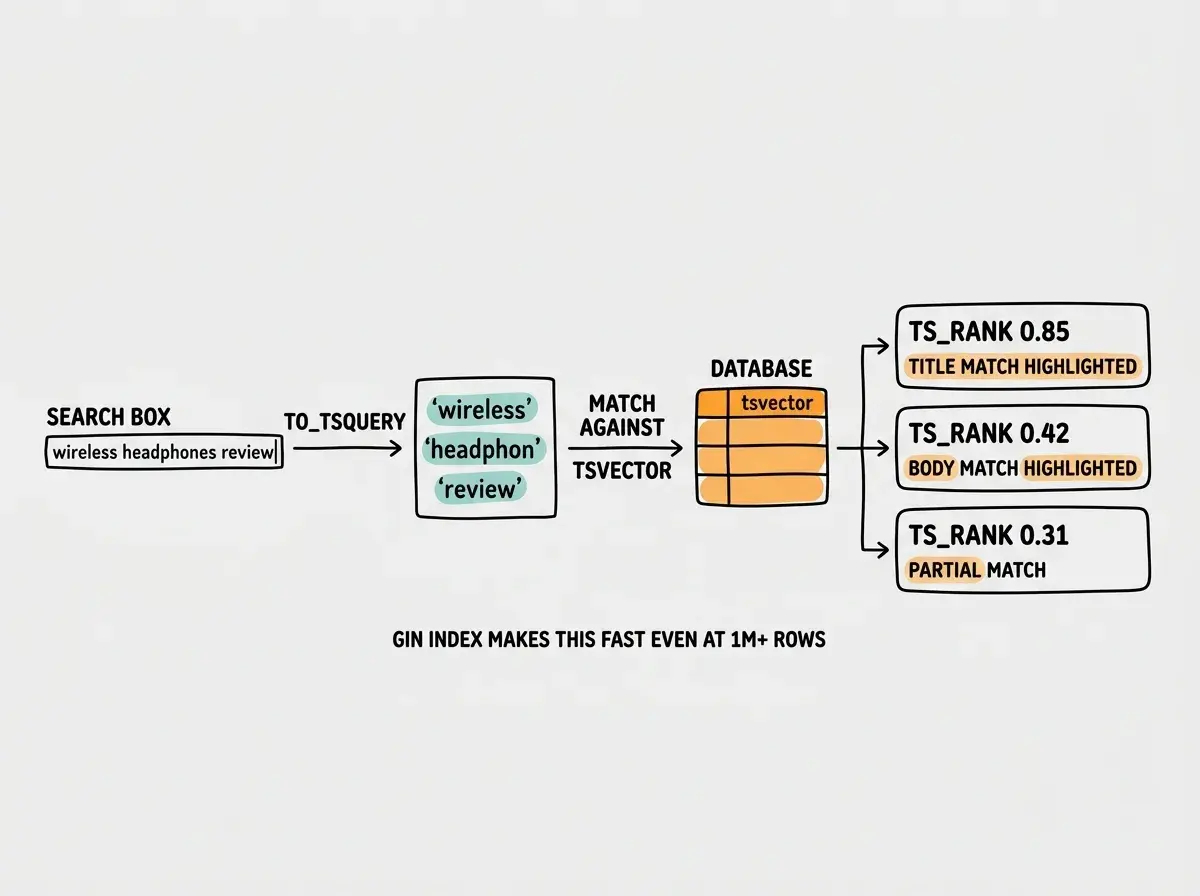
PostgreSQL full-text search handles stemming (matching "running" when you search "run"), ranking, and boolean operators. It does not handle typo tolerance or fuzzy matching well. If your users tend to misspell search terms, PostgreSQL will frustrate them. That is where dedicated search engines earn their place.
PostgreSQL full-text search is powerful enough for most applications with under 500K documents. The key is the setweight function for relevance tuning and the GIN index for performance. If you are already on Supabase or any PostgreSQL database, try this approach first before adding external search infrastructure. You can always migrate later if you hit limits.
Dedicated Search Engines Compared
When PostgreSQL is not enough, three search engines dominate the landscape for web applications: Meilisearch, Typesense, and Algolia. Each one takes a different approach to the same problem.
Meilisearch is open source and optimized for typo tolerance out of the box. It handles misspelled queries without any configuration. The search-as-you-type experience is fast (typically under 50ms) and the relevance defaults are surprisingly good. You can self-host it or use Meilisearch Cloud. Going back to our library analogy, Meilisearch is like a librarian who understands you even when you mumble.
Typesense is also open source and focuses on being the lightweight alternative. It supports geo-search, vector search, and faceted filtering natively. Its memory footprint is smaller than Meilisearch, making it a good fit for resource-constrained environments. Typesense Cloud offers a managed option with pricing based on RAM and CPU.
Algolia is the commercial option with the most mature feature set. It offers analytics, A/B testing for search relevance, personalization, and a global CDN. It is also the most expensive by a significant margin. For indie hackers, Algolia's pricing can become a real constraint. For funded startups, the analytics and managed infrastructure save engineering time.
Here is a practical comparison:
| Feature | PostgreSQL FTS | Meilisearch | Typesense | Algolia |
|---|---|---|---|---|
| Typo tolerance | Poor | Excellent | Good | Excellent |
| Setup complexity | None (built-in) | Low | Low | Lowest (SaaS) |
| Self-hostable | Yes | Yes | Yes | No |
| Cost at 100K docs | $0 | $0 (self-host) | $0 (self-host) | ~$50/mo |
| Search latency | 10-100ms | <50ms | <50ms | <20ms |
| Faceted search | Manual | Built-in | Built-in | Built-in |
For most AI-built applications, the decision comes down to a simple question: do you need typo tolerance? If yes, pick Meilisearch or Typesense. If no, PostgreSQL is likely sufficient.
Full-text search is one piece of the puzzle. Explore more tutorials for building production-ready features.
Browse tutorialsSetting Up Meilisearch in Practice
If you have decided PostgreSQL is not enough, here is a practical Meilisearch setup. This is the fastest path from "no search" to "search that handles typos and ranks results."
Start by running Meilisearch locally with Docker:
docker run -d -p 7700:7700 \
  -e MEILI_MASTER_KEY='your-secret-key' \
  -v $(pwd)/meili_data:/meili_data \
  getmeili/meilisearch:latest
Install the JavaScript client and index your data:
import { MeiliSearch } from 'meilisearch';

const client = new MeiliSearch({
  host: 'http://localhost:7700',
  apiKey: 'your-secret-key',
});

// Create an index and add documents
const index = client.index('products');
await index.addDocuments(products);

// Configure searchable attributes and ranking
await index.updateSettings({
  searchableAttributes: ['name', 'description', 'category'],
  rankingRules: [
    'words',
    'typo',
    'proximity',
    'attribute',
    'sort',
    'exactness',
  ],
});
The searchableAttributes list is ordered by importance, just like PostgreSQL's weights. Matches in name rank higher than matches in description. The rankingRules define how results are sorted. Meilisearch applies them in order: first by how many search words match, then by how few typos, then by how close the words are to each other. This is the librarian deciding that a book matching all your keywords perfectly ranks above one matching half your keywords with typos.
Query from your frontend:
const results = await index.search('wireles headphnes', {
  limit: 20,
  attributesToHighlight: ['name', 'description'],
});
Notice the intentional typos in "wireles headphnes." Meilisearch returns the right results anyway. That single feature justifies the additional infrastructure for any consumer-facing search experience.
Indexing every field in your database into the search engine. Search indexes should contain only the fields users actually search against, plus the fields you display in results. Indexing large text blobs you never search (like raw HTML or base64 images) bloats your index, slows down updates, and increases hosting costs. Keep your search index lean and purpose-built.
Relevance Ranking Patterns That Matter
Regardless of which search engine you choose, relevance ranking determines whether your search feels smart or broken. Here are the patterns that make the biggest difference.
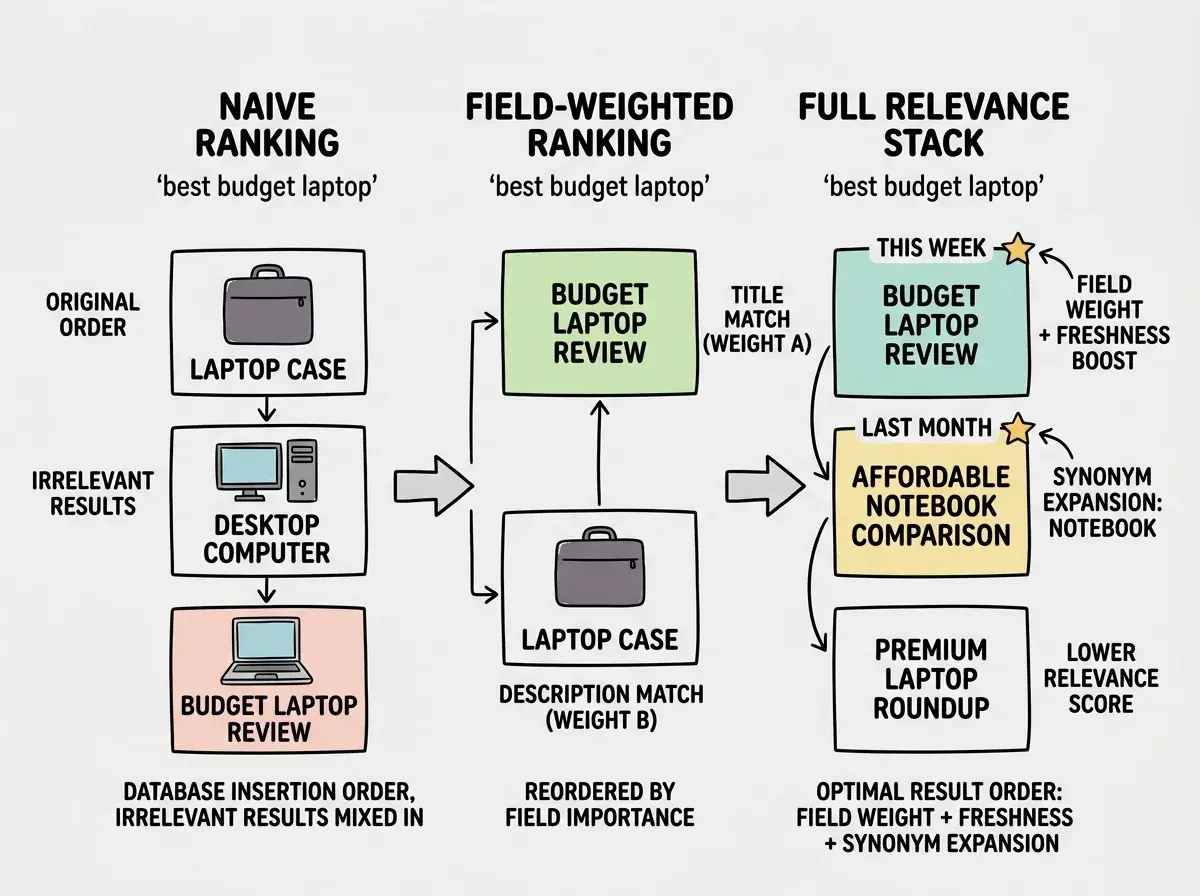
Field weighting is the foundation. Title matches should always outrank body matches. Category matches should outrank description matches. Every search engine supports this. In PostgreSQL it is setweight. In Meilisearch and Typesense it is the order of searchableAttributes. Get this wrong and your users will see irrelevant results at the top of every search.
Freshness boosting matters for content-heavy applications. A blog post from last week about "React Server Components" is more relevant than one from 2022. In Meilisearch, add a sortableAttributes configuration and allow sorting by date. In PostgreSQL, you can multiply the ts_rank score by a recency factor:
ts_rank(search_vector, query) * (1.0 / (EXTRACT(EPOCH FROM now() - created_at) / 86400 + 1))
This divides the rank by the number of days since creation, giving newer content a natural boost without completely burying older results.
Synonyms catch the gap between how your content is written and how users search. If your products list "laptop" but users search "notebook," you need synonym mapping. All three dedicated engines support this natively. PostgreSQL requires a custom synonym dictionary.
Choosing the Right Approach for Your App
The decision tree is simpler than the options make it seem.
If you are already on PostgreSQL and your content is primarily English text under 500K rows, start with PostgreSQL full-text search. It costs nothing, requires no additional infrastructure, and handles 80% of search use cases well. Set up the tsvector column, the GIN index, and the ranking function. Ship it.
If your users are searching product catalogs, content libraries, or anything where typos are common and search-as-you-type matters, go with Meilisearch or Typesense. Both are open source, both are fast, and both handle typo tolerance without configuration. Pick Meilisearch if typo tolerance is your primary concern. Pick Typesense if you also need geo-search or vector search.
If you have budget and want someone else to handle infrastructure entirely, Algolia is the premium choice. Be honest about whether you need what you are paying for.
The worst choice is no search at all. Users expect to type a few characters and see relevant results instantly. The card catalog era ended decades ago. Your application should not bring it back.
Search is just one feature your app needs. Get practical tutorials for shipping real products.
Explore the blogWhat This Means For Your Next Build
Full-text search implementation is not a feature you bolt on at the end. Add that tsvector column when you create the table, not six months later when users are complaining. Configure field weights based on how your users actually search, not how your data is structured.
Start with PostgreSQL if it is already in your stack. Graduate to Meilisearch or Typesense when you need typo tolerance. Skip the card catalog. Build the search your users expect.