Database design fundamentals are the difference between an app that works and one that falls apart the moment real users show up. You have probably used a spreadsheet before. Maybe you tracked customers in one tab, orders in another, and tried to connect them with copy-paste or VLOOKUP formulas that broke every other week. A database is what happens when you take that spreadsheet and give it rules, structure, and the ability to handle thousands of rows without melting.
If you are building with AI tools, this matters more than you think. 92% of developers now use AI coding tools daily, and roughly 46% of new code is AI-generated. That means your AI is writing database code for you. But it can only build what you describe. Describe a mess, you get a mess. Describe a clean structure, you get something that scales.
This article walks you through the core concepts of database design using the one thing you already know: spreadsheets.
Your Spreadsheet Already Has Tables
Think about a Google Sheet where you track an online store. You probably have one tab for customers (name, email, address) and another tab for orders (what they bought, how much, when). Each of those tabs is essentially a database table.
In a real database, a table works the same way. Each row is one record (one customer, one order). Each column is one field (name, email, order total). The difference is that a database enforces rules about what goes in each column. A price column only accepts numbers. An email column can require a valid format. A customer ID column can guarantee every entry is unique.
When you tell your AI tool "I need a database for an online store," it will create tables. Your job is understanding what tables you need and what columns belong in each one. The AI handles the SQL syntax. You handle the thinking.
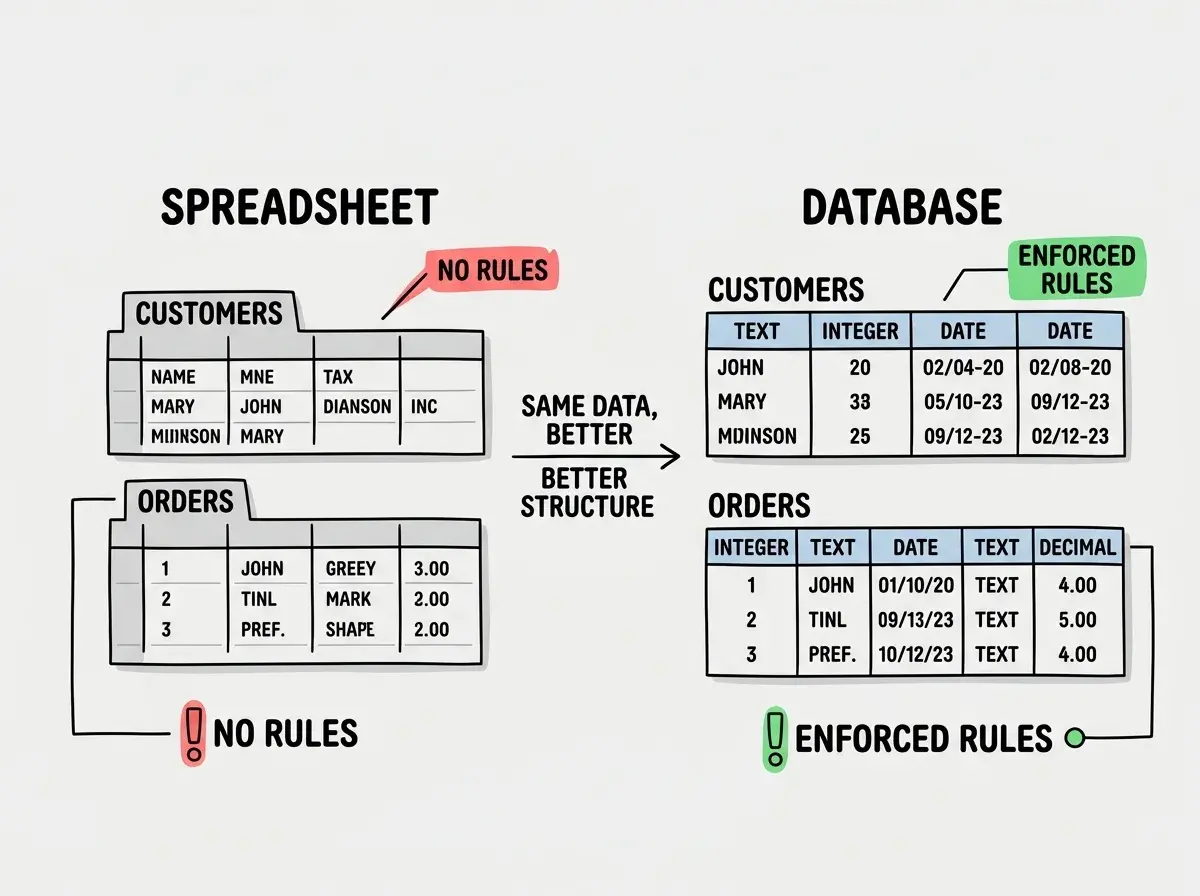
That structure is what keeps your data clean as your app grows from ten users to ten thousand.
Every Row Needs a Name Tag
In a spreadsheet, you might refer to "the customer in row 7." That works until you sort the sheet and row 7 becomes someone else entirely. Databases solve this with primary keys, a unique identifier for every single row.
Think of it like giving every customer a permanent name tag that never changes, no matter how you sort or filter the data. Most databases use an auto-incrementing number (1, 2, 3...) or a UUID (a long random string). Your AI tool will usually add these automatically, but you should know they exist because they become critical when connecting tables together.
Every table needs a primary key. No exceptions. If your AI generates a table without one, that is a red flag worth catching early.
Connecting Your Tabs Together
Here is where databases leave spreadsheets in the dust. Remember that online store with a Customers tab and an Orders tab? In a spreadsheet, you might put the customer's name in the Orders tab and hope nobody misspells it. In a database, you use something called a foreign key.
A foreign key is like writing the customer's permanent name tag number in the Orders table instead of their actual name. Order #501 does not say "John Smith." It says "customer_id: 42." The database knows that 42 always means John Smith, and it will refuse to create an order for customer 99 if customer 99 does not exist.
This is a relationship. Specifically, this is a one-to-many relationship: one customer can have many orders. There are three types of relationships you will encounter.
One-to-one. One user has one profile. Think of it like a spreadsheet where each customer row links to exactly one row in a settings tab. You rarely need these, but they show up when you want to separate sensitive data (like payment info) from general data.
One-to-many. One customer has many orders. One author writes many blog posts. One category contains many products. This is the most common relationship in any application, and the one your AI tool will create most often.
Many-to-many. Students enroll in multiple classes, and each class has multiple students. In a spreadsheet, this would be a nightmare of duplicate rows. In a database, you create a third table (sometimes called a junction table) that sits between the two and connects them. A row in the junction table just says "student 7 is in class 3."
When you prompt your AI tool to build a database, describe your relationships explicitly. Instead of "I need a database for a school," say "I need a students table, a classes table, and students can enroll in multiple classes while each class has multiple students." The more specific you are about how your data connects, the better structure your AI will generate.
Why Repeating Data Will Haunt You
In a spreadsheet, you might put the customer's full address in every single order row. It feels convenient. But then the customer moves, and you have to update the address in 47 different rows. Miss one, and you are shipping to the wrong place.
This is called data redundancy, and database designers avoid it through a process called normalization. The core idea is simple: store each piece of information in exactly one place. The customer's address lives in the Customers table. The Orders table just references the customer's ID. When the address changes, you update it once.
Normalization has formal levels (first normal form, second normal form, third normal form), but for your purposes as a vibe coder, the rule of thumb is this: if you are copying the same information into multiple tables, something is wrong. Pull that information into its own table and reference it with an ID.
Your AI tool might or might not normalize your database properly. It depends entirely on how you describe your data. If your prompt implies redundancy ("put the customer name and address in the orders table"), the AI will oblige. It does what you ask, even when what you ask creates problems.
Planning Before Prompting
Before you type a single prompt, grab a piece of paper or open a blank document and answer three questions.
What are the "things" in my app? Each thing is a table. A task management app has users, projects, and tasks. An e-commerce store has customers, products, orders, and reviews. List every noun that matters.
How do these things connect? Draw lines between your nouns. A user creates many projects. A project contains many tasks. A task belongs to one project. These lines become your relationships and foreign keys.
What information does each thing need? These become your columns. A user needs a name, email, and password hash. A task needs a title, description, due date, and status. Be specific. "User info" is too vague for your AI to work with.
This ten-minute exercise transforms your prompts from "build me a task manager" into "build me a database with a users table (id, name, email, password_hash, created_at), a projects table (id, name, owner_id referencing users), and a tasks table (id, title, description, status, due_date, project_id referencing projects)." The second prompt produces dramatically better results.
Start with a project that puts these database fundamentals into practice.
Browse beginner projectsCommon Field Types You Should Know
Back to the spreadsheet analogy. In Google Sheets, every cell can hold anything. You can put a date in a number column and a phone number in an email column. Databases do not allow that. Every column has a type, and knowing the common ones helps you describe your schema more precisely.
TEXT or VARCHAR. For names, emails, descriptions. VARCHAR lets you set a maximum length (like 255 characters), while TEXT allows longer content.
INTEGER. Whole numbers. User IDs, quantities, ages. Not for prices, because prices have decimal points.
DECIMAL or FLOAT. Numbers with decimal points. Use DECIMAL for money (it is precise) and FLOAT for things where tiny rounding does not matter.
BOOLEAN. True or false. Is the user active? Is the order shipped? Is the task complete?
TIMESTAMP. Dates and times. When was this row created? When was it last updated? Almost every table should have a created_at timestamp.
When you are reviewing AI-generated database code, this list covers 90% of the column types you will encounter.
Storing everything as text. When you do not specify column types in your prompt, AI tools sometimes default to TEXT for fields that should be integers, booleans, or timestamps. A "price" column stored as text cannot be summed, sorted numerically, or compared properly. Always specify types for important fields, especially anything involving money, dates, or true/false values.
Indexes Speed Up Your Lookups
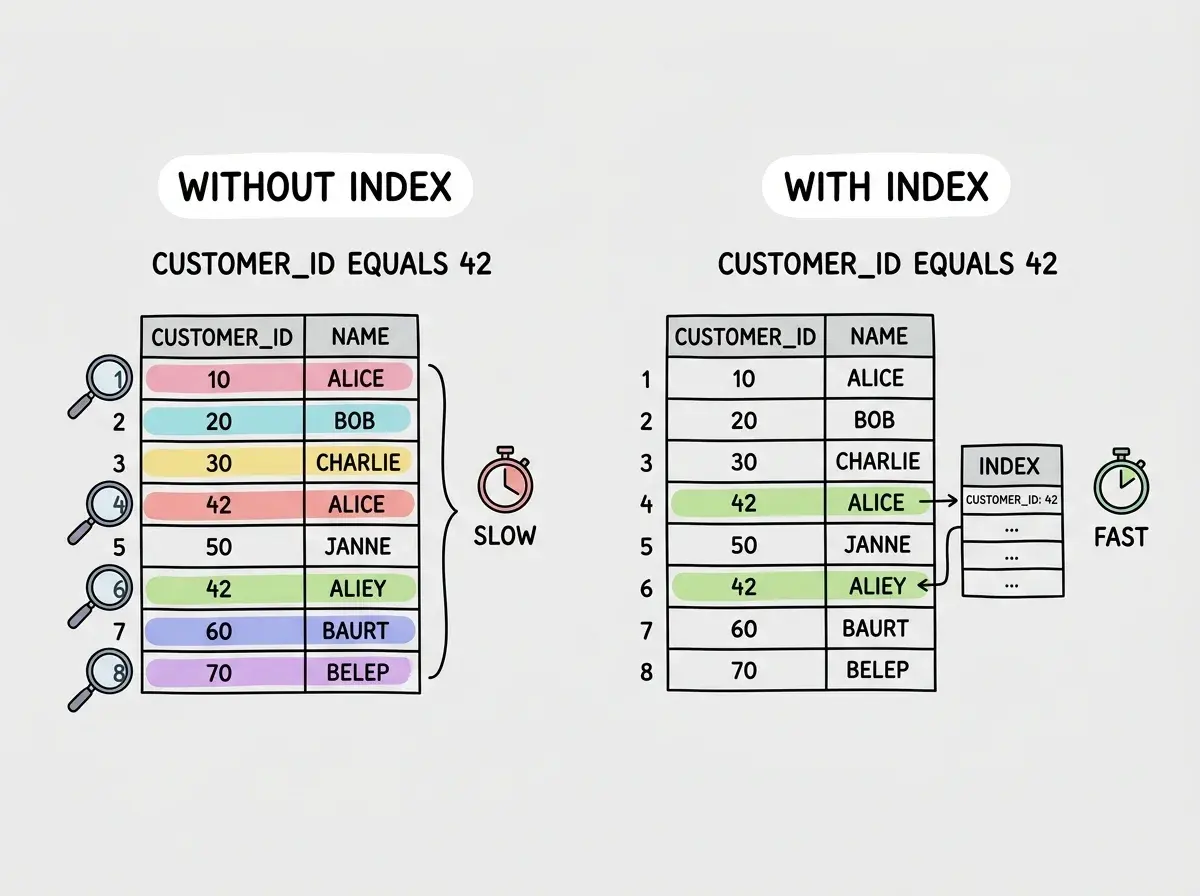
Imagine your spreadsheet has 50,000 rows of orders and you need to find all orders from one customer. Without any organization, you scan every single row. That is slow.
An index is like adding a sorted bookmark system to a column. When you index customer_id in your Orders table, the database builds a shortcut that jumps directly to matching rows instead of scanning all 50,000.
You do not need to index every column. Focus on columns you search or filter by frequently: email addresses for login lookups, foreign keys for relationship queries, date columns for sorting. Your AI tool adds indexes for primary keys automatically, but rarely for other columns. If your app feels slow on certain pages, missing indexes are often the cause.
Dig deeper
A few hand-picked sources if you want to go further.
What This Means For You
Understanding database design fundamentals does not mean you need to write SQL by hand. It means you can guide your AI tool toward a structure that actually works. That guidance is the difference between a prototype and a production app.
- If you are a founder: A well-designed database saves you from the painful rewrite that hits when your app grows beyond a few hundred users. Spend ten minutes planning tables and relationships before prompting. That small investment compounds every time you add a feature.
- If you are a career changer: Database design is one of the most transferable skills in software development. Every application stores data regardless of language or framework. Understanding tables, relationships, and normalization gives you vocabulary that makes you credible in technical conversations.
Your AI tool builds what you describe. Give it clear tables and explicit relationships, and it generates a database that holds up. Describe it vaguely, and you spend weeks untangling the mess.
Get the fundamentals that make every AI-built project stronger from day one.
Start with the basics