Database migrations are how you change your database structure after your app is already running with real data. Think of it like renovating a house while people still live in it. You can't just tear down a wall and hope for the best. You need a plan, a sequence, and the ability to undo your work if something goes sideways. With 92% of developers now using AI daily to write code, the volume of schema changes hitting production databases has exploded. And so have the things that go wrong.
If you have shipped an app and then realized you need to add a column, rename a table, or change a field type, you have already felt the problem that migrations solve. Your database has real user data in it. You can't just blow it away and recreate it from scratch like you did during development. Migrations give you a controlled, repeatable way to evolve your schema while keeping existing data intact.
What Database Migrations Actually Do
Back to our renovation analogy. Your database schema is the blueprint of the house. Tables are rooms, columns are walls and fixtures, and the data inside is everything your tenants own. A migration is a renovation work order. It says exactly what changes to make, in what order, and it keeps a record of every renovation that has already been completed.
Every migration has two parts. The "up" direction applies the change (knock out this wall, add a bathroom). The "down" direction reverses it (put the wall back, remove the bathroom). This reversibility is what separates professional schema management from the "just run some SQL and pray" approach that gets people into trouble.
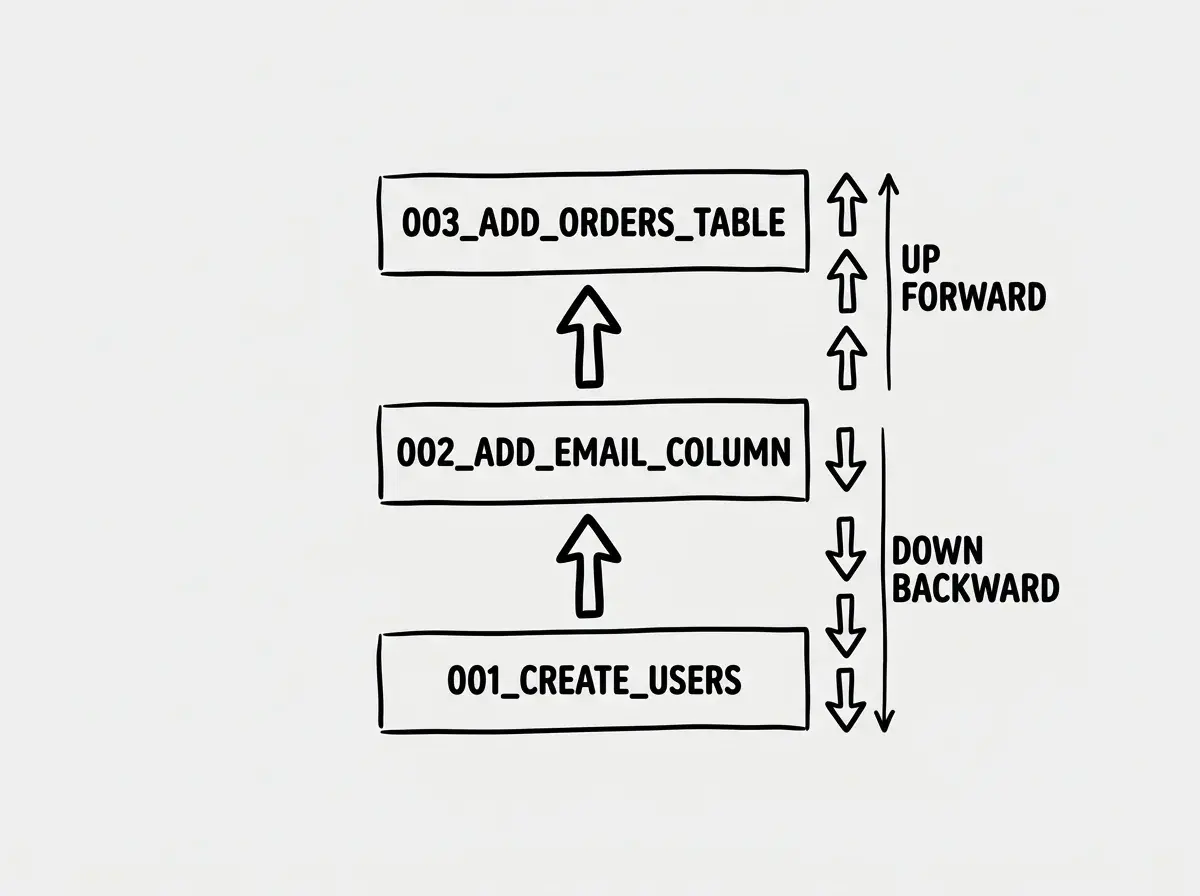
Migrations are tracked in a special table inside your database (usually called something like _migrations or _prisma_migrations). This table records which migrations have already run. When you deploy new code, the migration runner checks this table, sees which migrations are pending, and runs only the new ones. It is the same concept as version control for your code, but applied to your database structure.
The key insight is that migrations are incremental. You never describe your entire schema from scratch. You describe the difference between where you are now and where you want to be. That distinction matters enormously once you have multiple environments (development, staging, production) that might be at different points in the migration timeline.
Prisma Migration Workflow
Prisma takes a schema-first approach to database migrations. You define your data model in a .prisma file, and Prisma figures out what SQL to generate by comparing your schema to the current database state.
The workflow looks like this. You edit your schema.prisma file to add a new field, change a type, or add a relation. Then you run npx prisma migrate dev --name add_status_field. Prisma compares your schema to the database, generates a SQL migration file, applies it to your dev database, and regenerates the TypeScript client. The migration file lands in prisma/migrations/ with a timestamped folder name.
-- prisma/migrations/20260406_add_status_field/migration.sql
ALTER TABLE "Post" ADD COLUMN "status" TEXT NOT NULL DEFAULT 'draft';
For production, you run npx prisma migrate deploy, which applies any pending migrations without generating new ones. The generated SQL files are plain text that you can read, review in a PR, and understand before they touch production data.
This is where the renovation analogy gets practical. Prisma is like having an architect draw up plans (the schema diff), produce construction documents (the SQL file), and then hand them to the crew (the migrate deploy command). You review the plans before the crew starts swinging hammers.
Always review the generated SQL migration file before deploying it. AI tools and ORMs both optimize for getting your schema to the desired state, but they do not always choose the safest path. A column rename might become a drop-and-recreate, destroying your data in the process.
Drizzle Migration Workflow
Drizzle takes a different approach. Your schema lives in regular TypeScript files, and Drizzle Kit generates SQL migrations by diffing your TypeScript schema against the previous state.
You run npx drizzle-kit generate to produce migration files, then npx drizzle-kit migrate to apply them. The generated SQL lands in a drizzle/ folder. Like Prisma, the migrations are plain SQL that you can inspect and modify.
// schema.ts
export const posts = pgTable('posts', {
  id: serial('id').primaryKey(),
  title: text('title').notNull(),
  status: text('status').notNull().default('draft'),
  // new field added
  publishedAt: timestamp('published_at'),
});
-- drizzle/0003_add_published_at.sql
ALTER TABLE "posts" ADD COLUMN "published_at" TIMESTAMP;
Drizzle also offers drizzle-kit push for rapid prototyping, which applies schema changes directly to the database without generating migration files. This is fine for early development. It is absolutely not fine for production. Using push in production is like renovating without permits. It might work, but when something goes wrong, you have no paper trail and no way to undo it.
The practical difference between Prisma and Drizzle migrations comes down to where the schema lives. Prisma uses its own DSL (.prisma files). Drizzle uses TypeScript. If your team already thinks in TypeScript and you want one fewer language in your stack, Drizzle's approach feels more natural. If you prefer a dedicated schema language with visual tooling like Prisma Studio, Prisma's approach has the edge.
Zero-Downtime Migration Strategies
Here is where experienced developers earn their salary. Running a migration that locks a table for 30 seconds might not matter when you have 10 users. When you have 10,000 concurrent connections, a 30-second lock means 30 seconds of errors, timeouts, and angry customers.
The core principle is additive-first. Add before you remove. Never rename or drop something in the same deployment that starts using the new version.
Adding a column is almost always safe. The existing code does not know about the new column and does not care. New code starts writing to it. No downtime, no data loss.
Removing a column requires two deployments. First, deploy code that stops reading from and writing to the column. Then, in a separate migration, drop the column. If you drop it while old code is still running (during a rolling deploy, for example), those old instances will crash when they try to read a column that no longer exists.
Renaming a column is the most deceptive operation. It feels simple, but a rename is really a drop-and-add under the hood. The safe approach is three steps. Add the new column. Deploy code that writes to both columns and reads from the new one. Migrate existing data from old to new. Then drop the old column in a later deployment.
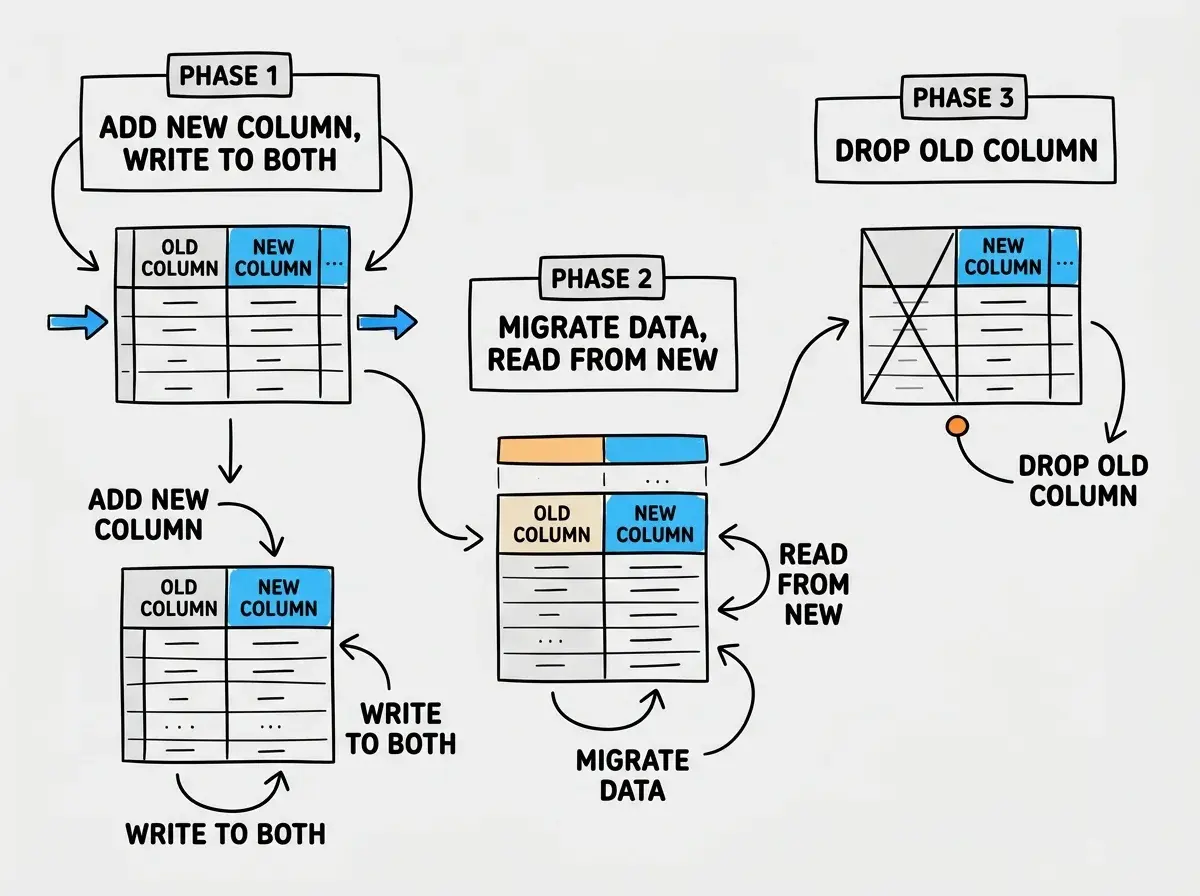
Changing a column type follows a similar pattern. Add a new column with the desired type, backfill it with converted data from the old column, switch reads to the new column, then drop the old one.
This is the renovation analogy at its most literal. You don't tear down the old bathroom before the new one is functional. You build the new bathroom first, start using it, then demolish the old one.
What AI Gets Wrong About Migrations
AI code generators are remarkably good at creating initial schemas. They are remarkably bad at evolving them safely. Here is what goes wrong most often.
AI generates destructive migrations without warning. When you tell AI "rename the status column to state," it will often generate ALTER TABLE posts RENAME COLUMN status TO state or, worse, drop the old column and create a new one. Both approaches break any running code that references the old name. AI does not think about your deployment process or the fact that old and new code versions run simultaneously during deploys.
AI skips data backfills. When you change a column from nullable to non-nullable, you need a backfill step that populates the empty values first. AI frequently generates the ALTER COLUMN SET NOT NULL without the preceding UPDATE statement, which fails immediately if any rows have null values.
AI forgets about indexes on hot tables. Adding an index to a table with millions of rows can lock it for minutes. AI generates CREATE INDEX without CONCURRENTLY (in PostgreSQL) because it does not know your table size or traffic patterns.
Never let AI generate and apply migrations in a single step without reviewing the SQL. Always run the generate command, read the migration file, and then apply it. Treating migration generation as a review checkpoint catches destructive changes before they reach your data.
Rollback Patterns That Actually Work
Every migration should be reversible, but "reversible" does not always mean "lossless." If your up migration adds a column and populates it with computed data, your down migration drops that column and all the data in it. The computation is lost. This is fine for a new nullable column. It is catastrophic for a column that took hours to backfill.
The practical approach is to keep a rollback plan that matches your deployment strategy.
For simple additive migrations (adding columns, tables, indexes), the rollback is straightforward. Drop what you added. Since no existing code depends on the new stuff yet, nothing breaks.
For data-moving migrations (backfills, type changes, renames), take a snapshot of the affected table before running the migration. If something goes wrong, you restore from the snapshot instead of trying to reverse-engineer the undo logic.
For large-scale migrations on tables with millions of rows, consider running the migration as a background job rather than a blocking DDL statement. Tools like pg-osc (for PostgreSQL) and gh-ost (for MySQL) create a shadow copy of the table, apply changes to the copy, then swap it in. Zero downtime, zero locks.
The most important rollback strategy is the one you actually test. Running your down migrations in a staging environment before deploying to production takes ten minutes and catches problems that would otherwise become 3 AM incidents.
Building Your Migration Discipline
Database migrations are not glamorous. They do not show up in demos or impress users. But they are the difference between an app that evolves gracefully and one that falls apart the first time you need to change something.
Start with these habits. Always generate migration files and review the SQL before applying. Never rename or drop in the same deployment that introduces new code. Test your rollback path in staging. And when AI generates a migration, treat it the same way you treat AI-generated application code: verify before you trust.
Your database is the one part of your app that cannot lose data and recover gracefully. Code can be redeployed. Frontend state can be refreshed. But once production data is gone, it is gone. Migrations are how you make sure that never happens.
Start with the fundamentals before diving into migrations.
Learn database basicsThe renovation never really ends. Your schema will keep changing as your product evolves, as users request features you did not anticipate, and as you learn things about your domain that reshape your data model. The developers who handle this well are not the ones who avoid schema changes. They are the ones who have a reliable, repeatable process for making them safely.
Drizzle and Prisma handle migrations differently. Find the right fit.
Compare ORMs