DataTalks.Club ran terraform destroy on their production infrastructure and lost their live environment in seconds. The command executed without guardrails, without a confirmation gate, and without anyone reviewing the plan output first. For anyone managing cloud infrastructure with Terraform, this incident is a case study in what happens when destructive IaC commands run unchecked.
What Happened at DataTalks.Club
DataTalks.Club is an online community focused on data engineering and machine learning education. They run courses, host events, and maintain infrastructure that serves thousands of active learners. Their stack relies on cloud resources managed through Terraform, the industry-standard infrastructure-as-code tool.
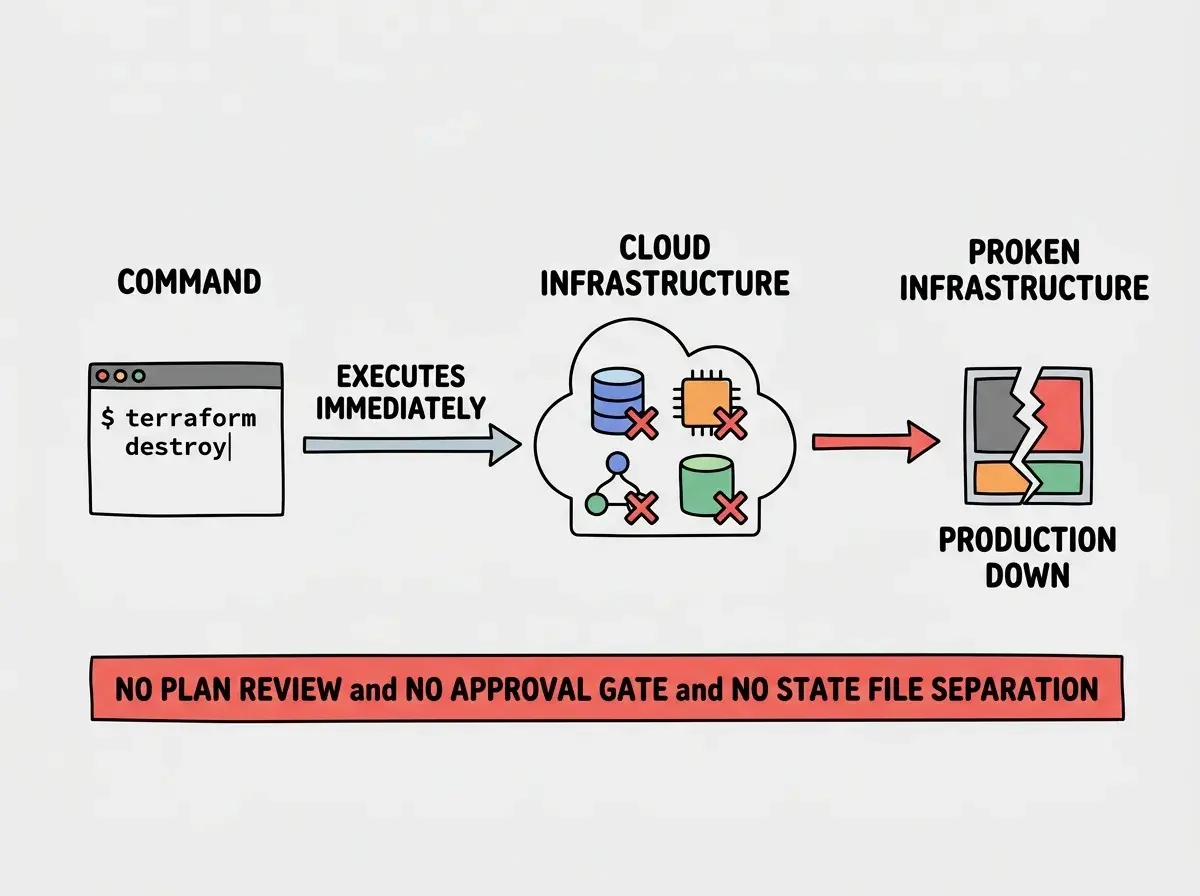
During a routine infrastructure change, someone executed terraform destroy against the production environment. The command did exactly what it is designed to do. It tore down every resource defined in the Terraform state file. Databases, compute instances, networking configurations, storage buckets. All of it, gone.
The critical detail is that this was not a malicious act. It was not a disgruntled employee or a security breach. It was a command that should never have been executable against production without multiple layers of approval. The fact that it ran at all reveals gaps in their infrastructure workflow that exist in thousands of other organizations right now.
Why terraform destroy Is Uniquely Dangerous
Most Terraform commands are additive or modifying. terraform apply creates or updates resources. terraform plan previews changes without executing them. But terraform destroy is a full teardown. It removes every resource that Terraform manages in the targeted state.
The danger compounds because Terraform state files determine scope. If your production and staging environments share a state file, or if your working directory points at the production state, a single destroy command affects everything. There is no built-in "are you sure this is production?" confirmation beyond a generic yes/no prompt that experienced operators often auto-confirm out of habit.
AI coding assistants have made this risk worse, not better. When developers ask an AI for help fixing infrastructure issues, the AI sometimes suggests terraform destroy followed by terraform apply as a clean-slate approach. The AI does not know it is pointing at production. It does not understand the blast radius. It treats infrastructure the same way it treats a broken npm install, as something you can tear down and rebuild without consequences.
This is not theoretical. Multiple incident reports in the Terraform community trace back to AI-suggested destructive commands that operators ran without fully understanding the scope.
The AI-Suggested Command Problem
The DataTalks.Club incident highlights a growing pattern in infrastructure management. Developers increasingly rely on AI assistants to troubleshoot configuration issues, and those assistants sometimes recommend the nuclear option.
An AI sees a state conflict or a resource error and suggests terraform destroy as a quick fix. The suggestion appears in the same conversational tone as "try clearing your cache." The developer, trusting the assistant, runs the command. The AI has no concept of environments, no awareness of whether the current state targets production or development, and no ability to assess the business impact of resource deletion.
The responsibility still falls on the operator. But the tooling should make catastrophic mistakes harder to execute, not easier. When a single command with a single confirmation prompt can delete an entire production environment, the system is fragile by design.
The terraform destroy command is not the problem. The problem is that production environments are reachable by destructive commands without mandatory review steps. Every infrastructure team needs to treat terraform destroy the way banks treat wire transfers: with multiple approvals, mandatory delays, and clear audit trails. If an AI suggests running destroy, that suggestion should trigger extra scrutiny, not faster execution.
Five Safeguards That Would Have Prevented This
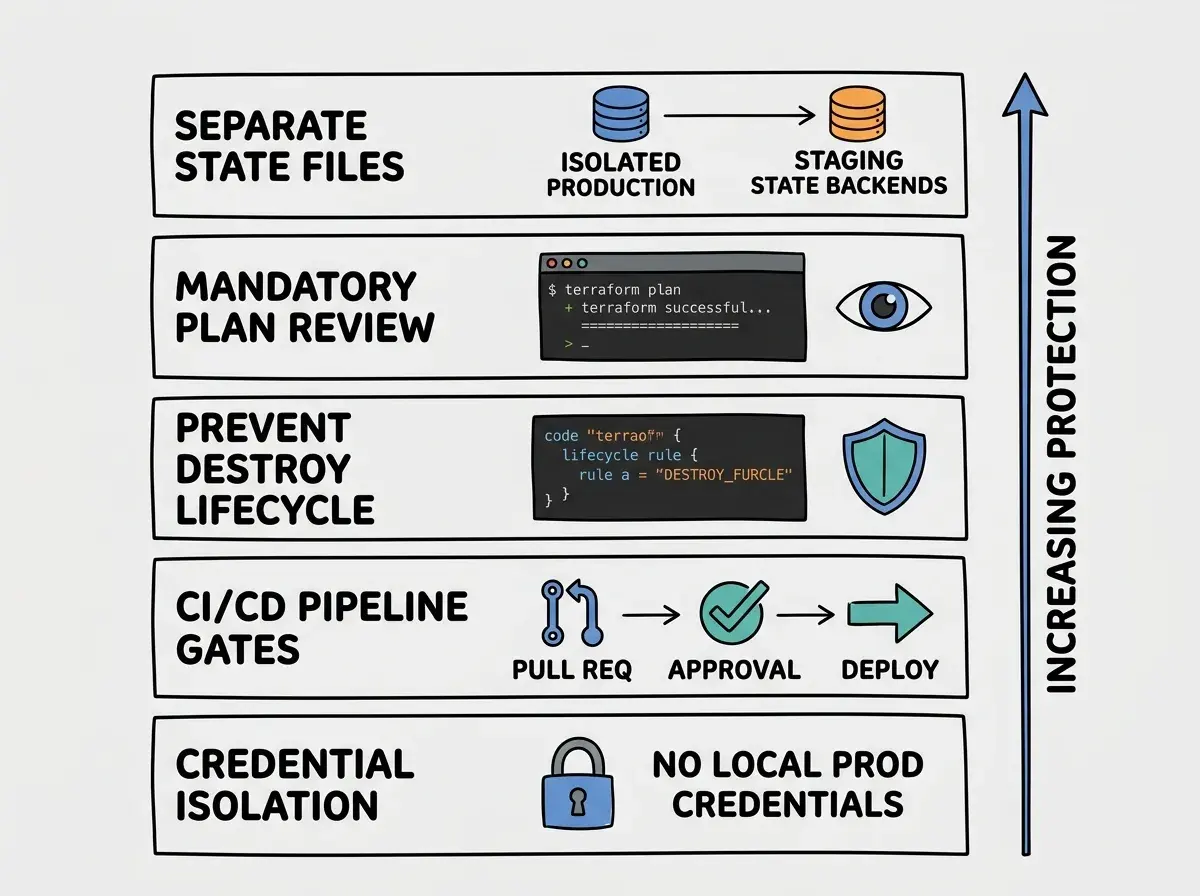
These are the specific configurations and practices that block accidental production destruction. Each one independently reduces risk. Together, they make accidental terraform destroy on production nearly impossible.
Safeguard one: Separate state files per environment. Production and staging should never share a Terraform state file. Use Terraform workspaces or, better yet, completely separate state backends for each environment. When state files are isolated, running destroy in the wrong terminal window affects only the environment that terminal is configured for.
Safeguard two: Require terraform plan before every apply or destroy. Never run terraform destroy directly. Always run terraform plan -destroy first, review the output line by line, and confirm that every resource listed for deletion is one you intend to remove. Pipe the plan to a file. Have a second person review it. This single practice catches the majority of accidental destruction.
Safeguard three: Use Terraform's prevent_destroy lifecycle rule. For critical resources like databases and storage buckets, add lifecycle { prevent_destroy = true } to the resource block. This makes Terraform refuse to destroy that resource, even if someone runs terraform destroy. You have to explicitly remove the lifecycle rule first, which creates an additional deliberate step.
Safeguard four: Implement CI/CD pipeline gates for infrastructure changes. Never run Terraform commands directly from a developer's laptop against production. All production infrastructure changes should flow through a CI/CD pipeline (like GitHub Actions, GitLab CI, or Atlantis) that requires pull request approval before executing. The pipeline runs terraform plan, posts the output to the PR, and waits for human approval before applying.
Safeguard five: Restrict production credentials. Developers should not have credentials that allow them to modify production infrastructure from their local machines. Production Terraform runs should only happen through service accounts attached to your CI/CD pipeline. If nobody has local credentials for production, nobody can accidentally destroy production from their terminal.
Learn the safeguards every builder needs before running infrastructure-as-code in production.
Read more guidesHow to Audit Your Own Setup Right Now
If you are using Terraform to manage production infrastructure, run through this checklist today. Not tomorrow. Today.
Check your state file configuration. Open your Terraform backend configuration and verify that production and staging use completely separate state backends. If they share a backend, fix this first. It is the single highest-impact change you can make.
Check your CI/CD pipeline. If anyone on your team can run terraform apply or terraform destroy against production from their laptop, your pipeline has a gap. Lock down production changes to your CI/CD system only.
Check your critical resources. Every database, every persistent storage bucket, and every resource that holds customer data should have prevent_destroy = true in its lifecycle block. Run a quick search across your Terraform files for resources missing this rule.
Check your AI workflow. If your team uses AI assistants for infrastructure troubleshooting, establish a rule: any AI-suggested command that includes destroy, delete, remove, or force gets a mandatory second review before execution. Write this into your team's runbook.
Trusting AI-suggested infrastructure commands without verifying the target environment. An AI assistant told a developer to run terraform destroy to resolve a state conflict. The developer ran it without checking which workspace was active. The command targeted production. AI assistants do not track your environment context. Every destructive command they suggest needs manual verification of the target environment before execution.
The Broader Pattern in Infrastructure Incidents
The DataTalks.Club incident is not unique. Terraform destruction incidents follow a remarkably consistent pattern. Someone runs a destructive command against the wrong environment because the tooling made it easy and the guardrails were not in place.
GitLab had a similar incident years ago when an engineer ran rm -rf on the wrong database directory. Cloudflare has had incidents where configuration changes propagated to production without adequate review gates. The tool changes, but the pattern stays the same. Destructive operations that are too easy to execute, targeting production environments that are too easy to reach.
Infrastructure-as-code was supposed to make operations safer by making changes reviewable and repeatable. And it does, when the review step is actually enforced. When teams skip the review step (running Terraform directly instead of through a pipeline), they lose the primary safety benefit of IaC while keeping all of its destructive power.
The rise of AI assistants adds a new dimension to this risk. AI makes it faster to generate and execute infrastructure commands, which means mistakes happen faster too. The velocity that makes AI useful for building also makes it dangerous for destroying.
Understand the risks and safeguards before AI-assisted commands touch your production infrastructure.
Explore safety guidesWhat This Means For You
The DataTalks.Club terraform destroy incident was preventable. Every safeguard described in this article is a standard practice that takes hours to implement, not weeks. The cost of setting them up is trivial compared to the cost of rebuilding a production environment from scratch.
- If you are a senior developer or DevOps engineer: Audit your Terraform configuration this week. Separate your state files, add prevent_destroy to critical resources, and lock production changes behind CI/CD approval gates. If your team uses AI assistants for infrastructure work, add a mandatory review step for any AI-suggested destructive command.
- If you are a founder or technical leader: Ask your infrastructure team one question: "Can anyone on this team destroy production from their laptop right now?" If the answer is yes, that is your top priority this sprint. The fix is not expensive. The incident is.
Production infrastructure deserves the same protection as production code. Code gets reviewed before it merges. Infrastructure changes should get reviewed before they apply. The teams that enforce this never end up writing post-mortems about accidental destruction. The teams that skip it eventually do.